ChatGPT Content Creation

You probably know the feeling. You open a blank doc, ask ChatGPT for a blog post or course lesson, and get something that looks polished for about ten seconds. Then you notice the voice is flat, the examples are generic, and the whole thing could belong to any brand in your niche.
That’s where most chatgpt content creation efforts stall. The model can draft quickly, but publish-ready content still needs research, structure, voice, fact-checking, and editorial judgment. The creators getting real value from ChatGPT treat it like a drafting partner inside a bigger workflow, not a one-prompt solution.
Why Most ChatGPT Content Falls Flat
The first mistake is asking for a finished piece before you’ve decided what makes the piece worth reading. I see this happen in course writing, blog production, onboarding emails, and membership updates. The result is usually competent prose with no point of view.
A generic draft often sounds clean because ChatGPT has learned the safest possible patterns. It will give you a tidy intro, a few balanced subpoints, and an ending that feels complete without saying much. If you publish that without intervention, readers get a summary of the obvious, not something they’d bookmark or share.
The real problem is upstream
ChatGPT doesn’t know which angle matters most to your audience unless you tell it. It also doesn’t know which examples your readers have already seen ten times, or which claims need proof before they can go live. That’s why a staged workflow matters more than a longer prompt.
A useful analogy is search visibility. If you want a piece to show up in a crowded result set, you need a sharper angle than everyone else. For a practical lens on how search features influence what readers notice first, SemDash’s overview of featured snippets vs AI Overviews is a helpful companion read.
Practical rule: If a draft sounds like it was written for everyone, it was written for no one.
That applies especially to educators and course creators. A lesson module with vague advice and recycled examples won’t hold attention, even if the grammar is fine. If you’re building instructional content, the right starting point is often a clear content brief, which is why a planning resource like LearnStream’s guide on AI for instructional design fits naturally into a broader workflow.
The fix is to stop treating ChatGPT as the whole process. It’s one stage in a content pipeline. When you separate research, outlining, drafting, editing, and repurposing, the model becomes much more useful because each step gives it tighter guardrails.
Research and Outline Before You Draft
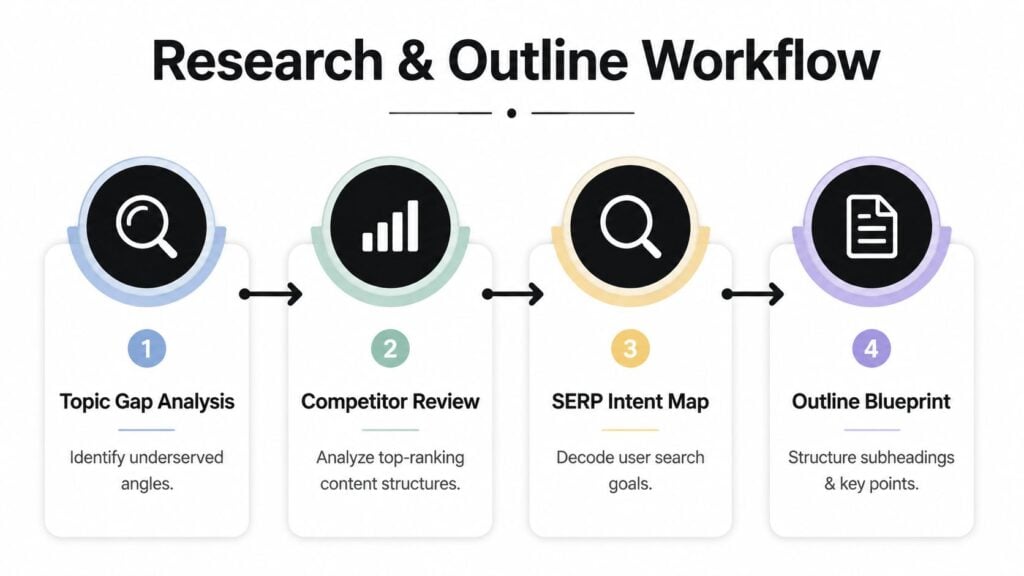
The cleanest ChatGPT drafts come from work that happens before drafting starts. I usually begin with topic-gap research, because that’s where generic content gets exposed fast. If three competitors already cover the same angle with the same subheads, the model will happily reproduce that pattern unless you intervene.
The best prompt I use at this stage is simple and specific. I ask ChatGPT to help me identify the audience, the search intent, the competing content patterns, and the angle that has been missed. Then I make it compare those findings against the point of view I want the piece to carry.
A prompt that keeps the model honest
A strong research prompt sounds like this.
“Help me identify the most underserved angle for [topic], based on audience pain points, search intent, and common competitor coverage. Then suggest three outlines that avoid recycled structure and reflect a distinct editorial point of view.”
That prompt works because it forces the model to think in terms of gaps, not filler. If you want ChatGPT to help with outline work for an online course, this downloadable course outline template can be a practical starting point for locking structure before you draft.
The next move is to lock your outline early. Once the structure is set, ChatGPT has less room to wander into predictable openings and repetitive transitions. A workflow guide on using ChatGPT for content creation recommends splitting the process into research, outline, draft, edit, visuals, and repurpose stages, with topic-gap research first, structure locked early, and a fresh-chat edit pass at the end to reduce generic phrasing and default openings as outlined in this workflow guide.
Here’s the part many skip. I turn the outline into a decision document. Each H2 needs a job, each H3 needs a reason to exist, and each section needs one clear takeaway that can’t be replaced with a stock paragraph.
Strong outlines don’t make the content robotic. They make it harder for the model to drift.
For me, that’s the difference between a usable first draft and a polished-sounding mess. A full article or course module can still evolve later, but the structure should be settled before the model starts writing long-form prose.
Drafting with Your Own Voice Intact
Once the outline is locked, I draft in sections instead of asking for a complete article in one shot. That gives me more control over tone, pacing, and examples. It also makes it easier to stop the model from flattening everything into the same rhythm.
The most useful thing I’ve added to my workflow is a voice block. I paste in a few short samples of my own writing, then I ask ChatGPT to mirror the rhythm, sentence length, and level of directness without copying phrasing. That matters because the model is good at mimicry in a loose sense, but it still defaults to safe, polished, forgettable language if you don’t anchor it.
A drafting prompt that preserves style
This is the kind of prompt that works well for me.
“Write this section in a tone that matches the sample below. Keep the language direct, practical, and specific. Avoid generic openings, avoid hype, and keep the pacing close to the sample. Use the outline points provided, but don’t force all of them into identical paragraph shapes.”
That gives ChatGPT enough direction to stay on brand without boxing it into unnatural phrasing. If I’m writing a course module, I’ll often ask for one lesson at a time, then revise the section before moving on. If I’m writing a blog post, I’ll draft one heading section at a time and compare the output against my original outline intent.
A helpful ethical reference for writers who want to preserve their own style while still using AI is Storyloft’s ethical AI guide for authors. It’s useful because the voice issue shows up everywhere, not just in fiction. A course lesson, a community update, and a marketing article can all sound bland if the draft is left too close to the model’s default phrasing.
I also like to draft with constraints that fit the format. A microlearning script needs tighter sentences than a blog article. A membership email needs a faster path to the point. A lesson summary needs less preamble and more immediate usefulness.
That’s one reason a tool like LearnStream’s online course drafting guide fits well into this kind of workflow. When the format is clear, the model has fewer opportunities to drift into generic “all-purpose internet writing.”
Editing and Quality Assurance Checks
A ChatGPT draft is a starting point, not a publishable asset. The editing pass is where I look for repeated phrasing, weak transitions, unsupported claims, and anything that sounds suspiciously smooth in a bad way. That last one matters more than people admit, because overly neat wording can hide real problems.
I always do a fresh-chat edit pass. I paste in the draft, then ask ChatGPT to focus only on obvious grammar issues, repetitive language, and places where the writing feels vague or inflated. The point is to get a second set of eyes, not a rewrite that erases the draft’s best choices.
Red flags I watch for
- Vague statistics, especially if they appear without a clear source.
- Unnamed studies, which often sound authoritative and say almost nothing.
- Suspiciously perfect citations, since ChatGPT can fabricate references.
- Default openers, such as broad claims that could introduce any article.
- Repetitive structures, where every section starts the same way and ends the same way.
That citation issue isn’t hypothetical. In a study of 222 references cited in GPT-3.5-generated papers, 55% were fabricated, which means more than half of the citations didn’t correspond to real sources Nature Scientific Reports. If you’re writing anything that depends on source trust, you have to verify every citation yourself.
Never let the model be the authority on its own sources.
The review process should also be human-managed. Ahrefs reported that 97% of companies still edit and review AI content before publication Ahrefs summary in BrowserCat’s report. That makes sense, because the draft can be fast without being final. Teams that publish well treat ChatGPT output as material to refine, not text to approve automatically.
The practical checks I use are simple. I confirm that every claim can be traced to a real source, I remove any phrase that sounds inflated, and I compare the final version against the outline to make sure it still says what I intended. For team workflows, that review should live in a shared checklist so every editor applies the same standards.
Real Use Cases for Educators and Membership Sites
ChatGPT becomes much more valuable when the format has clear boundaries. That’s why it works well for educators, course creators, and membership site owners. The model doesn’t need to invent the whole product, it needs to help you move through a known pipeline faster.
For microlearning, I use ChatGPT to compress a topic into a short lesson arc. I ask for one outcome, one example, one mistake to avoid, and one short recap. That keeps the content focused enough that it doesn’t sprawl into a lecture.
For drip courses, the model is useful for sequencing. I’ll prompt it to map a series of lessons so each one builds on the last without repeating the same explanation. That’s especially helpful when a course has to stay coherent across several weeks of delivery.
For membership communications, the workflow changes again. Onboarding emails need clarity and a quick sense of momentum. Community updates need to feel current without sounding like a bulk template. I’ve found that ChatGPT is strongest when I give it the context it needs to match the format and weakest when I ask for “something engaging” with no additional detail.
The same core pipeline also adapts well to broader publishing needs. LearnStream’s guide on how to create a course with ChatGPT shows how prompts can support outlines, lesson scripts, slide outlines, exercises, and course descriptions, which makes the tool useful across both teaching and marketing content.
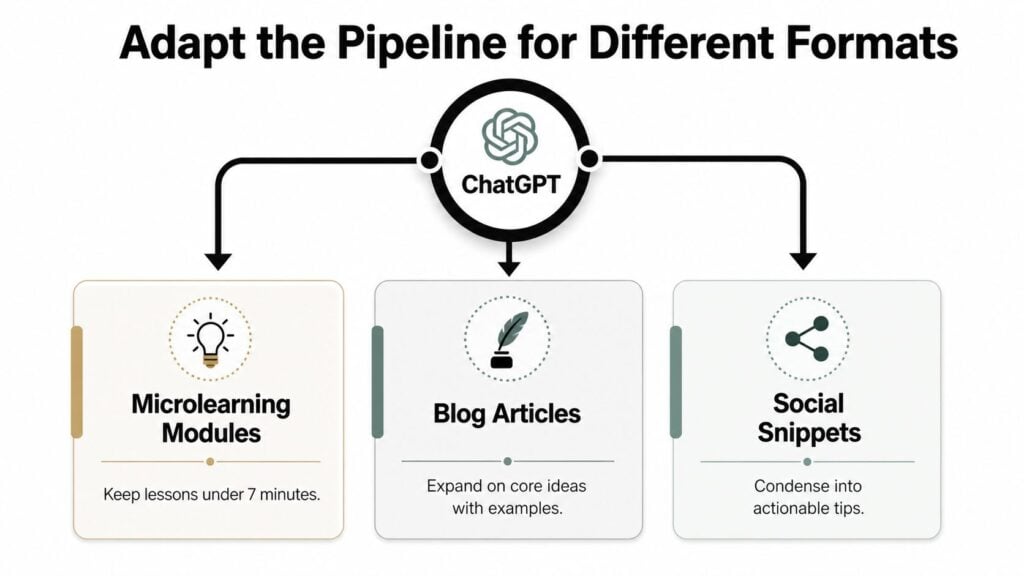
The bigger pattern is simple. The more specific the format, the more specific the prompt should be. That’s how a single workflow can support a lesson script, a course summary, a welcome sequence, and a community post without producing the same bland output every time.
Ethics and Accuracy Governance at Scale
Once a team starts using ChatGPT across a publishing calendar, the question shifts from speed to control. At that point, the biggest risk isn’t just weak writing. It’s inconsistent standards, unclear disclosure, and uncaught factual errors that reach the audience.
The Chicago Manual of Style says you should credit ChatGPT when you use text it generated, and if there isn’t a publicly available URL, the AI-generated content should be acknowledged in the text or in a note rather than in a bibliography or reference list. It also gives a note format example, including the prompt-style citation of text generated by ChatGPT, OpenAI, with a specific date and URL Chicago Manual of Style Q&A.
APA Style handles it differently. APA says that when you cite ChatGPT, you should include the prompt you used and the part of the response you’re citing. It also notes that if the author and publisher are the same, you don’t repeat the publisher name in the source element and move directly to the URL APA Style guidance. That level of specificity matters because AI citation habits are still inconsistent across teams.
Microsoft’s guidance makes the practical limit clear. If you ask ChatGPT to cite its sources, you need to be very specific in the prompt, and you still have to double-check whatever it gives you. Microsoft also states that ChatGPT’s primary function is to reproduce patterns in text, not to actively consult sources for accurate information Microsoft guidance on source citation.
For teams, that means governance has to be built into the workflow, not added after something goes wrong. A content governance framework can help define who checks claims, who approves citations, and how AI-assisted drafts move through review. If you want a practical starting point, WebinOne’s content governance framework guide is a useful reference for organizing that process.
Your ChatGPT Content Creation Checklist
I keep the workflow simple enough to reuse, because complexity kills consistency.
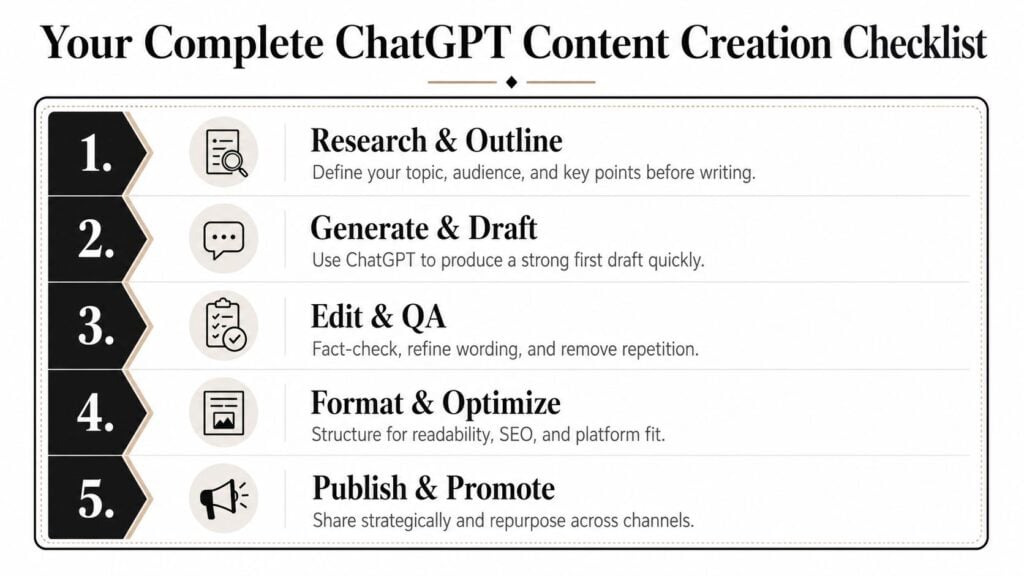
- Research and outline: Have I identified a real gap, a clear audience, and a structure that doesn’t copy the competition?
- Generate and draft: Did I feed ChatGPT my own voice samples, format rules, and section goals before asking for prose?
- Edit and QA: Did I check every claim, cut repetitive wording, and verify any citation or reference?
- Format and optimize: Did I tighten the headings, add the right internal links, and make the piece easy to scan?
- Publish and promote: Did I review the final version as if I were a reader seeing it for the first time?
The most common mistakes are easy to spot. People skip the outline, accept the first draft too quickly, and trust ChatGPT citations without verification. That’s where quality falls apart.
If you want chatgpt content creation to save time without flattening your voice, keep the process staged. Research first, structure second, draft in sections, then edit with a hard QA pass.
If you want to use ChatGPT more seriously in your own content workflow, pull one draft from your queue today and run it through the five-step checklist above. Start with the outline, rewrite one section in your own voice, and verify every factual claim before publication.