LMS Pricing Comparison: Real Costs and Hidden Fees
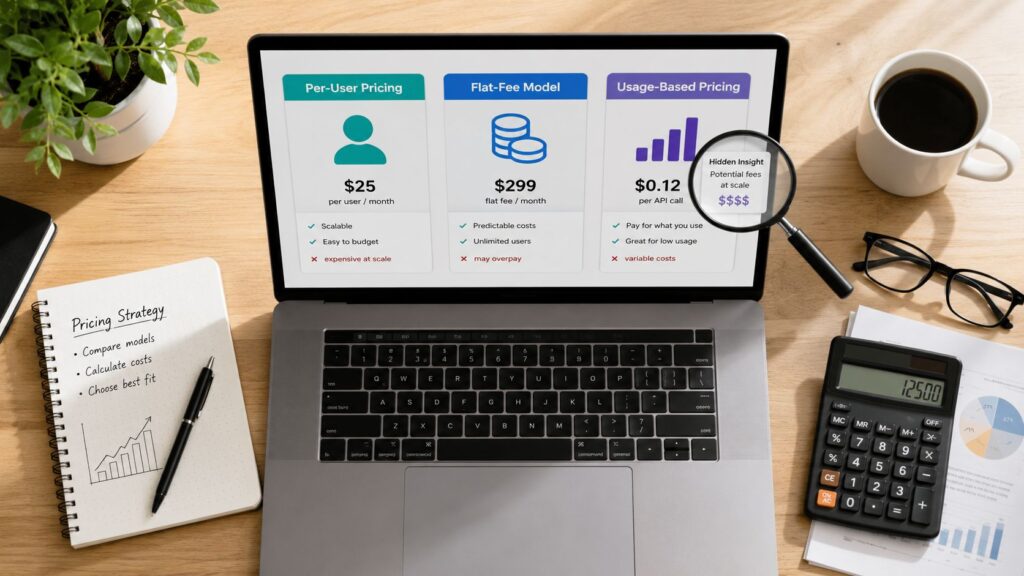
You’ve opened three LMS pricing pages, and somehow you’ve received three different definitions of “affordable.” One vendor lists a monthly fee, another charges by learner, and a third asks you to book a demo before it will discuss price. Meanwhile, your training launch date is getting closer and your finance team wants a budget they can trust.
I’ve helped organizations compare LMS platforms, and the mistake I see most often is simple. Buyers compare the advertised subscription while ignoring the cost of getting the system configured, connected, populated, supported, and adopted.
This LMS pricing comparison focuses on the number that matters most, your first-year total cost of ownership. The table below gives you a quick orientation before we examine the pricing models and the fees vendors often leave out.
| Pricing approach | Typical public benchmark | What usually changes the bill |
|---|---|---|
| Flat subscription or tier | Around $119 to $449 per month for basic small-team plans | User bands, features, support, annual terms |
| Per-user subscription | About £5 to £25 per user per year for many small and medium businesses | Registered seats, minimum packs, feature tiers |
| Active-user pricing | Vendor-defined | Who counts as active and billing-cycle usage |
| Enterprise LMS | About $80,000 per year in reported average TCO | Implementation, integrations, analytics, support |
| Open-source deployment | $15,000 to $55,000 in year one in one cost analysis | Hosting, staffing, customization, maintenance |
Public pricing examples and cost benchmarks come from iSpring’s LMS pricing guide, World Metrics’ LMS statistics guide, Thirst’s LMS pricing overview, and Brights’ LMS cost analysis. Treat these as comparison points, not automatic quotes for your organization.
Why LMS Pricing Feels So Confusing
A training manager can spend an afternoon trying to compare platforms and still fail to create a meaningful shortlist. The problem usually appears on the first page. One vendor charges for every registered learner, another counts active users, and a third groups customers into flat tiers. Some vendors publish prices, while others reveal nothing until a salesperson understands the project.
That confusion has a practical cause. LMS vendors package similar capabilities in very different ways. A reporting dashboard might sit inside the base plan with one platform and require an upgrade with another. SSO, integrations, branded portals, analytics, storage, support, and onboarding can all change the final quote.
The first price you see is a starting point for questions, not a purchasing decision.
The market has also moved strongly toward recurring software billing. A 2024 market report found subscription-based pricing represented more than 75% of LMS market share in 2023, reflecting the move away from one-time licenses toward recurring SaaS payments. The same report projected the global LMS market would grow from USD 24.5 billion in 2024 to USD 107.9 billion by 2033, at a 17.9% CAGR, as reported in this LMS pricing trends report.
The same learner count can produce different bills
Suppose two organizations each have a similar number of learners. One runs mandatory employee training throughout the year. The other trains customers and partners in occasional campaigns. A registered-user plan may suit the first organization, because participation is steady and predictable. An active-user or usage-based plan may fit the second, because paying for dormant accounts would waste budget.
Features create another layer of difficulty. A basic course library and completion report require less configuration than a multi-portal customer academy connected to a CRM, HR system, payment gateway, and identity provider. Calling both products “an LMS” doesn’t make their costs comparable.
A better way to read vendor pricing
I recommend separating every quote into four lines:
- Platform access: The recurring subscription, license, or usage charge.
- People and setup: Implementation, onboarding, administrator training, and migration.
- Capability extensions: Integrations, SSO, advanced analytics, e-commerce, branding, and authoring.
- Operating exposure: Support tiers, storage limits, overages, renewal terms, and seat rules.
Once those lines are visible, the market feels much less mysterious. You can compare what each vendor charges, what each plan includes, and what your team must still pay to make the system usable.
The Main LMS Pricing Models Explained
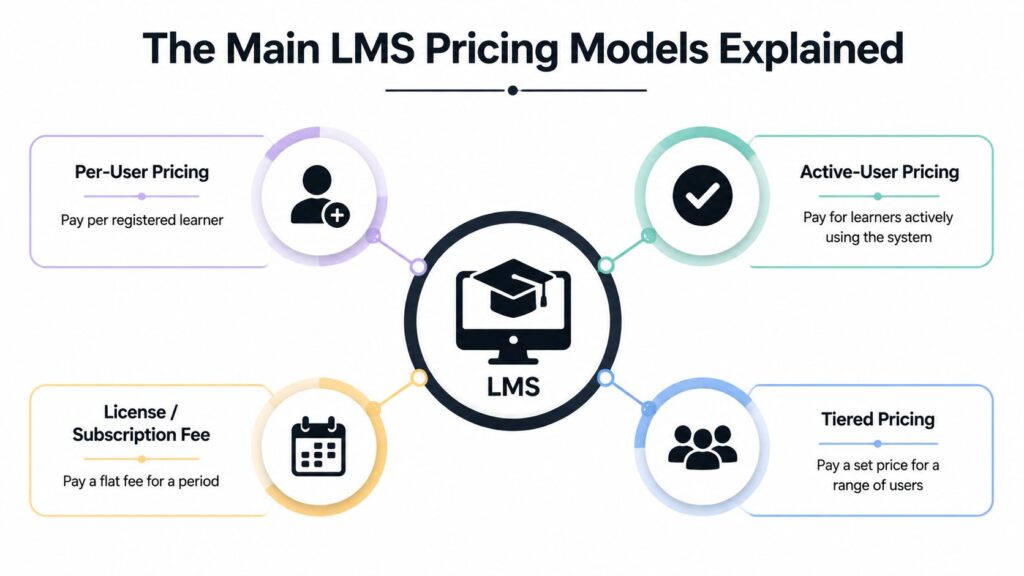
Most LMS quotes use one of four practical structures. Vendors may combine them, but you should identify the dominant billing logic before comparing plans.
Per-user pricing
With per-user pricing, you pay for a defined number of learners, usually registered or licensed accounts. The appeal is clarity. If the vendor gives you a fixed seat count and a fixed rate, finance can forecast the subscription without estimating monthly activity.
The weakness is overpayment. An account can remain in the system even when its owner has finished onboarding or never logs in. Seat-based plans can also impose minimum packs, charge for inactive seats, or include administrator and reviewer accounts in the bill, according to this LMS pricing guide from People Managing People.
The model fits organizations with stable learner populations and mandatory training. It’s less attractive for seasonal programs, customer education, or memberships with irregular participation.
Active-user pricing
Active-user pricing charges for learners who use the system during the billing cycle. The definition matters. A vendor may count a login, a course activity, or another qualifying event, so you need that definition in writing.
This structure suits one-time training, rotating cohorts, and external programs where many people are registered but only some participate at a given time. Docebo’s explanation of active-user pricing describes the model as charging for learners who use the LMS during the billing cycle.
The trade-off is budget variability. A successful campaign can create a larger invoice if activity increases, and a vendor may still apply a minimum commitment. Ask whether “active” means any login, course consumption, completion, or a separate threshold.
Flat subscription and tiered pricing
A flat subscription charges a recurring fee for a plan, often with limits based on users, features, storage, or support. Tiered plans may offer Basic, Professional, and Enterprise packages, with more advanced functions reserved for higher levels.
Public small-team examples show how broad the range can be. One comparison reported plans around $119 per month for 1 to 40 active users, $229 per month for 1 to 70 users, and $449 per month for 1 to 100 users, with extra-user fees on some tiers. Those figures appear in iSpring’s LMS pricing guide.
Flat pricing works well when predictable budgeting matters and your usage fits comfortably within the plan. It becomes expensive when you buy a high tier for one feature while leaving most included capabilities unused.
Usage-based pricing
A usage-based model ties cost to actions such as enrollments, course transactions, content consumption, or other measurable activity. Some vendors combine a base subscription with usage charges.
This is useful for campaign-led learning, paid courses, and programs where demand rises and falls. It also creates the highest forecasting risk. Storage, bandwidth, transactions, or enrollments can push the cost above the original expectation, so request a scenario showing low, normal, and high usage.
Subscription billing now dominates the category, but that doesn’t make every subscription equivalent. A careful comparison must normalize the billing unit, feature package, implementation scope, and contract commitment.
Comparing Pricing Models Side by Side
The right pricing model depends on how your learners behave, not just how many people work for your organization. A small company with irregular customer training may need more flexibility than a larger employer with predictable compliance assignments.
| Pricing Model | Cost Predictability | Best For | Risk Factor |
|---|---|---|---|
| Per-user pricing | High when seats remain stable | Organizations with consistent mandatory training | Paying for inactive or unused seats |
| Active-user pricing | Medium | Rotating cohorts, seasonal programs, external learners | A broader definition of activity can raise the bill |
| Flat subscription | High within plan limits | Teams that value a stable recurring budget | Paying for an expensive tier to access one feature |
| Usage-based pricing | Low to medium | Paid courses and campaign-based learning | Usage spikes, overages, and difficult forecasting |
Where each model works
Per-user pricing is the cleanest choice for an internal learning department that expects most employees to complete assigned training. It gives managers a stable license framework and makes recurring budgeting straightforward.
Active-user pricing earns its place when the registered population is much larger than the group learning in any given cycle. A partner academy, for example, may have a broad audience but only a portion taking courses at once. The vendor’s activity definition becomes the key negotiation point.
Flat subscriptions suit teams that want a stable operating expense and can select a tier that covers their actual needs. I’d favor this approach for a small training team with a steady catalog, provided the plan includes the required reporting and integrations.
Usage-based pricing works for variable demand, but I wouldn’t choose it without a written cost ceiling or a detailed usage model. Flexible billing can become an unpleasant surprise after a successful enrollment campaign.
Compare the contract, not the headline
For a useful learning management system comparison, place every vendor on the same worksheet. Record the user definition, included seats, feature tier, implementation scope, support response, storage terms, renewal rules, and overage rates.
You can also use this comparison from Tutorbase when you’re evaluating adjacent training and education software. It’s valuable as a reminder that product category labels don’t guarantee comparable packaging.
My recommendation: Choose the model that matches your usage pattern, then negotiate protection against the billing event you can least predict.
That might mean a cap on active users, a larger seat band at renewal, included migration, or a firm definition of what counts as an integration. Predictability is a contract feature, not merely a pricing-model feature.
Hidden Fees That Inflate Your Real Cost
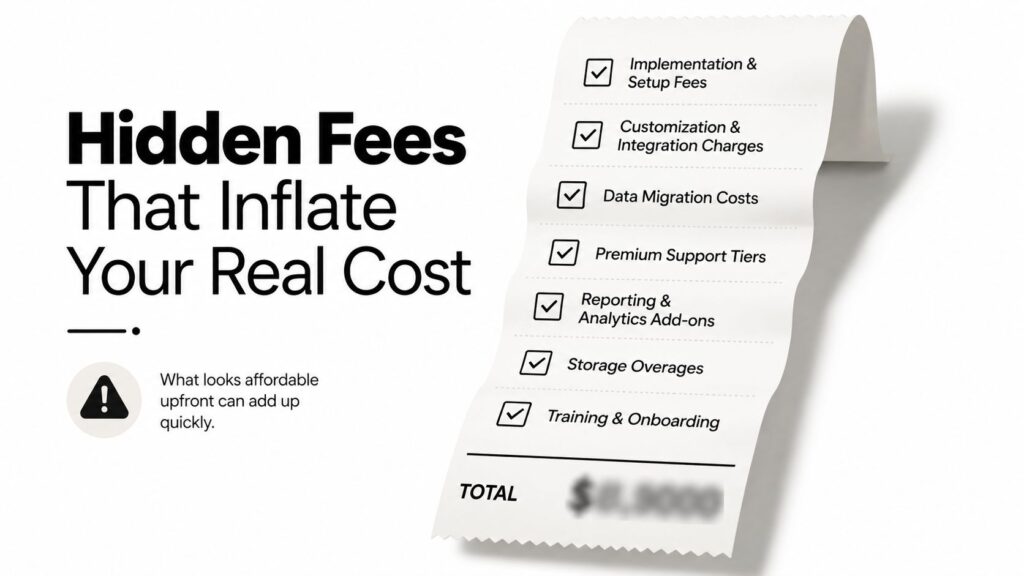
A vendor can quote an attractive subscription and still leave your organization with a much larger first-year bill. Finance pays for deployment, preparation, support, and the work required to make the platform usable. Your LMS pricing comparison should therefore measure total cost of ownership, not the number shown on the pricing page.
The Capterra guide to LMS pricing models identifies implementation, training, integrations, content migration, support tiers, contract minimums, and usage overages as budget items that can change the final cost. It also reports entry-level pricing as low as $8 to $51 per user per month, with sample monthly averages of $192 for entry-level, $461 for mid-tier, and $844 for high-end plans. Treat those figures as starting points, not first-year totals.
The line items vendors may separate
Implementation and onboarding may cover configuration, workflows, administrator training, launch support, and integrations. If the package provides only access to the software, your team absorbs project management and setup work.
Data migration can become expensive when the project includes historical completions, certifications, user records, course files, or custom fields. Ask whether migration is included, restricted to a particular format, or charged as professional services.
Review integrations and customization separately. SSO, HRIS connections, CRM synchronization, branded portals, API work, and custom workflows may fall outside the advertised tier.
Premium support may also sit outside ordinary ticket support. Faster response commitments, a dedicated account manager, launch assistance, and strategic reviews often require a higher plan.
Check analytics and reporting with the same care. Basic completion reports may be included, while advanced dashboards, BI connectors, exports, and skills reporting require an upgrade.
Seat rules create quiet waste
Registered-user billing charges for accounts even when learners never use the platform. Active-user billing can reduce that waste, but only when the vendor defines activity clearly and avoids a large minimum commitment.
Seat-based contracts may charge for inactive seats, require minimum seat packs, or bill administrator and reviewer accounts. SSO and advanced analytics can also be restricted to higher tiers. Include these rules in your LMS pricing estimate rather than treating them as minor contract details.
Use this buyer checklist before accepting a quote:
- User definition: Confirm whether billing uses registered, licensed, or active users.
- Feature boundaries: Request a written list of included integrations, reports, storage, and branding options.
- Implementation scope: Assign responsibility for configuration, migration, testing, and launch.
- Overage rules: Ask what happens after you exceed seat, storage, bandwidth, or usage limits.
- Renewal terms: Confirm price changes, minimum commitments, downgrade rights, and cancellation conditions.
Separate the first-year bill from the recurring subscription. That calculation exposes the cost of the deployment and makes vendor quotes comparable. The practical guidance in this LMS pricing comparison resource supports that approach.
Open Source vs Commercial LMS Total Cost
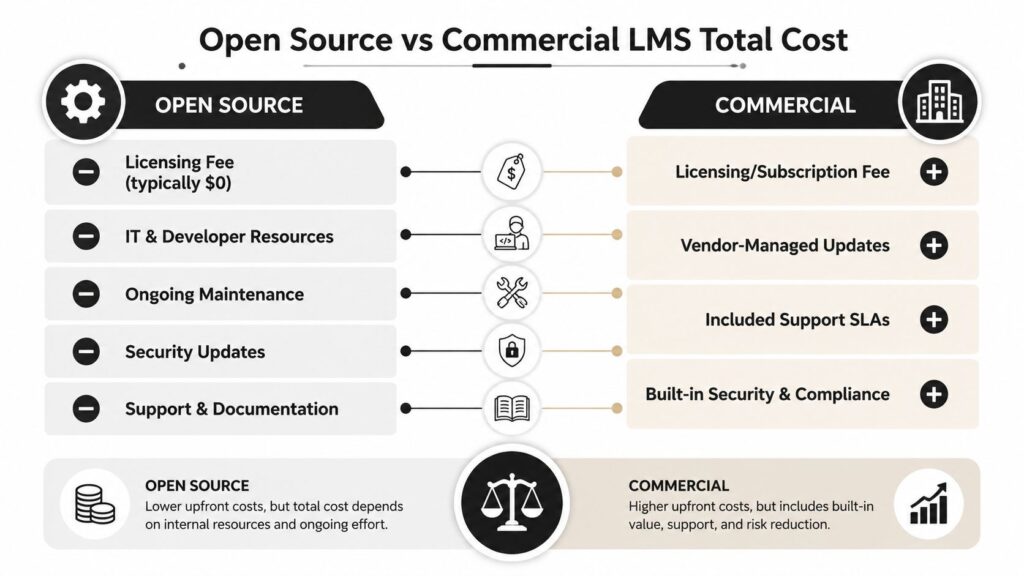
Open source removes a software license charge, but it doesn’t remove the work required to run an LMS. Someone still has to provision hosting, apply security updates, manage backups, monitor performance, support administrators, customize workflows, and maintain integrations.
A university comparison illustrates why license price alone can mislead. Blackboard licensing was reported at about $7 per FTE across UNC, while the average five-year total cost of ownership for six open-source universities was about $25 per FTE, after the wider ownership burden was considered. The figures are presented in this complete LMS pricing guide.
Calculate the ownership burden
Use this sequence before choosing an open-source platform:
- Price the infrastructure: Include hosting, storage, monitoring, backups, and security operations.
- Assign technical labor: Count the internal time needed for administration, development, upgrades, and troubleshooting.
- List customization work: Include theme changes, plugins, integrations, data structures, and bespoke reporting.
- Budget operational continuity: Decide who covers maintenance when the original implementer leaves.
- Compare the same scope: Match the open-source deployment against a commercial quote that includes equivalent support and functionality.
A 2024 LMS cost analysis estimated open-source, self-hosted, or managed deployments at $15,000 to $55,000 in year one and $50,000 to $200,000 by year five, because hosting, support, customization, and maintenance remain part of the total cost. See Brights’ analysis of LMS development costs.
When open source makes sense
Open source can be a strong choice when you have a capable technical team, unusual workflows, a clear need for deep customization, and the governance to maintain the platform over time. It can also suit organizations that need direct control over deployment and data.
I wouldn’t recommend it to a small training team that expects a turnkey launch and has no dedicated technical owner. The “free” download can become an expensive internal project once you account for engineering, security, support, and responsibility for every failure.
Commercial SaaS usually converts those responsibilities into a recurring vendor fee. That fee may be higher on paper, but vendor-managed updates, support processes, and standard integrations can reduce internal workload. Compare the full operating model, not the presence or absence of a license line.
For a broader look at platform architectures, the LearnStream guide to learning management system types can help you distinguish deployment and functionality choices before you request quotes.
How to Choose the Right LMS Pricing Model for Your Needs
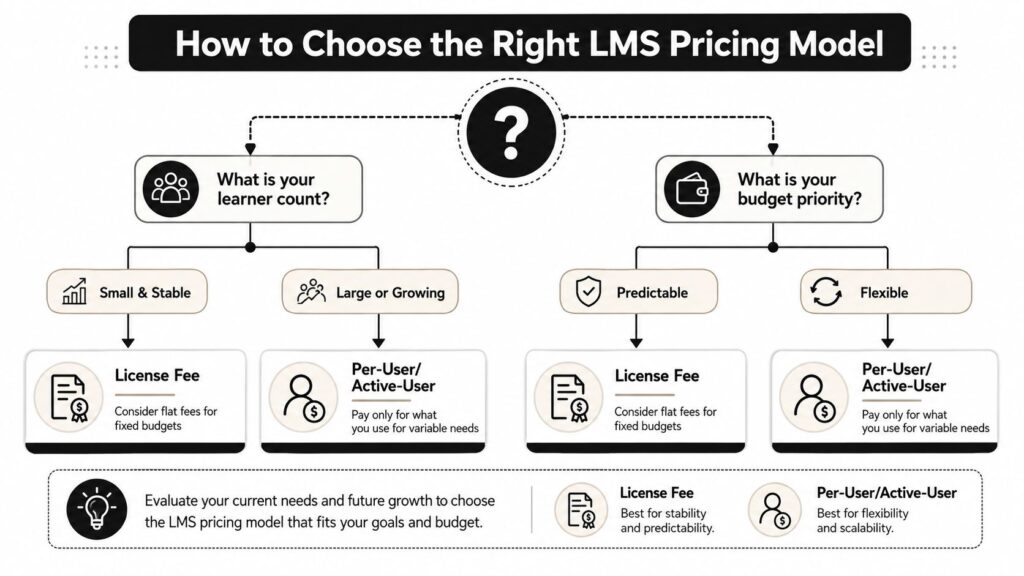
Start with usage, then match the contract to your budget preference. Don’t begin with the cheapest plan and hope it will stretch to cover your learning operation.
Use this recommendation matrix
| Your situation | My recommendation | What to verify |
|---|---|---|
| Solo course creator with a small, stable audience | Flat subscription tier | Course limits, payment tools, support, branding |
| Small internal training team | Flat tier or per-user plan | Seat bands, reporting, administrator access |
| Growing membership or customer academy | Active-user or hybrid pricing | Activity definition, portals, e-commerce, overages |
| Enterprise learning department | Negotiated subscription or enterprise plan | Implementation, integrations, SLA, renewal protection |
| Technical organization with unusual requirements | Open source or managed open source | Internal ownership, maintenance, security, customization |
Ask five questions before choosing
How many learners will use the system during a billing cycle? Count expected activity, not just employees or contacts. Separate permanent learners from occasional participants.
How predictable must the bill be? If finance needs a stable recurring amount, favor a flat or tiered subscription. If your audience changes substantially, active-user or usage-based pricing may fit better, but ask for safeguards against spikes.
Which functions are mandatory? Write down SSO, HRIS integration, branded portals, certificates, advanced analytics, mobile access, e-commerce, and administrator permissions. Then ask each vendor to identify the exact plan containing them.
Who will operate the platform? A commercial SaaS product often suits teams that want limited IT involvement. Open source requires a committed technical owner, even when a partner handles the initial deployment.
What happens as you grow? Request pricing for your current audience and a realistic expansion scenario. The vendor should explain seat thresholds, upgrade timing, add-on charges, renewal adjustments, and data portability.
My buying advice
For most small and mid-sized organizations, I’d start with a transparent cloud subscription and a modest feature tier. Pay for the capabilities you need now, but secure written pricing for the next user band and confirm that migration support is available if the platform stops fitting.
For variable external training, I’d prioritize active-user or hybrid billing. For mandatory employee learning with stable participation, per-user or tiered subscription pricing is usually easier to administer. For open source, proceed only when your technical capacity is a deliberate strategic choice, not a reaction to the word “free.”
Get at least two complete quotes. Ask vendors to show year-one platform cost, implementation cost, add-ons, support, and expected operating charges on separate lines. Then compare the first-year total and the recurring cost after launch.
The best LMS pricing comparison is the one that leaves no important assumption hidden. Shortlist the platforms that match your user behavior, request itemized proposals, and reject any quote that won’t define seats, activity, implementation, integrations, support, and renewal terms in writing.
Before signing an LMS contract, build a first-year cost sheet using the checklist above and send it to every shortlisted vendor. Request an itemized quote with your actual learner pattern, required integrations, migration needs, support expectations, and projected growth, then choose the platform with the clearest total cost, not merely the lowest advertised subscription.