Features of Learning Management System You Should Know

You’re probably looking at an LMS because your current training setup has become difficult to manage. Course files sit in shared folders, attendance lives in a spreadsheet, quiz results arrive by email, and learners keep asking where to find the latest version. The platform may have started as a simple course library, but administration has gradually spread across too many tools.
That’s why choosing among the features of a learning management system matters more than choosing a familiar logo. The right feature set helps the people running training, teaching courses, and taking lessons complete their work with less friction. The wrong one creates more support requests, weak reporting, and a system nobody fully trusts.
Why LMS Features Matter More Than the Brand Name
A training manager can spend a morning answering basic questions instead of improving a course. One learner can’t find the onboarding module. Another completed it but didn’t receive a certificate. A department manager wants a progress report, while the administrator is still reconciling three spreadsheets.
Those problems rarely come from the brand name alone. They usually come from missing or poorly exposed capabilities, such as weak permissions, unclear navigation, limited reports, or an awkward enrollment process. A polished interface won’t compensate for an LMS that makes routine work harder.
An LMS brings content delivery, learner administration, assessment, tracking, and reporting into one software environment. That combination developed over time. Early teaching machines appeared in 1924, adaptive teaching systems followed in the 1950s and 1960s, and LMS software became a fuller platform by 1990, when SoftArc released FirstClass on the Macintosh. By the 2000s, user management, content management, reporting, and integrations had become the baseline capabilities of modern systems, as described in this history of learning management systems.
The cloud delivery shift after 2008 also made online deployment easier to scale because organizations no longer needed to install the platform locally, according to the same historical overview. That background explains why today’s LMS usually combines administration, delivery, tracking, and reporting instead of treating each activity as a separate product.
Practical rule: Judge an LMS by the work your administrators, instructors, managers, and learners can complete inside it on an ordinary day.
The rest of this guide keeps three audiences in view:
- SMB course sellers, who need simple authoring, payments, and learner access.
- Corporate training teams, who need assignments, audit trails, integrations, and reliable reports.
- Schools and universities, which need rosters, grades, instructional workflows, accessibility, and academic integrations.
The useful question isn’t which vendor has the longest feature page. It’s which capabilities support your business model now, and which can wait until the underlying operation is ready for them.
The Core Features Every LMS Should Have
Start with the tools an administrator uses on a busy Tuesday. If these basics are frustrating, advanced analytics and artificial intelligence won’t rescue the learner experience.
Build and organize course content
A practical course builder should let an instructor assemble lessons without coding. Look for drag-and-drop authoring, support for video, audio, documents, presentations, and interactive activities, and a way to release content gradually. Drip release is useful when learners should receive one module at a time rather than opening the entire curriculum immediately.
A sales manager onboarding thirty new hires, for example, might release product knowledge first, followed by practice activities and an assessment. The LMS should make that sequence visible and easy to update.
Manage people without manual duplication
User management covers more than creating accounts. Administrators need roles for learners, instructors, managers, and system owners. Cohorts help group people by department, intake, location, or program. Bulk enrollment lets an administrator assign a course to a whole group instead of repeating the same action for every person.
Permissions deserve close attention. A manager may need to see a team report but shouldn’t be able to edit course settings. An instructor may need to grade assignments without accessing organization-wide user data.
Assess learning and issue proof
A useful assessment engine supports quizzes, assignments, question banks, retakes, pass rules, and automated grading. Multiple-choice questions are easy to score, while written assignments may require instructor review and a rubric.
Certificates matter when learners need evidence of completion. The LMS should record the course, learner, completion status, and certificate details in a way that administrators can retrieve later.
Report on activity clearly
Basic reports should show completion status, time on task, assessment results, and learner progress. Exportable data is important because teams often need to combine LMS records with HR or operational information.
Enterprise reporting becomes more valuable when it includes real-time data, customizable reports, manager visibility, skills analytics, and exportable datasets. These capabilities let administrators identify completion bottlenecks, compare cohorts, and connect learning activity with broader performance information, as explained in this LMS reporting guide.
Use this checklist before considering extras:
- Content: Can the team build, revise, organize, and schedule lessons?
- People: Can administrators assign roles, cohorts, and bulk enrollments?
- Assessment: Can the system handle quizzes, assignments, grading, and retakes?
- Evidence: Can it issue certificates and preserve completion records?
- Reporting: Can managers find trustworthy data and export it?
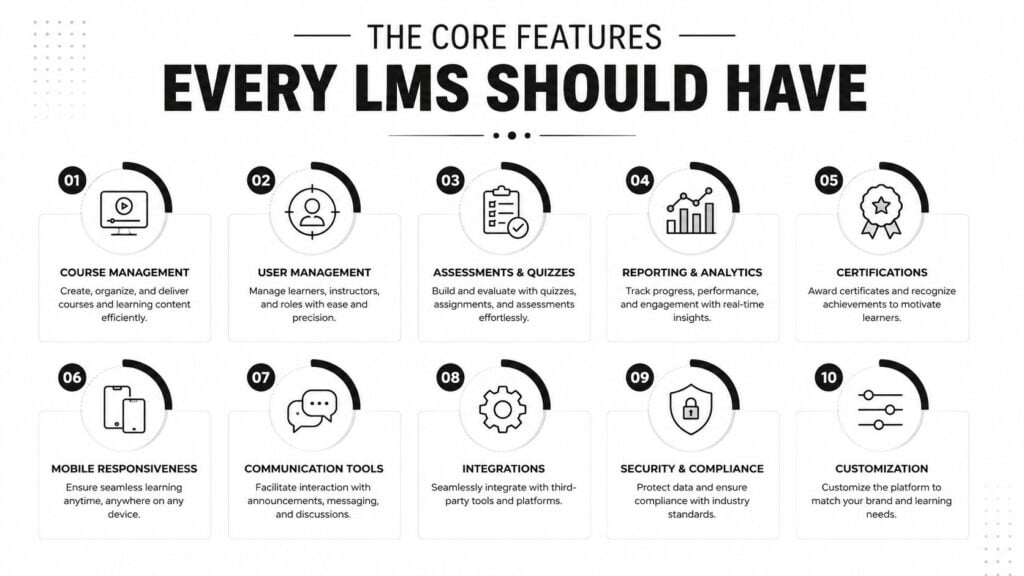
A short visual checklist can help your team compare vendors before demos. For a broader walkthrough of how LMS functions fit together, watch the video below.
SCORM, xAPI, and the Standards That Make Content Portable
SCORM and xAPI are standards that help learning content communicate with an LMS. You don’t need to understand every technical detail, but you do need to know what kind of evidence each standard can capture.
SCORM packages a course and defines how it launches and reports activity. It can track completions, quiz and test scores, and pages or slides viewed. That makes it a dependable compatibility baseline for formal courses, especially when an organization has existing content. The standard’s role in packaging, launching, and tracking is outlined in this LMS standards overview.
xAPI, sometimes called Tin Can, records learning events in a more flexible format. Those events can include video viewing, simulation choices, retry attempts, and time spent on questions. xAPI is therefore useful when learning happens across mobile apps, simulations, informal resources, or systems outside the LMS. The practical differences between the two are also covered in this SCORM and xAPI comparison for course creators.
The xAPI specification was finalized in April 2013, marking a newer generation of e-learning standards designed to address limitations involving cross-domain learning, mobile learning, and situations where a browser isn’t being used, according to this history of SCORM versions.
SCORM vs xAPI at a Glance
| Aspect | SCORM 1.2 / 2004 | xAPI (Tin Can) |
|---|---|---|
| Main purpose | Package, launch, and track formal courses | Record learning events across different environments |
| Typical evidence | Completion, pass or fail, scores, pages or slides viewed | Video activity, simulations, retries, question time, and other detailed events |
| Best fit | Structured browser-based compliance and course content | Interactive, mobile, informal, or multi-system learning |
| Reporting depth | Standard course results | Granular behavioral data |
| Infrastructure | Usually communicates directly with the LMS | Commonly sends statements to a Learning Record Store |
| Portability question | Strong baseline when the receiving LMS supports the version | More flexible for distributed learning data |
For a simple compliance course that only needs completion and a score, SCORM may be sufficient. Choose xAPI when the learning experience includes simulations, mobile activity, or several connected systems. If you need compatibility with established SCORM content while planning for broader tracking, check whether the LMS supports the specific SCORM version your library requires.
Engagement and Ecosystem Features That Bring Courses to Life
Core administration gets learners into a course. Engagement features influence what they do once they arrive.
Start with assessment variety. Multiple-choice quizzes work well for knowledge checks, but they shouldn’t carry every learning objective. Branching questions can show different scenarios based on a learner’s choice. Drag-and-drop tasks can test sequencing or classification. Open-text responses can be judged with a rubric, while proctored exams may be necessary when identity and exam conditions matter.
A field technician may need a short scenario that asks which safety step comes next. A graduate student may need to defend a position in writing. The platform should support the instructional activity, rather than forcing both learners into the same question format.
Use gamification with restraint
Points, badges, streaks, and leaderboards can give routine compliance training a visible sense of progress. They may also help a membership community encourage weekly participation. The same mechanics can feel distracting or childish in an advanced academic program.
The design question is simple. What behavior should the feature encourage? A streak may support regular practice. A badge may recognize a meaningful milestone. A leaderboard may work for a sales challenge but undermine collaboration in another setting. See this guide to gamification for e-learning for a deeper look at where these mechanics fit.
Treat mobile access as part of the delivery plan
A deskless worker shouldn’t have to wait for a laptop to complete a required module. An HVAC apprentice might review a troubleshooting lesson from a job site, while a commuter watches a short video before arriving at class. Responsive design, readable navigation, and offline support can determine whether the course fits the learner’s day.
Integrations connect the LMS to the rest of the operation:
- SAML or OIDC single sign-on: Learners use an existing identity rather than another password.
- Zoom or Teams: Instructors can schedule and deliver live sessions.
- Stripe or PayPal: Course sellers can collect payment during enrollment.
- HRIS synchronization: Corporate teams can update users and assignments from employee records.
- Zapier or webhooks: Administrators can create custom notifications and workflow actions.
Learner feedback completes the loop. Ask whether people found the course clear, useful, and accessible, then use a structured guide to course survey questions to improve the questions you ask.
Matching LMS Features to Your Use Case
A yoga membership site and a hospital onboarding program have different operational problems. Comparing them against one generic feature checklist leads to wasted budget and unnecessary complexity.
The table below separates likely priorities for three common models. “Must-have” means the capability supports the core operation. “Nice-to-have” can improve delivery but shouldn’t decide the purchase before the basics work. “Skip for now” means the feature may add cost or administration without solving an immediate need.
LMS Feature Priorities by Use Case
| Feature | Corporate Training | Membership Sites | Schools & Universities |
|---|---|---|---|
| SCORM or xAPI | Must-have for formal course tracking and varied learning data | Nice-to-have unless importing external course packages | Useful when adopting packaged instructional content |
| Audit trails and compliance reports | Must-have | Skip for now unless certifications are regulated | Useful for program and accreditation records |
| Role-based access | Must-have for employees, managers, instructors, and administrators | Useful for members, moderators, and coaches | Must-have for students, faculty, staff, and administrators |
| SSO | Must-have where the LMS connects to company identity systems | Nice-to-have for a smaller paid community | Must-have when linked to institutional identity |
| HRIS or SIS integration | Must-have for automated employee or student data flows | Skip for now | Must-have when rosters and grades depend on existing school systems |
| Bulk enrollment | Must-have | Useful for cohort launches | Must-have for classes and terms |
| Drip content | Nice-to-have for structured development | Must-have for memberships and cohort journeys | Useful for paced courses |
| Payment gateways and subscriptions | Skip for internal training | Must-have | Usually skip unless the institution sells continuing education |
| Community forums | Nice-to-have | Must-have for member interaction | Useful where discussion supports the course |
| Live classroom tools | Nice-to-have | Nice-to-have | Must-have for blended delivery |
| Grade books and rubrics | Useful for skills programs | Skip for most memberships | Must-have |
| Accessibility controls | Must-have for inclusive workplace learning | Must-have for an accessible public service | Must-have, including support for WCAG 2.2 requirements |
| Branded certificates | Useful | Must-have for credentialed memberships | Useful for continuing education |
| Advanced predictive analytics | Nice-to-have after clean data is available | Usually skip for now | Useful when the institution has a clear intervention process |
Corporate teams should begin with identity, enrollment, compliance, reporting, and integration. Premium authoring and advanced live-session tools can come later if the instructional model needs them.
Membership operators usually gain more from drip scheduling, payment gateways, subscription billing, community tools, and branded certificates than from detailed audit trails. A member advancing to a new tier after consistent weekly check-ins needs a smooth journey, not an enterprise compliance dashboard.
Schools and universities should protect academic workflows first. Rosters, grade books, rubrics, LTI integrations, accessibility, and connections to existing student information systems deserve testing with real course scenarios before decorative engagement features.
AI and Blended Learning Features Changing in 2026
AI features in an LMS now range from practical assistance to ambitious promises. The useful distinction is whether the feature saves a human time while preserving human review.
AI-assisted authoring can turn an outline into a draft lesson. Transcript and caption generation can reduce the manual work involved in preparing video. Content tagging can improve search, while adaptive learning paths can respond to quiz performance and direct learners toward suitable material.
These uses have clear boundaries. An instructor still needs to check generated explanations, captions, translations, and questions for accuracy, tone, accessibility, and alignment with the learning objective. AI can produce a plausible wrong answer quickly, and automated grading can reproduce bias when the rubric or training data is weak.
Human review belongs inside the workflow, not at the end of it.
Predictive analytics is more useful when an LMS captures detailed engagement telemetry, including activity logs, pacing, assessment behavior, and attendance. In a 2026 study of 523 students across 3 universities, a Multilayer Perceptron model reached 70.0% accuracy when identifying at-risk students, with LMS activity and pacing among the strongest predictors, according to the study on predictive analytics and student risk. That result supports a cautious design principle. Better signals can help staff intervene earlier, but a prediction should prompt a conversation rather than make a final judgment.
Market direction also points toward cloud and blended delivery. Cloud LMS platforms held 88.24% of global market share in 2025 and are growing at a 14.22% CAGR, while blended learning is projected to grow at a 13.48% CAGR, according to this learning management system market analysis. Those projections make attendance sync, scheduling, live-session connections, breakout rooms, and offline check-ins practical priorities for mixed delivery.
AI can be especially useful for translating global courses, generating draft questions from existing videos, and summarizing learner analytics for managers. For a closer look at personalization decisions, use this guide to AI for personalized learning.
Picking the Right LMS Without Overpaying or Underbuying
A vendor demo should show your workflow, not just a collection of attractive screens. Bring one real course, one real learner group, one reporting question, and one integration requirement.
Ask the vendor to demonstrate the complete path from enrollment to completion. Can an administrator enroll a group, assign a role, release content gradually, review an assessment, issue a certificate, and export a report without switching to another system? Can a manager see only the people they’re responsible for? Can a learner complete the course comfortably on a phone?
LMS Feature Checklist by Business Model
| Feature | Corporate Training | Membership Sites | Schools/Universities |
|---|---|---|---|
| Course authoring | Must-have, simple internal updates | Must-have, branded and reusable | Must-have, with varied activity types |
| User and role management | Must-have, with departments and managers | Must-have, with member access levels | Must-have, with academic roles |
| Progress tracking | Must-have, tied to assignments and compliance | Useful for member journeys | Must-have for course progress and grades |
| Certificates | Useful for required training | Must-have for credentials and milestones | Useful for continuing education |
| Payments | Usually unnecessary | Must-have for paid access | Needed only for selected programs |
| Community | Optional | Must-have | Useful where pedagogy requires discussion |
| SSO and directory integration | Must-have | Optional | Must-have in many institutional environments |
| HRIS or SIS connection | Must-have | Usually unnecessary | Must-have where rosters depend on SIS data |
| SCORM or xAPI | Choose based on content library | Optional | Useful for packaged and interactive content |
| Mobile and offline access | Must-have for distributed teams | Useful for flexible consumption | Useful for fieldwork and blended courses |
| Advanced AI analytics | Later-stage investment | Usually defer | Consider after data quality and intervention processes are ready |
A platform such as LearnStream can be considered alongside other options when a creator needs course building, progress tracking, role-based permissions, and completion certificates. Evaluate those capabilities against your actual enrollment, payment, reporting, and community workflows rather than treating them as proof of fit.
Questions buyers often ask
What are the most important LMS features?
Start with course delivery, user management, assessments, progress tracking, reporting, permissions, and integrations. Add specialized tools only when they support a defined learning or business requirement.
Should a small course seller buy an enterprise LMS?
Usually, a smaller operation should prioritize ease of use, payments, drip content, learner communication, and manageable administration. Enterprise controls can add complexity before they add value.
Does every LMS need SCORM or xAPI?
No. The choice depends on how your content was created and what activity you need to track. SCORM suits formal packaged courses, while xAPI suits broader learning events and multi-system activity.
How can I compare vendors fairly?
Use the same course, learner group, report, device, and integration scenario in every demo. Record the number of manual steps, the clarity of learner navigation, and whether the exported data answers a real management question.
Choose the smallest feature set that supports your current model, while leaving room for the integrations and reporting you’re likely to need next. Before booking demos, write your essentials, test them with real users, and request a clear implementation plan from each shortlisted vendor.