Learning Management Features You Actually Need

The most popular advice about learning management features is simple: buy the platform with the longest feature list. I disagree. A polished demo can show you AI recommendations, social hubs, adaptive paths, gamification, and elaborate dashboards in a single sitting. Your learners may still struggle to find the next lesson, forget their passwords, or abandon a course on mobile.
The useful question is narrower: which features will learners and administrators use repeatedly enough to justify their cost? By the early 2020s, LMS platforms had become mainstream training infrastructure. One industry summary reports that 83% of organizations worldwide use an LMS, with adoption reaching about 98% in major enterprises, and identifies roughly 73.8 million LMS users worldwide. The same summary says 87% use web-based platforms, while the global LMS market was valued at $14.43 billion in 2021 and projected to reach $40.95 billion by 2029, at a projected 14.2% CAGR (industry LMS adoption and market summary).
That scale changes the buying decision. An LMS isn’t an optional experiment for many teams. It carries onboarding, compliance, course delivery, and learner records. The strongest stack usually starts with dependable fundamentals, then adds complexity only when a real workflow demands it.
Why Most Learning Management Features Go Unused
More features don’t automatically make a better LMS. They often make a harder LMS to understand, administer, and adopt.
I’ve watched buyers get pulled toward the most impressive part of a sales demo. A vendor opens an AI recommendation engine, switches to a social learning feed, then displays a dashboard filled with colorful behavioral signals. Everyone in the room can see the potential. Few people stop to ask who will configure the feature, who will maintain it, and whether learners have a reason to return to it.
The adoption gap is more revealing than the product tour. An independent 2026 India adoption survey found that ease of use fell from 88% expected to 61% in reality. In the same survey, AI recommendations were used by 39%, social learning by 33%, and VR or simulations by just 14% (2026 LMS adoption survey). Those figures don’t prove that advanced tools are useless. They show that buying them before solving basic friction is risky.
The feature-list trap
A feature can be technically available and practically absent. If learners can’t locate it, managers don’t understand its output, or administrators need a manual process to keep it current, the feature becomes shelfware.
Common causes include:
- Too much setup: A learning path may require careful rules, tagging, content maintenance, and testing before it serves one learner.
- Weak relevance: A social feed feels empty when the program has little peer interaction or no facilitator to seed useful discussion.
- Poor workflow fit: An AI assistant doesn’t help much if learners already ask questions in Slack, Microsoft Teams, or a community platform.
- Administrative overload: Every additional tool creates permissions, support requests, reporting decisions, and content governance work.
Practical rule: Treat every feature as a recurring operating cost, not a free line in a product comparison.
The simpler platform often wins because people can use it without training about the LMS itself. Learners need a clear catalog, obvious progress, reliable assessments, and access that works on the devices they already carry. Course creators need to publish and update material without calling support for routine tasks.
Before paying for advanced capabilities, define the behavior you want to change. If the problem is unfinished onboarding, start with assignments, reminders, progress visibility, and mobile delivery. If the problem is regulatory proof, prioritize records, assessment results, access controls, and reporting. A feature deserves budget when it removes a known obstacle or produces evidence you can act on.
The Core Learning Management Features You Actually Need
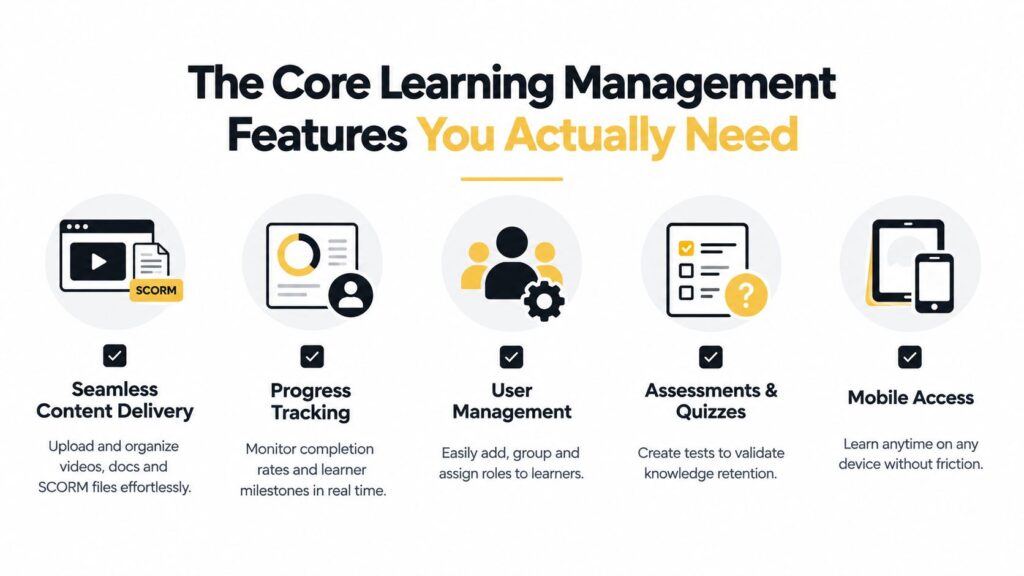
The foundation is straightforward. Your platform should deliver content smoothly, show learners where they stand, manage access cleanly, confirm understanding, and work across ordinary devices.
Content delivery comes first
A good content layer handles videos, documents, lessons, and imported packages without making learners hunt through folders. Look for clean course organization, dependable playback, clear prerequisites, and a library that remains usable as your catalog grows.
SCORM support matters when you rely on externally authored courses. SCORM defines a run-time environment, standardized communication between content and an LMS, and a data model for learner information, including completion and score records (ISO and SCORM technical reference). Test an actual package during evaluation. A checkbox in a sales sheet doesn’t tell you whether bookmarks, completion states, or quiz results will transfer correctly.
Progress tracking should answer ordinary questions
Administrators need to know who enrolled, who started, where learners stopped, and which milestones remain. Learners need the same information in a simpler form. If the progress display is buried or confusing, the platform creates support work instead of reducing it.
User management belongs in the same foundation. Bulk enrollment, groups, roles, permissions, and assignments should be easy to operate. A course creator shouldn’t receive administrator access just to update a lesson, and a manager shouldn’t need a spreadsheet to see their team’s status.
Assessments validate learning
A completion mark only tells you that a learner reached an endpoint. Quizzes, tests, question banks, feedback, pass thresholds, and retake rules provide a stronger indication that the material was understood. For a membership owner, even a short knowledge check can reveal where a lesson needs clarification.
Mobile access is equally practical. Check the experience on a real phone, not only a responsive browser window in a desktop demo. Buttons, captions, downloads, navigation, and quiz controls should work without friction. WCAG is the W3C’s reference set of web accessibility guidelines, so accessibility should apply to both the course content and the LMS interface (WCAG and e-learning design standards).
Microlearning can support this foundation when the subject suits short lessons. One published summary reports that microlearning modules are typically completed 60 percent faster than equivalent traditional courses, with 30-day knowledge retention of 25 to 60 percent, compared with 10 to 20 percent for traditional learning (microlearning completion and retention summary). Use short modules to reduce cognitive and scheduling friction, not to chop every complex topic into shallow fragments.
Advanced Tracking and Analytics That Drive Real ROI
Basic reporting is enough for many small programs. If you need to confirm course completion, review assessment results, or identify overdue learners, SCORM tracking and a clear dashboard may cover the job.
SCORM primarily communicates a defined set of browser-based learning fields, including score, completion, bookmarking, and time spent. That makes it useful for structured courses where the LMS is the main place learning happens. A small membership site that sells recorded lessons probably doesn’t need a complex event architecture because xAPI appears in an enterprise feature list.
Where xAPI changes the picture
xAPI, or the Experience API, records learning experiences in a Learning Record Store. It can capture activity from mobile apps, simulations, offline learning, in-product walkthroughs, and real-world tasks, using structured statements rather than relying only on course completion and score data (SCORM and xAPI feature comparison).
A separate feature analysis describes the practical difference clearly. xAPI extends tracking beyond the LMS to mobile apps, simulations, and offline learning by sending statement-based event data to a learning record store, moving the requirement from course-finish reporting toward richer behavioral telemetry (xAPI and LMS features).
That flexibility helps when your learning ecosystem includes multiple environments. A product training team might want to connect an in-product walkthrough with a formal course. A field workforce might need activity recorded offline. A simulation-heavy program may care about decisions, attempts, and sequences rather than a single completion flag.
For a conventional course catalog, xAPI can be overkill. You’ll need clear event definitions, governance, storage decisions, reporting logic, and people who can interpret the data. More telemetry doesn’t create more insight by itself.
Analytics needs architecture, not decoration
ISO/IEC TR 20748-2:2017 describes an analytics environment with defined roles for data sources, storage, analysis engines, visualization, feedback, privacy controls, consent handling, secure processing, and interfaces for heterogeneous data exchange (ISO learning analytics technical report). It also addresses lifecycle management for activity logs, assessments, and curriculum metadata, alongside scalability for the volume, velocity, and variety of incoming data.
That has a practical implication. A dashboard that shows completion percentages isn’t automatically a learning analytics strategy. Before you pay for advanced reporting, decide which decision the report will support. Will a manager intervene with a stalled learner? Will a course creator revise a confusing activity? Will a compliance team export a defensible record?
If you need a more structured way to think about learner milestones before choosing a platform, build a progress tracker that works offers useful planning context. For a plain-language look at dashboard design, see how LMS reporting dashboards work.
The Human Side of Feature Adoption
A technically capable LMS can still fail on day one if people don’t trust it, understand it, or have enough space in their routine to use it.
An academic study covering LMS feature adoption in higher education during 2025 to 2026 found that adoption depends on more than functionality. Emotional readiness and social-cultural context also influence whether people adopt LMS features (academic study of LMS feature adoption).
That finding matches what practitioners see in workplaces and membership communities. A learner may avoid a discussion tool because public participation feels risky. An instructor may ignore analytics because previous reporting systems were used for surveillance rather than support. An administrator may resist a new workflow because the vendor underestimated the effort required to migrate users and clean up old content.
Reduce the first-use burden
Adoption improves when the first useful action is obvious. Give learners one clear starting point, explain why the activity matters, and remove unnecessary choices from the opening screen.
For administrators, introduce features around an existing task. Show a manager how to review overdue learners during a real onboarding cycle. Show a course creator how to publish one lesson, inspect its completion record, and make an update. Training people on every available menu creates familiarity with the interface, not competence with the workflow.
Useful adoption checks include:
- Confidence: Do users believe the feature helps them, or do they see it as another monitoring mechanism?
- Context: Does the feature appear where the work already happens?
- Support: Can someone recover from a forgotten password, failed upload, or confusing assignment?
- Feedback: Do learners see what changed because they completed an activity?
A feature becomes part of the learning experience only after people build a habit around it.
Community tools deserve the same scrutiny. Discussion boards can deepen a program when prompts are specific and someone responds. They become empty shells when the owner enables them and waits for spontaneous activity. Practical guidance on keeping participation useful appears in community engagement best practices.
Start with a small pilot, observe where people hesitate, and fix those points before adding more capability. Adoption is a design problem and a change-management problem, not only a software problem.
How to Prioritize Features for Your Specific Audience
The right feature mix depends on the job your LMS performs. A compliance manager, a cohort-based course creator, and a paid membership owner may all need content delivery and progress tracking, but their next priorities differ sharply.
| Business Model | Must-Have Features | Nice-to-Have Features |
|---|---|---|
| Corporate training | Role-based enrollment, assessments, completion records, reporting, security, integrations, compliance workflows | Advanced xAPI telemetry, adaptive paths, gamification, social learning |
| Regulated workforce | Version-controlled content, audit trails, certification tracking, renewal reminders, access controls, assessments | Simulations, personalization, branded portals |
| Independent course creator | Simple content publishing, payments or ecommerce support, mobile access, learner progress, quizzes, email or community connections | AI recommendations, complex analytics, adaptive learning |
| Cohort-based program | Scheduled content, live-session support, assignments, discussion or community tools, progress visibility | Badges, leaderboards, advanced behavioral data |
| Paid membership site | Searchable library, recurring access management, mobile delivery, drip scheduling, basic reporting | xAPI, immersive simulations, elaborate recommendation engines |
| Customer or partner education | Separate user groups, branded portals, permissions, certifications, reporting, integrations with customer systems | White labeling, multilingual support, advanced personalization |
Corporate and regulated training
Corporate teams usually need reliable identity and data flows. HRIS or single sign-on integration, role-based permissions, manager reporting, and automated assignment rules may save more time than a recommendation engine.
Regulated environments need proof. Version history, audit exports, signed acknowledgments, renewal tracking, and protected records should move near the top of the list. A visually rich learner experience can’t compensate for missing evidence when an audit arrives.
Creator-led programs
Independent creators should protect their operating time. A course builder that makes publishing easy, a usable mobile experience, a clear checkout path, and basic learner reporting usually matter more than enterprise analytics. If your business sells access directly, confirm whether the platform handles payments, entitlements, refunds, coupons, and membership status or requires separate tools.
For a membership community, the LMS shouldn’t compete with the place where members already interact. Integrate deliberately. A simple lesson library with clear progression can work alongside a dedicated community platform more effectively than an unused social hub inside the LMS.
LearnStream is one option for teams that need e-learning content hosting and management, a Simplified Learning Plan for assigning and tracking learning opportunities, and a Canvas integration that synchronizes registration data with an LMS. Evaluate those capabilities against your actual enrollment and content workflows rather than treating them as automatic reasons to switch.
A Practical Checklist for Evaluating LMS Platforms
A vendor demo is a sales environment, not a usability test. Bring your own content, your own questions, and at least one person who will administer the system after launch.
Start with a real learner journey
Ask the vendor to let a test user complete the path from invitation to course completion. Use an actual video, document, quiz, and SCORM package if those formats matter to you. Watch for small obstacles, such as unclear navigation, slow loading, missing captions, awkward password recovery, or a progress indicator that doesn’t update.
Then repeat the process on a phone. Don’t accept a promise that the platform is mobile-friendly. Test the exact screens learners will use, including quizzes, downloads, video controls, and assessments.
Test administration, not just presentation
Create a sample course, assign it to a group, change a due date, update a lesson, and run a report. Ask whether each action can be completed by the correct role without vendor intervention.
Use this checklist during the evaluation:
- Content: Can you upload, organize, replace, and version your real materials?
- Users: Can you add groups, assign roles, and remove access without manual cleanup?
- Assessments: Can you set pass rules, record attempts, and export results?
- Reporting: Can managers see the information they need without receiving full administrator access?
- Integrations: Which HRIS, identity, payment, community, or video connections work natively?
- Support: Who answers configuration questions, and what happens when a critical workflow fails?
- Data: Can you export learner records in a usable format if you leave?
- Accessibility: Can users move through content with assistive technology, captions, keyboard controls, and readable contrast?
Ask uncomfortable questions
Don’t ask, “Does it integrate with our tools?” Ask which exact integration is available, what data moves in each direction, and who maintains it. Don’t ask, “Do customers use the AI feature?” Ask what content preparation, governance, and review it requires.
Run a limited pilot before signing a long contract. Include a learner, an instructor, a manager, and an administrator. The LMS evaluation checklist for small teams can help organize the review around practical fit rather than demo appeal.
Finally, document every must-have and identify the person responsible for validating it. A feature that nobody tests during procurement will eventually become a feature nobody uses after launch.
Start Simple and Scale Your Tech Stack
Start with the smallest set of learning management features that can deliver a complete learner journey. That usually means content delivery, enrollment, progress tracking, assessments, mobile access, and reporting that someone will review.
The history of LMS design supports this gradual approach. A timeline identifies 1990 as the arrival of SoftArc’s FirstClass for Macintosh, 1991 for Ekko, described as the first fully featured LMS, 2002 for Moodle’s introduction as an open-source LMS, 2004 for SCORM 2004, and 2013 for TinCan xAPI (LMS history and e-learning milestones). The progression moved from course administration toward interoperability and broader experience tracking. Your platform doesn’t need to begin at the end of that progression.
Add complexity only when a bottleneck appears
Use a basic stack while your main challenge is publishing consistently and helping learners finish. Add stronger automation when enrollment or reminders consume too much administrative time. Consider xAPI when learning happens across apps, simulations, offline environments, or workplace tasks. Introduce advanced personalization when a broad catalog and varied learner roles make generic assignments inefficient.
Keep a feature review log. For each proposed addition, record:
- The problem: What recurring learner or administrator obstacle does it address?
- The behavior: What should users do differently after launch?
- The owner: Who will configure, maintain, and review it?
- The evidence: Which report or observation will tell you whether it helps?
- The exit rule: When will you remove or reconsider it if nobody uses it?
This prevents your LMS from turning into a museum of abandoned experiments. It also gives your team permission to ignore features that look modern but don’t support the current business model.
Your first platform choice matters, but disciplined implementation matters just as much. Pick a system that makes the essential journey easy, test it with real users, and let usage earn every later feature. Before your next vendor demo, list the three learner behaviors you need to improve, test those workflows with your own content, and reject any capability that can’t show a clear path to repeated use.
Choose your must-have features today, shortlist two platforms, and run a real learner test before you sign.