Content Delivery Network Benefits for E-Learning Sites

A learner in another country emails you after launch. The course videos keep buffering, lesson images take too long to appear, and the dashboard sits on a spinning loader. Meanwhile, students near your office say everything feels fast.
That contrast is frustrating because your course content hasn’t changed. The delivery path has. Some learners are travelling farther across the internet to reach your server, and your origin may be handling every request itself. content delivery network benefits become practical rather than promotional at this point. A CDN can place reusable content closer to learners and reduce repeated trips to your main server.
It won’t magically fix slow database queries, poorly compressed videos, or an overloaded application. The useful question is more specific: which parts of your learning experience can a CDN deliver well, and which parts still depend on your origin platform?
Why Your Course Platform Feels Slow for Some Learners
A course site usually has one main home for its files and application logic. That home might be a cloud region in North America, Europe, or another part of the world. A learner nearby may get a quick response, while someone in Asia, Africa, or South America may travel through longer or more congested network routes.
A peer-reviewed study on CDN deployment found median client latency near 20 milliseconds for users in North America and Europe, while users in developing regions experienced median latencies as high as 200 milliseconds. The same study found that placing edge caches inside local internet service provider networks improved observed latency for clients in Asia and Africa by approximately 70 milliseconds. The study’s findings on regional latency and edge placement show why geography matters so much.
The problem has more than one layer
Suppose a learner opens a lesson page. Their browser may request the page itself, a JavaScript bundle, stylesheets, thumbnail images, video posters, captions, and several video segments. If every request travels to your origin, distance affects each round trip.
Your server can also become the bottleneck. A launch email, live cohort, or popular lesson release may send many learners to the same files at once. The server then spends resources repeatedly delivering objects that haven’t changed.
Practical rule: Before buying a CDN, identify whether the delay comes from distance, repeated file delivery, slow application work, or all three.
The distinction matters. A CDN can help static lesson assets travel a shorter route and can answer repeated requests from an edge location. It won’t automatically speed up a personalized progress dashboard that must query a database before responding.
That’s why a CDN should be treated as a delivery layer, not a universal speed button. The strongest results usually appear when a course has learners in several regions and serves many reusable files, especially video segments, images, scripts, stylesheets, and downloads.
What a Content Delivery Network Actually Does
A learner in another region opens your course page during a busy launch. The browser requests lesson images, scripts, stylesheets, video segments, and downloads. Without a CDN, many of those files must travel from your central server, even when thousands of learners are requesting the same unchanged objects.
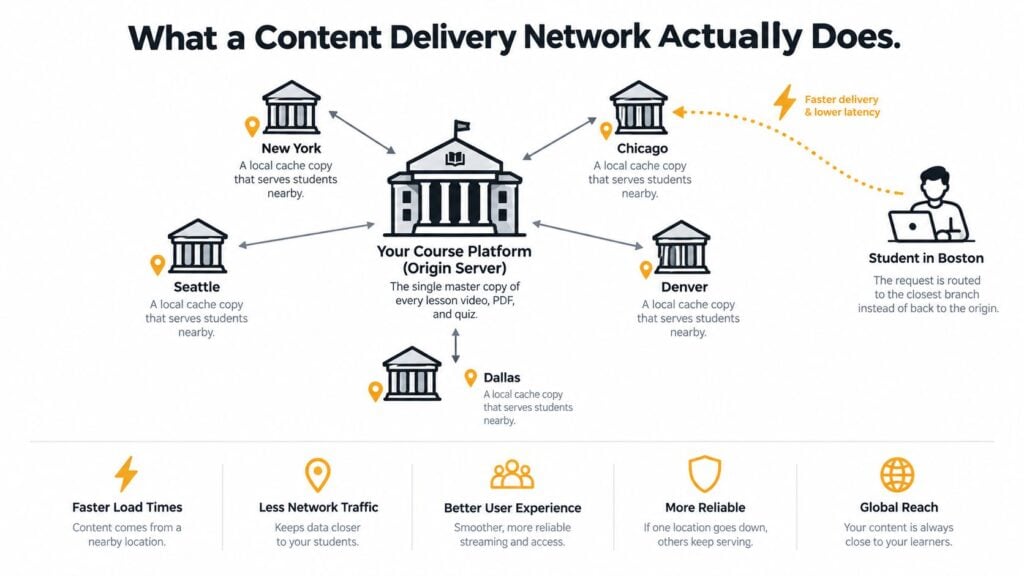
A content delivery network adds branch libraries near learners. These branches, or edge locations, keep selected copies of reusable files. When a learner requests a commonly used lesson image or video segment, a nearby branch can respond instead of sending the request to the central server.
The important pieces
Your existing course infrastructure is the origin server. It stores master copies and runs the application behind accounts, enrollment, payments, progress tracking, and other personalized work.
A CDN places points of presence, commonly called PoPs, in different locations. Each PoP has edge infrastructure that can store selected objects. A routing system directs requests to a suitable edge location through methods such as DNS redirection, HTTP redirection, URL rewriting, or anycast.
If the requested object is already at that edge, the request produces a cache hit. The PoP returns its local copy without contacting the origin. If the object is absent, the result is a cache miss. The CDN fetches the object from the origin, may store it under the cache policy, and then sends it to the learner.
That stored copy remains available while its time to live, or TTL, is valid. After the TTL expires, the CDN checks for or retrieves a current version before serving later requests. This explanation of CDN caching and cache hits describes this basic process.
Two reasons delivery improves
The first is geographic proximity. The browser communicates with an edge location that may be closer than the origin.
The second is cache bypass. A cache hit removes the origin request, saving a round trip and reducing application-server work. This advantage applies mainly to reusable assets, not to responses that must be created for one learner.
The useful measurement is the cache hit ratio, or CHR. It divides cache hits by total requests. web.dev’s CDN guidance identifies 90% as a reasonable target for many sites, while noting that additional PoPs can split traffic across separate caches and reduce the ratio.
For a course creator, the decision is practical: a CDN earns its overhead when learners are spread across regions and request many repeatable files. It adds less value when traffic is local, the site is small, or most requests are personalized dashboards that must reach the origin anyway. The same branch-and-warehouse model applies outside e-learning. Wistec’s guide to speed up your Shopify store shows how the pattern works in commerce.
The Four Real Benefits That Matter for Course Creators
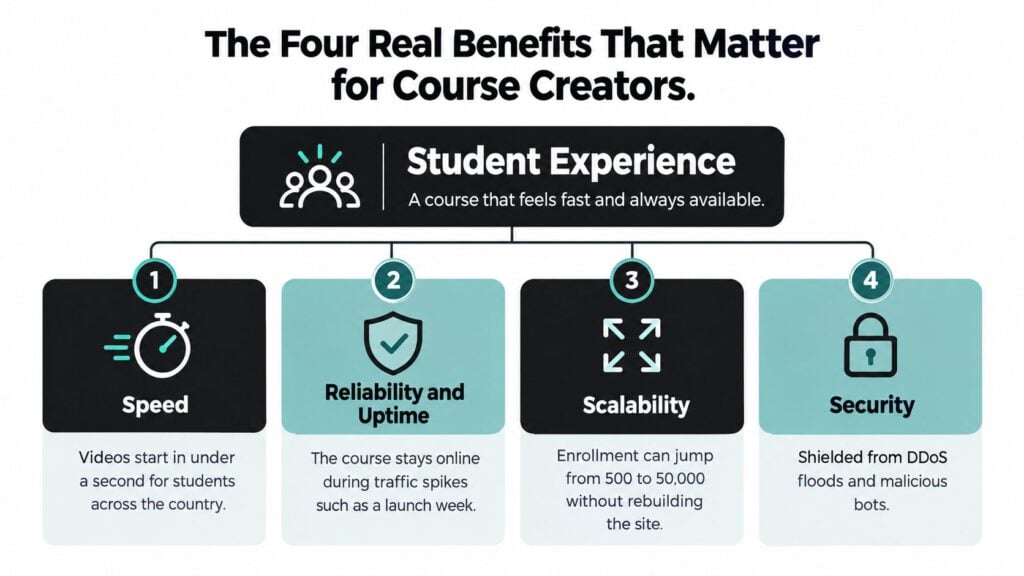
CDN providers often lead with a long list of features. For a course or membership business, I’d rank the practical benefits in this order: speed, reliability, scalability, and security. The right order can change with your business, but student experience should remain the first test.
Speed is the benefit learners notice
A CDN can shorten the path to cacheable files and serve them without an origin request. That can make course pages feel more responsive, particularly for learners far from your main infrastructure.
The regional evidence is compelling, but it also has limits. The size of the improvement depends on cache placement, routing, the learner’s region, and whether the requested object is cacheable. A dashboard that waits on a database query won’t become fast just because its HTML passed through a CDN.
For a course creator, speed means more than a homepage loading quickly. It includes the start of a video segment, the appearance of lesson images, the loading of interactive scripts, and the delivery of downloadable resources.
Reliability supports launches and live teaching
A CDN can absorb repeated requests for shared files at the edge, which reduces pressure on your origin during a launch, webinar, or synchronized lesson release. Akamai reported that its globally distributed platform handled more than 2 trillion internet transactions per day in a 2016 connectivity report. That figure describes the scale of a historical CDN platform, not a promise for your site, but it illustrates how the model evolved beyond a single cache server. Akamai’s connectivity report and CDN scale discussion provide that context.
Reliability still depends on your origin, application, database, video setup, and provider configuration. A CDN can’t rescue an enrollment service that is failing internally.
Scalability reduces launch-day pressure
Caching lets edge locations answer repeated requests without consuming the same origin CPU, database connections, bandwidth, TLS capacity, and application resources each time. That gives your main platform more room for work that must remain dynamic, such as authentication and checkout.
The effect depends on your traffic mix. A public catalog may cache well, while a private member dashboard may not. The strongest deployment separates shared assets from personalized responses.
Security is useful, but it needs careful boundaries
Many CDN platforms include traffic filtering, bot controls, TLS handling, and protection against abusive request floods. Those features can reduce the amount of unwanted traffic reaching your origin.
Security configuration deserves care. A rule that caches a private response publicly can expose learner information. A rule that forwards every cookie and query parameter can destroy cache efficiency. Security and performance need to be configured together, not treated as separate checkboxes.
For most educators, speed and origin relief justify the investment first. Reliability, scalability, and security strengthen the case when you run launches, cohorts, or a membership community with international traffic.
Where a CDN Helps and Where It Does Nothing
A typical course page mixes content with very different delivery requirements. The mistake is treating the whole page as one object.
A lesson thumbnail can usually be shared among many visitors. A learner’s progress response cannot. A video segment may be delivered efficiently from an edge location, while a checkout request needs fresh application logic and careful authorization.
| Asset Type | Example on Your Site | Cache-Friendly | Notes |
|---|---|---|---|
| Video segments | Recorded lesson playback | Usually | Cache according to licensing, access, and signed-URL rules |
| Images | Course thumbnails and lesson graphics | Usually | Version files when you publish replacements |
| JavaScript and CSS | Player bundles and interface files | Usually | Long-lived caching works well for immutable versions |
| Downloads | PDFs, worksheets, and software files | Often | Confirm access permissions before shared caching |
| Course metadata | Titles, descriptions, and catalog details | Sometimes | Use revalidation or shorter TTLs when edits are frequent |
| Learner dashboard | Progress, certificates, and recommendations | Rarely | Personalization makes public caching unsafe |
| Checkout | Cart, payment, and enrollment actions | No | Keep these requests at the application origin |
| Access control | Entitlement and login responses | No | These require current authorization decisions |
Walk through the learner journey
A visitor browsing a public course catalog may receive cached images and scripts from a nearby PoP. When that visitor starts a video, the CDN can serve popular video segments without making every playback request travel to the origin.
Once the learner opens a dashboard, the requirements change. The platform needs to identify the account, retrieve current progress, check entitlements, and perhaps calculate recommendations. A CDN can still proxy the request, but it may not reduce the application work.
A poorly configured CDN can add DNS, TLS, or proxy overhead to dynamic requests without removing the slowest part of the journey. That’s why you should test each class of request separately.
Choose the right video delivery model
Video hosting adds another decision. A CDN can deliver video files, but you still need to consider adaptive streaming, access control, player behavior, and analytics. If you’re comparing hosting options, this guide to Vimeo versus Wistia for hosting course videos can help you evaluate the video layer before you tune the delivery layer.
My rule is simple. Cache content that many learners can safely share. Keep account-specific decisions at the origin. The more personalized the response, the less likely a public cache will improve it.
Setting Up a CDN Without Breaking Your Course Site
A safe rollout starts with inventory, not a DNS change. Ask your developer to list the public assets, private responses, video paths, API endpoints, cookies, query strings, and authentication states used by the platform.
Then use a staged sequence.
1. Prepare the domain and certificate
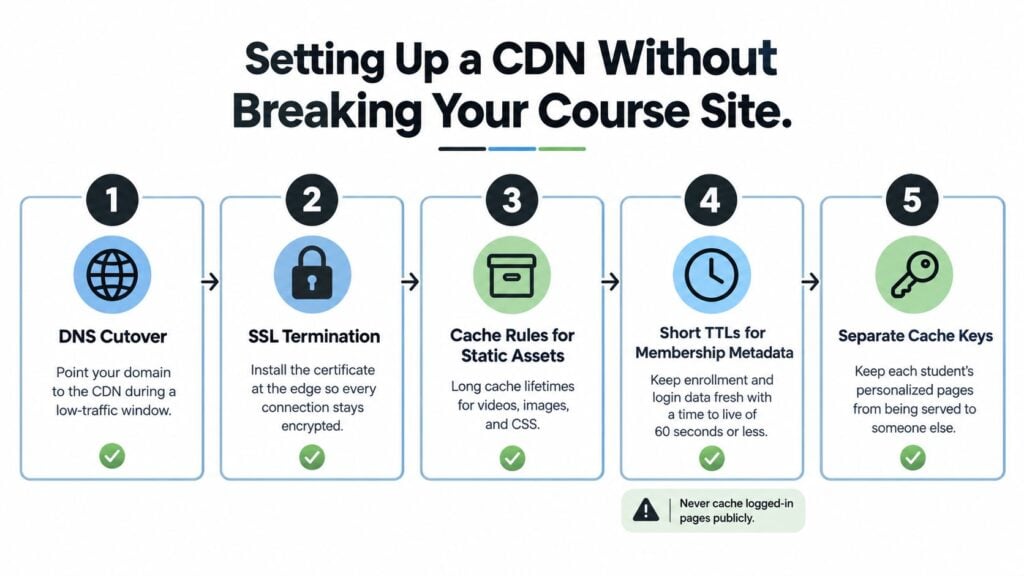
Point the relevant delivery hostname through the CDN during a low-traffic period. Confirm that the CDN has a valid certificate and that encrypted connections work for public pages, logged-in pages, video requests, and downloads.
Keep the origin available during the first test window. You want a quick rollback path if a player, webhook, login flow, or payment callback behaves differently after the cutover.
2. Cache the safe, reusable assets
Start with versioned JavaScript, CSS, images, course thumbnails, and public downloads. Immutable files can use long cache lifetimes because a new filename can represent a new version.
Use more cautious policies for course metadata that changes regularly. A short TTL or revalidation lets you update a title, price, schedule, or availability state without leaving an old copy at the edge for too long.
3. Keep membership data private
Never place logged-in pages, progress records, entitlement responses, or payment information in a shared public cache. Separate cache keys by authorization and personalization state so one learner’s response can’t be reused for another.
Membership metadata may need a short TTL. The exact value depends on your platform’s behavior, but your developer should document what can be stale and for how long.
4. Test the small details
Query-string variation, cookie forwarding, and synchronized expiry can subtly reduce the cache hit ratio. Two requests for the same image may produce separate cache entries if irrelevant query parameters remain in the cache key.
Synchronized expiry can also create a burst of origin requests when many objects expire together. Your engineer can use revalidation, staggered expiry, or prewarming where the platform supports it.
For a broader review of the surrounding architecture, use a structured tech stack audit before making the CDN the only performance project.
Metrics Worth Tracking After You Go Live
A monthly dashboard can show whether your CDN is helping learners, reducing origin work, or adding cost. Focus on measures that match your course site’s traffic mix: public images, thumbnails, downloads, and video segments may be cacheable, while dashboards and progress pages remain dynamic.
Start with cache behavior
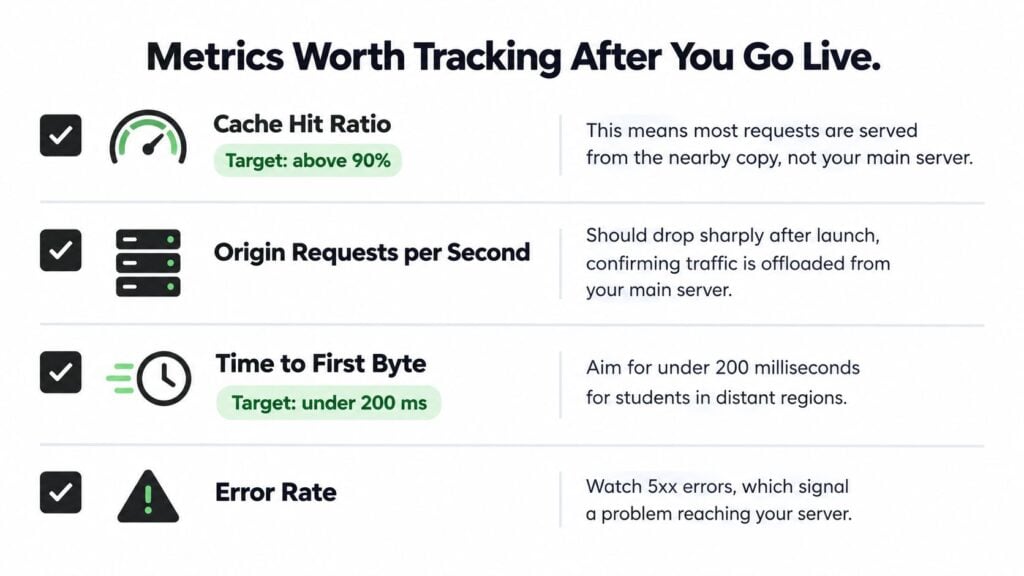
Track cache hit ratio for both requests and bytes. A 90% request hit ratio can be a useful target for many sites, but it does not show whether the cached objects are small images or large video segments. Byte hit ratio reveals how much traffic the CDN serves, which is often more useful for a media-heavy course library.
Watch origin requests per second, origin egress, database utilization, and application resource use as well. If public assets are cached but origin traffic barely changes, inspect cache keys, TTLs, cookies, and query strings.
Separate fast paths from slow paths
Measure time to first byte for cache hits and misses. Review p50, p95, and p99 rather than one average. The median may look healthy while a smaller group of learners waits during a launch or synchronized lesson release.
Compare regions where learners live. For example, if p95 TTFB in Southeast Asia is three times your p50, that gap is the delivery problem worth fixing. A CDN may improve a distant learner’s access to public files while doing little for a personalized dashboard.
Add a business-facing view
Track error rates, especially server-side errors, alongside learner behavior. Faster files do not compensate for failed logins or broken video requests.
For video, pair delivery measures with playback behavior. A practical video engagement metrics guide can help connect buffering, completion, and learner experience instead of treating bandwidth as the outcome.
Pitfalls That Quietly Undo the Whole Point
A CDN can fail in ways that look like success from the control panel. The domain is connected, requests pass through the provider, and the dashboard shows traffic. Learners may still see little improvement.
Private data gets cached too broadly
The most serious mistake is caching a response that contains learner-specific information. Symptoms include stale progress, incorrect account details, or another user’s personalized response appearing in the wrong context.
The fix is strict separation. Public assets can use shared caching, while authentication, progress, entitlement, checkout, and account responses should remain private and origin-bound.
Cache keys become too fragmented
A high number of edge locations won’t help if every request creates a different cache entry. Unnecessary query parameters, forwarded cookies, authorization states, and inconsistent URLs can turn one reusable object into many rarely reused objects.
Review the cache key and remove variations that don’t change the response. Keep variations that protect personalization and access control. Research on CDN performance emphasizes that workload and routing behavior determine the actual benefit, so provider size alone isn’t enough.
The origin remains the bottleneck
Caching public files won’t fix a slow database query, overloaded API, or inefficient enrollment process. If the dashboard remains slow after the CDN launch, measure origin application time instead of adding more edge locations.
Cost and sustainability also need a realistic review. More replication can mean additional storage and transfer, while lower origin load doesn’t automatically mean lower total energy use. A 2025 Oxford study found operational carbon savings of 13% to 64% from carbon-intelligent CDN scheduling depending on workload. A separate CDN-Shifter study estimated reductions of up to 15.9% in the United States, 42.6% in Europe, and 29.1% worldwide under a 30-millisecond latency constraint. The Oxford study on carbon-aware CDN scheduling also reflects the trade-off between routing choices, latency, and energy use.
Before and after launch, check four things:
- Privacy: Confirm that no shared cache stores private learner responses.
- Cache quality: Review hit ratio, byte offload, query strings, cookies, and TTL behavior.
- Origin health: Check application time, database use, errors, and dynamic request volume.
- Learner reality: Test mobile devices and the regions where your students live.
A CDN is worth serious consideration when your audience is geographically spread out, your site serves many reusable assets, or launches create repeated demand for the same files. It may be mostly overhead when nearly every request is personalized, your learners are already close to the origin, or the core problem sits inside your application.
If you run an online course or membership site, start by exporting a week of request data and classifying each major asset as cacheable, private, or dynamic. Then ask a developer to test regional latency, cache-hit behavior, origin load, and mobile performance before committing to a full rollout. LearnStream offers practical guidance for building and refining digital learning experiences, so visit LearnStream when you’re ready to connect delivery infrastructure with the wider technology stack behind your courses.