LMS Implementation Guide: A Course Creator Playbook
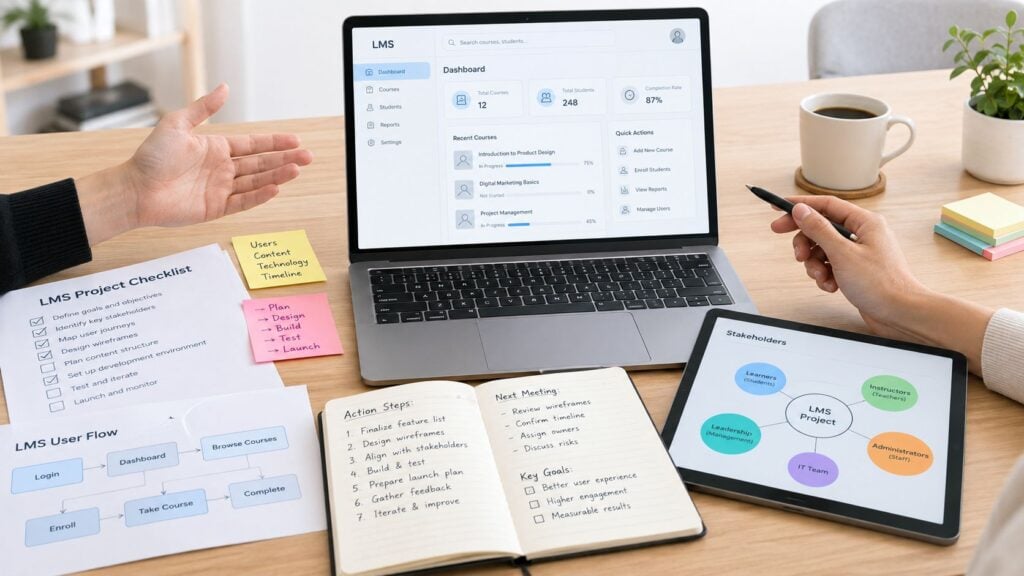
You’ve chosen the platform, uploaded a few courses, and announced a launch date. Then a member can’t find the first lesson, an instructor’s permissions are wrong, and the welcome email never arrives. Suddenly, the LMS rollout feels less like opening a polished school and more like fixing a live website while people are already inside it.
A reliable LMS implementation guide needs to cover more than installation. You’re building the operating system for your learning business, so the plan has to include requirements, content, access, support, accessibility, low-bandwidth use, AI governance, and the work that starts after launch.
Why Your LMS Launch Is Really Week One
A course creator I know once celebrated launch day with a screenshot of the new dashboard. The colors were right, the sales page looked clean, and the first members logged in without obvious trouble. Two weeks later, support messages revealed that learners were skipping the orientation module, instructors were unsure how to review assignments, and several people were watching videos on mobile connections that couldn’t reliably load them.
The technical launch had worked. The implementation hadn’t.
Higher education provides a useful benchmark for the scale of the responsibility. A 2014 Educause Center for Analysis and Research report found that 99% of higher-education institutions had an LMS, while 85% of faculty and 83% of students used the institutional system (academic review of LMS use in higher education). Those figures show why an LMS can’t be judged by whether the software is switched on. Instructors need to use it in their normal workflows, and learners need dependable access at scale.
Three horizons for the rollout
Think of implementation as three connected horizons:
- Foundation: Decide what the platform must do, configure access and integrations, prepare content, and establish ownership.
- Pilot and launch: Test real workflows with representative users, fix the problems they find, and open access with support in place.
- Operating rhythm: Review adoption, learner progress, support requests, accessibility, content quality, and business outcomes after launch.
Small course businesses often spend nearly all their energy on the first horizon. Enterprise teams may build a large project plan but still stall because nobody owns daily decisions after go-live. Common failure points include unclear responsibilities, weak training, poor business-process redesign, inadequate testing, and content that was migrated without being checked.
Practical rule: A go-live date proves that the system is available. It doesn’t prove that your school is usable.
Your team doesn’t need six departments to manage this well. One person may own the project, another may handle content, and a technical contractor may cover integrations and security. What matters is that every important workflow has an owner and a test.
If you’re choosing a platform, start with the requirements and technical foundation sections. If content is already prepared, focus on migration and pilot design. If members are already using the system, skip straight to measurement and the 30, 60, and 90 day review cycle.
Mapping Needs, Stakeholders, and Real Requirements
Start with the outcome, not the feature list. A membership site may say it needs “better automation,” but the useful question is more specific: do you need to reduce manual enrollment, help members find the next lesson, improve completion, or give instructors a clearer way to respond to learner work?
Write the answer in one sentence. For example: “Members should be able to join, receive the correct course access, complete the orientation, and find their next lesson without contacting support.” Every requested feature should connect to a sentence like that.
Research on LMS diffusion grouped implementation success factors into 10 technology factors, 7 human factors, and 7 organizational factors, covering technology, human capability, and organizational support (peer-reviewed LMS diffusion research). That’s a useful reminder that your requirements meeting shouldn’t include only the founder and the vendor.
Talk to the people who inherit the problems
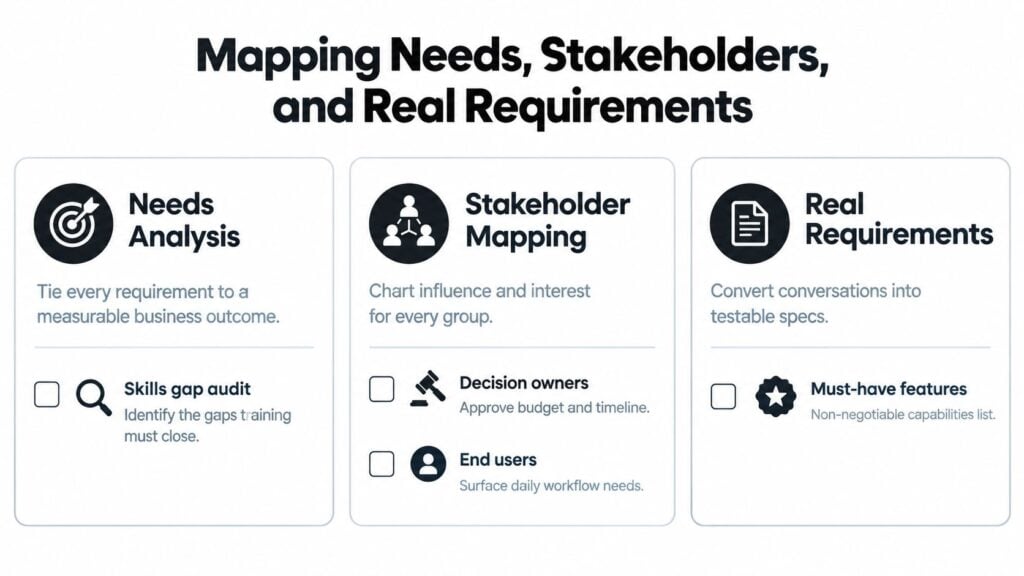
Map four groups:
- Decision owners: The person approving scope, budget, and timing.
- Daily operators: Administrators, instructors, assistants, and support staff.
- End users: Current members, new learners, customers using mobile devices, and people requiring assistive technology.
- Technical owners: Whoever manages identity, integrations, backups, analytics, and vendor communication.
Ask each group what they do today, where the process breaks, and what a successful learner journey should look like. An existing training needs assessment template can help you turn broad requests into specific skills gaps and learning outcomes.
A lightweight RACI can fit on one page:
| Workstream | Responsible | Accountable | Consulted | Informed |
|---|---|---|---|---|
| Course structure | Instructional lead | Product owner | Instructors | Support |
| Access and roles | Technical lead | Product owner | Support | Instructors |
| Content approval | Subject expert | Instructional lead | Learners | Technical lead |
| Launch messages | Communications owner | Product owner | Support | Instructors |
| Reporting | Data owner | Executive sponsor | Product owner | Team |
Turn conversations into testable requirements
Separate your document into must-have, nice-to-have, and non-goal. A must-have might be “a member receives the correct access after payment.” A nice-to-have might be “the dashboard displays a custom progress animation.” A non-goal might be “rebuild the entire community experience inside the LMS before launch.”
| Area | Requirement example | Acceptance test |
|---|---|---|
| Learner experience | Resume a course on mobile | A test learner leaves and returns to the same lesson |
| Admin experience | Issue a refund and remove access | Admin completes the workflow without database work |
| Content workflow | Approve lessons before publication | Draft content stays hidden from members |
| Reporting | Filter completion by cohort | Report returns the expected test users |
Before signing, ask how data can be exported, how roles work, what happens when an integration fails, how accessible the platform is, and which changes require vendor support. A platform constraint is acceptable when you know about it early. It becomes expensive when your sales process, course structure, and support promises depend on a feature the platform can’t provide.
Choosing Between Hosted Platforms, WordPress Stacks, and Open Source
A first launch can look simple until a payment fails, a learner loses access, or a plugin update breaks enrollment. The main choice is whether to buy, configure, or build, and each route shifts work between your team and outside providers.
A hosted platform such as Thinkific, Teachable, or Kajabi reduces infrastructure maintenance and can get a small team selling quickly. A WordPress stack built with LearnDash or Tutor LMS and MemberPress offers more control over branding and workflows. Your team also owns updates, plugin compatibility, hosting, security, and troubleshooting.
Open source options such as Moodle or Open edX provide deeper control over the environment and data. They require more operational capability, including technical support for hosting, upgrades, integrations, backups, and custom workflows. That control matters when low-bandwidth delivery, accessibility changes, or AI-related data rules need configuration beyond a vendor’s defaults.
| Path | Typical Monthly Cost | Time to Launch | Customization | Data Ownership |
|---|---|---|---|---|
| Hosted platform | Vendor-defined subscription | Usually quicker | Platform boundaries | Depends on export and contract terms |
| WordPress stack | Hosting, plugins, and maintenance | Moderate | Broad through themes and plugins | Greater control, with operational responsibility |
| Open source | Hosting and technical operations | Usually more involved | Deep | Highest control, with highest maintenance burden |
The table avoids false precision. Actual cost depends on payment processing, video hosting, email, community tools, development, support, and the customization your team must maintain. Compare those ongoing responsibilities in our learning management system comparison before choosing a platform.
Match the path to your tolerance for maintenance
Choose hosted when your priority is selling and teaching rather than managing infrastructure. Choose WordPress when your business already relies on WordPress and someone can maintain the stack. Choose open source when data control, unusual workflows, or institutional integration justify the added technical work.
A separate community platform such as Circle can handle discussion and events while a dedicated LMS manages structured courses, assessments, and completion records. This split adds integration work, so decide which system owns users, payments, course access, communications, and AI-generated or learner-submitted data before connecting anything. Test the experience on slower connections and with assistive technologies before treating the setup as ready.
For tutoring or coaching workflows, review what to look for in tutoring software, including scheduling, communication, learner management, and reporting. Those requirements can change the platform decision even when the course catalog appears simple.
Use a decision worksheet with five questions:
- Stage: Are you validating a first offer or operating an established membership?
- Technical capacity: Who handles updates, backups, permissions, and integrations?
- Learner journey: Do members need courses only, or courses plus community, coaching, and events?
- Data needs: Can you export users, progress, assessments, and payment-related access records?
- Required workflows: Which actions must work on day one?
A feature-rich platform creates extra work when nobody can maintain it. A simpler option may serve learners better if it stays fast, accessible, and easy to operate after launch.
Setting Up the Technical Foundation
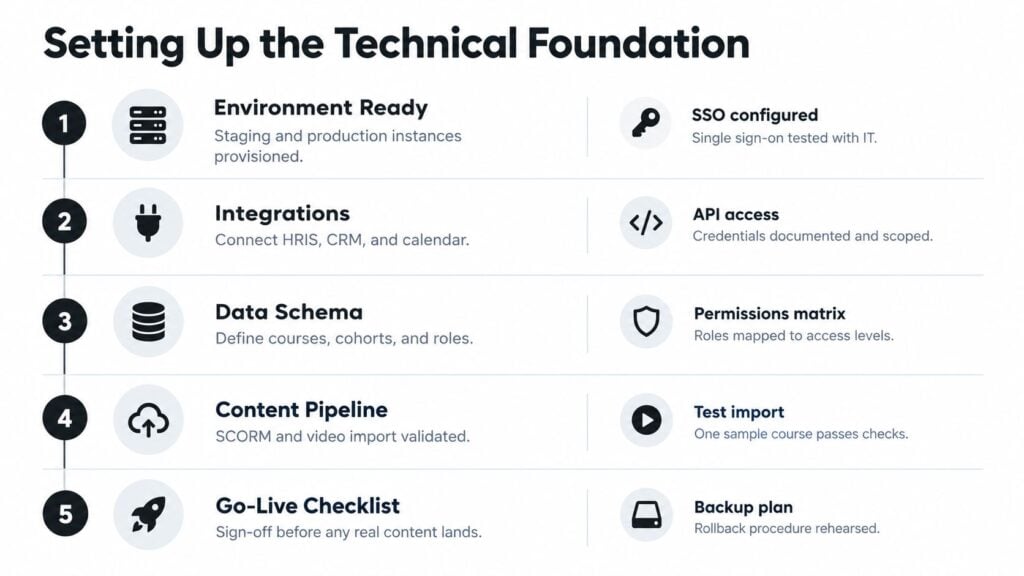
Before uploading real content, create a staging environment and test the platform as a learner, instructor, support agent, and administrator. The technical foundation should be a go or no-go gate, not a list you revisit after members complain.
Research on LMS success identified seven recurring capabilities to verify before launch: single sign-on, learning management, content management, integration, security, tracking, and group management (LMS success capabilities research).
Test identity, roles, and content
Set up SSO or the simplest reliable identity flow your audience can support. Test new account creation, returning-user login, password recovery, enrollment, withdrawal, and access removal. Then build a permissions matrix for owners, instructors, assistants, support staff, and learners. A support agent shouldn’t need instructor privileges to solve a password problem.
Content standards need their own check. SCORM established a common way to package, launch, and track digital learning content, including completion, quiz scores, and viewed pages. SCORM 1.1 was the first implementable version, while later SCORM 1.2 and SCORM 2004 expanded adoption and functionality (SCORM version history). xAPI extends tracking beyond the LMS, including mobile apps, simulations, and workplace activity.
Import one representative package before migrating a library. Confirm launch behavior, completion rules, score reporting, bookmarking, and reporting exports. If you need specialist help with integrations or custom workflows, a practical guide to hiring developers in Latin America can help you assess an external technical resource.
Make accessibility and AI part of the foundation
Request a Voluntary Product Accessibility Template before procurement or renewal, and ask about keyboard operation, screen-reader compatibility, and captioning. Guidance for accessible education platforms recommends checking WCAG 2.1 Level AA and testing navigation, forms, the course builder, and media player (accessible LMS design guidance). Run key workflows with keyboard navigation and a screen reader such as NVDA or JAWS.
For AI features, document what data leaves the LMS, whether a vendor may use it for model training, how long data is retained, and how deletion works. Add human review, disclosure to learners, bias checks, accessibility testing, an appeal route, and a fallback for service failure before enabling AI feedback, proctoring, analytics, or content creation.
Running a Pilot That Actually Tells You Something
A pilot should make the launch uncomfortable in useful ways. If every participant already knows the platform, forgives broken links, and has a fast internet connection, you’re testing politeness rather than readiness.
A small membership team I worked with invited 12 founding members to test a new learning area. The group included experienced online learners, a member who mostly used a phone, and people who hadn’t been involved in the build. Within the pilot, they found a confusing checkout flow, broken email notifications, and an accessibility problem in the video player. Any one of those issues could have created a public launch problem.
Give the pilot a clear job
Ask participants to complete real scenarios from beginning to end:
- Purchase or receive an invitation.
- Create or confirm an account.
- Open the orientation course.
- Watch a lesson and download a resource.
- Complete an assessment.
- Leave a comment or contact support.
- Return later and resume progress.
- Find help when something fails.
Don’t ask only, “Did you like it?” Ask where they expected to click, what they thought would happen next, and which instruction made them stop. Record each issue with the user type, device, browser, workflow, severity, and owner.
A good pilot produces a short list of decisions, not a long list of opinions.
Use a two-week rhythm
During the first few days, observe access, checkout, course navigation, notifications, and media playback. In the middle of the pilot, hold a short group debrief and separate defects from preferences. During the final days, retest every high-impact fix with the same scenario.
Compensate pilot members with a clear benefit, such as continued access, a private feedback session, or a meaningful credit. Don’t turn their participation into a disguised sales promotion. Their value comes from showing you where the experience fails under normal conditions.
The pilot is complete when the team can explain which issues were fixed, deferred, or accepted. If nobody owns the fix list, the pilot becomes a rehearsal for launch without changing the outcome.
Migrating Content, Training Your Team, and Launching
Launch week works best when content, technology, and support move in batches. Uploading everything at once makes it difficult to identify whether a problem comes from a course package, a permission rule, an email trigger, or an integration.

Migrate in controlled batches
Start with one course, one cohort, and one complete learner path. Validate formatting, links, downloads, transcripts, captions, assessment scoring, completion rules, and mobile playback. Reconcile old records against new records, and keep a migration log that records what moved, what was retired, and what needs manual review.
Use the SCORM import checklist for an LMS when you’re moving packaged courses. For organizations connecting content and business systems, documentation about LMS integration with Sitecore and SharePoint offers useful context on content management and enterprise integration patterns.
Training should cover the tasks your team performs under pressure:
- Access support: Reset passwords, change enrollments, and resolve missing course access.
- Content operations: Create drafts, approve lessons, update files, and check completion settings.
- Learner support: Answer common navigation, assessment, and media questions.
- Reporting: Run a cohort report and identify incomplete or blocked learners.
- Escalation: Record a defect with enough detail for a vendor or developer to reproduce it.
An ERP implementation study reported that 60.7% of projects applied moderate change-management focus, 25.1% intense focus, and 14.2% little or none, while only 46.4% finished on budget (ERP implementation statistics). The figures aren’t LMS-specific, but they’re a useful warning to budget real time for training and communications.
On launch day, send one clear message explaining what changed, what members need to do first, and where to get help. Keep a known-issues page ready. If a bug delays access, say what happened, who’s affected, and when the next update will arrive. People usually tolerate a delay better than silence.
Measuring Success and Improving After Launch
The first post-launch review should answer a simple question: are learners making progress with less friction? Login counts alone can’t answer it.
A validated higher-education LMS success scale identified seven constructs: information quality, educational quality, system quality, service quality, intention to use, user satisfaction, and net benefits (validated LMS success scale). For a small course business, translate those constructs into a compact scorecard.
Track whether course information is accurate and understandable, whether instruction supports the intended outcome, whether the system is reliable, whether support resolves problems, whether learners intend to return, whether they’re satisfied, and whether the LMS is producing a useful result for the business.
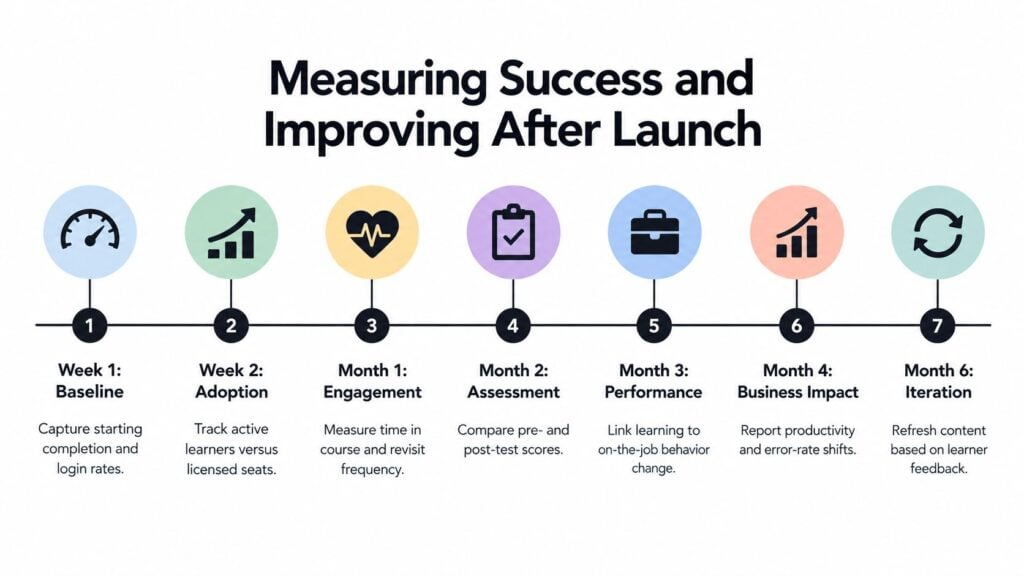
Use a 30, 60, and 90 day review
At 30 days, inspect access failures, support tickets, course starts, assessment errors, and the first learner feedback. Fix anything that prevents people from beginning or continuing.
At 60 days, compare cohorts and identify where learners stop. Review course structure, reminders, instructor response time, and confusing instructions. Speak with learners who completed, learners who stalled, and people who never started.
At 90 days, connect learning activity to the outcome you defined before selecting the platform. Decide which content needs revision, which workflow should be automated, and which feature request can wait.
Design for constrained access
Offline and low-bandwidth readiness deserve a permanent place in the improvement cycle. A 2025 feasibility study found unreliable connectivity and power, limited funding, inadequate training, and weak technical support were significant barriers to LMS adoption. It also found that institutional support explained 72.4% of the variance in implementation obstacles in the classrooms studied (LMS feasibility study).
Offer downloadable materials, compressed media, asynchronous assessments, and a clear synchronization approach where the platform supports it. Test shared-device practices, local backups, and email or SMS fallback procedures. A learner who loses connectivity shouldn’t lose the entire learning path.
The useful quarterly question is whether the LMS helps people learn, complete, and return with confidence. If it only hosts videos, your next improvement may belong in course design, support, accessibility, or access continuity rather than in another platform feature.
Start your rollout by writing the one-sentence business outcome, naming the people who own each workflow, and selecting one representative course for a full technical test. Then schedule the pilot and the first 30-day review before launch day arrives. That small amount of structure will give your LMS a much better chance of becoming a dependable learning business instead of an expensive collection of login screens.