
What Is xAPI and How Does It Track Learning?

xAPI, short for Experience API, is an open specification for recording learning and performance experiences as statements that a Learning Record Store (LRS) can store and query.
You might have a course in your LMS, practice exercises in an app, and useful discussions happening in a membership community. Your course report shows who finished, but you still can't connect those other activities to each learner's progress.
That's the problem xAPI helps address. The catch is that connecting records takes more than switching on an integration. Your tools need to describe activities consistently, and someone still needs to turn those records into a useful report.
What xAPI Is and Where It Came From
xAPI gives learning tools a shared structure for recording experiences. Think of a learner completing a simulation, practicing a workplace task, or finishing an assessment. Each experience can become a record that another system can read.
You'll also encounter its original name, Project Tin Can, in older documentation and forum discussions. Those references belong to the same development story, rather than a competing standard you need to evaluate separately.
Why learning needed a broader record
According to the xAPI project history, SCORM was approximately 10 years old in 2010 when the Advanced Distributed Learning (ADL) Initiative sought ideas for its successor. The work gathered input from more than 300 stakeholders through the xAPI User Voice Forum, alongside industry interviews, customer discussions, and earlier SCORM 2.0 research.
That process led through early versions 0.9 and 0.95 to the first stable 1.0.0 release on April 27, 2013. Rustici Software carried out the early research and implementation work, while ADL subsequently became the steward of the open specification.
The underlying need is easy to recognize. Say you teach workplace safety. Your learners might study a browser-based lesson, practice on a mobile device, and demonstrate a procedure with a supervisor. A course completion alone leaves much of that learning journey unrecorded.
What that means for course creators
SCORM's primarily browser-and-LMS-centered approach suits packaged courses. xAPI was designed around a broader view that includes mobile learning, simulations, games, and workplace practice.
For a licensing educator, 24hourEDU's online study insights for MLO licensing offer a relevant setting for thinking about study experiences. When planning tracking for a program like this, distinguish accessing a resource from demonstrating understanding.
Practical rule: Start by describing the learning experience you want to understand, rather than the software you want to connect.
xAPI doesn't observe real-world learning on its own. An app, connected tool, or deliberate recording process must capture the event. But if your learning happens outside the LMS, xAPI was built with you in mind.
What Goes Into Every Statement
An xAPI statement reads a little like a plain English sentence: Maria completed Safety Module 3. Maria is the actor, completed is the verb, and Safety Module 3 is the object.
The early Tin Can API specification defines actor, verb, and object as required, with result and context available for additional details. Properties can appear in any order, but each property can appear only once within its containing object.
The parts of an xAPI statement
| Part | Required | What It Holds | Example |
|---|---|---|---|
| Actor | Yes | The person or group that performed the action | Maria Lopez, identified by account |
| Verb | Yes | The action, as a full URI with a display label | completed |
| Object | Yes | The activity or target, with its own unique identifier | Safety Module 3 |
| Result | No | Outcome details such as success, completion, score and duration | Success: true, completion: true |
| Context | No | Surrounding details such as instructor, team, platform or parent activity | Platform: tablet app, parent: Safety Course |
Identify the person, action, and activity
The actor needs a reliable identity, usually an account or email-based identifier. A display name alone is a poor way to connect records because learners can share names or change them. An actor can also represent a group.
The verb contains a machine-readable identifier and a human-readable label. As the xAPI statement introduction explains, verbs use full URIs, while their display labels can be localized into different languages.
A URI is an identifier formatted like a web address. Your team should select established identifiers where appropriate and document any identifiers it creates. Don't assume that matching display words guarantee matching meanings.
The object tells you which activity or target was involved. Give activities stable identifiers so that a renamed lesson doesn't accidentally become a different activity in your reports.
Add detail with a purpose
Result answers questions about the outcome. Did Maria succeed? Did she complete the activity? Was there a score?
Context describes the circumstances. It can connect the event to a parent course, instructor, team, or platform without squeezing that information into the activity's name.
Statements are serialized as JSON, a structured text format, and sent over HTTP. You don't need to write JSON to plan useful tracking, but you should be able to recognize whether the fields describe the event accurately.
I use a simple reading test: can you say who did what to which activity in a sentence? If you can't, investigate the record before adding more optional details.
Reading One Statement From Start to Finish
Suppose Maria finishes a safety quiz in a tablet app. In this hypothetical example, she earns 85 percent, passes, and completes the activity during a recorded session.
A useful record keeps those details separate. Completion tells you she reached the activity's defined endpoint. Success tells you she met its passing criteria. Those aren't interchangeable outcomes.
Read the identity and outcome together
Maria's account identifier belongs in the actor. The verb uses the agreed URI for completed, accompanied by a readable display label. The object points to the quiz's unique activity identifier, rather than relying on its title.
For our example, the result could contain:
- Success:
true, because Maria met the quiz's passing rule. - Completion:
true, because she finished the activity. - Score: A hypothetical raw score of
85, with a minimum of0, a maximum of100, and a scaled score of0.85. - Duration: The recorded time associated with the activity.
The xAPI technical overview's statement explorer illustrates success and completion set to true, with a duration of PT1H37M56.34S, meaning 1 hour, 37 minutes, and 56.34 seconds.
That duration uses the ISO 8601 representation. The letters identify time components, so reporting software can interpret the value without guessing whether a number represents seconds or minutes.
Be careful about what the app measures. A session lasting that long doesn't establish that Maria spent every moment concentrating on the quiz. Define whether duration means elapsed session time, active interaction time, or another measurement.
Use context to make the attempt interpretable
The context can include a registration identifier for the learning attempt. If your implementation maps registrations to a course run or cohort, your reporting tool can use that mapping to group the relevant records.
A parent activity connects the quiz to the full safety course. Instructor and platform details let you compare records by teaching assignment or device environment, provided those fields are populated consistently.
Completion, success, and time spent answer different questions. Keep them separate when you build the report.
With those details, a reporting team can distinguish a completed quiz from a passed quiz and place the attempt within Maria's wider course journey.
Before accepting a vendor's sample statement, ask what its verb means. Labels such as viewed or finished leave room for interpretation. Select a defined verb for each event and use it consistently across the tools producing that event.
How a Statement Reaches a Learning Record Store
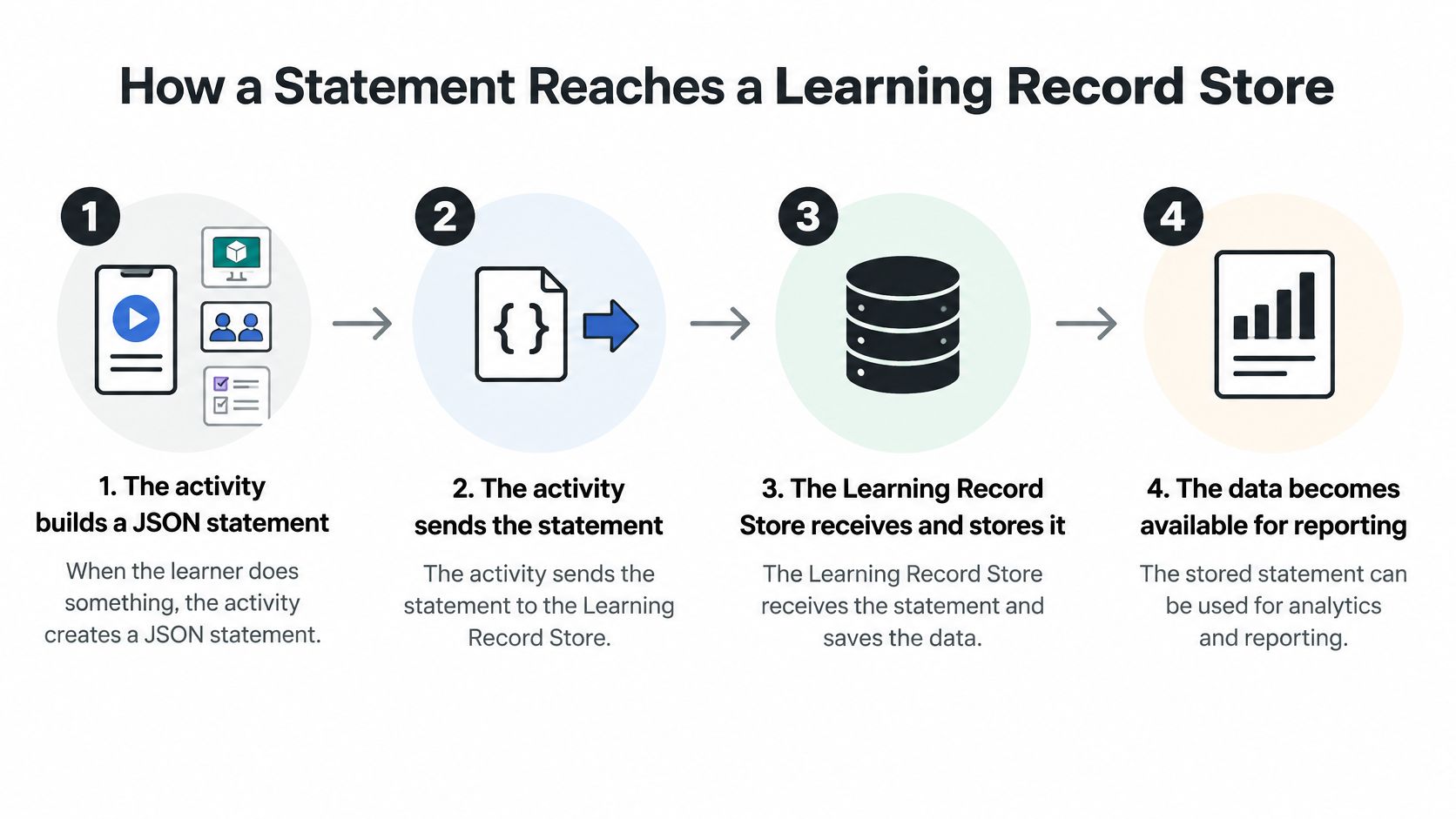
The activity and the record store have separate jobs. A simulation can produce learning records without being embedded inside your LMS, while the LRS provides a destination for those records.
The IEEE Experience API standard formalizes the JSON data model and REST service used to exchange statements between activities and an LRS.
Follow the record through the system
- The activity builds a statement. A mobile app, simulation, webinar platform, or quiz creates a JSON record when a defined event occurs. Your implementation decides which events deserve recording.
- The activity sends the statement. It transmits the record over HTTP to the LRS's REST endpoint, using the required authorization.
- The LRS stores the record. It accepts valid statements and maintains the stored records. Depending on what the sender supplies, the LRS can assign a statement identifier and populate relevant timestamp information.
- A reporting tool retrieves the data. A dashboard or other reporting process queries the available records and transforms them into a report.
The process looks like this:
Storage doesn't equal insight
An LRS isn't automatically an analytics system. It stores and retrieves records. It doesn't decide whether your instruction worked or whether a learner can perform a task independently.
The xAPI overview explains the record-sharing architecture, but making that data useful still requires a reporting layer, agreed metrics, learner identity handling, and appropriate privacy controls. A collection of events alone can't establish mastery, retention, or business impact.
For teams managing employee courses and certifications, HR Management 365 provides useful operational context. Keep administrative requirements, such as certification status, distinct from the detailed event history you might analyze in an LRS.
Choose the reporting question before choosing storage. If you need to identify learners who need additional practice, define what evidence would justify that decision and how an instructor should respond.
For implementation planning, use our guide to creating a Learning Record Store for xAPI. Then perform a basic end-to-end check: send a test statement, retrieve it, and confirm that its identity, activity, result, and context match what you intended.
xAPI Compared With SCORM and cmi5
SCORM, xAPI and cmi5 at a glance
| Criteria | SCORM | xAPI | cmi5 |
|---|---|---|---|
| Typical scope | Content run inside an LMS | Any activity, online or real-world | xAPI profile for LMS-launched courses |
| Data format | Fixed data model used in the browser | JSON statements sent over HTTP | JSON statements that follow the cmi5 profile |
| Where records live | Usually the LMS | A Learning Record Store, separate or built into the LMS | An LRS, with LMS launch and course structure |
| Tracks completion and score | Yes | Yes, when the statement includes them | Yes, as defined by the profile |
| Works offline or on mobile | Limited | Yes, when the activity supports queuing and later synchronization | Mobile delivery is possible, with LMS launch and session requirements |
| Best fit | Legacy courses inside one LMS | Learning beyond the LMS | Teams that want xAPI data with LMS course structure |
The most useful distinction is who launches the learning and what needs recording. A packaged course launched from an LMS creates different requirements from a field-practice app that learners open independently.
SCORM provides a familiar model for delivering and tracking browser-based courses. If your learners complete a course and you need its completion, score, and time records, a working SCORM setup may already meet your needs.
Where cmi5 fits
cmi5 is an xAPI profile for LMS-launched courses. It uses xAPI statements while adding rules for course launch, sessions, and defined learning outcomes.
That addresses a common point of confusion. xAPI itself doesn't provide a complete course-launching workflow. Choosing xAPI output in an authoring tool doesn't, by itself, tell an LMS how to launch and manage that content.
cmi5 adds that structure, but it shouldn't be treated as a guarantee of unrestricted offline operation. Mobile delivery and offline synchronization are separate capabilities. Your content, launcher, and storage arrangement must support the intended workflow.
Our SCORM, xAPI, and cmi5 comparison goes deeper into those implementation differences.
Choose according to the job
- Use SCORM when your content stays inside an LMS and its existing reporting answers your questions.
- Use xAPI when you need records from apps, simulations, field practice, or other connected learning environments.
- Use cmi5 when you want xAPI records alongside defined LMS launch and course-management behavior.
Don't migrate a working course library just because another format sounds newer. Start with content that has a clear unmet tracking requirement, and test the publishing and launch workflow before expanding.
Existing SCORM records don't disappear when you introduce xAPI. Keep historical records accessible and plan how reports will distinguish old and new data. You can run both approaches side by side while deciding which experiences benefit from a different standard.
Where xAPI Projects Get Stuck
JSON doesn't guarantee that tools understand each other. It provides a shared structure, but your team still has to agree on what the records mean.
Inconsistent descriptions can leave a reporting team facing a screen like this:
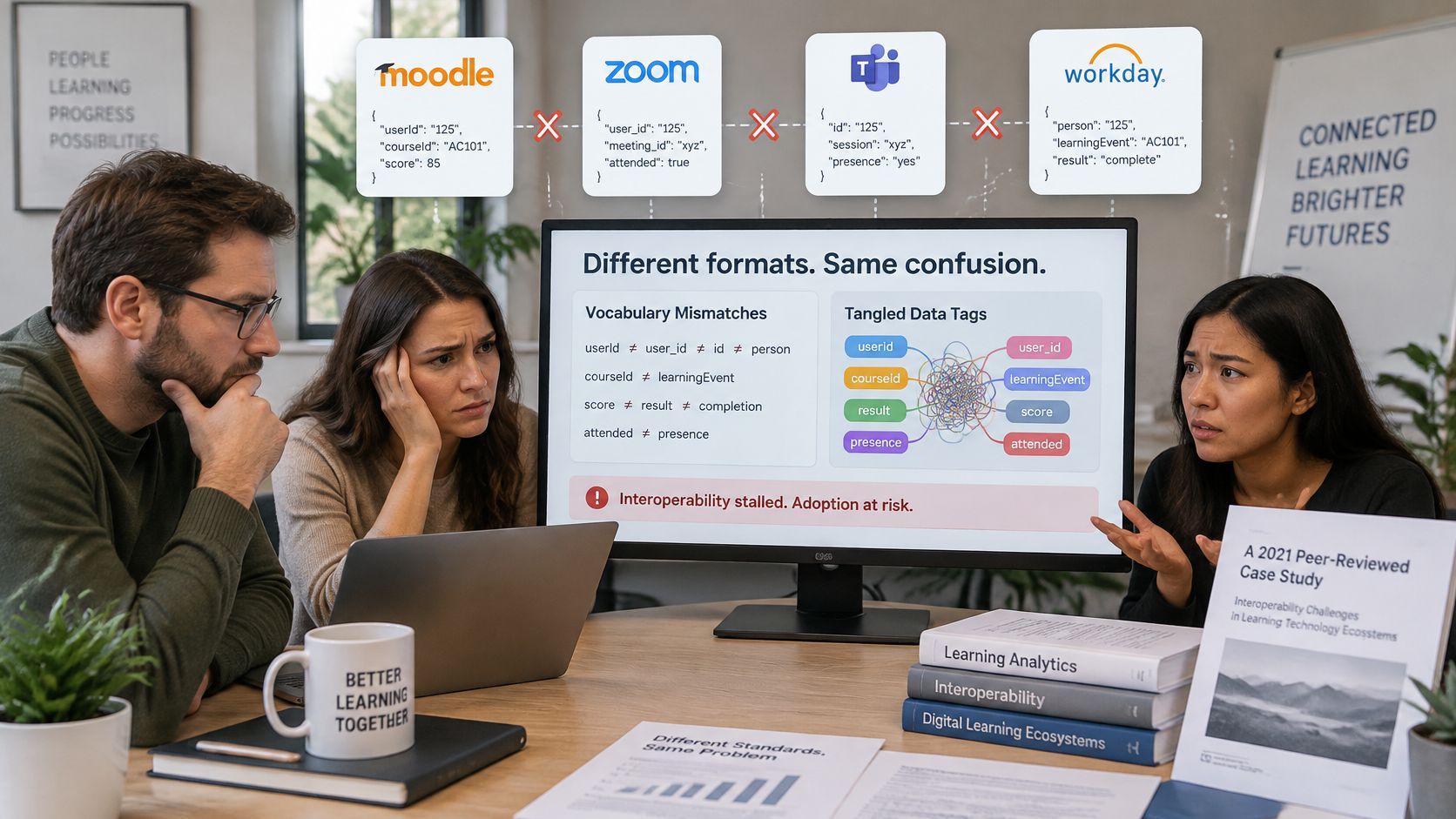
The xAPI specification defines statement structure and exchange rules. Those rules don't ensure that independently configured tools will describe equivalent events using compatible vocabulary and context.
Say a video plug-in records watched, a community integration records viewed, and a course tool records completed. The problem runs deeper than the words. One might mean the learner opened the player, another might mean playback started, and another might mean the video reached its end.
Write down the meaning before connecting tools
A shared event dictionary should document the decisions that developers and reporting staff would otherwise make separately:
- Verb definitions: Specify the exact action that triggers each verb and record its URI.
- Activity identifiers: Establish stable identifiers and rules for course revisions.
- Context conventions: Define how tools represent parent courses, registrations, platforms, and instructors.
- Validation rules: Reject or flag statements with missing identifiers, unexpected values, or conflicting meanings.
Consider an xAPI profile to express shared vocabulary and statement patterns. A profile gives producers a more specific agreement to follow than the base specification alone.
An instructional designer should help own the event meanings because those meanings depend on learning intent. A data specialist or developer should own technical validation, with both reviewing sample statements together.
For another explanation of the standard, this video can support the team discussion:

Test agreement, not just connectivity
Flexibility can reduce interoperability when every producer invents its own vocabulary. Successful delivery to an LRS proves that a record arrived, not that your report can compare it fairly with another record.
Test equivalent events from different tools and inspect the resulting statements together. Include someone who will use the report, so technical agreement doesn't conceal an educational misunderstanding.
The question to ask about any integration is straightforward: Will its statements mean the same thing as records produced elsewhere?
Pick One Use Case Before You Choose Tools
Choose a decision you need to make. Perhaps you need to know whether field staff are practicing a procedure before assessment, or where learners stop progressing through a cohort.
I'd avoid starting with a goal such as collecting richer data. Name the action you'll take when you have an answer, such as offering targeted practice or revising a confusing activity.
Build a small pilot
- Write the question. Use a specific sentence, such as whether learners who struggle on the final assessment completed the relevant practice.
- List the activities. For a hypothetical pilot, choose three to five sources of evidence, such as opening the practice, submitting an attempt, receiving feedback, and completing the assessment.
- Agree on the vocabulary. Keep the pilot to five or fewer verbs, documenting each URI, display label, and triggering condition.
- Test the complete path. Choose an LRS, send a statement from the actual activity, and retrieve it through the route your reporting process will use.
- Build the first report. Compare its interpretation with assessment records, instructor observations, and what you already know about the learners.
Our guide to measuring training effectiveness can help you choose evidence that supports an educational decision rather than just counting activity.
Review the failures as carefully as the report
Try a 30-day pilot as a manageable planning choice, not a promise that every implementation will be ready in that time. Keep a shared log of missing fields, duplicate events, identity mismatches, conflicting verbs, and confusing report results.
Include privacy in that review. Record only the learner information you need, define who can access it, and agree on retention and deletion practices before expanding collection.
A small report that changes an instructional decision is more useful than a large event archive nobody reviews.
My goal on this blog is to share insights and learnings in a way that's digestible and a bit fun. If xAPI still feels abstract, a focused pilot will make the trade-offs much easier to understand.
Pick a question and write it down today. Then name the learning activity that could help answer it, the person responsible for defining its statement, and the report you'll use to decide what to do next.