8 Ways to Collect and Use Feedback for Online Courses

You just finished a course launch. Videos are up, quizzes work, and you send the final survey on a Friday.
By Monday the comments arrive. Week two instructions were confusing. A download link broke. Nobody could make the live session. Every one of those was fixable on the day it happened, and none of them are fixable now.
I've been on both sides of this. As a learner, I've filled in surveys for courses that were already over. As a creator, I've read the results and felt the same mild frustration about the timing.
Mid-course feedback changes the math. You hear the problem while the cohort is still moving, you fix it before the next module, and the learners watch you respond. That's the whole trick, and it holds whether you run a fifteen-person workshop or a course with thousands of enrollments.
The habit is the same everywhere: ask early, ask something specific, and act on something visible. That pattern also applies on the audience side, where this guide to subscriber feedback for publishers covers the newsletter version of the same loop.
Eight methods follow. For each one I'll cover how to collect it, how to read it, and what to do with it, plus whether it fits a small cohort or a large course.
1. Instant Auto-Graded Quiz Feedback
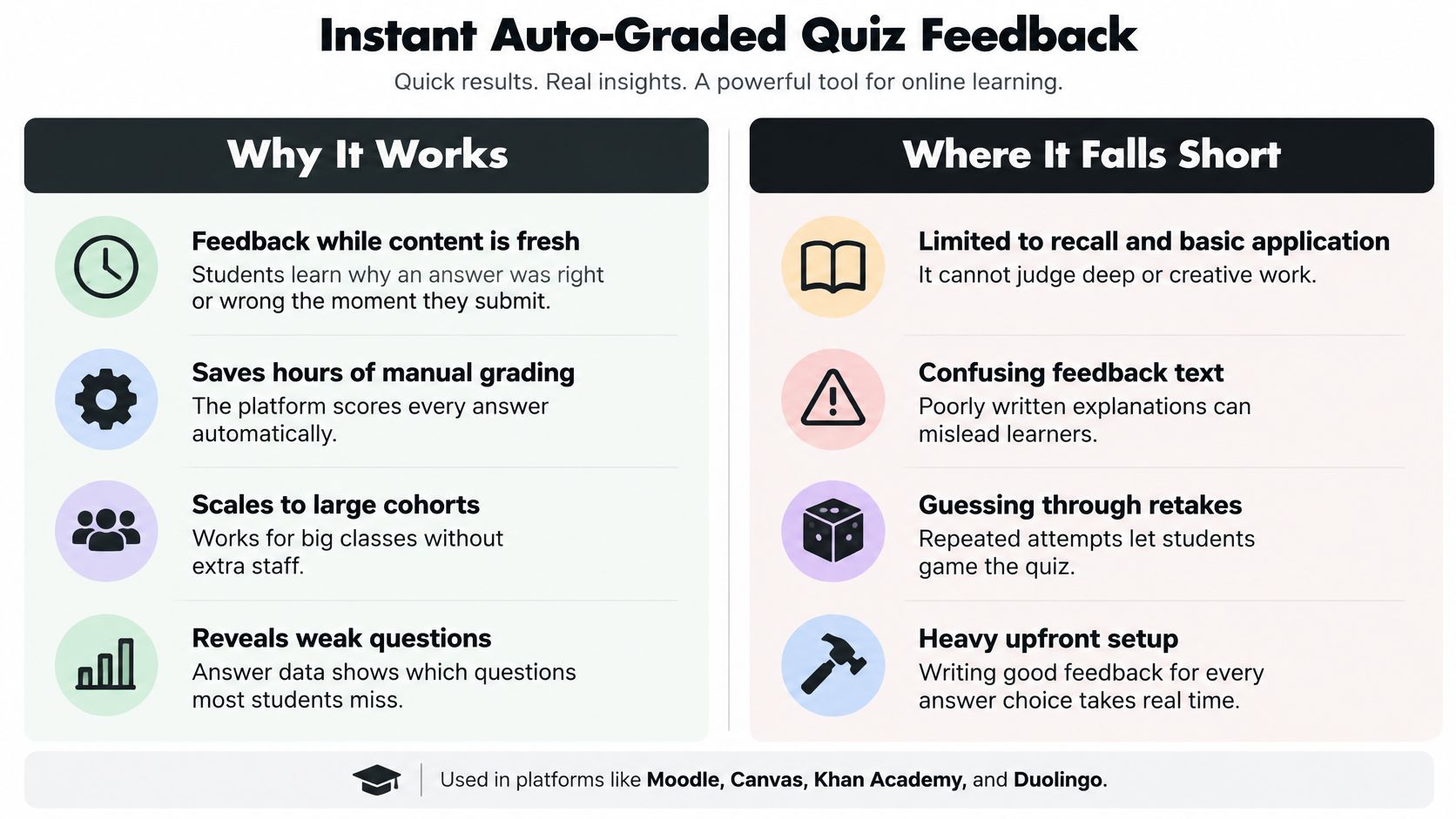
Most course creators start here, and it's the right first move. A learner answers a question, hits submit, and gets a result plus a short explanation in under a second.
The platform does the labor. Canvas and Moodle both let you attach feedback text to each answer choice, so a wrong answer can explain the reasoning instead of just turning red.
The comparison below sums up where this method earns its place and where it gets in the way.
Three setups that work well:
- Khan Academy style practice: hints appear before the reveal, and the learner retries while the idea is still warm.
- Duolingo style drills: the correction lands seconds after the mistake, which is when the learner still remembers why they picked that answer.
- Compliance training in Moodle: a wrong answer on a safety question links back to the exact lesson section, so the learner rereads two paragraphs instead of the whole module.
One caution is worth knowing. A randomized study of 463 first-year biomedical and medical students tested detailed feedback inside app-based formative assessments, with 231 students receiving it and 232 working without it. The extra detail didn't produce a further meaningful improvement in study behavior or performance, and the authors point to a ceiling effect where the practice-test format was already carrying the learning (randomized trial of detailed feedback in app-based formative tests). Read that as a warning about volume, not a reason to skip explanation.
- Explain the reasoning: "the answer is C" teaches nothing. "You added the denominators, and only the numerators get added" teaches the rule.
- Limit retakes or shuffle questions: otherwise guessing pays off across three attempts.
- Add a hint before the reveal on hard questions: a nudge keeps the learner working, an answer ends the thinking.
- Review question-level stats every few weeks: rewrite anything almost everyone misses, since that's usually a badly worded question rather than a hard concept.
Collect, read, act
- Collect: answer-level accuracy and attempt counts, exported from the quiz report each week.
- Read: look for questions where most learners pick the same wrong answer. That's a shared misconception and a teaching problem.
- Act: rewrite the feedback on that distractor, or add a two-minute explainer before the next quiz opens.
Best fit: large courses. Once a quiz loop is built, it costs you nothing per learner.
2. Video Feedback on Assignments
Typing a long comment on a draft burns real time and often reads flat. Recording a two-minute walkthrough of the same draft takes less time and lands harder, especially when you can point at the exact sentence that broke.
Loom and similar screen recorders make it quick. You open the file, talk through it, and drop the link into the gradebook comment field. The learner hears your tone, sees your cursor on the problem, and gets a fix in their own words rather than a red pen they have to decode.
The direction is backed by strong evidence. A 2025 meta-analysis covering 30 studies and 54 effect sizes found that online feedback produced an overall Hedges' g of 0.929 on learning (meta-analysis of feedback in online courses). The effect was much larger for cognitive outcomes such as comprehension and academic performance at g = 1.238 than for affective outcomes like motivation and confidence at g = 0.275, a difference that was statistically significant at p = 0.001.
That's your script for a video review. Spend the minutes on the reasoning gap, and let your voice carry the encouragement without spending words on it.

Where this method tends to pay off:
- A writing course: the instructor annotates drafts out loud, circling the paragraph where the argument jumps tracks.
- A coding bootcamp: the instructor records a walkthrough of a student's pull request and narrates the failing test case.
- A design course: portfolio pieces get screen recordings with voice comments on hierarchy and contrast.
The two-minute rule: keep feedback videos short. Put the strongest point first, then the fix, then stop.
Open with one thing the student did well, end with a clear next step, and add captions or a written summary so the feedback still works for a learner who can't hear audio. If file sizes fight you, run the recording through a LinkShip video link tool so it opens on any device.
Collect, read, act
- Collect: keep one folder per cohort, with every feedback video saved and labeled by student and assignment.
- Read: play the week's videos back to back. You'll hear yourself repeating the same note across different students.
- Act: that repeated note becomes a class-wide announcement or a short explainer for everyone, which saves you recording it again in six more videos.
Best fit: cohorts up to roughly 100 learners, or a single high-stakes assignment in a bigger course. Past that scale, recording per-student feedback eats the hours you were trying to save, and written or peer-based methods carry more of the load.
3. Structured Peer Review
Handing feedback to students looks like a shortcut. Used well, it's a way to make them think like evaluators, which is the deeper skill.
A 2023 meta-analysis of online versus offline peer feedback in higher education found a statistically significant positive effect for the online version, with a Hedges' g of 0.33 across 12 learning-outcome comparisons and a 95% confidence interval from 0.08 to 0.58 (meta-analysis of online peer feedback). Small, real, and worth planning around.
Quality beats volume by a wide margin. A study of 13 courses involving 2,421 students across seven universities and six disciplines found that students grew more in task performance when they wrote longer comments rather than more comments, and that the feedback students gave mattered more for their later performance than the feedback they received (study of peer feedback across 13 online courses). That's a design instruction, not a personality trait.
- Coursera peer-graded assignments: used across professional certificate courses, with calibration steps and multiple reviewers to keep scores fair.
- A writing class: peer drafts reviewed against a three-question checklist before final submission.
- A teacher training program: participants review each other's lesson plans on a shared rubric.
A few things make peer review work instead of generating polite noise. Give reviewers a rubric with examples of strong and weak feedback. Ask each reviewer to name one specific strength and one specific suggestion. Run a calibration round on sample work first. Then spot check a handful of reviews yourself so you know what quality looks like in this cohort.
Collect, read, act
Collect the completed reviews plus the rubric scores. Read for the reviews that say "great job" and nothing else, since those are the ones that need a nudge. Act by pairing a weak review with a model review and a short note on what to add next time.
Best fit: any size with a rubric and multiple reviewers, though spot checking needs staffing once you pass a few hundred learners.
4. Rubric-Based Written Feedback
A rubric is a grid that names your criteria and describes what each level looks like. Pair it with two or three sentences of comment and students stop guessing what you wanted.
Canvas SpeedGrader and most other graders let you attach the rubric to the assignment, so the same language shows up on every submission in a large class. That consistency is the whole point: two students with the same score should be able to see the same reason.
Writing courses show how much the reviewer matters. A 2021 meta-analysis of online feedback for ESL and EFL writing, covering 1,568 students, reported an overall Hedges' g of 0.753 for written feedback, with online instructor feedback at g = 2.248, peer feedback at g = 0.777, and automated feedback at g = 0.696 (meta-analysis of online writing feedback). When a learner needs detailed guidance on revision, a human who knows the assignment still wins.
Setups I'd copy:
- The AAC&U VALUE rubrics: used by many colleges to assess written communication and critical thinking, and a sensible starting point for your own criteria.
- A marketing course: campaign plans scored on audience insight, clarity, and feasibility.
- A nursing program: simulated patient care scored on observable behaviors rather than impressions.
Keep to four or five criteria per assignment. Describe excellent, adequate, and weak work in plain language, not academic jargon. Pair the score with one comment on the biggest opportunity. Share a graded example before the first submission so students can see the standard. If you do not want to write the level descriptions from scratch, the LearnStream article on how to create rubrics covers the process and gives you a structure to adapt for your own assignments.
- Collect: rubric scores per criterion plus your comment text.
- Read: look for criteria where the whole class clusters at the same level. A cluster at "adequate" usually means the criterion is vague.
- Act: tighten the wording, then re-share the rubric with the next cohort before the assignment opens.
Best fit: every size, and it scales far better than free-form comments. A small cohort gets richer comments per student. A large course gets consistency across graders, which matters more once you pass a few dozen submissions.
5. Mid-Course Pulse Surveys
An end-of-course survey tells you how the course went for people who already finished. A pulse survey tells you what's happening now, while you can still change it.
Three to five questions at the midpoint. Start, stop, continue is the format I keep coming back to: one thing to start doing, one to stop, one to keep.
Participation is the first number to watch. In a study of 844 learners in an online module, 179 students, about 21.2%, didn't take part in the feedback process at all, and 44.7% of respondents reported only moderate satisfaction (study of learner feedback participation in an online module). A healthy response count can hide both of those facts.
Response rates also fall when you ask for a single rating. One university reported an online response rate of 41%, against about 50% for its paper evaluations over the previous three or four years, and the study criticized single-number rating systems for producing limited formative information (comparison of online and paper course evaluations).
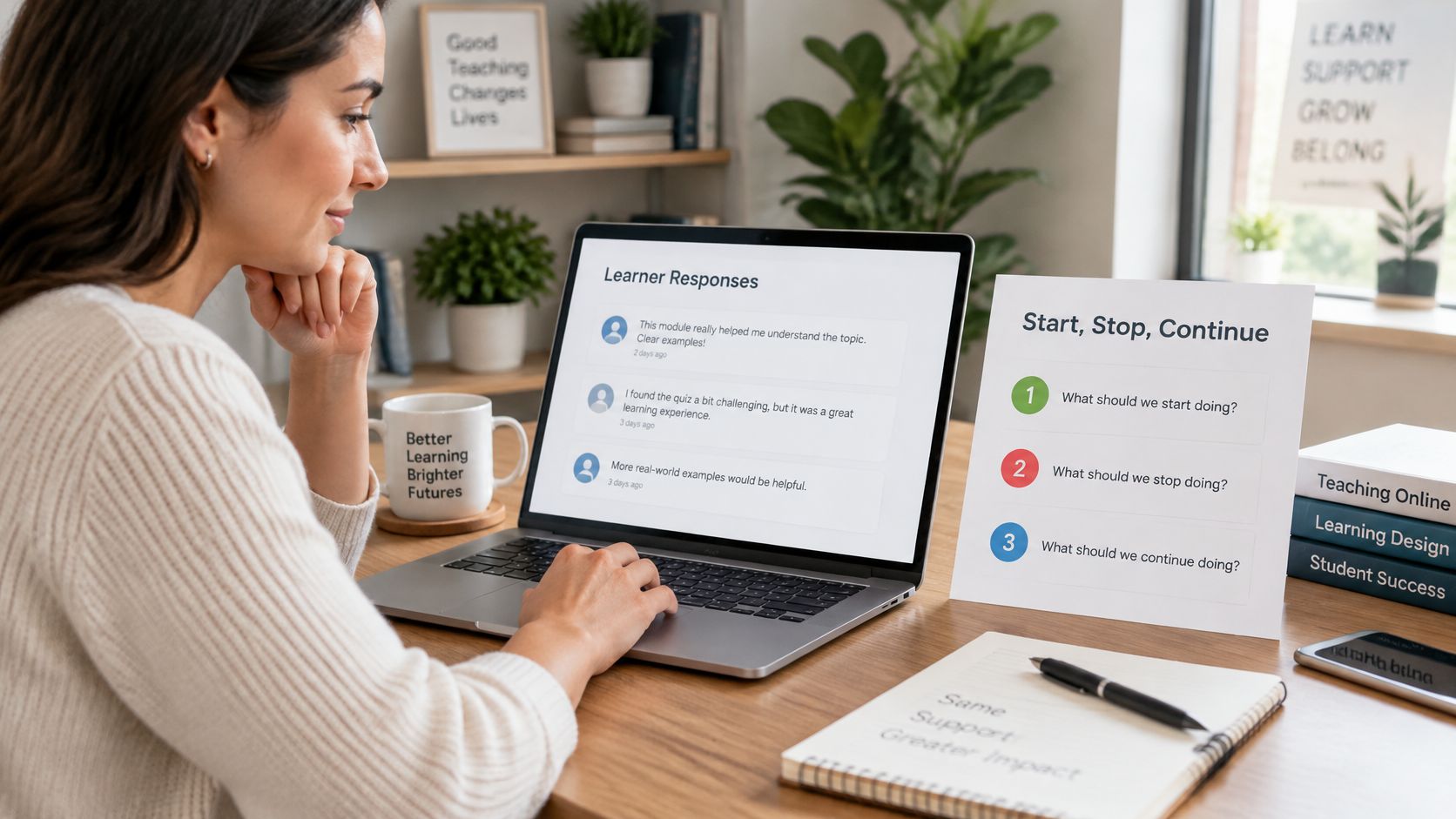
A corporate training team I'd model this on asks two questions after each module: what's still fuzzy, and what did you need that wasn't there. Two questions, ninety seconds, and the answers are specific enough to act on.
Keep it under five minutes. Ask one question about content and one about the experience. Send the same pulse at the midpoint and near the end so you can compare. Then publish a short summary of what you heard and what changed. Our guide to managing course feedback surveys covers the wording and the follow-up message.
Collect: short pulse questions at milestones plus an optional open-text box. Read: separate content complaints from pacing, support, and assessment complaints, because each one gets a different fix. Act: change one thing before the next module and say so.
Best fit: all sizes. In a big course, compare respondents and nonrespondents by completion status, device, and cohort so you know who the survey is missing.
6. Discussion Board Feedback and Prompts
Discussion boards are the one feedback channel where the work is already public. When you reply with a specific question, thirty other learners read the answer.
It's also where the gap between feedback delivered and feedback used shows up most clearly. A 2025 Open University survey examined students' experiences of feedback, assessment, and revision, and it treats revision behavior as its own issue rather than assuming comments produce improvement (Open University survey on feedback, assessment and revision). The useful question becomes how you design feedback a learner will act on.
What works is selective facilitation. You don't reply to every post. You pick three or four threads each week, pull out the strongest idea, and ask a follow-up that pushes the thinking further.
- A graduate seminar: one weekly question, with the instructor replying to the strongest responses.
- A coding bootcamp: threaded debugging discussions where the instructor comments on the diagnosis, not just the fix.
- A community course: a facilitator highlights one standout post each week and explains why it stood out.
A prompt I reuse: "What would change your mind about this?" It turns a reply into a conversation, and it tells you whether the learner understands the argument or just the conclusion.
Respond to a handful of posts rather than all of them. Ask follow-up questions instead of saying "good job". Post a weekly summary that pulls the best ideas together. Set expectations for how often you'll reply, so nobody waits on a response that isn't coming.
Collect: the threads, the reply counts, and your own replies. Read: look for the same confusion appearing in different words across threads. Act: answer that confusion in a summary post, then adjust the next prompt so the confusion doesn't repeat.
Best fit: strong in cohorts under about 50. Workable into the hundreds with teaching assistants or a facilitation rota. At thousands, let peer replies carry the load and use the weekly summary as your broadcast channel.
7. Learning Analytics Dashboards
Your platform is already recording what learners do. Logins, video views, quiz attempts, and time on task are feedback without a survey.
I reach for analytics once a course has enough learners to show a pattern. With fifteen people, one slow week is noise. With two hundred, a stall in module four is a design problem.
Automation deserves a careful hand. A 2025 study found that emotional feedback significantly increased engagement, while the presence of a pedagogical agent had a slightly negative effect on transfer scores, and a separate 2025 survey of instructional designers rated AI as useful for creating rubrics, automated quizzes, and feedback, which reflects professional perception rather than proof (study of AI feedback, engagement and transfer). Speed is the easy win. Transfer is the thing to test before you scale it.
Here's a quick walkthrough of the reporting view I mean.

Typical uses:
- Moodle analytics reports: flag students who've gone inactive in a university course.
- Canvas analytics: show assignment completion by module so you can see exactly where the drop happens.
- A corporate training team: uses completion data to rewrite a confusing compliance module rather than nagging people to finish it.
Pick two or three metrics tied to your learning goals. Check them weekly rather than daily, since daily checking leads to overreacting to a single quiet day. Pair every flag with a personal message instead of an automated warning. Tell learners what you track and why.
- Collect: completion, attempt, and engagement data straight from the platform.
- Read: patterns first, individuals second. A cluster of stalls in one module is your problem, not theirs.
- Act: rewrite the struggling module or send a short check-in to the flagged learners, then watch whether the pattern moves.
If the reporting view itself is unfamiliar, our explainer on LMS reporting dashboards for beginners covers what the standard panels show.
Best fit: courses in the hundreds or more, plus any corporate program with completion requirements.
8. One-on-One Check-Ins and Office Hours
Some feedback only happens in a conversation. A fifteen-minute call lets you ask two questions, hear the hesitation, and give advice that fits one person's situation.
Office hours for the whole class, short booked calls for anyone who's stuck or bored. That's the split I use.
Individual attention shows up in the numbers too. A correlational study of online learners found that receiving more individualized, content-specific feedback per assignment was positively associated with both standardized-exam performance and end-of-course satisfaction, and learners who got a higher ratio of feedback matched to their own submitted work rated instruction and curriculum more favorably (EDUCAUSE analysis of feedback experiences in online learning). Specific beats thorough.
Setups that hold up:
- A coaching-based membership: monthly one-on-one calls for members who opt in.
- A language course: tutors meeting students for 15-minute speaking checks.
- A corporate program: short progress calls with anyone who misses two deadlines.
Send a short agenda ahead of time. Cap the call at 15 or 20 minutes unless something real needs unpacking. Write down two next steps and send them in a follow-up message, because the call fades and the message lasts. Offer an asynchronous option like a voice note for anyone who won't book a call.
Collect: a booking link plus three questions you ask every person. Read: listen for the thing they almost didn't say, which is usually the actual problem. Act: write the two next steps, share a relevant resource, and check in a week later on whether the step happened.
Best fit: small cohorts, or a handful of targeted calls in a large course aimed at learners who are stuck or ready for a stretch challenge.
How the eight feedback methods compare
| Item | Best for | Setup effort | Speed of response | Scales to large cohorts |
|---|---|---|---|---|
| Instant Auto-Graded Quiz Feedback | Fast practice and checking recall | High upfront effort | Immediate | Excellent |
| Video Feedback on Assignments | Personal, detailed feedback on complex work | Moderate | Asynchronous; depends on recording time | Limited |
| Structured Peer Review | Building evaluation skills and sharing feedback | Moderate; needs rubrics and calibration | Depends on review schedule | Good |
| Rubric-Based Written Feedback | Consistent grading with clear improvement guidance | High upfront effort | Moderate | Good |
| Mid-Course Pulse Surveys | Identifying course issues while there is time to adjust | Low | Quick once responses arrive | Excellent |
| Discussion Board Feedback and Prompts | Group learning and shared discussion | Low | Ongoing | Good |
| Learning Analytics Dashboards | Spotting cohort trends and learners who may be falling behind | Moderate; may require technical setup | Timely, with regular data checks | Excellent |
| One-on-One Check-Ins and Office Hours | Personalized guidance and relationship-building | High | Immediate during conversations | Poor |
Closing the Loop With the Feedback You Collect
Collecting feedback is the easy half. The half that changes completion rates and referrals is the part where learners watch something move because of what they said.
Pick one method this week. Not all eight. If you run a cohort of twenty, a pulse survey or a handful of calls will tell you more than any dashboard will. If you run a course with a thousand enrollments, start with the quiz report and the rubric, since both give you signal at scale without extra hours.
Read the responses within a few days. Sitting on feedback for three weeks is the same as not asking, and learners notice the silence.
Then make one visible change before the next module opens. It doesn't have to be big. Rewriting a confusing instruction, moving a deadline, or replacing a broken download is enough to prove the loop is real.
Tell them what you heard and what you did. A two-line post in the announcements does the job: you told me this, and this changed as a result. That single habit is what keeps people answering the next survey instead of clicking through with fives.
The same etiquette applies when you're on the receiving end of comments about your own work. This piece on how to respond to supervisor feedback is a good reminder that the reply matters as much as the revision.
Keep a short log as you go. One line per change, the date, and the source of the request. After two cohorts, that log is the most useful course document you own, and it makes the next round of feedback easier to interpret because you can see what you've already tried.
Skip the temptation to collect everything. A course drowning in surveys gets lower response rates on each one, and the data gets thinner, not richer.
We write about this loop a lot at LearnStream, where the guides on feedback surveys, rubric design, and LMS reporting are all built around the same collect, read, and act rhythm.
If your course is running right now, open the quiz report today, find the question most learners miss, and rewrite its feedback before the next module opens. Then post two lines in the announcements telling learners what you changed and why. That's a complete feedback loop, and it takes about twenty minutes.