Learning Management System Definition You Can Use

An LMS is web-based software used to plan, deliver, manage, and assess learning, and I'd evaluate it with a six-job test: identity and enrollment, content delivery, assessment, progress records, reporting, and administration.
You might already have videos in one app, a live-class link in another, learner names in a spreadsheet, and payments somewhere else. Everything works until someone asks who finished the course, and you have to open several tabs to answer.
A useful learning management system definition should help you decide whether your current tools can handle that question. It should also help you separate the records software can keep from the learning outcomes you still need to judge.
What an LMS Is and How It Runs
If your team asks whether you need an LMS, I'd start with the work you're doing between apps. Copying names, checking submissions, updating completion cells, and assembling reports are signs that you need to examine how you manage learning, rather than just where you publish lessons.
The OpenEduCat glossary defines an LMS as an application or web-based platform for planning, delivering, managing, and assessing learning. Instructors organize lessons and assignments, learners access materials and submit work, and administrators manage enrollment and review results.
Six jobs that define an LMS
Use this table to score a platform or your current stack. Mark each row pass, partial, or missing, based on something you can demonstrate rather than a feature description.
| Job | What it handles | It passes if |
|---|---|---|
| Identity and enrollment | Users, roles, and course access | People can be added and given the right course |
| Content delivery | Lessons, files, and activities | Learners open assigned material in one place |
| Assessment | Quizzes, assignments, and scores | Work is submitted and graded in the system |
| Progress records | Completions and activity | You can see who started, finished, or stalled |
| Reporting | Organization-wide views | Admins can pull participation and results |
| Administration | Routine workflows | Enrollment and records are not a manual spreadsheet |
For a pass, ask someone to perform the job while you watch. For a partial, write down the extra tool or manual step required. A missing function should stay visible rather than disappearing under a broad claim such as course management.
Don't treat the score as a product ranking. A platform could handle academic gradebooks well while making paid-course enrollment awkward. The test establishes whether the system does the necessary jobs, then you can judge whether it does them in a way that suits your program.
Practical rule: If a demonstration ends with someone updating a spreadsheet, include that spreadsheet work in your evaluation.
The shared notebook behind the screens
Think of an LMS as a shared course notebook. It holds the class list, assigned lessons, submitted work, scores, and completion dates, with each entry attached to the right learner.
The database matters more than the notebook metaphor suggests. The Springer reference on learning management systems describes a shared data layer connecting users, courses, activities, assessments, and reporting across online, blended, and face-to-face programs.
That connection makes administrative rules possible. An administrator can identify learners who haven't completed an assigned activity and configure a reminder, provided the platform supports that workflow. They don't have to reconcile a video-viewing list with a separate enrollment sheet first.
Say you teach a blended photography course. Learners study camera settings online, attend a practical session, and submit a photo assignment afterward. Keeping those activities against the same learner record lets you review the whole course instead of treating each delivery format as a separate program.
A file library can hold the camera guide and sample images. It won't pass this test just because learners can open them. You also need to know who was assigned the work, what they submitted, and how their result was recorded.
Before buying anything, I'd write down the records I want available through one administrative login:
- Learner details: Name, role, group, and course access.
- Course assignments: Required materials, activities, and due dates.
- Assessment evidence: Submissions, feedback, scores, and attempts.
- Progress history: Activity status and completion dates.
- Usable reports: Participation and results that can be filtered and exported.
The Features That Make the System Work
Your learners may need a simulation, publisher quiz, or live workshop that runs outside the LMS. Interoperability is how you connect those activities without losing the relationship between the learner, the course, and the result.
The useful questions are where the activity runs, how the learner opens it, and where the evidence ends up. The Defense Technical Information Center document on learning interoperability provides a technical basis for evaluating content exchange and learning-system connections, rather than treating every integration as equivalent.
Give each standard a specific job
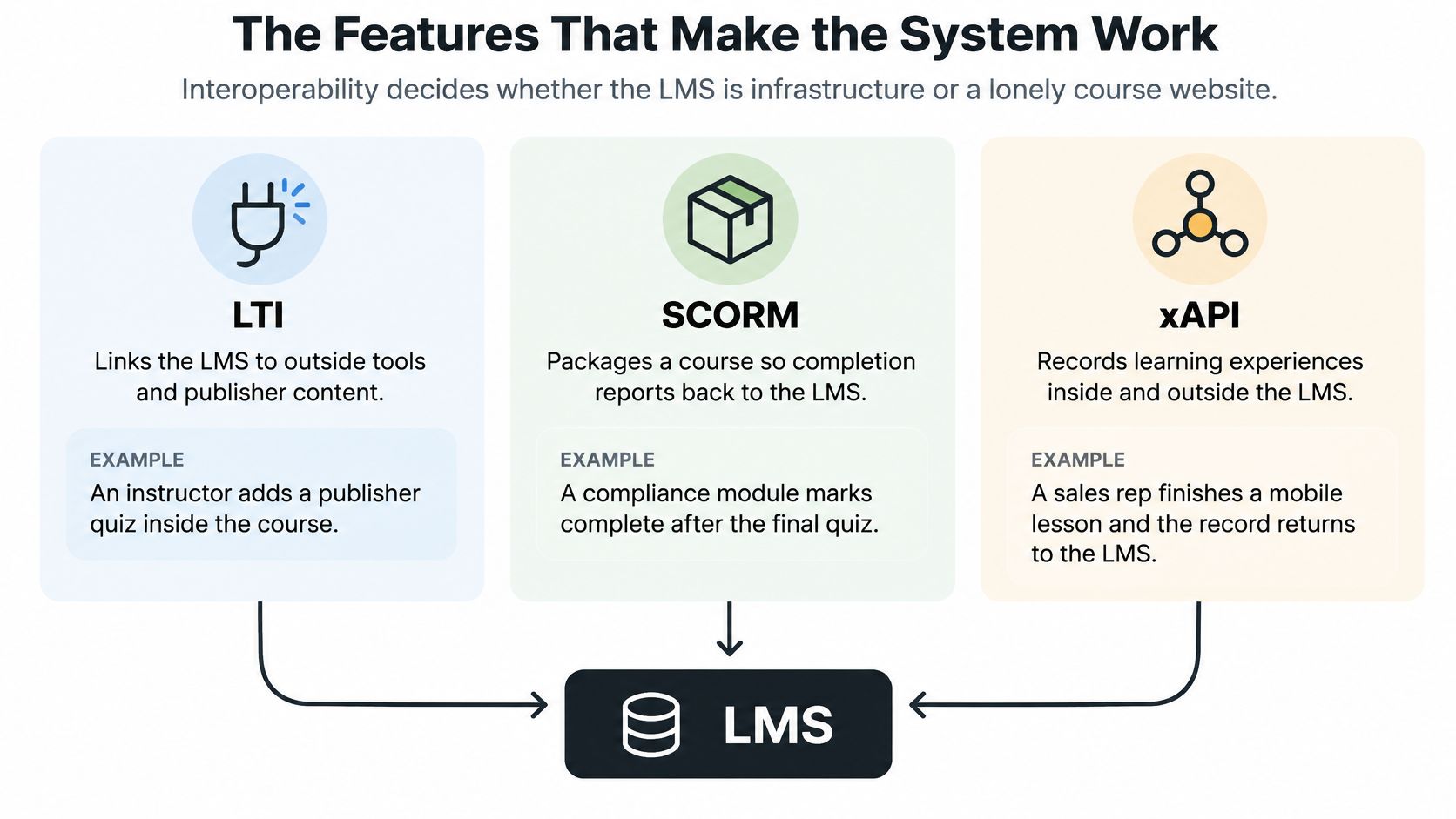
SCORM packages course content for delivery inside an LMS and reports courseware activity. A packaged compliance module is a straightforward example: the learner opens the module, completes its assessment, and the package sends the configured result to the LMS.
xAPI records learning experiences across systems. For a simulation or an instructor-led workshop outside the course page, specify which experience should generate a statement and where that statement will be stored. Don't assume that collecting an event automatically updates the LMS gradebook.
Learning Tools Interoperability, usually called LTI, launches externally hosted learning tools. As 1EdTech's standards documentation explains, it can connect learners to tools such as publisher quizzes or digital textbooks without a separate login, and supported services can return assessment results.
The diagram separates these integration jobs.
Scheduling deserves its own check too. If you run classroom sessions alongside online work, TP Training's resource on class scheduling software for RTOs is useful context for distinguishing timetable management from lesson delivery and learner records.
Write the specification before watching the demo
I'd turn the important connections into a short technical checklist. A broader guide to learning management system features can help you identify requirements, but your actual tools should determine what gets tested.
- Content compatibility: Name the required SCORM or cmi5 versions.
- Experience records: Specify xAPI statement handling and the destination for those records.
- External tools: Document LTI launch support and the services you need.
- Identity provisioning: Establish how accounts and course access are created or updated.
- Returned results: Confirm grade passback, completion behavior, and export APIs.
A standards logo on a pricing page doesn't establish that your workflow works. Vendors may implement different subsets, and a successful launch doesn't prove that the result returns correctly.
Run an end-to-end compatibility test with your real authoring package or external tool. Open the assigned activity as a learner, complete it, then inspect the administrator's record. Confirm that the expected grade and completion appear against the correct person and course.
Where People Use an LMS in Real Life
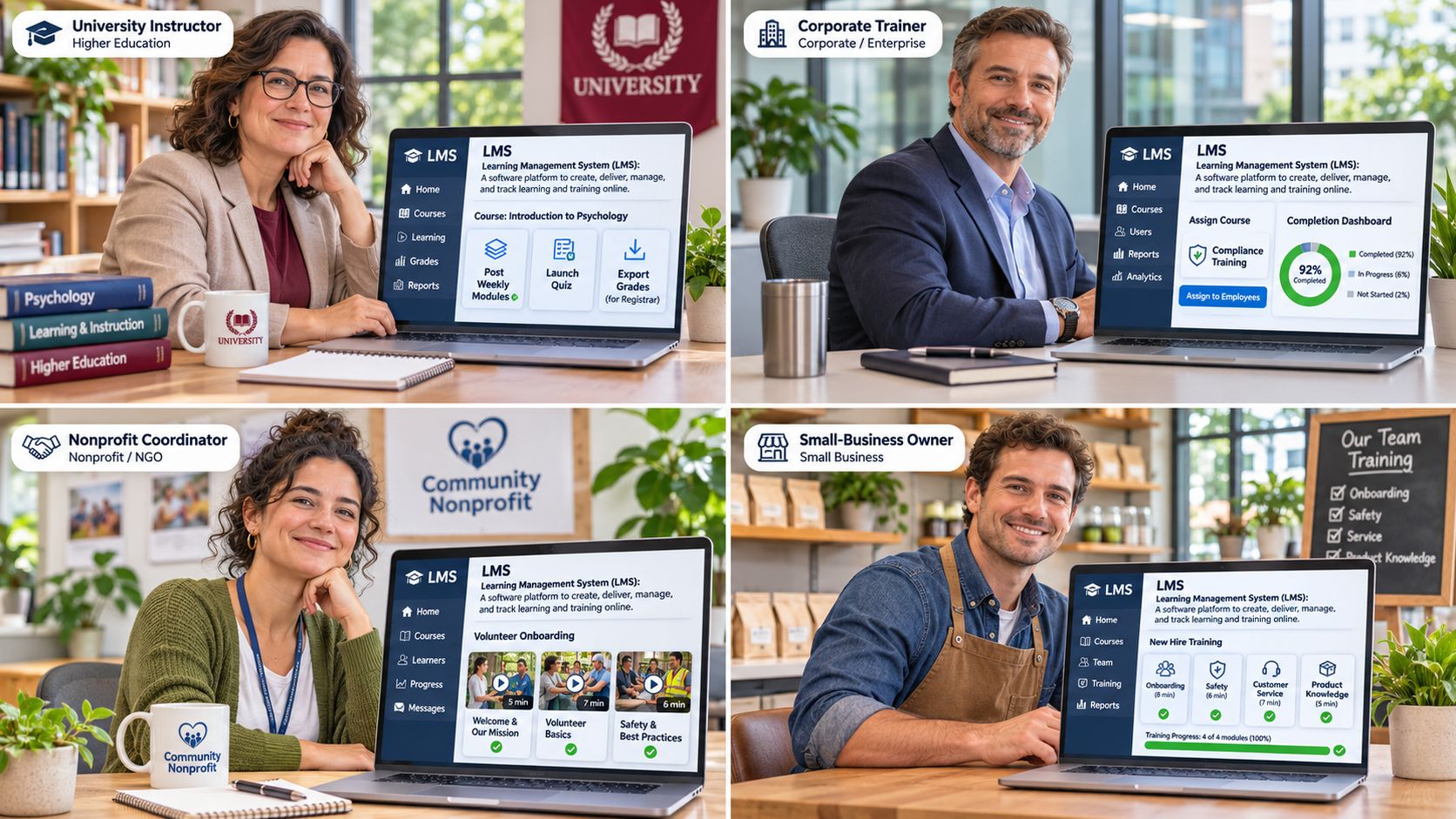
The screens change between a university, an employer, and a paid course business. The practical question stays grounded in what each person needs to assign, submit, review, or report.
These settings give the definition some everyday context.
A university course and a workplace safety program
Say a university instructor publishes weekly modules, runs a quiz, and exports grades for the registrar. Content delivery, assessment, and reporting are the LMS jobs in use. The instructor still needs to establish a grading policy and decide how to handle an unusual submission or an appeal.
An assessment screen can collect student work without making that work educationally useful. For instructors developing that side of the course, ELTica's teacher training in designing online courses is relevant to the teaching decisions that sit alongside platform setup.
Now consider a corporate training manager assigning a safety course. They set a due date, check outstanding assignments, and prepare a completion report for an audit. Enrollment, administration, and progress records support that task, but the manager still needs to observe whether employees perform the procedure correctly at work.
That distinction changes the follow-up. A learner who hasn't finished may need a reminder or protected study time. Someone who completed the quiz but struggles with the procedure needs coaching, practice, or a different assessment.
A distributed program and a paid creator course
A government department or school program might assign required training across several sites. Local coordinators need to see their own groups, while a central administrator needs an organization-wide view. Identity, access, and reporting matter here, but a responsible person still has to interpret policy and decide which staff need which training.
An independent course creator has a different workflow. Say buyers receive access to a program, lessons open gradually, and the creator checks who stopped before module three. Enrollment, delivery, and activity records help the creator identify whom to contact, while payment handling and community discussion may belong to connected tools.
The broad use of LMS platforms across academic, business, government, and independent teaching settings follows from the instructional and administrative capabilities described in this academic account of LMS development. The useful comparison is the work each program needs done, rather than whether everyone uses the same product.
For another way to explore the category, this video provides a visual introduction.

When comparing learning management system examples, I'd keep a scenario like yours beside the screen. Follow a learner from assignment to submission to administrator review, and note every point where another tool or a human decision is needed.
Which scene matches your work, and which outside tool are you about to confuse with the LMS?
What an LMS Is Not
Do you need an LMS, or would a course host, community, webinar tool, and payment stack do the job? That's a reasonable question, especially when several products advertise the same features.
Video hosting, discussion, certificates, payments, and live teaching may be built into a platform or supplied through integrations. The Ruzuku learning management system glossary is useful for considering these boundaries and the difference between tracking course activity and evaluating learning outcomes.
LMS versus the tools people confuse with it
These are category-level distinctions, not promises about every product. Some tools extend well beyond their original purpose, so test the actual platform before ruling it in or out.
| Tool | Main job | Gap versus an LMS |
|---|---|---|
| Course host | Publish lessons and video | May lack detailed enrollment records and organization-wide reporting |
| Authoring tool | Build the lesson | Building content alone doesn't provide delivery and tracking at scale |
| Virtual classroom | Run the live session | Session attendance alone isn't a lasting course-level learner record |
| Learning experience platform | Recommend content | May be lighter on compliance records and gradebooks |
| Community platform | Discussion and membership | Social participation doesn't supply formal assessment |
| CRM or payment stack | Sell and bill | Knows the buyer, not necessarily their learning progress |
LMS is a functional category, not a trustworthy product label. A platform aimed at university assessment can meet the definition while feeling unsuitable for selling a creator-led membership. A polished course storefront can look ideal while lacking the records a training administrator needs.
I'd be equally careful with feature names. A certificate might be issued after opening every page, passing an assessment, or receiving instructor approval. The certificate button tells you less than the rule behind it.
A completion record tells you that the configured completion condition was met. You still need to decide whether that condition represents meaningful learning.
Separate recorded results from judged outcomes
Tracking becomes useful when someone knows what to do with the result. A stalled learner might need help with access, a difficult assignment, or competing demands. An activity log alone won't tell you which explanation is correct.
Completion and quiz scores also don't establish skill transfer, retention, satisfaction, or revenue impact. You may collect evidence about those outcomes in connected systems, but someone still needs to choose the measure and interpret it.
I recommend writing separate lists before configuring dashboards:
- What the LMS record can show: Assigned courses, submissions, recorded scores, activity status, and completion dates.
- What a person or another tool must judge: Whether someone can apply a skill, remember it later, value the learning experience, or contribute to a business result.
For example, a course creator can see that a learner submitted a business plan. Judging whether that plan is workable requires a rubric and review. Knowing whether the learner later launched a viable business requires follow-up beyond the submission record.
Accessibility for Learners and Authors
Accessibility belongs in your purchase decision because learners aren't the only people using the platform. Instructors and administrators also need to build lessons, manage assessments, and review records without encountering barriers.
The World Wide Web Consortium's guidance on ATAG in education identifies distinct responsibilities for authoring tools: making the authoring interface usable by people with disabilities and helping authors create accessible content. Authoring Tool Accessibility Guidelines, or ATAG, address both sides.
Test the editor as well as the lesson
An LMS could display an accessible learner page while presenting an instructor with an editor they can't operate using a keyboard or screen reader. That instructor may be unable to reorder lessons, add feedback, or publish a course independently.
The reverse problem matters too. An instructor might use the editor successfully but find no clear way to add image descriptions, identify headings, or attach captions. An accessible interface needs to support accessible output as well.
I'd use a real lesson during the pilot rather than relying on a polished sample course. Include text, an informative image, a video, and a quiz so you can examine the tasks your team will perform.
Run these checks during your pilot
-
Build a lesson using only the keyboard. Move through the editor, upload a file, reorder content, save, and publish. Check whether you can see where keyboard focus is and whether any control leaves you stuck.
-
Add accessible content inside the editor. Confirm that authors can apply meaningful headings, enter alt text, and provide captions. Check the published result as a learner, since an available editing field doesn't prove that the output works well.
-
Ask how the authoring interface addresses ATAG. Request documentation that distinguishes author access from learner access. Ask for a demonstration of any task your instructors couldn't complete during the trial.
-
Open a quiz with a screen reader. Confirm that questions, instructions, answer choices, and feedback are presented in a sensible order. Include submission and review, not just the opening question.
Record the task, the barrier, and whether a workaround requires another person. That makes the issue easier to evaluate than a general note saying accessibility needs improvement.
Purchase check: A platform that prevents an instructor from building independently creates a recurring course-production problem.
Use a practical guide to accessibility for online courses to support your content review, but keep platform access and content quality separate in your notes. Good captions won't fix an unusable authoring interface, and an accessible editor won't make unclear instructions easier to understand.
I'd involve the people who will teach and administer the course before signing off. Give them ordinary work to complete, listen to where they encounter barriers, and include unresolved issues in the buying decision.
Decide Whether You Need an LMS
If you only need to publish videos for people to watch, I'd consider staying with a course host. If you need managed enrollment, assessed work, and records you can explain and retrieve, I'd look for an LMS that fits your workflow, either alone or connected to tools you already use.
I wouldn't start by migrating everything. First, I'd turn the decision into a small, observable test.
Make the decision with real work
-
Score your current stack against the six jobs. Demonstrate each job and note every manual handoff. Keep the tools that work well, but make the administrative effort visible.
-
Circle the result you can't see today. That might be a completion report for an audit or a clear view of where learners stopped in a paid course. Choose a question important enough that someone will act on the answer.
-
Test the standard your course requires. Use SCORM, xAPI, or LTI with a real lesson or external activity. Inspect the returned record instead of accepting a successful launch as the finish line.
Keep the pilot manageable
I'd begin with a small pilot group, a course that represents your normal teaching, and a report you'll open every week. Include an instructor and an administrator so the evaluation covers more than the learner's view.
Write down what would make you stay, switch, or postpone. If the platform fixes reporting but makes assessment administration harder, that trade-off needs an explicit decision rather than an optimistic assumption.
For employee training, our LearnStream guide compares learning management systems by team size, pricing, SCORM and xAPI support, and use case, and includes a pilot plan. Use it to build a shortlist, then score your current stack and run a real course through your leading option before committing to a migration.