Course Delivery Methods: A Creator’s Practical Guide
You’ve got the course topic. You know who it’s for. Maybe you’ve even outlined the lessons and picked your platform.
Then you reach the decision that fundamentally shapes everything else. How will you deliver it?
That choice tends to look simple at first. Live or recorded. Online or in person. Cohort or self-paced. But in practice, course delivery methods affect almost every part of the learning experience. They shape how students ask questions, how often they show up, how much support you need to provide, and whether your course can grow without eating your calendar alive.
I’ve seen creators spend weeks polishing slides and worksheets while treating delivery as a last-minute setup detail. Usually that leads to friction later. Students feel lost, engagement drops, and the instructor ends up doing a lot of manual rescue work.
A better approach is to treat delivery as a strategy decision early. When you do that, the format starts working for you instead of against you.
Your Most Important Course Decision
A lot of creators make this choice based on instinct.
They think, “I teach well live, so I should run Zoom sessions.” Or, “Students want flexibility, so I’ll just record everything.” Both instincts can be valid. Both can also create problems if they don’t match the kind of learning experience you’re trying to build.
That’s why I treat delivery as the backbone of the course. Content sits on top of it, community depends on it, and your operations have to support it.
Why this decision matters so much
The strongest reason is simple. Delivery changes outcomes.
A reported study summary on e-learning says e-learning can improve retention by 25% to 60%, compared with 8% to 10% retention in traditional classroom learning. The same source says Brandon Hall Research Group estimated online learning can take 40% to 60% less time than face-to-face study.
Those numbers don’t mean every online course is better by default. I wouldn’t read them that way. I read them as proof that format design has real consequences. If learners can revisit lessons, move at a workable pace, and skip the friction around travel and scheduling, the experience can become more efficient and more memorable.
Practical rule: Don’t choose a delivery method because it sounds modern. Choose it because it gives your students the best shot at finishing.
What creators usually underestimate
The primary focus is often presentation. Slides, camera setup, lesson recordings, maybe a workbook.
Students experience something different. They experience timing, pacing, access, accountability, and support.
A few examples make this clearer:
- A live cohort course can feel energizing because students show up together, ask questions in real time, and build momentum from the group.
- A self-paced course can fit beautifully into real life because students can learn after work, on weekends, or in short sessions between obligations.
- A blended structure can reduce overwhelm because students study core material on their own, then use live time for feedback and application.
- An in-person course can work best when the subject needs physical presence, hands-on coaching, or equipment.
Your choice also affects your side of the business.
If you build around weekly live calls, your teaching quality may be excellent, but your calendar becomes the product. If you build around asynchronous modules with structured support, the course may scale more easily, but you’ll need stronger systems for motivation and communication.
That’s why I call this the most important course decision. It determines what kind of experience you’re building for learners and what kind of workload you’re creating for yourself.
The Four Core Delivery Models Explained
The easiest way to understand course delivery methods is to stop thinking of them as labels and start thinking of them as different architectures.
Each one answers the same basic questions in a different way. Do students have to be present at a set time? How quickly can they get feedback? How much of the course happens independently? Where does interaction happen?
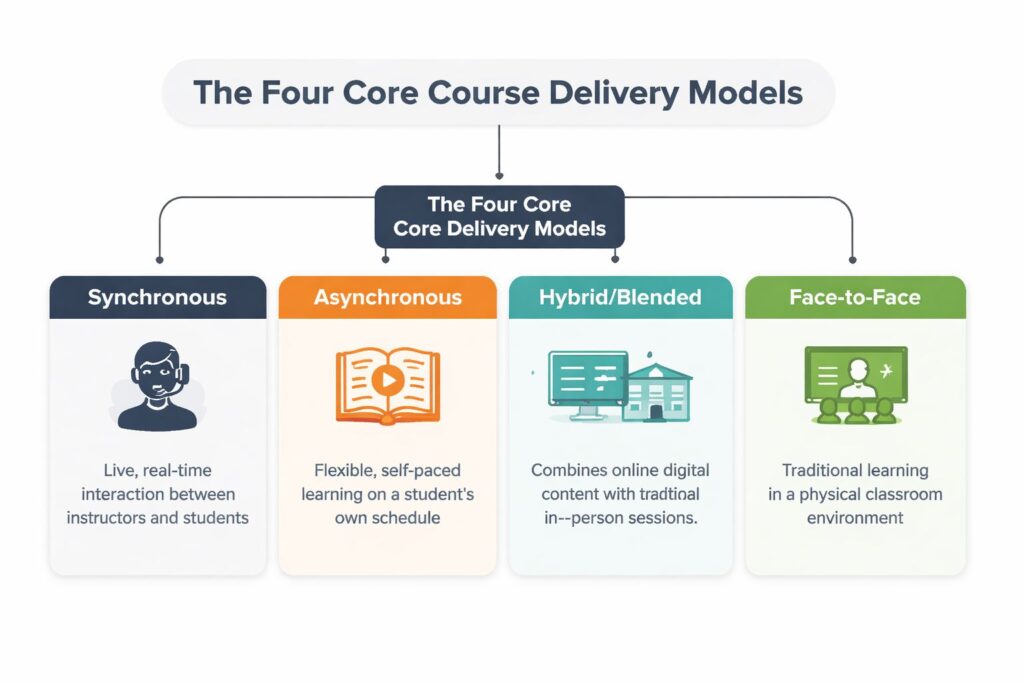
According to the University of Guelph’s overview of course delivery modes, a fully online asynchronous course removes required physical meetings, a hybrid model reduces in-class time and shifts learning online, and synchronous formats preserve real-time interaction either in person or through live video.
Synchronous
This is the “everyone meets now” model.
Picture it as a live event. A workshop on Zoom, a webinar, a coaching call, or a classroom session. Students and instructor are present at the same time, which means questions can be answered in the moment.
Synchronous delivery works well when discussion, practice, or immediate clarification is central to the learning.
Good fit examples:
- Writing workshops where students need live critique
- Language classes where speaking practice matters
- Software training where learners get stuck and need help fast
Asynchronous
This is the “watch it when it works for you” model.
The easiest analogy is Netflix. The content is available on demand. Students move through videos, readings, quizzes, and activities on their own schedule, usually inside an LMS or course platform.
That flexibility is powerful, but it changes your job. You can’t rely on live presence to create momentum. The materials, prompts, navigation, and support systems have to carry more of the load.
Asynchronous courses give learners freedom. They also demand clearer instructions than almost any live format.
Hybrid or blended
This model mixes live and self-paced elements.
Students might complete lessons, readings, or short assignments on their own first. Then they join a live session to discuss, practice, or get feedback. That’s often the sweet spot for creators who want flexibility without losing human connection.
If you want a deeper look at how this model works in practice, this guide on blended teaching and learning is useful.
Face-to-face
This is the traditional classroom setup.
Instructor and learners share a physical space. The main strength here is presence. You can read body language, manage activities more directly, and support hands-on work with less tech friction.
A quick way to compare the four models:
| Model | Best known for | Main trade-off |
|---|---|---|
| Synchronous | Real-time interaction | Fixed schedule |
| Asynchronous | Maximum flexibility | Delayed feedback |
| Hybrid | Balance of flexibility and support | More complex to design |
| Face-to-face | Physical presence and hands-on guidance | Least flexible for access and scheduling |
Synchronous vs Asynchronous A Head to Head Comparison
This is the decision most online educators wrestle with.
Not because the definitions are confusing, but because both models solve one problem by creating another. Live teaching gives you energy and immediacy. Self-paced teaching gives learners freedom and gives you room to scale. The choice often comes down to these two benefits.
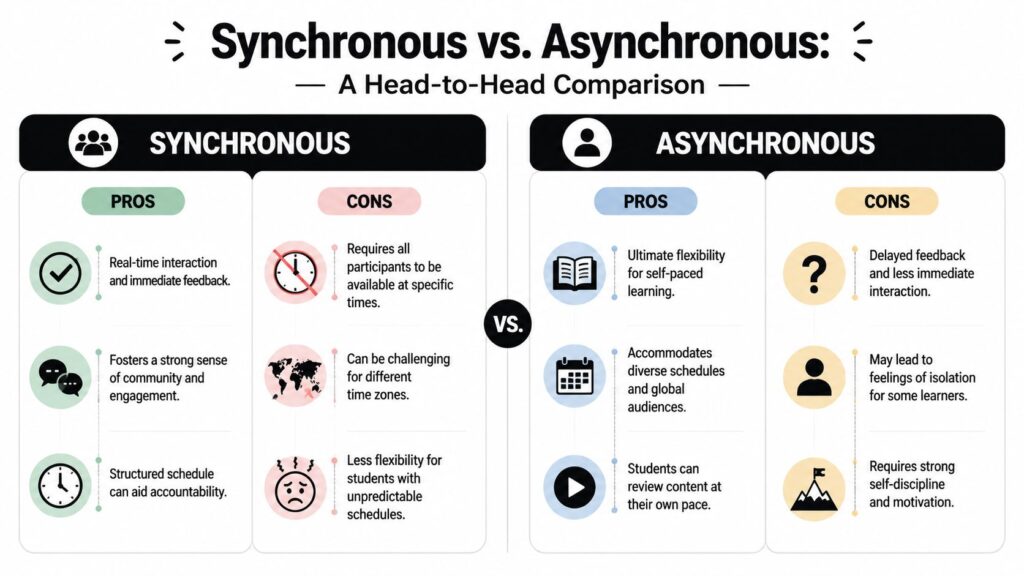
A lot of creators get stuck here because they compare tools instead of experiences. Zoom versus video library isn’t the main question. The key question is what kind of rhythm helps your students keep going and what kind of operating model you can sustain.
What students feel in each format
Here’s the practical difference from the learner side.
| Factor | Synchronous | Asynchronous |
|---|---|---|
| Flexibility | Lower, because learners must attend at set times | Higher, because learners choose when to engage |
| Feedback speed | Immediate or close to it | Often delayed |
| Sense of community | Easier to create quickly | Needs more intentional design |
| Pacing | Instructor-led | Self-directed |
| Pressure level | Can feel motivating or stressful | Can feel freeing or isolating |
A live course can help a student who needs deadlines, group energy, and quick answers. The same format can frustrate a student with shift work, caregiving responsibilities, or an unstable schedule.
A self-paced course can be a gift for someone who needs control over their week. It can also become a pile of unfinished lessons if the course doesn’t provide structure and regular prompts.
For a closer look at the distinction, this article on synchronous and asynchronous learning differences breaks it down well.
What it means for you as the creator
Now the business side.
If you teach synchronously, you’re trading flexibility for responsiveness. You can adapt on the fly, respond to confusion immediately, and build trust quickly. But every session depends on your presence. If you stop showing up, the experience changes immediately.
If you teach asynchronously, you do more work upfront. You have to script clearly, record carefully, design logical pathways, and think through likely questions before they happen. But once that system is built, you can serve more learners without repeating the same teaching hour after hour.
A live course often scales your expertise. An asynchronous course often scales your infrastructure.
That doesn’t mean asynchronous is always better for growth. If your promise depends on live critique, discussion, or accountability, removing those elements can weaken the offer. I’ve seen creators chase scale and accidentally strip away the thing students were paying for.
This short video gives a useful overview before you make the call:

A quick gut-check
Choose synchronous first if your course depends on live practice, coaching, or group momentum.
Choose asynchronous first if your audience values flexibility, your content can be learned in well-designed modules, and you want the product to work without your constant attendance.
If neither answer feels complete, that usually points to a hybrid model.
How to Choose the Right Method for Your Course
I like to make this decision by pressure-testing four things. The learner, the content, the scale, and the reality of my own capacity.
A delivery method looks great on paper until it runs into actual people, actual teaching goals, and the actual week you have available to support it.
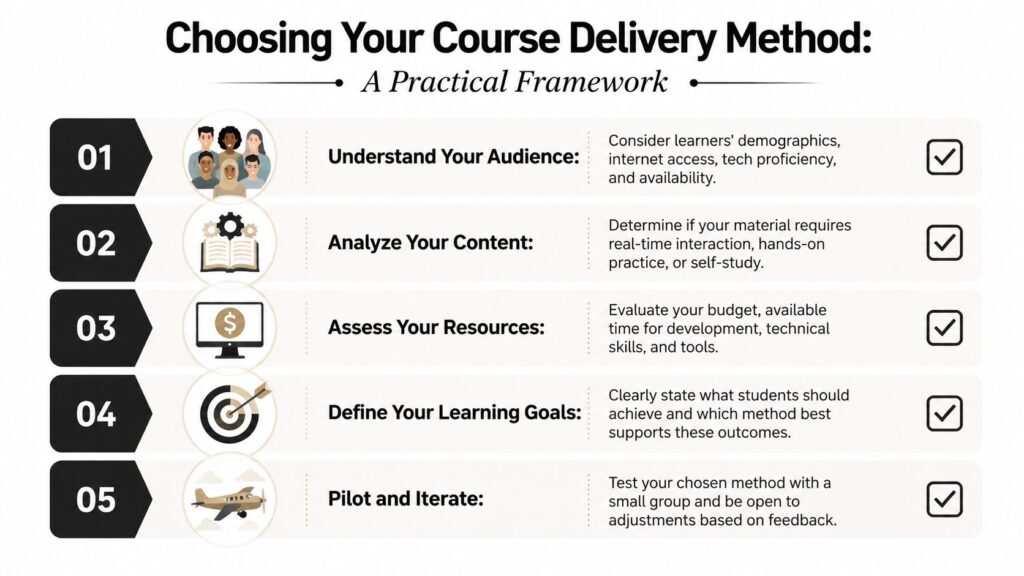
Start with the learner, not your preference
At this point, many course plans go off track.
You might love teaching live. Your students might need something they can complete at night on a phone. You might prefer self-paced content. Your students might need deadlines and visible instructor presence to stay engaged.
Ask questions like these:
- What does their week look like? Busy professionals, parents, and global audiences often need flexibility.
- How comfortable are they with technology? A simple recorded course inside one platform may work better than a stack of tools, calendars, discussion spaces, and live rooms.
- What support will help them keep going? Some groups need real-time contact. Others mostly need clear instructions and predictable check-ins.
Match the method to the type of learning
Not every subject wants the same structure.
If you’re teaching conceptual material, an asynchronous path often works well. Learners can pause, replay, reflect, and revisit examples. If you’re teaching performance, communication, or critique-heavy skills, live elements usually become more valuable.
I use this rough filter:
| If the course teaches… | Delivery usually leans toward… |
|---|---|
| Knowledge and frameworks | Asynchronous |
| Discussion and interpretation | Synchronous or hybrid |
| Hands-on practice | Face-to-face or hybrid |
| Coaching and feedback loops | Synchronous or hybrid |
Think about scale before launch, not after
Creators often ask how to scale after the course is built. That’s late.
Your delivery choice already sets your scaling limits. A weekly live cohort can be fantastic, but every new group adds teaching load. A self-paced course can reach more people, but only if the onboarding, lesson flow, and support system are sturdy enough to stand without you in every room.
If you want more students later, design a method now that won’t break when more students arrive.
Reality-check your constraints
This part isn’t glamorous, but it saves a lot of pain.
Look at:
- Your available time. Can you host calls every week for months?
- Your production ability. Can you create polished recordings, transcripts, and structured modules?
- Your tool stack. Are you using Zoom, an LMS, a community platform, and email in a way students can follow?
- Your support capacity. Who answers questions when learners get stuck?
One final point matters more than people think. If your course carries academic credit or formal seat-time requirements, delivery planning has to map to actual instructional time. For example, Morgan Community College’s delivery definitions state that one credit equals 750 minutes of instruction, their online model preserves that equivalency through asynchronous activities, and their hybrid model keeps at least 33% of approved lecture contact hours in synchronous traditional mode while documenting the remaining 67% through instructional activities.
Even if you’re not in higher ed, that idea is useful. Every activity in your course should earn its place. If students spend time on a discussion, worksheet, simulation, or recorded lesson, you should know why it’s there and what it’s replacing.
Boosting Engagement No Matter the Method
A lot of engagement problems get blamed on the format when the underlying issue is design.
I’ve heard creators say, “Students don’t engage in self-paced courses,” or “Live sessions always work better.” Neither is reliably true. Students engage when the course gives them useful interaction, clear access to help, and a reason to keep returning.
Research on virtual teaching found that students prefer interactive lectures, recorded content, and multiple communication touchpoints. They also value revisiting recordings, live Q&A, discussion boards, and content packaged in short “bursts” or “bites,” as described in this study on virtual statistics teaching.
What learners actually respond to
That research lines up with what I’ve seen in real course builds.
Students don’t want a one-way content dump. They want a course that feels reachable. They want to know where to look when they miss something, how to ask a question, and whether they can revisit material without hunting for it.
Here are the design moves that help most:
- Make lessons easier to return to by organizing them in small, named chunks instead of long unbroken recordings.
- Create more than one communication lane so students can use the channel that fits the moment, like email for support, discussion boards for peer exchange, and live Q&A for harder questions.
- Use recordings strategically even in live courses. Students often need to review key explanations after the session ends.
Practical ways to apply this
If your course is synchronous, build interaction into the session itself. Pause for questions. Use polls. Ask learners to apply something before moving on. A live session with no participation usually feels longer than it is.
If your course is asynchronous, shorten the distance between “I’m confused” and “I got help.” That might mean weekly office hours, active discussion prompts, or a clearly marked question thread inside your LMS or community.
If your course is hybrid, be careful not to duplicate effort. Don’t make students watch a long lecture and then sit through the same lecture live. Use the self-paced portion for input and the live portion for use.
Shorter content blocks work because students can finish them, revisit them, and connect them to one clear task.
A simple engagement checklist
Before launching, I’d ask:
- Can students replay the important parts without digging?
- Can they ask questions in at least two ways?
- Does each lesson lead to some kind of action, reflection, or response?
- Are the modules short enough to fit into normal life?
- Do students know what to do next after every lesson?
That checklist works across almost every delivery model I’ve used.
Why Your Delivery Method Is an Accessibility Choice
This part gets overlooked far too often.
People talk about course delivery methods as if they’re mostly about convenience. Live versus recorded. Online versus in-person. Fast versus flexible. But for many learners, the format changes whether they can participate well at all.
That makes delivery an accessibility decision from the start.
Clemson’s accessibility-focused guidance notes that delivery-method selection should be considered alongside accommodations and mobile learning support, and it cites data that 34% of respondents with a documented disability had enrolled in an online degree program in the source it discusses. It also points to practices such as universal design, captions, screen-reader compatibility, and mobile-friendly materials in this guide to selecting a delivery method with accessibility in mind.
Online doesn’t automatically mean accessible
I think this is the biggest misconception.
Putting your course on the internet doesn’t remove barriers by itself. A recorded lesson without captions can exclude people. A mobile-unfriendly course can frustrate learners who rely on a phone. A discussion format that depends on rapid live participation can shut out students who need more processing time or accommodation support.
That’s why I try to evaluate delivery through a simple lens. What demands does this format place on the learner before learning even starts?
Small design choices make the format usable
You don’t have to rebuild everything from scratch to improve access.
A few high-impact moves:
- Caption every video so learners can read along, review by reading, or catch missed details.
- Provide readable text alternatives for key audio or video content.
- Check screen-reader compatibility for slides, PDFs, and LMS pages.
- Design for phones first if your audience is likely to use mobile access.
- Avoid making live attendance the only path to essential instruction when possible.
If accessibility is part of your planning process, this guide on making e-learning accessible for disabled learners is worth keeping nearby.
The most inclusive delivery method is the one that removes the most friction for the specific learners you serve.
Accessibility also improves the experience for people who don’t identify as disabled. Captions help learners in noisy spaces. Mobile-friendly design helps commuters and busy parents. Clear structure helps everyone.
When you choose a format, you’re deciding more than where lessons live. You’re deciding who can comfortably stay in the room.
Conclusion Building with Intention
There isn’t one best answer for course delivery methods.
The right choice depends on your learners, your teaching goals, your support capacity, and the kind of business you want to run. Live formats can create energy and accountability. Asynchronous formats can create flexibility and room to grow. Hybrid models often give you a strong middle ground when used deliberately.
Pick the method that supports completion, not just launch speed.
If you want more practical help designing digital learning experiences, LearnStream’s course creator guides are a good next step.