Micro Content Creation: A Practical Playbook
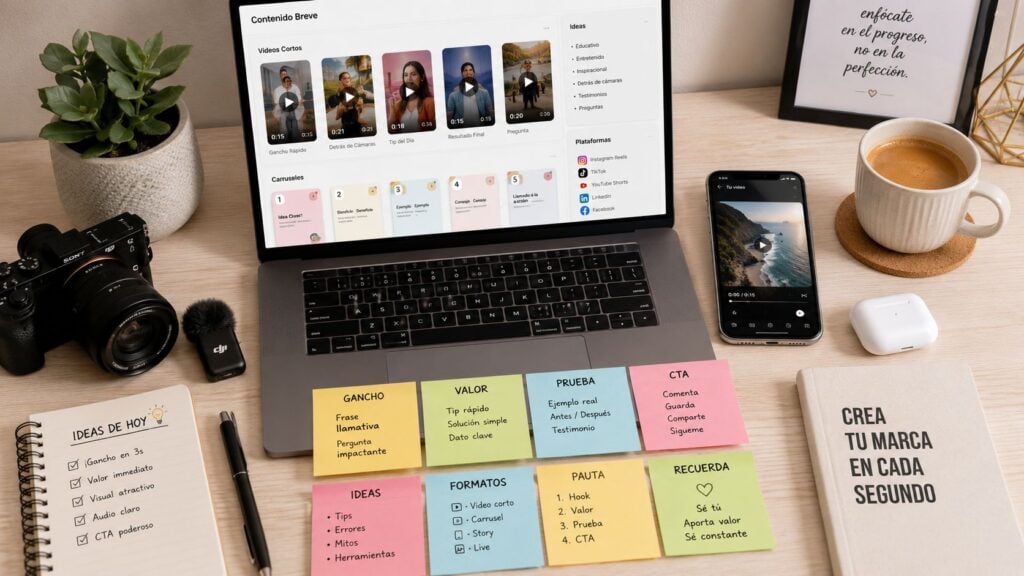
You’ve got a long course module, a webinar replay, and a week’s worth of social posts sitting in one folder, and none of it feels like it’s moving the needle. The irony is familiar to anyone who teaches online or runs a membership site, the deepest content often gets the least attention because people rarely arrive with the time or patience to finish it in one sitting. Micro content creation gives that material a second life in the places where people do consume, skim, save, and share.
The shift is bigger than a format change. Short-form publishing is now baked into the way major platforms distribute attention, which means educators and creators can’t treat micro pieces like filler between “real” content. Metricool’s 2025 short-form video analysis found that videos published rose by 71% year over year and accounts using the format rose by 51%. TikTok led the growth with a 156% increase in video posts, while Instagram still led total volume and grew by 34.43% in the 2025 short-form video report coverage.
For learning businesses, that matters because micro pieces now function as the front door to larger lessons, sales pages, and communities. They can tease a framework, show a proof point, or open a path into a fuller experience. I’ve found that the strongest ones don’t try to replace teaching. They create enough curiosity or confidence to earn the click, the save, or the next step.
If you’re also exploring how video is being adapted into short assets, it can help to browse AI video tools and see how different workflows handle clipping, captioning, and repackaging. That matters less for novelty and more for speed, since micro content creation only works when publishing stays light enough to repeat.
Why Micro Content Creation Matters Right Now
A lot of creators know the feeling of publishing a strong workshop replay, then watching the replay page go quiet after a few days. The material is useful, but the audience does not move through a 60-minute asset the way they might have a few years ago. They catch the hook in a feed, save a quote, skim a caption, and move on.
That shift is why micro content creation has become a practical response instead of a trendy side tactic. Micro content is not just “short stuff.” In real use, it is the small, platform-native piece that gives a bigger idea a chance to travel. That can be a 15-second clip, a quote card, a one-line insight, a tiny lesson, or a short email excerpt that leads back to the parent asset.
The distribution problem changed first
Short-form publishing is expanding fast across major platforms, and that makes repeated compact publishing cycles part of visibility. For course creators and community managers, that means long-form content now has to earn attention after the first impression, not before it. If you only ship long-form content, you are asking people to give you a level of focus most feeds no longer reward.
The business case is visible in creator marketing too. Status’s 2025 benchmark reporting says brands are collaborating with 33% more micro-influencers year over year, the average campaign now uses 30 micro-influencers, and 81% of brands rate micro-influencer content as meeting or exceeding expectations Status benchmark reporting. Short-form videos from those creators generate an average 11.4% engagement rate across industries Status benchmark reporting. That does not mean educators should copy influencer culture. It does mean the format has proven utility for discovery and response.
Practical rule: if a learner can understand the idea without seeing the whole lesson, the idea is a good candidate for micro content.
The main shift for a learning business is that micro assets can do more than entertain. They can pre-teach, reinforce, and reopen a topic after the live session is over. That is why I treat them as part of the learning path, not as decoration around it.
The Working Definition and the Formats That Convert
A course launch clip opens with a promise, a single correction, or one line that changes how the viewer understands the topic. That is the level micro content needs to hit. Micro content is usually content a person can consume in about 10 to 30 seconds, and some guides stretch that toward under 30 to 60 seconds or under 280 characters depending on the channel Brafton’s microcontent guide. That range matters because a 20-second clip, a tight tweet, and a one-image post all ask for different production choices.
Micro, short-form, and snackable are not identical
Micro content is the smallest useful unit. Short-form content often gives you a little more room for explanation, and snackable content is the broader bucket people use for fast, easy-to-consume pieces. In practice, I think of micro content as immediate engagement, short-form as compact teaching, and snackable content as quick visibility.
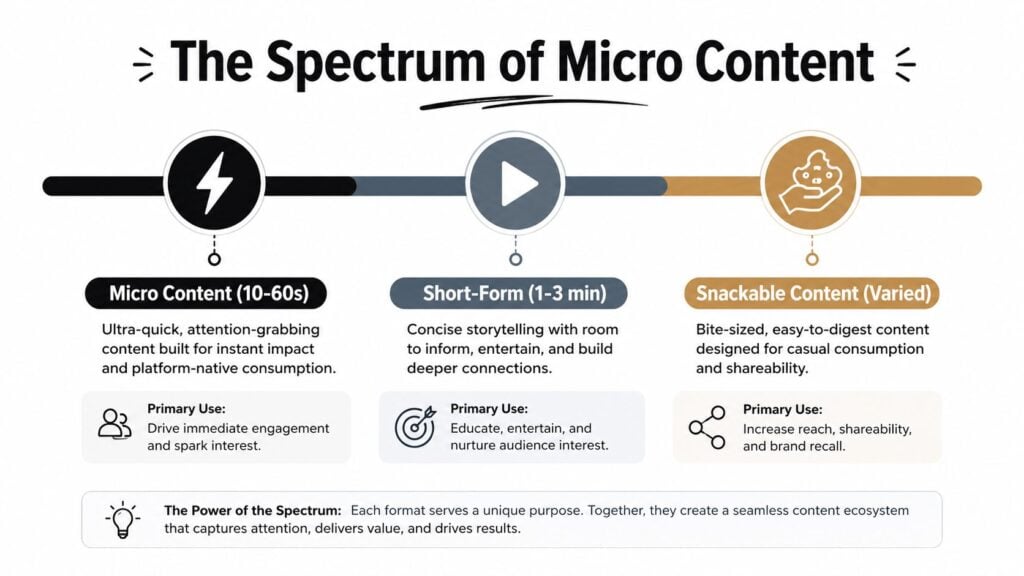
For educators, the formats that convert are the ones that point back to a deeper asset without forcing the short piece to do every job. Reels work well when the first few seconds carry one clear idea. Carousels work when you need a compact sequence. Text posts and quote graphics work when one sentence can carry the value. Micro-lessons work when a learner needs one concept, one example, and one action.
I also keep LearnStream’s guide to eLearning content creation tools close when I’m deciding what format a lesson should take, because the tool choice should match the job, not the other way around. A clean screen recording does a different kind of teaching than a quote card, and a captioned clip does different work than a carousel.
A simple fit test
Use a reel or short clip when the point is emotional, visual, or demonstrative. Use a carousel when the idea has steps or comparisons. Use a quote graphic when the strongest asset is a line from a webinar, interview, or lesson. Use a micro-lesson email snippet when the audience already knows you and needs a fast win inside the inbox.
For LinkedIn distribution, the AI LinkedIn viral content generator is a useful reminder that platform-native writing needs a different shape from a course outline. I do not use every tool the same way, but I do use that distinction every week, because a post that reads well on a lesson page can fall flat in-feed.
The formats that waste time are the ones copied from trends with no teaching job attached. A flashy template with no takeaway rarely helps a learning business. A short piece with one clear promise usually does.
Designing a Single Micro Piece That Earns Its Place
A micro piece earns its place when it has one job and does that job cleanly. I’ve made enough of these to know where they usually fail. They fail when the creator tries to teach the full framework, sell the offer, and build brand authority in the same 20-second asset.
Start with one learning objective
The first filter is simple: decide whether the micro piece is meant to attract, teach, or reinforce. If it’s doing teaching work, the objective needs to be narrow enough that a viewer can grasp it without context. A course launch quote card might surface a belief shift. A webinar clip might show one mistake and its correction. A carousel might list three symptoms of the same problem.
Once the objective is set, the format usually becomes obvious. A visual hook helps when the concept is emotional or surprising. A text post helps when the insight is sharp. A short clip helps when tone, expression, or demonstration carries the value. I keep the copy line tight, usually 10 to 15 words, because the shorter line forces me to decide what matters.
Don’t script around the topic. Script around the moment of understanding.
What the finished piece looks like
On paper, a good micro lesson looks like this, a headline, one proof or example, one takeaway, and one next step. On screen, it’s even leaner. The hook lands fast, the subtitle supports silent viewing, and the visual keeps the eye moving without clutter.
For video-first micro content, the first 3 seconds are critical. One practical guide recommends a bold statement or action up front, plus captions for silent viewing and an eye-catching thumbnail and title Crazy Egg’s micro-content guide. That’s consistent with what I’ve seen. If the opening doesn’t earn attention fast, the rest of the piece barely gets a chance.
A working example from a webinar segment might be a 20-second clip that opens with the exact mistake people keep making, then cuts to the fix, then ends on a short prompt to watch the full training. The short asset stands alone, but it still points to the larger path. That balance is what makes it useful.
Workflows and Tools That Fit a Solo Creator or Small Team
Tool choices can make micro content feel simple or turn it into a subscription swamp. A solo educator doesn’t need the same pipeline as a membership team with weekly launches, and a small team doesn’t need a bloated stack if its output is steady rather than massive. The best setup is the one you’ll repeat on a tired Thursday afternoon.
Three stacks that make sense
| Team size | Recording and editing | Design and captions | Scheduling and analytics | Rough monthly cost |
|---|---|---|---|---|
| Solo creator | Phone camera or Loom, basic trim in CapCut or Descript | Canva for quote cards and captions | Native scheduling inside one platform, plus built-in analytics | Low, usually one or two tools |
| Small membership team | Descript or CapCut for quick cuts, Riverside for cleaner source recordings | Canva Pro for templates and caption overlays | A social scheduler plus platform analytics | Moderate, a few tools plus one shared workspace |
| Bigger operation | Riverside or a similar recorder, Descript for edits, shared asset folders | Brand templates in Canva, caption presets, approval flow | A scheduling tool with reporting and team access | Higher, but still lighter than full production software |
For a smaller setup, the trade-off is usually between simplicity and flexibility. Doing everything in Canva can keep the workflow tidy, but it can also slow down anything that needs real video editing. A multi-tool pipeline gives you more control, though it adds handoffs and the risk of forgotten files.
A practical reference point for broader content stacks is LearnStream’s own eLearning content creation tools, which is useful if your micro pieces need to sit alongside course production rather than apart from it.
If you want a writing-oriented shortcut for post copy and hooks, the best tools for writing viral tweets roundup is worth scanning. I wouldn’t use it as a strategy document, but it can speed up first-draft captions and help a team compare tone options quickly.
A workable weekly flow is usually batch-based. Record once, cut the strongest moments, store them in one shared folder, template the captions, then schedule the pieces with space between them so the audience doesn’t get hit with a burst all at once.
Repurposing From Webinars, Courses, and Long-Form Posts
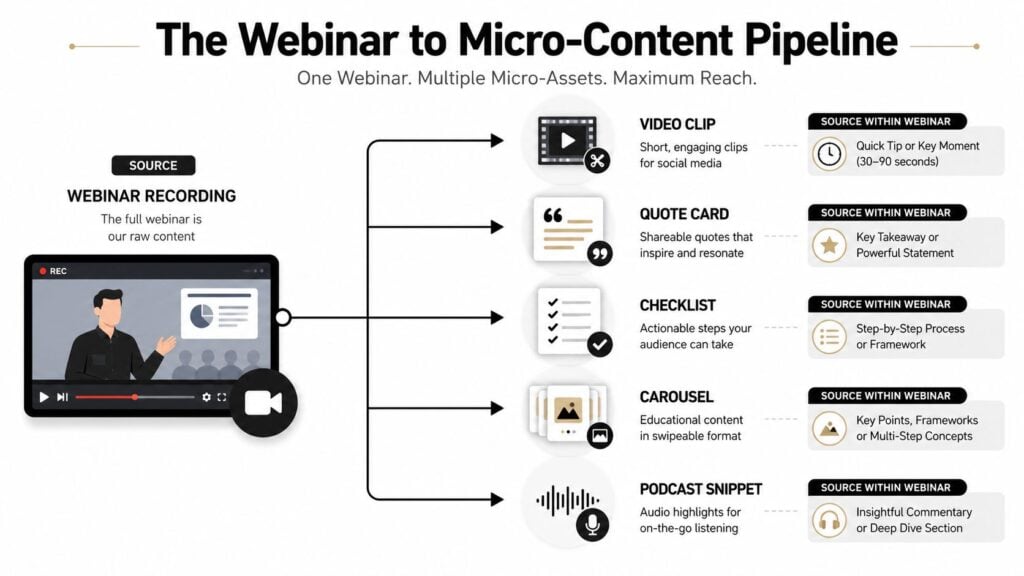
Repurposing is where micro content creation stops being busywork and starts acting like distribution infrastructure. One good webinar can produce far more than a single replay page if you treat it like a source library instead of a finished product. The best practice I keep coming back to is simple, extract the moments that still make sense on their own, then give each one a path back to the fuller idea.
What one long asset can become
A 60-minute webinar can usually support several kinds of micro assets, a quick clip, a quote card, a checklist slide, a carousel, and a short audio snippet. A pillar article can turn into a “key point” post, a framework series, or a single question-and-answer card. A course module can become a teaser lesson, a misconception post, or a reminder for current students.
I like using recurring templates because audiences start recognizing the format quickly. A series like “Three mistakes,” “Five facts,” or “Things people miss about X” gives the content a recognizable shape. One guide on facts-based TikTok formats notes that recurring templates help viewers understand the value fast Reelry guide.
Practical rule: if a micro asset can’t stand alone, it probably needs more editing or a different angle.
For membership and community operators, the gold is often inside member Q&A, cohort discussions, and office hours. Those moments contain real language, real objections, and real turning points. Turn one good answer into a clip, a quote, and a short follow-up post, and you’ve got a content set that also signals what the next cohort will care about.
The catch is keeping each micro piece standalone. A short post should make sense without the original webinar in front of someone. Linking back matters, but the short piece has to carry its own value first. That’s the part most repurposing guides skip, and it’s the part that determines whether the asset travels.

For a deeper workflow on clipping and redistribution, I also keep the internal guide on repurposing webinar content close by when I’m planning a launch week.
Measurement That Goes Beyond Likes and Views
Likes are easy to count and easy to misunderstand. For a learning business, they rarely tell you whether the content helped someone understand the topic, take the next step, or move closer to enrollment. That’s why I push micro content measurement toward outcomes, not applause.
The metrics that matter more
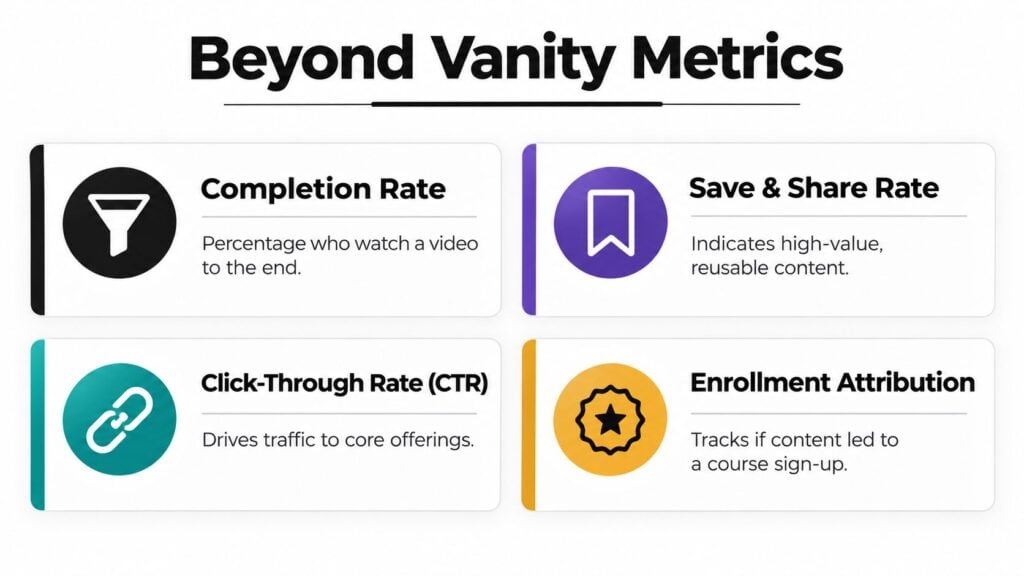
Start with completion rate, because it tells you whether the hook and the body held attention. Then look at save and share rate if the content is meant to stay useful or travel through a community. Click-through rate matters when the piece is meant to move people to a landing page, and enrollment attribution matters when you want to know whether the piece contributed to sign-up.
The harder part is attribution. You won’t always be able to connect a single clip to a paid course purchase with perfect certainty, and that’s fine. What you can do is trace a path, view to click, click to opt-in, opt-in to trial or purchase, then purchase to completion of the next micro lesson. A simple dashboard can track that chain without turning your life into spreadsheet theater.
Three experiments worth running
- Hook test: publish two versions of the same idea with different openings, then compare which one gets people to keep watching or keep reading.
- Path test: send one micro asset to a landing page and another to a related micro lesson, then see which route produces better downstream action.
- Sequence test: pair a short clip with a follow-up teaching post and watch whether people complete the second piece more often than when they see it alone.
For a fuller breakdown of what to watch in video, the internal guide on video engagement metrics is a useful companion.
The cleanest measurement habit I’ve found is this, don’t ask whether micro content is “working” in the abstract. Ask what it moved, who it moved, and what happened after the click. That’s the level where micro content starts helping revenue and retention instead of just filling the feed.
The One Page Playbook and Three Real Examples to Copy
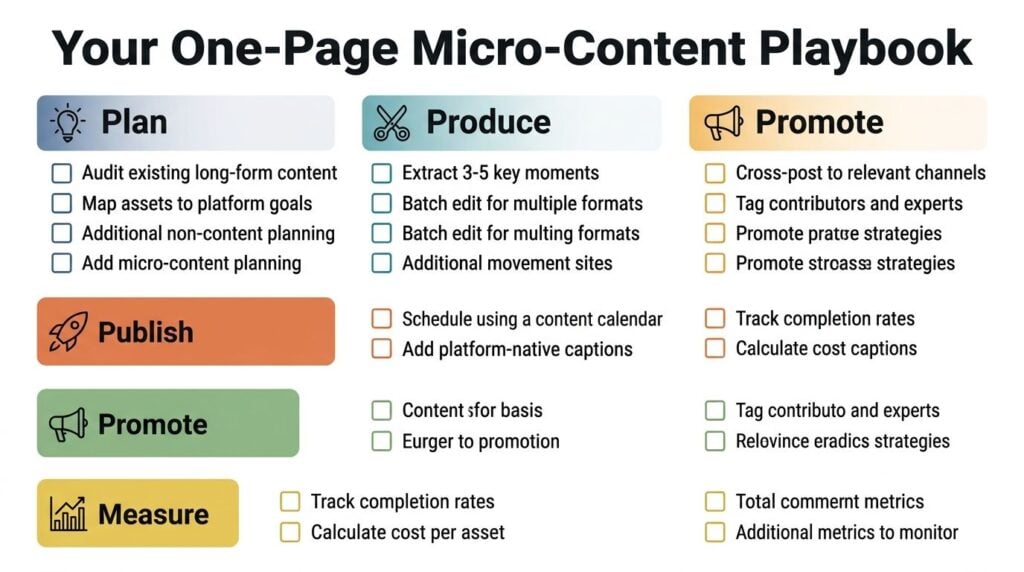
A practical micro content workflow fits on one page.
- Plan: audit a webinar, module, or article, then pick one learning objective.
- Produce: extract a small set of moments, then write one tight line for each asset.
- Publish: schedule with room between posts, use captions, and keep the format native to the platform.
- Promote: cross-post the pieces that fit, and tag only the people who contributed.
- Measure: track completion, clicks, and the downstream action you care about.
Three examples keep this grounded. A quote graphic from a course launch works when it captures a belief shift, not a generic compliment. A 20-second webinar clip works when the opening sentence names the pain point fast. A recurring “three mistakes” carousel works when each slide teaches one fix and the final slide points back to the deeper lesson.
Micro content is strongest when it sits inside a real learning path. Used that way, it helps the right people find the right lesson faster, then move into the deeper work with less friction. If you’re planning your next launch or cohort, pull one long asset apart this week and turn it into five small pieces, then measure which one earns the next step.