What Is a Personal Learning Environment and Why It Matters
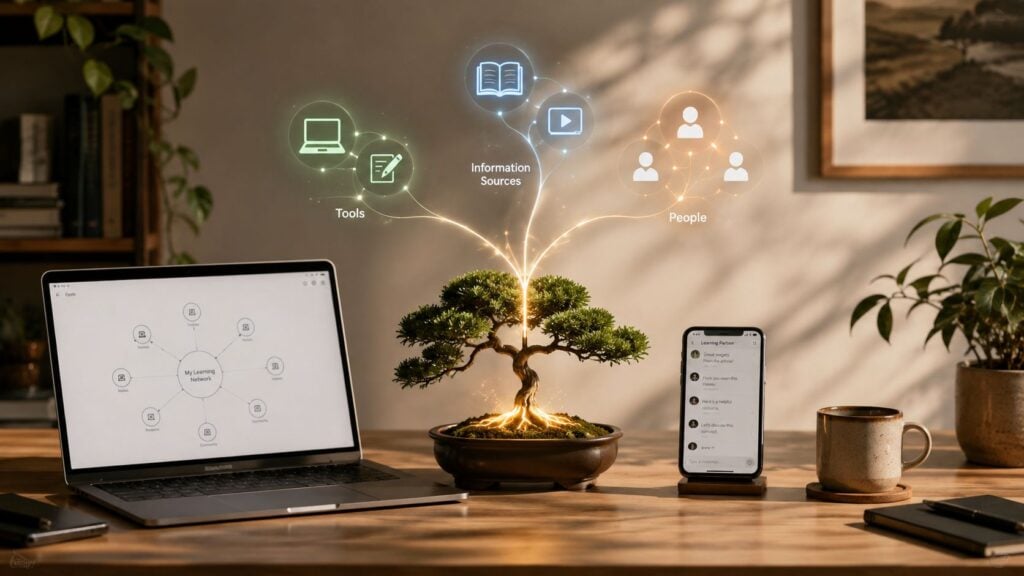
You probably already have one, even if you’ve never named it. Maybe you finish a course in your LMS on Monday, ask a question in a Discord channel on Tuesday, save a video to your notes app on Wednesday, test an AI tutor on Thursday, and only log back into the course portal on Friday. That mix of tools, people, and resources is what educators mean by a personal learning environment, or PLE.
A useful way to think about it is simple. A PLE is the learner’s own setup for directing learning across different spaces, not just one platform. The idea has been around for years, and it matters now because learning has become more portable, more networked, and more self-directed than the old classroom-only model ever allowed Educause’s overview of personal learning environments.
A Learning Moment That Changes How You Think
The first time I noticed a PLE in the wild, it didn’t look like a system at all. It looked like a person trying to keep up with a busy week. They were moving between a course shell, a group chat, bookmarked articles, a note archive, and an AI tool that helped them turn a rough question into a cleaner study prompt.
That’s the part many explainers miss. A PLE usually isn’t a single place with a neat label. It’s the learner’s own network of tools, sources, and people, assembled in whatever way helps them learn. When education and technology writers describe PLEs as learner-controlled, they mean the learner is choosing what gets used, what gets ignored, and how the parts fit together.
What makes the idea click
Once you start seeing learning this way, a lot of everyday behavior makes sense.
- Course portals give structure, deadlines, and official content.
- Notes apps help the learner store, revisit, and connect ideas.
- Communities fill in the gaps with peer answers and lived experience.
- AI tools can summarize, quiz, or reframe material in a more usable way.
Practical rule: if a learner regularly moves across tools to make sense of one topic, they’re already acting like they have a PLE.
That doesn’t mean every collection of apps is automatically well designed. It does mean the concept starts with what learners already do, then asks a better question. How can that personal system become clearer, safer, and easier to maintain?
For course creators and membership owners, that question matters. Learners rarely experience education through one platform alone, so the design challenge is to support the entire learning path, not just the inside of your own course shell.
The Three Building Blocks of Every PLE
A clean way to define a PLE is to break it into three parts, tools, information sources, and people. That framing shows up repeatedly in educational references, and it helps because it turns an abstract idea into something you can map. When I work with educators, I usually ask them to sort their own habits into those three buckets first.
Tools, sources, and people
Tools are the apps and platforms a learner uses to do the work. That might include a note-taking app, a calendar, a bookmark manager, a course platform, a writing app, or an AI assistant.
Information sources are the things the learner consumes. These can be LMS lessons, articles, podcasts, videos, datasets, webinars, or AI-generated explanations.
People are the humans around the learner. That includes instructors, classmates, mentors, forum members, and the authors or creators whose work they follow.
The useful part is how these pieces connect. In a PLE, the learner doesn’t just collect resources in a pile. They move between them in a pattern, one source leading to another, one person pointing to a tool, one tool helping organize a source.
Why the network matters
That network shape is the distinction. A hierarchy says one platform controls the experience. A PLE says the learner is building a workflow across many places, and the connections matter as much as the parts.
If you want to test your own setup, start with a quick inventory.
- Name your tools. Write down the apps you open when learning.
- List your sources. Include the content formats you rely on most.
- Map your people. Add the communities and individuals who shape your understanding.
A PLE becomes visible the moment you can trace how one resource leads to the next.
That’s why educators often describe PLEs as dynamic and learner-centered. The learner changes the mix as goals change, which is much closer to real life than a fixed course shell ever is. For a broader tech-stack comparison, I’d also point course builders to how to choose an LMS when they’re deciding what the institution should own versus what the learner should assemble.
Where the PLE Idea Came From
A learner opens a laptop to finish a course module, checks a note app for ideas from last week, then asks a question in a community forum before lunch. That mix of tools, people, and sources is the kind of setup the PLE idea was built to describe. The term may feel current, but the thinking behind it has been developing for a long time.
Early writing framed personal learning environments as a move away from relying on a single textbook or LMS and toward building a personal network of resources. That idea still fits because learning rarely stays inside one platform. People gather articles, videos, notes, mentors, and discussion spaces, then connect them in ways that suit their goals and routines.
Pew Research Center offered a useful snapshot of that shift in 2016. It found that 74% of U.S. adults were “personal learners,” meaning they had done at least one learning activity in the previous 12 months to advance knowledge about a personal interest. Pew also found that 73% of adults considered themselves lifelong learners, and that among adults with both a smartphone and home broadband, 82% had done personal learning in the past year versus 64% among those with only one or neither of those connection types [Pew Research Center, 2016]. That gap shows how consumer technology made self-directed learning easier to carry, connect, and repeat across settings.
What the research timeline tells us
The academic literature followed a similar path. A systematic review published in 2021 found PLE-related research expanding strongly between 2011 and 2020, with 2013 producing the highest number of papers at 17, and 2014 and 2017 each producing 16 papers. That pattern shows the idea moving from an early concept into a sustained research area the 2021 review of PLE literature.
Later writing describes PLEs as digital spaces that are collaborative, adaptive, and autonomous. Those qualities fit the way many learners already work. They save a useful article, share a resource with a peer, adjust the tools they use, and keep refining the mix as their needs change.
The historical point matters. PLEs did not emerge because the field needed another acronym. They emerged because learning habits changed, and the tools learners relied on began stretching across more contexts. That is why the concept still matters now, even with newer technologies layered on top.
PLE vs LMS and How They Actually Fit Together
People often ask whether a PLE replaces an LMS. The cleaner answer is that they do different jobs, and most learners use both. An LMS is institution-controlled, which means the school or organization decides the structure, the content flow, the tracking, and the credentials. A PLE is learner-controlled, which means the learner decides which tools, sources, and communities belong in their system.
| Dimension | PLE | LMS |
|---|---|---|
| Control | Learner-controlled | Institution-controlled |
| Structure | Flexible and assembled by the learner | Fixed by the platform and provider |
| Content flow | Across many tools and sources | Inside one course environment |
| Social layer | Communities, mentors, peers, and networks | Usually built around course participants |
| Main purpose | Support self-managed learning | Deliver and administer formal learning |
The world is usually collaborative, not competitive. A learner might take a compliance module in the LMS, then use notes, chats, and outside resources to make sense of it afterward. That extra layer is the PLE doing its work.
How they fit in practice
For course creators, the key design question is simple. How do you make the LMS easy to use inside a broader learner stack? That might mean exportable notes, clear module structure, links to outside communities, or guidance on where to ask questions.
It also means accepting that learners are already taking your material outside the platform. They copy ideas into notes, discuss them in Slack or Discord, and use search tools to fill in gaps. A strong LMS can support that behavior instead of fighting it.
Useful distinction: the LMS organizes the official learning experience, while the PLE helps the learner continue that experience in the places they actually work.
If you’re comparing platform options for that institutional layer, keep the learner’s downstream workflow in mind. The best platform choice is often the one that makes it easier for learners to bring the content into their own systems and keep going after the lesson ends.
Real-World Examples of a Personal Learning Environment
The easiest way to understand a PLE is to watch one form in real life. The shape changes by role, but the pattern stays the same. The learner picks a mix of content, tools, and people, then moves between them as needed.
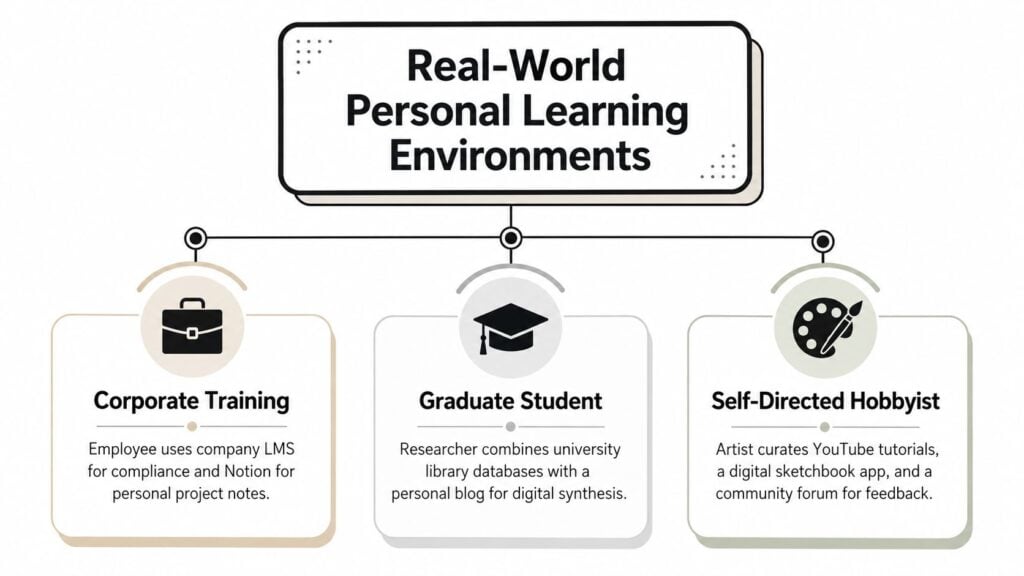
Three common patterns
A corporate training manager might use the company LMS for compliance modules, keep personal notes in Notion, ask peers questions in Slack, and use an AI assistant to summarize long reports. Her PLE is the way those pieces work together around her workday.
A course creator may move between Teachable lessons, a Discord community, an email newsletter, and a recording app where she reflects on learner questions. Her PLE helps her see how students are interacting across channels, not just inside one course page.
A self-directed learner studying product design might use Coursera, YouTube, a Notion portfolio, weekly coffee chats with a mentor, and an AI tutor to test ideas. The point isn’t the specific tools. It’s that the learner is the integration layer.
That’s also why visual maps are so helpful. Several educational models represent a PLE as a network of nodes and links, because that’s closer to how people learn. Resources connect to other resources, and people connect to ideas.
If you want a practical companion for managing the attention side of that network, tools to reclaim focus effectively can help learners reduce friction when their stack starts to sprawl.
Designing and Managing Your Own PLE
A PLE works best when it stays small enough to use and flexible enough to change. I usually start by telling learners to map what they already do, because many learners already have pieces in place. The work is in making the system deliberate.
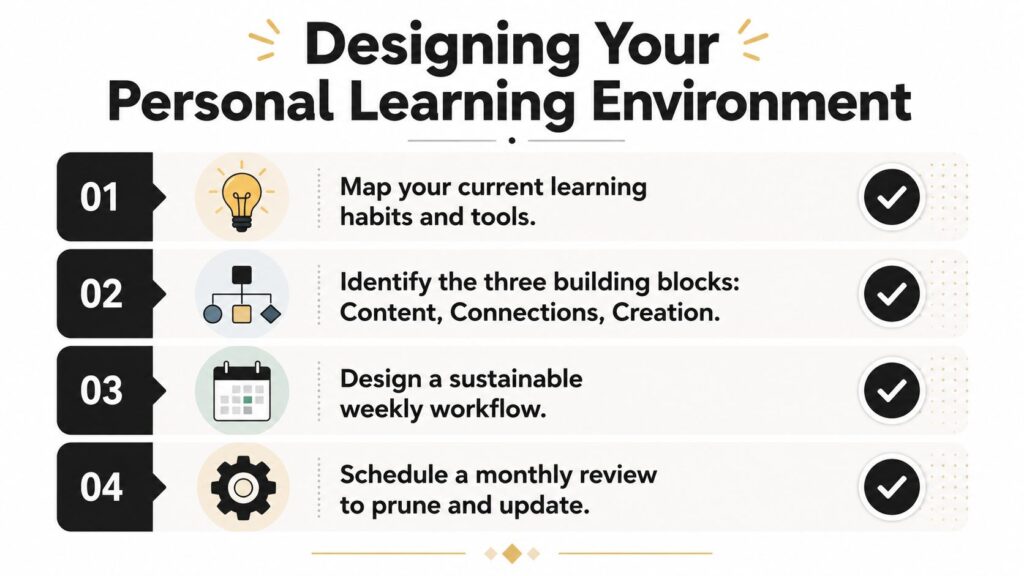
Build a simple workflow
Start with one anchor platform, usually the place where your formal learning happens. Then choose one note system so your thinking stays searchable, one community channel for conversation, and one AI tool for summarizing, questioning, or practice.
A clean setup often looks like this.
- Anchor platform: the LMS, membership site, or course hub.
- Note system: one place for summaries, prompts, and ideas.
- Community channel: one space for peer learning and questions.
- AI support: one tool for reviewing, quizzing, or reframing content.
Then decide what you’ll measure. Some learners track weekly hours. Others track completed projects or skills they can now perform without help. The important thing is to measure something you’ll review.
Keep the stack governable
I’d also treat the PLE like a living system, not a permanent setup. Review it on a regular cadence, prune what you no longer use, and keep an eye on whether the stack is helping or distracting.
Practical rule: if a tool doesn’t support a current learning goal, it belongs on the review list, not on the homepage.
There’s a good reason to be disciplined here. The more apps and channels you add, the easier it is to lose the thread. A PLE should reduce confusion, not create a second inbox.
For educators choosing software that supports that kind of workflow, personalized learning software is worth comparing against whatever you already use, especially if you want progress tracking and learner-facing organization in one place. LearnStream is one option in that category, since its dashboard includes structured management for progress, deadlines, and study notes.
The Equity and Overload Problems Nobody Talks About
The autonomy story sounds appealing until you ask who gets left out. Personalized learning can reduce inequity, but only when it’s designed with students of color, low-income learners, English learners, students with disabilities, and trauma-affected learners in mind. Without that design work, the same model can widen gaps because it assumes time, devices, and self-management skills that not every learner has.
A second issue is overload. A PLE can become messy fast, especially once AI tools, dashboards, and community spaces all start competing for attention. The more fragmented the stack becomes, the more cognitive energy a learner spends managing the system instead of learning from it.
What to design for
A strong PLE needs boundaries, not just flexibility. That means choosing defaults, creating simple routines, and limiting the number of active places where learning decisions happen.
- Accessibility first: provide transcripts, low-bandwidth options, and clear paths for learners who need more structure.
- Clear expectations: tell learners when to use the official platform and when to work in their own stack.
- Privacy awareness: make data flows understandable, especially when tools span different vendors.
- Support for self-direction: assume not every learner arrives with strong self-regulation.
A recent review on cognitive load in e-learning design is a helpful companion here, especially for anyone trying to keep the learning environment usable rather than just feature-rich cognitive load theory in e-learning design.
The honest view is that PLEs are powerful for learners who have enough support to manage them. Good design gives people enough scaffolding to succeed without forcing everyone into the same mold.
A Quick Checklist for Course Creators and Membership Owners
If you run a course, community, or membership site, you’re already part of your learners’ PLE whether you planned for it or not. The question is whether you’re making that experience easier to manage or harder to follow.
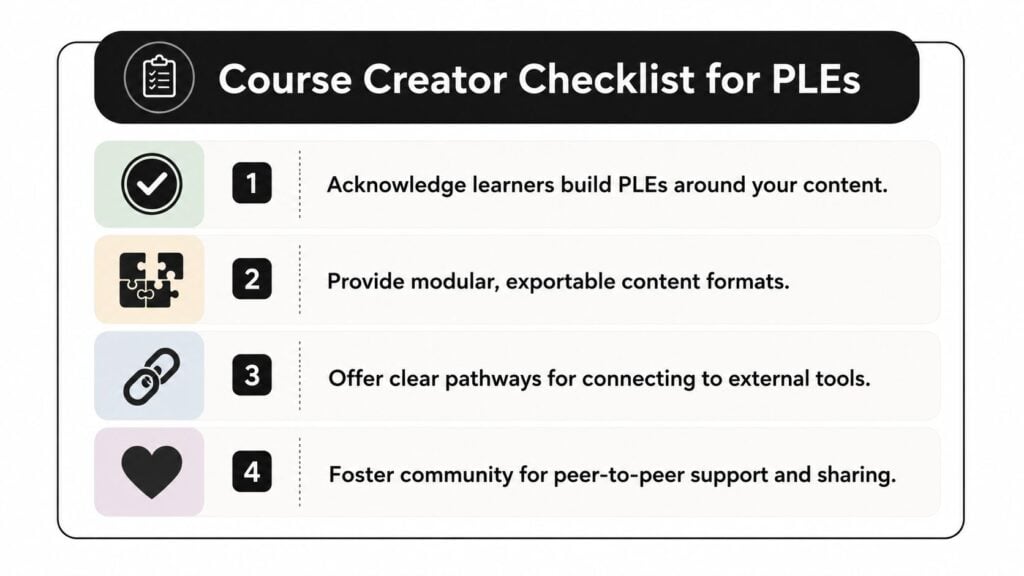
Four things I’d check first
- Acknowledge the full stack. Learners are already building PLEs around your content, so design as if they’ll bring notes apps, AI tools, and community channels with them.
- Make content movable. If your materials are modular and easy to reference, learners can carry them into their own systems without friction.
- Explain the boundaries. Tell people what belongs in your platform and what’s better handled in their own learning stack.
- Protect trust. Clear privacy language and low-barrier access options matter because a PLE only works when learners feel safe using it.
A simple decision lens
A course fits the PLE model well when learners need to move between formal instruction and self-directed exploration. It fits less well when the experience demands a single locked environment with no outside workflow.
That makes the course or membership the anchor in a learner’s system, the place they return to when they need the next step to be obvious. You are not trying to control every part of the learning journey. You are helping learners connect your content to the rest of the way they learn, and that includes the notes apps, community spaces, and AI tools they already rely on.
A PLE is defined by the relationship between the learner and the tools they choose, not by any single product or platform. If you create learning experiences, your job is to make that relationship easier to sustain, easier to trust, and easier to return to.