Course Creation Software: Build & Sell Courses

You’ve probably done the fun part already.
You picked a topic you know well, sketched a rough course idea in a notes app, maybe even recorded a test lesson. Then you opened a few tabs to figure out the software side and suddenly you were knee-deep in terms like LMS, authoring tool, checkout flow, drip content, certificates, and SCORM.
That’s where a lot of solid course ideas stall out.
I’ve seen this happen with first-time creators, consultants turning expertise into a product, and even experienced educators moving from live teaching into self-paced programs. The problem usually isn’t the course idea. It’s the feeling that choosing the wrong tech will create a mess you’ll regret later.
Your Course Idea Is Great Now What About the Tech
A friend of mine once described this stage perfectly. She said building the course felt exciting, but shopping for the software felt like trying to buy kitchen equipment when all she wanted to do was cook dinner.
That’s a normal reaction.
Many course creators start with one simple question, like “How do I sell my course?” Then they run into ten more. Do I need a website first? Should I use an all-in-one platform? What if I want quizzes? What if I care about certificates? What if I want a community later? What if I switch platforms and break everything?
The good news is that your confusion doesn’t mean you’re behind. It means the category has grown fast. The demand is very real too. The global online course app market generated $3.1 billion in revenue in 2023, reached over 125 million people, and saw 46.4 million app downloads that year, according to Business of Apps’ online course app market data.
That matters because it tells you something practical. There is already a large audience comfortable with digital learning. You are not trying to invent a new behavior. You’re trying to deliver a useful learning experience in a crowded but proven market.
Practical rule: Don’t choose software by asking which platform has the longest feature list. Choose it by asking which setup helps you publish, teach, and get paid with the least friction.
If you’re still comparing broad options, this roundup of platforms for selling online courses is a useful starting point.
The real job of the tech
Course creation software has one job. It should help you turn expertise into a learning product people can use.
That includes a few separate tasks:
- Building content so lessons, modules, downloads, and quizzes are organized
- Delivering access so students can log in and move through the material
- Handling business tasks like payments, emails, pricing, and basic reporting
When those pieces fit together, your course business feels manageable. When they don’t, every launch turns into a workaround.
What makes people choose badly
I think most bad software decisions come from one of three mistakes:
- Buying too much too early because a platform promises every feature under the sun
- Buying too little because the cheapest tool can’t support your actual business model
- Copying someone else’s stack without checking whether their audience, teaching style, and goals match yours
The smart move is simpler. Match the software type to the kind of creator you are and the kind of business you’re building.
What Exactly Is Course Creation Software
Course creation software is the set of tools you use to plan, build, publish, and sell an online course.
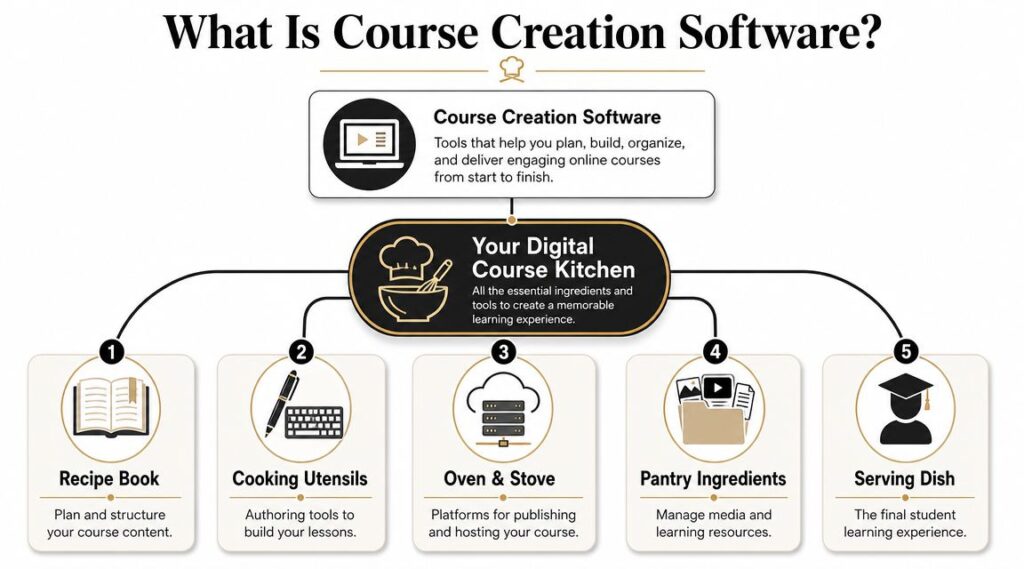
I like to think of it as your digital kitchen. Some setups give you a fully equipped kitchen in one room. Others give you separate appliances that you connect yourself. Both can work. The right choice depends on how hands-on you want to be.
The three jobs it handles
At the simplest level, course creation software helps with three things.
First, it helps you structure the learning. That means creating modules, lessons, attachments, quizzes, and progression rules.
Second, it helps you deliver the experience. Students need a place to watch videos, read lesson text, submit work, track progress, and return later without getting lost.
Third, it helps you run the business side. That can include checkout pages, payment processing, coupons, email automations, enrollments, and reporting.
If a tool only handles one of those jobs, you may need to pair it with something else.
The main categories you’ll run into
Most course creation software falls into one of these buckets:
| Type | What it does well | Tradeoff |
|---|---|---|
| All-in-one platforms | Combines course hosting, payments, pages, and often email tools | Less control over custom setups |
| WordPress LMS plugins | Gives you flexibility if you already run a WordPress site | More setup and maintenance |
| Standalone authoring tools | Great for building polished lesson content and interactive assets | Usually needs a separate place to host and sell |
Here’s how I explain them to clients.
All-in-one platforms
Think Kajabi, Teachable, Thinkific, Podia, or Mighty Networks. These tools are built for creators who want one dashboard for most of the work.
You can usually upload lessons, create a sales page, connect payments, and start enrolling students without stitching together many external tools.
This category is often the easiest place to start if you’re selling directly to consumers.
WordPress LMS plugins
Think LearnDash or Tutor LMS paired with WordPress. This route gives you more control over design, plugins, SEO, and your broader site setup.
It’s a solid fit if your website is already central to your business and you or someone on your team is comfortable managing plugins, updates, and integrations.
You’re getting flexibility, but you’re also accepting more responsibility.
Standalone authoring tools
These tools focus on creating the instructional material itself. They’re useful when the course experience needs richer interactions, formal training structure, or export options for use inside another system.
They’re often chosen by instructional designers, training teams, or businesses with a separate LMS already in place.
A lot of confusion comes from mixing up authoring tools with hosting platforms. One builds the lesson package. The other delivers and sells it.
Once you see those categories clearly, a lot of the jargon loses its power.
The Core Features You Actually Need
Feature lists can get ridiculous fast. A platform will advertise dozens of capabilities, and half of them won’t matter for the kind of course you’re building.
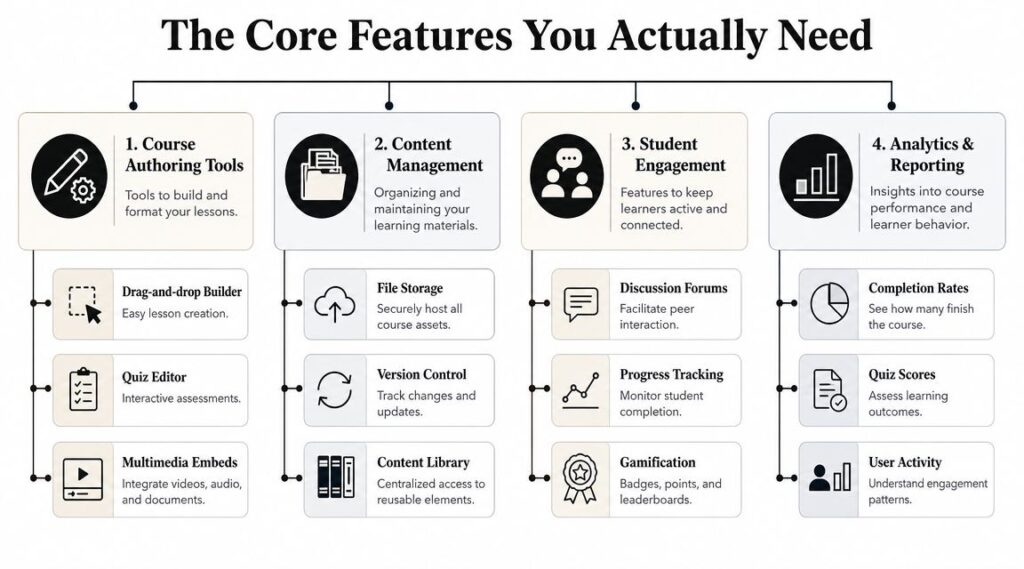
I’d focus on four buckets instead. If your software handles these well, you can build a strong course business without turning your setup into a science project.
Authoring tools that reduce setup friction
You build the course itself here.
You want a lesson builder that makes it easy to arrange modules, upload media, write text lessons, and insert quizzes or downloads without fighting the interface. Good authoring tools help you think clearly. Bad ones make every small edit feel heavier than it should.
AI now plays a role here too. Modern AI features can speed up the initial build. AI content ingestion can automatically extract themes and key concepts from PDFs or videos and turn them into a structured outline of modules and lessons for you to refine, as explained in Learniverse’s overview of auto course creation software.
That’s useful, but only if you treat it as a draft assistant.
- Use AI for first-pass outlines when you have messy source material like workshop recordings or long documents
- Use manual editing for learning flow because software can suggest structure, but it can’t fully judge whether the sequence makes sense for your learner
- Use templates carefully when your topic is repeatable, like onboarding, skills training, or process-based teaching
If you’re evaluating platforms more broadly, this guide on how to choose an LMS helps sort through the practical decision points.
Engagement features that keep students from drifting
A course is not just a video folder.
Students stay involved when the software gives them things to do and places to respond. For some creators, that means lightweight comments under each lesson. For others, it means discussion spaces, live sessions, assignments, reflections, or community prompts.
The right level of engagement depends on the promise of the course.
A quick technical tutorial might only need simple progress tracking and quizzes. A transformation-based course on fitness, writing, language learning, or business building usually benefits from stronger interaction.
Here’s the shortcut I use:
| Course type | Engagement need |
|---|---|
| Reference or tutorial course | Low to medium |
| Skill-building course | Medium |
| Cohort, community, or accountability course | High |
Assessment and analytics that show what’s working
A lot of creators skip this part and regret it later.
You need some way to tell whether learners understand the material and whether they’re getting stuck. That doesn’t always mean formal exams. It can mean short quizzes, lesson completion markers, surveys, reflection prompts, or assignment submissions.
Analytics matter for a business reason too. If many students stop at the same lesson, that usually points to a design problem, not a lazy audience.
One useful test: If a student disappears halfway through, can your software show you where they stopped and give you a way to follow up?
That question is more valuable than a flashy dashboard.
Delivery and integrations that match your business
This is the infrastructure layer. It sounds boring until checkout breaks on launch day.
Look at how the software handles:
- Payments for one-time sales, subscriptions, or payment plans
- Email connections for onboarding, reminders, and promotions
- Access control for bundles, memberships, and time-based release
- Admin workflow for refunds, enrollments, and support
Some creators want everything inside one platform. Others prefer a stack where one tool handles courses, another handles email, and another handles community.
Neither approach is automatically better. The question is whether your setup matches your tolerance for complexity.
Understanding the Course Creation Workflow
A common misconception is that software is needed first. Usually, a clearer workflow is needed first.
The daily reality of building a course is less glamorous than people imagine. You’re making a long series of small decisions. What comes first. What students need before they move on. What should be a video versus text. Where confusion is likely to show up.
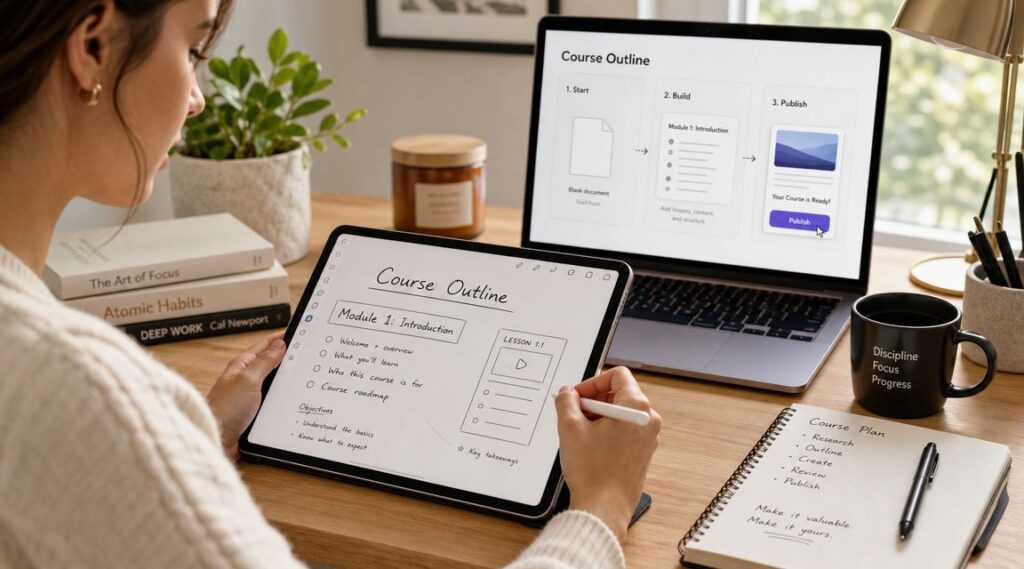
From rough idea to structured outline
I usually start with a messy brain dump. Every lesson idea, exercise, FAQ, and example goes onto a page. Only after that do I organize it into modules.
This is the first point where course creation software starts helping. The builder becomes a visual outline. You can drag lessons around, group topics, and see whether the flow feels too thin or too bloated.
A simple rule helps here:
- Start with the learner outcome
- Break the outcome into milestones
- Turn each milestone into lessons
- Add proof of learning, such as a quiz, worksheet, or action step
That process sounds basic, but it prevents a common mistake. Many creators build content in the order they thought of it, not in the order a student should learn it.
Building the assets
Once the outline looks solid, you move into production.
That usually means recording videos, writing lesson text, designing slides, collecting templates, making checklists, and polishing resources. Some platforms make this stage smoother by letting you upload different media types into one lesson. Others feel rigid and push everything into the same format.
If you dread updating a lesson after publishing, the software is probably fighting your workflow.
That matters more than people think. Good courses evolve. Students ask questions. You spot confusing sections. You replace examples. Your software should make those updates easy.
Assembly, pricing, and launch prep
The final stretch is part content setup and part operations work.
You upload the assets, write course descriptions, set lesson order, configure drip timing if needed, add assessments, connect payments, and test the student experience from the first click to the final lesson.
Before launching, I always check these points:
- Checkout flow so there’s no confusion during purchase
- Welcome emails so buyers know how to access the course
- Lesson navigation so students don’t get lost
- Mobile usability because plenty of learners use smaller screens
- Support plan so questions don’t pile up in your inbox
This is why the workflow matters. When you understand the sequence, choosing the software becomes easier. You stop asking, “Which platform has everything?” and start asking, “Which platform supports the way I work?”
How You Will Pay and How You Will Get Paid
Software cost and course revenue need to make sense together.
I’ve seen creators buy a heavy all-in-one platform because it looked polished, then realize they only needed a simple checkout and a clean lesson area. I’ve also seen people choose the cheapest possible tool and then patch together forms, payment links, email sequences, and community access until their business felt fragile.
Your software cost model
Most course creation software charges in one of a few ways.
Some use a recurring subscription. Some add transaction fees. Some gate better features behind higher plans. And some look affordable until you realize you need several extra tools to make the setup usable.
That means the sticker price is only part of the decision.
You should also ask:
- What else do I need besides the platform
- Will I outgrow this setup quickly
- Does my business depend on features locked behind a higher plan
- How much admin work will this save or create
For a broader look at platform cost structures, this guide to learning management system pricing is worth reading.
Your revenue model
The platform you choose should support the way you want to earn.
A one-time course sale is the simplest model. Students pay once and get access.
A membership model works better if you plan to release ongoing lessons, host a resource library, or run a community alongside the course.
Payment plans can help if your course has a higher ticket and you want to lower the barrier to entry without changing the offer itself.
Here’s the practical match-up:
| Monetization model | Software requirement |
|---|---|
| One-time purchase | Clean checkout and course access control |
| Membership or subscription | Recurring billing and ongoing content delivery |
| Payment plan | Installment billing and failed payment handling |
| Course bundle | Product bundling and segmented access rules |
The part many creators ignore
Your revenue doesn’t just depend on the checkout page. It also depends on how well your software supports the business around the course.
That includes email capture, upsells, renewals, reminders, and the ability to keep students engaged after the first purchase. If you’re exploring tools and services focused on empowering online course businesses, it helps to think beyond course hosting and look at the wider operating system around your offer.
Cheap software can be expensive if it creates manual work every week.
That’s the lens I’d use. Not “What’s the lowest monthly cost?” but “What setup supports my pricing model without forcing me into clumsy workarounds?”
Choosing the Right Tech Stack For You
There isn’t one best setup for everyone. There’s the setup that fits your stage, your teaching style, and the way you want the business to run.
That’s why I prefer matching software types to creator profiles instead of publishing a generic top ten list.
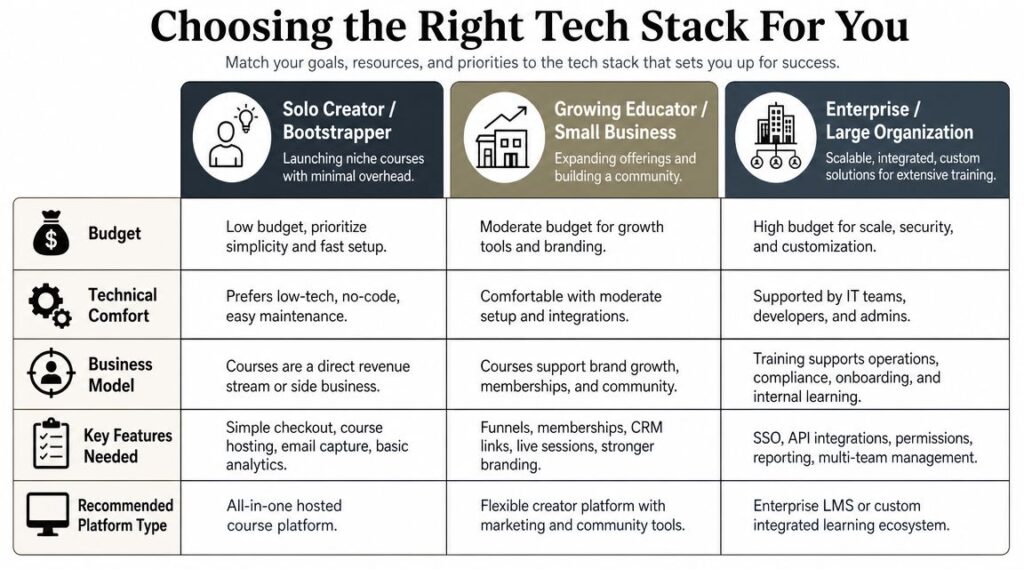
Three common creator profiles
The first profile is the solo beginner. This person wants to launch one focused course, keep costs controlled, and avoid technical rabbit holes.
The second is the growing educator. They care more about structured learning, better assessment, and a more polished student journey. They may be building multiple products or serving a professional audience.
The third is the community builder. Their course is part of a broader membership or paid group experience. Discussion, events, and recurring engagement matter as much as lesson delivery.
Tech Stacks for Different Creator Profiles
| Creator Profile | Primary Goal | Recommended Stack Type | Example Tools |
|---|---|---|---|
| Solo Creator | Launch quickly with minimal setup | All-in-one platform | Teachable, Thinkific, Podia |
| Professional Educator | Deliver a stronger learning experience with more structure | LMS-focused platform or WordPress LMS stack | LearnDash, Thinkific, LearnWorlds |
| Community Builder | Combine learning with discussion and ongoing membership | Community-first platform with course layer | Mighty Networks, Circle plus course tool |
| Hands-on Operator | Keep full site control and customize deeply | WordPress plus plugin stack | WordPress, LearnDash, WooCommerce |
| Tool-conscious creator | Use a visual course builder with quizzes, certificates, drip content, and analytics inside one platform | All-in-one course platform | LearnStream |
That last category matters if you want a straightforward builder without piecing together a large stack.
What I’d recommend by scenario
For a first-time creator, I’d lean toward an all-in-one setup. You want fewer moving parts, faster publishing, and less time spent troubleshooting. Design freedom matters less at this stage than getting the offer live and learning from real students.
For a professional educator, I’d look harder at quiz depth, lesson structure, certificates, and reporting. If the course promise depends on mastery, the software has to support a real teaching process, not just content hosting.
For a community-led business, I’d put the member experience first. If learners mainly stay because of discussion, events, accountability, and ongoing participation, a community-first platform often beats a classic course platform.
One useful reality check is retention. If recurring revenue is part of your model, it helps to compare online learning platform churn and think about the operational side of keeping members active over time.
Pick the stack that supports your next stage, not the one you might need three business models from now.
That advice saves a lot of money and even more frustration.
Important Questions Most Guides Dont Answer
Most course software guides spend all their time on templates, video hosting, coupons, and branding. Those things matter. But two issues deserve much more attention because they affect both learner experience and business risk.
Can you build an accessible course without a cleanup nightmare
A major gap in most tool comparisons is accessibility. According to WCET’s guidance on creating accessible and inclusive online courses, accessibility isn’t an add-on. It needs to account for readability, multimedia alternatives, navigation structure, and compatibility with assistive devices from the start.
That changes how I evaluate platforms.
I want to know whether the software makes it easier to add captions, transcripts, clear headings, readable layouts, keyboard-friendly navigation, and accessible media. If the platform fights those basics, you’ll end up doing manual remediation later.
Ask these questions before you commit:
- Can I create a clean heading structure
- Can I provide captions or transcripts for media
- Is the navigation usable without a mouse
- Will the course still make sense on mobile and with assistive tools
- Does the platform preserve accessibility when exporting or embedding content
If a review never mentions those questions, it’s leaving out a big part of the decision.
How much AI is actually safe to use
AI can be helpful in course creation. It can organize source material, propose outlines, generate draft quiz questions, and speed up repetitive setup work.
But speed creates its own risk.
If you let AI draft too much of the instructional core, you can end up with bland lessons, factual errors, weak examples, or explanations that sound polished but teach very little. Human review becomes essential once the content moves from structure into substance.
My own rule is simple.
Use AI for drafting, sorting, summarizing, and first-pass formatting. Use a human for accuracy, pedagogy, tone, examples, and final approval.
That boundary keeps the software useful without letting it flatten your expertise into generic content.
The better buying question
A lot of buyers ask, “Which platform has AI?” or “Which platform has the most features?”
I think the better question is this:
Which platform helps me create a clear, usable, accessible course that still sounds like me?
That question leads to smarter software choices.