Mastering Course Completion Certificates
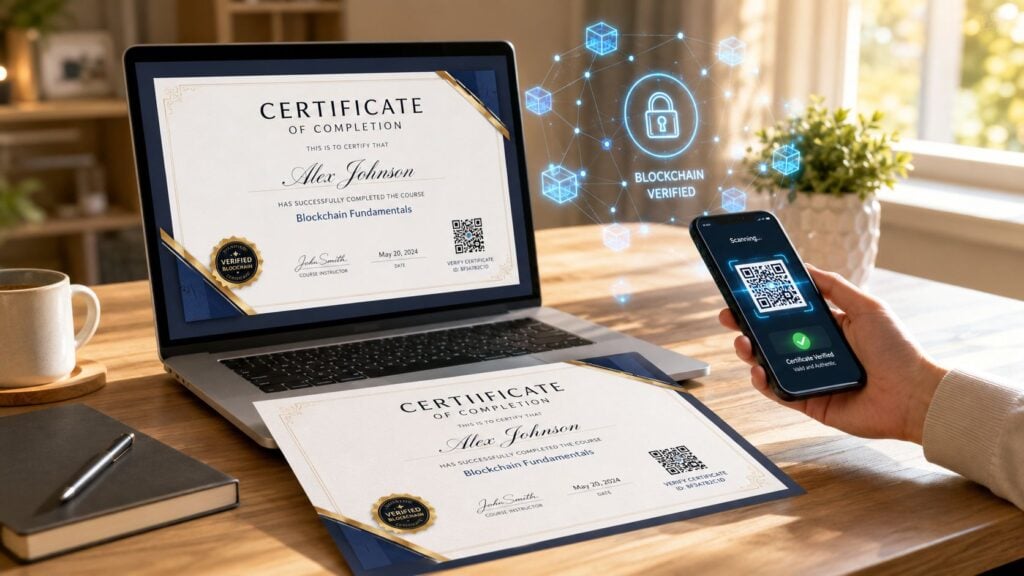
You’ve probably been there. A learner finishes your course, sends a quick “thanks,” and then asks the question that always comes next: “Do I get a certificate?”
That moment tells you something important. People don’t see a certificate as decoration. They see it as proof, closure, and something they might use.
I’ve found that course completion certificates work best when you treat them as part of the product, not as an afterthought at the end of it. If the certificate looks weak, arrives late, or can’t be verified, it lowers the perceived value of the course you worked hard to build. If it looks polished, lands instantly, and carries clear wording, it reinforces the whole learning experience.
That’s the playbook. Good certificates sit at the intersection of motivation, design, operations, and trust.
Why Certificates Are More Than Just a PDF
A lot of creators think of certificates as the final file someone downloads and forgets. That’s too narrow.
A certificate marks the finish line. For many learners, seeing that finish line changes how they move through the course in the first place. In a University of Michigan summary of research covering more than 70 Coursera courses from 2012 to 2016, paid users who could earn a certificate showed 10% to 12% higher engagement than free users, and they spent 10% more time on the course portal.
That matches what many course operators see in practice. When learners know there’s a meaningful artifact waiting at the end, they tend to take progress more seriously.
Motivation needs something visible
Most online courses lose momentum in the middle.
People start with good intentions, then work gets busy, life interrupts, and “I’ll finish this later” turns into never. A certificate helps because it makes the outcome concrete. It turns an abstract promise like “learn data analysis” into a visible milestone.
Practical rule: If you want learners to finish, give them something specific to finish toward.
That doesn’t mean a certificate fixes a weak course. It won’t. But it can strengthen a good one by giving effort a clear endpoint.
Certificates also market your course for you
The second job of a certificate is external. It leaves your platform and enters the learner’s world.
A strong certificate gets downloaded, added to a portfolio, uploaded to LinkedIn, shared with a manager, or attached to an internal training record. That means your course branding shows up in places your sales page never will.
Here’s where many creators miss the opportunity:
- A bland certificate feels disposable and rarely gets shared
- A branded certificate extends your reputation after completion
- A verifiable certificate signals that your course has standards
- A well-worded certificate helps the learner explain what they did
The certificate is often the last touchpoint in the student experience. Last touchpoints stick.
The value is emotional and operational
Learners want recognition. Organizations want records. Instructors want completion. Certificates sit right in the middle of those needs.
If you build them well, they do more than say “completed.” They support learner motivation, brand perception, and program credibility all at once. That’s why I never treat them like a bonus feature anymore.
Designing a Certificate That Feels Valuable
Design changes how people judge the credential before they read a single word.
I’ve seen good courses undermined by ugly certificates. Tiny logos, random fonts, weak spacing, low-resolution signatures. The learner still finished, but the document doesn’t feel like an achievement. It feels like a receipt.
A valuable certificate doesn’t need to look ornate. It needs to look intentional.
Start with visual hierarchy
The best certificates are easy to scan in a few seconds.
The learner’s name should stand out first. The course title should come next. Then the supporting details, such as completion date, issuer, and certificate ID if you use one. If everything is the same size and weight, nothing feels important.
I usually think about layout like a conference badge mixed with a formal letter. It has to be readable at a glance, but it also has to feel official.
A simple structure works well:
- Top area for your logo and issuing brand
- Center area for the learner’s name and achievement statement
- Lower area for course title, date, signature, and verification details
- Footer for website or credential reference information
Match the certificate to your brand
Many templates fall apart, employing generic gold borders, stock icons, and fonts that don’t match the course business at all.
If your course brand is modern and minimal, keep the certificate clean. If your training company serves corporate teams, make it formal and restrained. If you teach creative skills, you can push the styling further, but readability still wins.
Typography matters more than people think. If you need help choosing combinations that look polished instead of improvised, this guide to fonts for certificates is worth reviewing.
A certificate should look like it came from your program, not from a random template library five minutes before launch.
Include the right information and leave out fluff
The strongest designs don’t overload the page.
What belongs on most course completion certificates:
| Element | Why it matters |
|---|---|
| Learner name | Makes the achievement personal and official |
| Course title | Tells employers or managers what was completed |
| Completion date | Anchors the record in time |
| Issuer name | Shows who stands behind the credential |
| Signature line | Adds a human and institutional signal |
| Certificate ID or verification note | Improves trust and reusability |
What usually doesn’t help:
- Buzzwords everywhere that make the certificate sound inflated
- Too much body text that turns it into a mini brochure
- Fake seals or fake accreditation language that creates confusion
- Vague labels like “Award of Excellence” when it’s really a completion certificate
That last point matters. Bellevue University makes an important distinction in its explanation of certificate of completion versus certification. A certificate of completion proves someone finished a course. A certification usually involves passing an exam and is more likely to be industry-recognized. Your design and wording should make that difference obvious.
Small details do a lot of work
The finishing touches are what make a certificate feel credible:
- High-resolution logo files so branding stays sharp
- Consistent spacing so the page doesn’t feel crowded
- A real signature asset rather than typed script font pretending to be one
- Subtle security elements like a watermark or background pattern
- Horizontal orientation if learners are likely to print it
If someone wants to post the certificate publicly, the document has to hold up on screen and on paper. That’s the standard I’d use.
Wording Your Certificate for Maximum Impact
The text on the certificate tells a story about the learner. Most certificates waste that chance.
I’ve seen too many that say little more than “This certifies that [Name] completed [Course].” Technically fine. Memorable? Not even close.
If the design creates first impressions, the wording creates meaning.
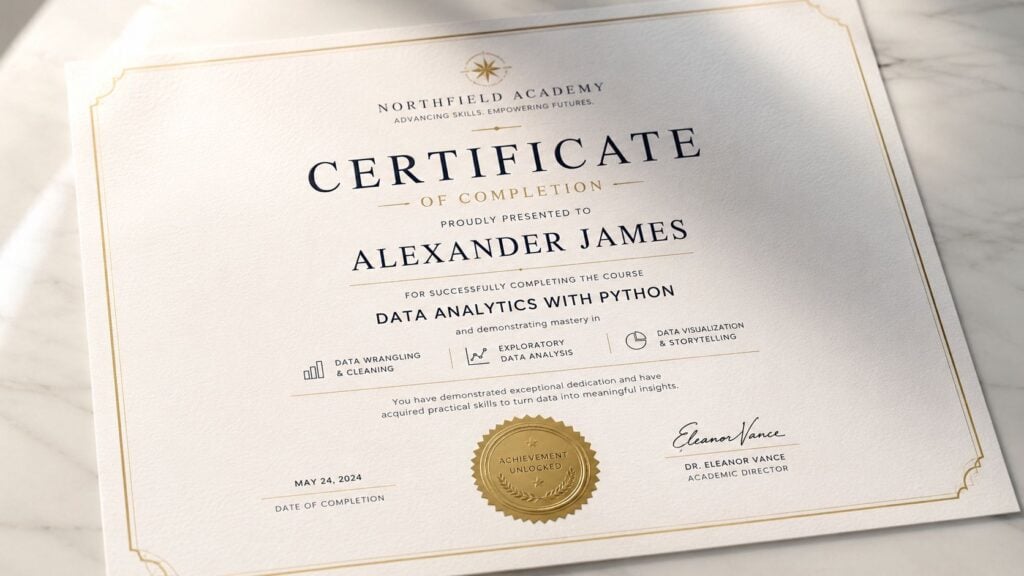
Generic wording sounds weak
Here’s the difference.
Weak version
This certifies that Jordan Lee has completed the Social Media Marketing Course.
Stronger version
This certificate is awarded to Jordan Lee for successful completion of Social Media Marketing, including campaign planning, content workflow development, audience targeting, and performance review.
The second version gives the learner language they can reuse. It helps when they add the credential to LinkedIn, discuss it in a job interview, or explain it to a manager.
Use text that reflects the actual learning experience
You don’t need long paragraphs. You do need precision.
Good certificate wording often includes three layers:
Achievement statement
Example: “This certificate is awarded to Priya Shah for successful completion of…”Scope statement
Example: “…a guided course of instruction in UX Research Fundamentals…”Skill or activity statement
Example: “…covering interview planning, usability testing, synthesis, and research communication.”
Here are a few reusable lines I like:
For a practical workshop
“Awarded for successful completion of hands-on training in…”For a cohort course
“Granted in recognition of completing the full cohort-based program in…”For a professional development course
“Presented for completing professional instruction in…”For an assessment-backed completion certificate
“Awarded for successful completion of course requirements and final evaluation in…”
Add limits where they matter
Trust begins with this.
If your certificate only confirms completion, say that clearly. Don’t imply a professional license, regulated designation, or employer-recognized certification if that isn’t what you offer. That kind of fuzzy wording creates disappointment later.
A short disclaimer can help. For example:
Completion-only disclaimer
“This certificate confirms course completion and does not represent professional licensure or third-party certification.”Internal training version
“Issued for educational and training record purposes.”
Useful test: If a hiring manager read the certificate with no other context, would they correctly understand what the learner actually did?
Write for the learner’s next step
The best wording supports whatever comes after completion.
If learners mostly share the certificate publicly, use concise language with recognizable skills. If they submit it to HR or L&D, include the exact course name and issuer details. If they use it for continuing education records where allowed, make the title precise and avoid nicknames.
A certificate doesn’t need to sound grand. It needs to sound clear, credible, and worth keeping.
Automating Certificate Delivery and Management
Manual certificate handling feels manageable when you have a handful of completions. Then enrollments grow, one learner’s name is misspelled, another didn’t get the email, someone asks for a reissue, and suddenly you’ve built yourself a clerical job.
Automation fixes that.
It also improves the learner experience. If someone completes a course at 10:30 p.m., they shouldn’t have to wait for you to wake up, open Canva, export a PDF, and send it by hand.
A structured system matters here too. Independent benchmarking reported by Ruzuku shows that large marketplace-style courses often complete at under 15%, while cohort-based courses typically reach 50% to 70%, and hybrid programs with live sessions can reach 60% to 80%+ in some cases, as outlined in this breakdown of course completion rate benchmarks. The takeaway is simple. Certificates help, but they work best inside a course designed to get people across the line.
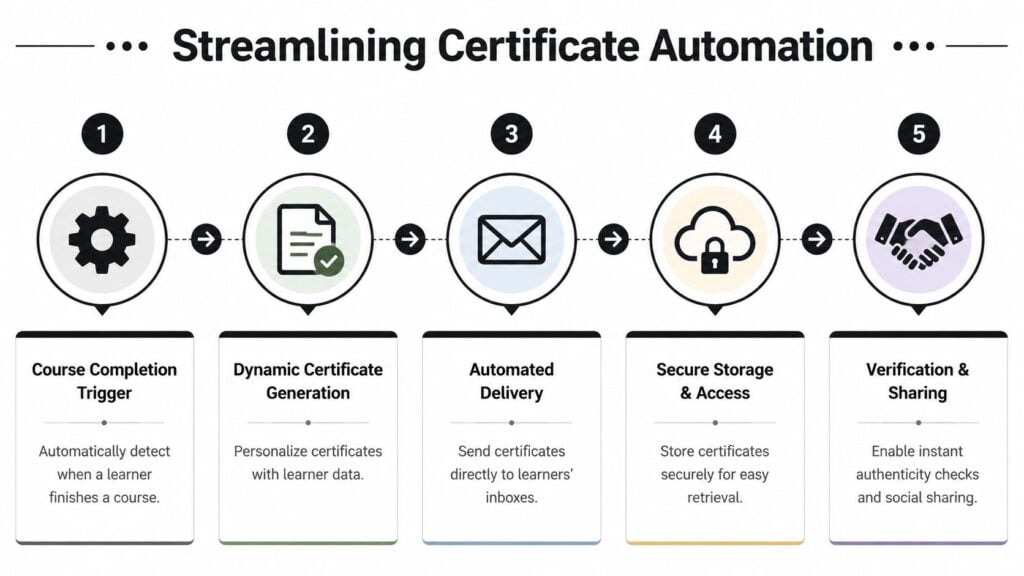
Here’s the visual flow most creators are aiming for:
The basic workflow that works
At a minimum, your setup should do four things well:
- Detect completion when the learner meets your rule
- Generate the certificate with dynamic fields
- Deliver it automatically by email or account dashboard
- Store a retrievable copy in case the learner loses it later
That workflow can be native inside your course platform, or stitched together with automation tools.
Native LMS tools vs stitched workflows
If you’re on a platform with built-in certificate support, start there. It’s usually the fastest route.
Platforms like Teachable, Kajabi, Thinkific, and other LMS tools may let you trigger certificates based on completion rules. The exact experience varies, but the principle is the same. You create a template, map learner fields, choose the trigger, and define how the learner receives it.
If your platform doesn’t do this well, use connectors. A common route is:
| Stage | Example tool types |
|---|---|
| Completion trigger | LMS or membership platform |
| Automation layer | Zapier or Make |
| Credential generator | Accredible, Certifier, or similar |
| Delivery | Email platform or direct credential link |
| Storage | Credential platform dashboard or your own records |
If you want a broader rundown of setup options, this guide to tools that automate course completion certificates is a good starting point.
Choose the completion trigger carefully
Automation can go wrong fast in these situations.
Don’t issue certificates for “last lesson viewed” unless your course is intentionally lightweight. In more serious programs, tie issuance to actual completion criteria. That could mean all lessons marked complete, all modules finished, or a final assessment submitted.
I prefer triggers that are hard to misfire. A learner shouldn’t receive a certificate because they clicked through the final page while skipping half the course.
A quick implementation checklist:
- Define completion clearly before you build any workflow
- Standardize learner name fields so certificates don’t generate with bad formatting
- Test edge cases like duplicate enrollments or restarted courses
- Create a resend path for support requests
- Keep an audit trail of issued certificates
Here’s a walkthrough video if you want to see an automation flow in action:

Don’t automate a broken experience
Fast delivery is great. Confusing delivery is not.
I’ve seen automated systems send learners an email with a dead link, no explanation, and a bland attachment named “certificate-final-v2.pdf.” That feels sloppy. Your email should tell them what they earned, how to download it, how to verify it if relevant, and where to get help if something’s off.
Keep the post-completion email short. Congratulate them, give the certificate link, and tell them what to do with it next.
Management matters after issuance
Issuing the certificate is only half the system.
You also need a way to handle name corrections, replacement downloads, support tickets, and updates if you change branding later. If you don’t plan this, your “automation” just shifts work into your inbox.
The best setups keep a searchable record of issued credentials and make re-delivery easy without manual redesign. That’s what makes the process sustainable once enrollments scale.
Making Your Certificates Verifiable and Trustworthy
A certificate has value only if other people trust it.
That’s the issue with plain PDFs. They’re easy to download, easy to forward, and easy to fake. For a hobby course, that may be fine. For professional training, internal L&D records, or anything stackable into a larger pathway, trust matters more.
Recent guidance around stackable credentials points in that direction. Complete College America reports that stackable credentials are associated with a 30% increase in completion and a 25% reduction in completion gaps for historically underserved populations, and that raises the bar for portability and verification in any system meant to support ongoing pathways, as described in its overview of stackable certificates and credentials.
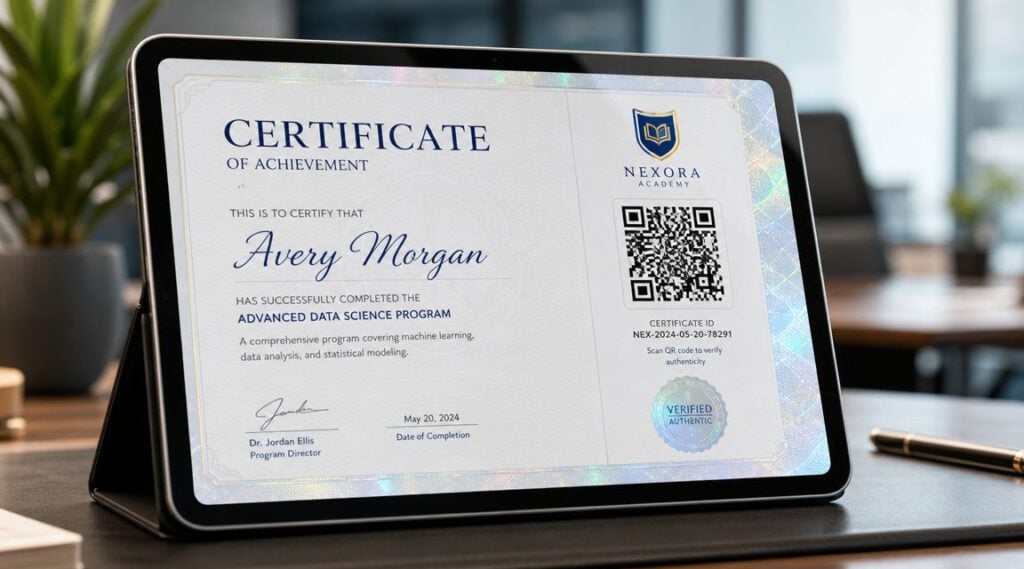
The simple end of verification
You don’t need advanced infrastructure to improve trust.
A few low-friction methods already help a lot:
- Unique certificate ID printed on the document
- Verification URL that confirms the credential on your website
- QR code linking to the same verification page
- Issue date and issuer identity displayed clearly
This setup works well for many independent course creators. It gives employers, managers, or clients a way to confirm the certificate came from you without turning the process into a technical project.
Third-party credential platforms add a trust layer
If your program is more formal, a credential platform usually makes sense.
These tools can host a credential profile, provide public verification, handle reissues, and give learners a cleaner way to share the achievement online. They also reduce support friction because learners don’t have to keep track of a single local PDF forever.
The trade-off is control versus convenience. A hosted credential system standardizes the experience, but you’re working inside another product’s rules and pricing. For many teams, that’s still worth it because verification becomes much easier to manage.
If a certificate is meant to live beyond your course platform, portability should be part of the design brief from day one.
Stackable pathways need stronger governance
Once certificates feed into a broader learning path, the stakes change.
A one-off workshop certificate can be simple. A certificate that may count toward a larger program needs naming consistency, issue rules, metadata discipline, and a format that can still be verified later. Otherwise, you end up with dead-end credentials that learners can collect but not meaningfully use.
That’s also why it helps to understand the difference between completion proof and deeper credential frameworks. If you want context for that decision, this comparison of micro-credentials vs traditional certifications is useful.
What about blockchain and tokenized records
Some organizations are experimenting with blockchain-style credential records and related verification models. I wouldn’t call that necessary for most creators today, but it’s relevant if you’re building credentials meant to be highly portable, tamper-resistant, or usable across institutions and systems.
For readers exploring that direction, RWA tokenization solutions from Blocsys Technologies offer a helpful look at how tokenized asset frameworks are being applied in verification-heavy environments. The concept isn’t the same as a standard course certificate, but it’s useful background if you’re thinking beyond static PDFs.
Pick the trust level that matches the course
Here’s how I’d consider it:
| Course type | Verification level that usually fits |
|---|---|
| Hobby or community course | Branded PDF with issuer details |
| Professional skills course | PDF plus certificate ID and verification page |
| Corporate training program | Hosted digital credential with retrievable records |
| Stackable pathway or institutional program | Verifiable, portable credential with governance rules |
The mistake isn’t using a simple certificate. The mistake is using a simple certificate where stronger trust signals are expected.
Quick Answers to Common Certificate Questions
Course completion certificates are standard enough now that learners expect them. In U.S. higher education alone, institutions awarded over 1.1 million postsecondary certificates in the 2013–14 academic year, and certificate awards rose 88.2% over 15 years, according to an IPEDS-based NCES analysis of certificate awards. That doesn’t mean every online course needs a complex credential system, but it does mean learners are used to seeing formal proof of completion.
What accessibility standards should my certificate meet
Make the certificate readable on screen and in print.
Use strong contrast, legible font sizes, and plain language. If you deliver certificates as PDFs, provide a version that works well with assistive technology where possible. Don’t put critical information only inside decorative script or low-contrast seals.
Do I need a legal disclaimer
Sometimes, yes.
If the certificate does not grant licensure, regulated status, or third-party certification, say so clearly. If it’s for internal training or educational participation, note that in plain English. A short disclaimer protects both you and the learner from misunderstanding.
What’s the difference between a certificate and a digital badge
A certificate is usually a document. A badge is usually a shareable visual marker tied to an online profile or metadata.
Some programs use both. The certificate works better for records and printing. The badge often works better for quick sharing on social platforms or internal dashboards.
My automation failed for one learner. What’s the fastest fix
Don’t rebuild the whole workflow.
First, confirm whether the learner met the completion trigger. Then check name-field formatting and email delivery. If your system stores issued records, resend from there. If not, generate a one-off replacement manually and log the issue so you can prevent the same failure later.
Should every course offer a certificate
No.
Offer one when completion itself has value to the learner. That includes professional development, cohort courses, internal training, continuing education contexts where accepted, and structured skill programs. For very casual content, a certificate can feel unnecessary unless your audience explicitly wants one.
Should I let learners edit their own names
Only with guardrails.
Let them correct mistakes through a controlled process, not by freely editing issued credentials after the fact. Name changes are one of the most common support requests, so set a policy early and make it easy to follow.