Course Curriculum Development Playbook
You probably have a course idea sitting in notes, voice memos, half-finished slides, or a folder full of videos you haven’t stitched together yet.
That’s where a lot of creators get stuck. They know the topic well. They may even be great teachers in live settings. But course curriculum development is a different skill. It asks you to turn expertise into a learning path that helps someone change how they think, work, or perform.
I’ve seen smart creators make the same mistake over and over. They start by producing content. They record lessons, design worksheets, open a course platform, and only later ask the hard questions. Who is this for? What should learners be able to do at the end? What evidence would prove they can do it? What belongs in the course, and what should be cut?
A strong curriculum feels simple to the learner because someone did the hard structuring work upfront.
That work doesn’t need to be mysterious. It helps to think like an architect. A good architect doesn’t begin by picking curtains. They start with use, flow, constraints, and load-bearing decisions. Good curriculum development works the same way.
Your Journey From Idea to Impactful Course
Most first-time creators think the process is messy because they only see the middle of it. They’re deep in content decisions before they’ve built a map.
A better way is to treat course curriculum development as a closed-loop system. The most reliable workflow follows needs analysis → measurable outcomes → scope and sequence → assessment design → pilot implementation → evaluation/redesign, a structure also formalized in the FAO’s curriculum guide across Planning, Content and Methods, Implementation, and Evaluation and Reporting in its curriculum development framework.
That loop matters because it keeps you from building blind. You don’t create lessons just because they seem useful. You create them because they support a specific outcome for a specific learner.
Think in layers, not assets
When creators say, “I need to build my course,” they often mean, “I need to make videos.”
Videos are one layer. Curriculum sits above that. A practical stack looks like this:
- Learner problem: What pain, gap, or goal brought them here?
- Outcome: What can they do after the course that they couldn’t do before?
- Assessment: What task would prove that outcome?
- Instruction: What lessons, examples, and practice help them get there?
- Refinement: What needs fixing after real learners try it?
If you skip the early layers, the later ones wobble.
Practical rule: If you can’t describe the learner’s starting point and desired finish line in plain language, you’re not ready to outline lessons yet.
The playbook mindset
Useful curriculum work is rarely glamorous. It’s a series of practical choices.
You decide what to include, what to leave out, where learners need support, where they need challenge, and what “done” should look like. You also decide how much freedom to give them. Some audiences need tight scaffolding. Others need room to adapt concepts to their own context.
The creators who ship the strongest courses usually do three things well:
- They narrow the promise. A focused transformation beats a giant content library.
- They design for use. Learners need action, not just explanation.
- They expect revision. Version one is a draft with better lighting.
That’s the roadmap. Start with the learner. Choose a design model. Map the course. Build activities that teach. Pilot it. Then measure whether it changed anything that matters.
Start with Who Before You Get to What
If your course feels fuzzy, the problem usually starts here.
Most weak courses aren’t weak because the teacher lacks expertise. They’re weak because the creator never got specific about the learner. They built for “beginners,” “professionals,” or “people who want to improve,” which tells you almost nothing.

Build a learner profile you can actually use
You don’t need a glossy persona document. You need a practical profile that drives decisions.
Write down:
- Current situation: What is this learner doing today?
- Trigger event: Why are they looking for help now?
- Constraints: Time, confidence, tools, language, device access, manager support
- Prior knowledge: What do they already know, and where are the gaps?
- Success scenario: What would make them say the course was worth it?
- Failure points: Where do they usually get stuck or quit?
If you want a structured way to gather this before planning your outline, use a training needs assessment template for course planning. It helps turn vague audience assumptions into design inputs.
Here’s a quick example.
Say you’re creating a course for freelance designers who want to sell strategy workshops. “Freelance designers” is too broad. A better learner profile might be: independent designers with client experience, weak confidence in facilitation, limited time, and a need to package and run paid workshops within a short implementation window.
That profile changes everything. It changes your tone, examples, pacing, templates, and practice activities.
Design for variability from day one
Good curriculum doesn’t assume one “normal” learner.
Guidance on inclusive curriculum design stresses that accessibility and equity should shape the course from the start, with culturally responsive content, intuitive page structure, and multiple ways for learners to engage and express understanding, because learner variability is the norm, not the exception, as outlined in this equity lens curriculum design guidance.
In practice, that means:
- Write clearly: Avoid unnecessary jargon unless you teach it
- Offer options: Video, transcript, worksheet, discussion, reflection
- Keep navigation stable: Don’t make every module look different
- Reduce hidden barriers: Check captions, alt text, reading load, and activity instructions
The fastest way to lose a learner is to make the path harder than the skill.
Turn learner insight into measurable outcomes
Once you know who the course serves, write outcomes that act like design filters.
Weak outcome: “Understand public speaking.”
Useful outcome: “Deliver a short founder pitch with a clear structure, credible delivery, and a call to action suited to investor or customer conversations.”
That kind of outcome gives you something to build toward.
A simple test for strong outcomes:
- Specific: What exactly will the learner do?
- Measurable: What evidence would show success?
- Relevant: Does this connect to the reason they enrolled?
- Realistic: Can it happen within your course constraints?
- Time-bound: By when, or by which module, should it happen?
If an outcome can’t guide assessment, it’s still too soft.
Choose Your Curriculum Design Blueprint
Once the learner and outcomes are clear, you need a build philosophy.
Many creators mix methods without realizing it. They borrow a little from workshop design, a little from school planning, a little from YouTube pacing, and end up with a course that feels inconsistent. A blueprint gives your decisions a backbone.
A useful historical anchor here is Ralph W. Tyler’s 1949 book Basic Principles of Curriculum and Instruction, which formalized the sequence of setting objectives, selecting learning experiences, organizing them, and evaluating outcomes. Modern instructional design frameworks still echo that logic, as described in this overview of Tyler’s curriculum model.
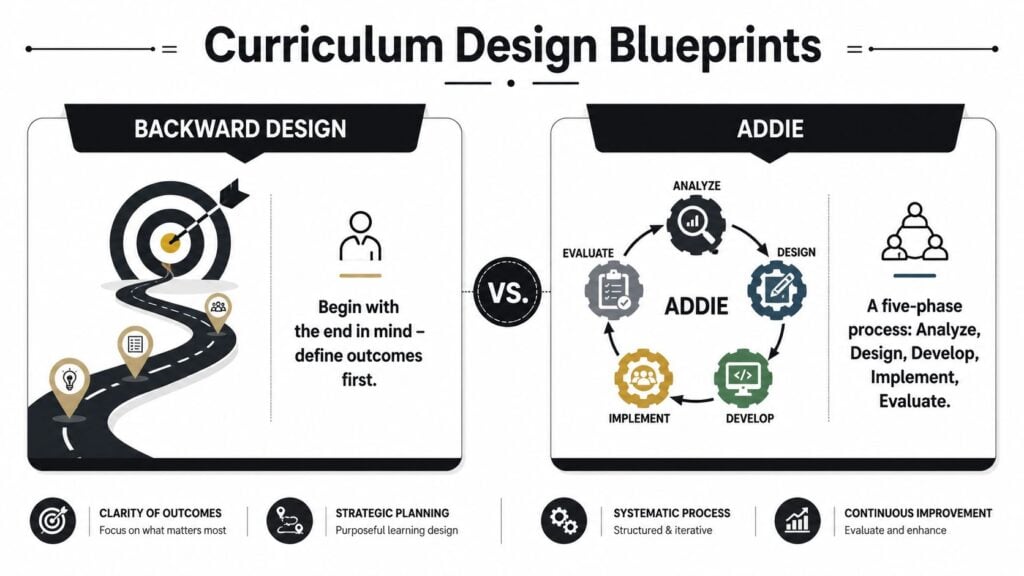
Backward Design versus ADDIE
I like to explain this as the difference between planning a trip around the destination or managing a full construction project.
| Model | Best for | Core question | Common risk |
|---|---|---|---|
| Backward Design | Transformation-focused courses | What should learners be able to do at the end? | Outcomes are strong, but production planning may be loose |
| ADDIE | Larger, multi-stakeholder course builds | How do we analyze, design, develop, implement, and evaluate systematically? | The process can get heavy for small creators |
When Backward Design is the better fit
Backward Design works well when your course promise is clear and practical.
You start with the final capability. Then you decide what evidence would prove the learner achieved it. Only then do you plan lessons and activities. This keeps your content lean because every lesson has to justify its place.
Use it when:
- You’re building a cohort course with a visible result
- You teach a skill that can be demonstrated through projects
- You want to avoid stuffing the course with “nice to know” material
This model also helps you improve video engagement through design because it forces each video to earn its role in the learning path instead of acting as filler.
When ADDIE makes more sense
ADDIE is more operational. Analyze, Design, Develop, Implement, Evaluate.
I reach for it when a course has more moving parts than a solo creator can keep in their head. Maybe you have a subject matter expert, video editor, LMS admin, facilitator, and reviewer. Maybe the training will be delivered in more than one format. Maybe approval cycles are involved.
Use ADDIE when:
- Several people touch the project: You need clearer handoffs
- The course has compliance or consistency requirements: Documentation matters
- You’ll maintain the course over time: The process needs to be repeatable
A house blueprint and a construction schedule are both useful. One clarifies what you’re building. The other keeps the crew aligned while they build it.
For many creators, the sweet spot is simple. Use Backward Design to protect learning quality. Use ADDIE-style project management to protect delivery quality.
Map Your Course with Modules and Lessons
At this point, the course starts to feel real.
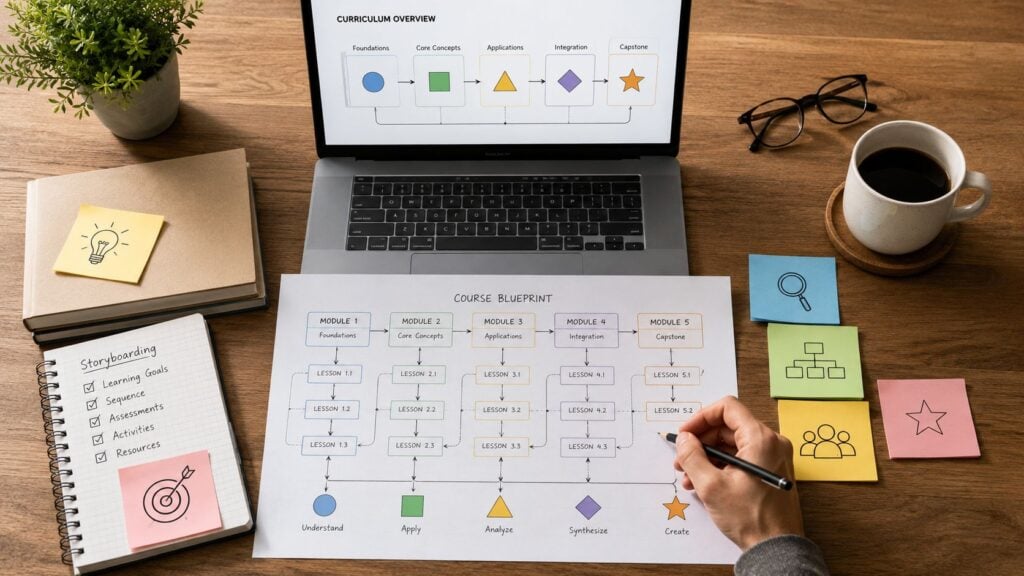
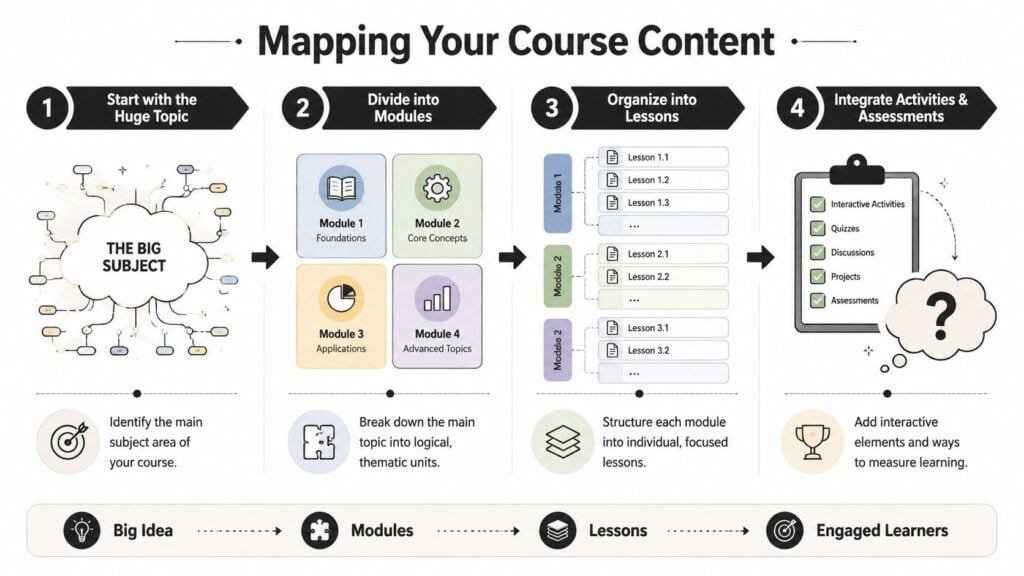
You’ve got your learner, your outcomes, and your blueprint. Now you need to convert a big topic into a sequence that feels natural to move through. Good course curriculum development depends on flow. Learners should feel like each lesson prepares them for the next one.
Start with the big shifts
Don’t outline from your folder of resources. Outline from the transformations the learner must go through.
I usually sketch these as “from-to” shifts:
- from scattered effort to a repeatable process
- from theory-heavy understanding to confident execution
- from dependence on examples to independent application
Each major shift becomes a candidate module.
Then ask what a learner needs in each module:
- A concept or model
- A worked example
- A chance to practice
- Feedback or self-check
- A bridge into the next stage
That sequence keeps lessons from turning into disconnected lectures.
A practical way to structure modules
The U.S. Department of Education’s Curriculum Development Tool Kit notes that curriculum units typically span 4 to 9 weeks in its course planning toolkit. Even if you’re not designing for a school setting, that benchmark is useful for scope control. It reminds creators that a unit should represent a meaningful chunk of learning, not a random pile of lessons.
For a digital course, I like this module test:
- One core question: What problem does this module solve?
- One visible capability: What can the learner do by the end?
- A manageable lesson count: Enough to build momentum, not enough to feel endless
- One meaningful output: Draft, plan, recording, worksheet, decision, or performance
If a module doesn’t produce a visible shift, it’s probably too broad.
For creators who need help turning rough outlines into build-ready lesson screens, a storyboard template for e-learning course design can save a lot of rework.
Sequence for confidence, not just logic
Logical order matters, but learner confidence matters too.
Put an early win near the start. Give learners a result they can feel quickly. That result doesn’t need to be the final transformation. It just needs to prove the course is usable.
This short video gives a helpful visual on mapping learning structure before production:

A simple sequencing pattern that works well:
- Module 1: Orientation and first success
- Module 2: Core method or framework
- Module 3: Guided application
- Module 4: More independent execution
- Module 5: Final performance, reflection, or rollout
If learners need to remember your table of contents to understand the course, the sequence is doing too much work and the lessons aren’t carrying enough.
Create Activities That Actually Teach
A course becomes useful when learners do something with the material.
Often, many courses flatten out. The creator records a clean set of videos, adds a quiz after each module, and assumes that information plus repetition equals learning. Sometimes it does. Often it doesn’t. Especially when the goal is performance.
Take a course called Public Speaking for Founders.
If the outcome is that founders can deliver a clear, confident pitch in real business settings, then every activity should push toward that performance. A polished lecture on storytelling might be interesting, but interest isn’t the same as capability.
Match the activity to the job
Early in that course, a short video works well for showing what strong delivery looks like. Learners need a model. They need to hear pace, pauses, and structure.
After that, a worksheet may be better than another video. Ask learners to draft a one-minute pitch using a simple framework. This changes them from observer to participant.
Then a low-stakes self-review helps. Have them record themselves on a phone, play it back, and score a few criteria such as opening clarity, structure, and delivery energy. You don’t need complicated tech to create a useful learning loop.
Here’s how that might look:
- Video demo: Show a strong and weak founder pitch side by side
- Guided worksheet: Fill in hook, problem, solution, proof, ask
- Reflection prompt: What felt awkward, and why?
- Quick quiz: Identify structural problems in sample pitches
- Practice upload: Submit a short recording
- Peer review: Give feedback using a simple rubric
Each asset has a job. That’s the key.
Use assessments that reduce fear
Learners improve faster when the course gives them room to practice badly at first.
A lot of creators jump straight to high-pressure evaluation. That’s rough on motivation. Better courses build from low-stakes practice to visible performance. In the public speaking example, don’t make the first assignment a polished investor pitch. Start with voice warmups, framing exercises, or rough takes.
Good activity design usually includes a mix of:
- Demonstration tasks: “Watch this and spot the issue”
- Decision tasks: “Choose the best opening for this audience”
- Practice tasks: “Draft and record your own version”
- Feedback tasks: “Revise based on comments or self-review”
- Transfer tasks: “Adapt your pitch for a hiring event instead of investors”
That last one matters most. It tells you whether the learner can use the skill beyond the exact example you taught.
Avoid the passive-content trap
If a lesson has no learner action, ask why it exists.
Some of the most effective teaching moments are small. A pause-and-write prompt. A checklist before submission. A template that removes blank-page paralysis. A discussion question that asks learners to compare two options from their own context.
Learners don’t need more content than they can use. They need more chances to apply the right content at the right moment.
When I review weak courses, I usually don’t see a lack of expertise. I see too much explanation and not enough designed practice.
Pilot, Get Feedback, and Make It Better
A pilot is where your assumptions meet real people.
This is the step many creators want to skip because they’re tired, eager to launch, or worried that feedback will slow them down. In practice, skipping the pilot creates slower, messier fixes later. You end up dealing with confused students, refund requests, support emails, and silent disengagement after the course is live.
A stronger standard is to treat the pilot as a dress rehearsal and only launch once navigation, content flow, and accessibility have been validated, as emphasized in this curriculum pilot and launch process guide.
What to test in a pilot
Don’t use the pilot only to ask, “Did you like it?”
That’s the least useful question in curriculum work. Ask what learners could do, where they got stuck, and what made them hesitate.
Look for friction in five places:
- Entry friction: Do learners understand how to begin?
- Instruction clarity: Are directions obvious without you explaining them live?
- Workload pacing: Does the effort match the promise?
- Activity usefulness: Which tasks helped, and which felt like filler?
- Completion blockers: Where did people delay, skip, or drop off?
The best pilot feedback often comes from behavior, not comments. Watch where learners pause. Notice where submissions go weak. See which questions repeat.
Keep feedback manageable
You don’t need a giant research operation.
Use one shared sheet or simple dashboard with columns like lesson name, issue observed, evidence, severity, and action. Group issues by pattern. If three pilot learners misunderstand the same instruction, the problem is in the course, not in the learners.
A practical way to organize this is with a course feedback survey workflow that separates usability comments from learning-impact comments.
A helpful pilot mix usually includes:
- A few representative learners from your target audience
- A clear test window with deadlines
- Short check-ins after major modules
- One end-of-pilot review focused on outcomes and obstacles
Revise with discipline
Not all feedback deserves equal weight.
If one learner asks for advanced material that doesn’t fit the course promise, don’t rebuild the curriculum around that request. If several learners struggle to understand the assignment path, fix that immediately.
The point of a pilot isn’t to satisfy every preference. It’s to improve fit, clarity, and learning performance before scale.
The best courses I’ve seen weren’t perfect at launch. They were observant. Their creators paid attention, fixed what mattered, and treated revision as part of the craft.
Your Tech Stack, Timeline, and True North Metrics
At some point, curriculum has to become a build plan.
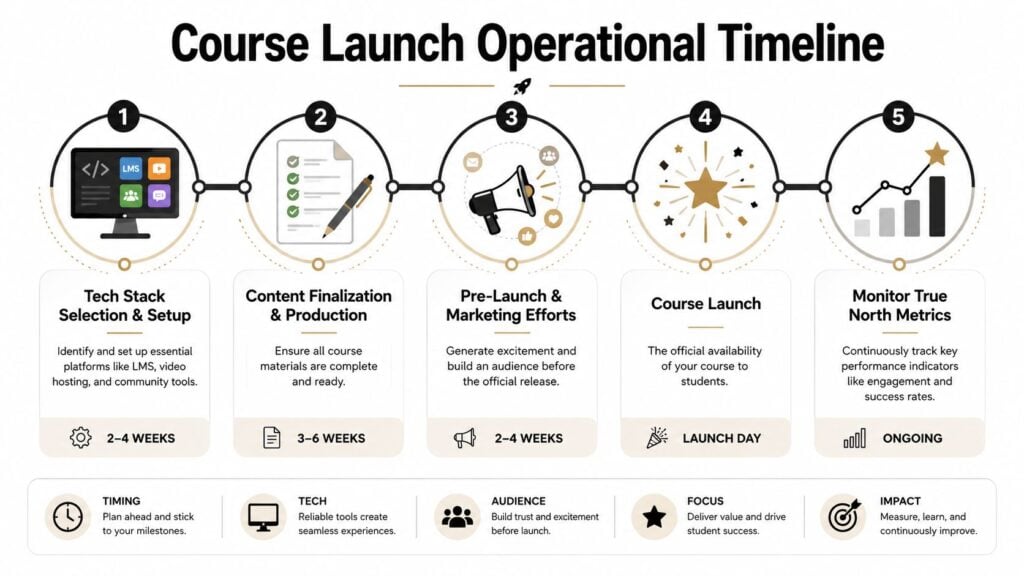
You need a place to host the course, a way to deliver video, somewhere for discussion or coaching, and a simple operational rhythm for updates. The stack doesn’t need to be fancy. It needs to support the learning experience you designed.
Pick tools that fit the teaching model
A solo, self-paced course has different needs than a cohort program with live feedback.
I usually think through the stack in categories:
- Course platform: Where lessons, downloads, and progress live
- Video hosting: Where your media streams reliably
- Community layer: Slack, Circle, Discord, or built-in discussion tools
- Assessment workflow: Quizzes, forms, submissions, peer review, rubric tools
- Operations tools: Project management, file storage, feedback tracking
The wrong stack creates hidden curriculum problems. A confusing LMS hurts navigation. Poor video organization makes revision painful. Weak submission handling can ruin otherwise strong assignment design.
A realistic production timeline
Most creators underestimate revision time and overestimate recording speed.
A practical timeline usually looks like this:
| Phase | What happens |
|---|---|
| Planning | Learner profile, outcomes, assessment decisions, module map |
| Design | Lesson outlines, scripts, storyboard, activity prompts, worksheets |
| Production | Record video, edit assets, upload materials, build platform pages |
| Pilot | Run test group, collect observations, fix friction points |
| Launch | Open enrollment or access, support learners, monitor patterns |
If you’re working alone, build in buffer for rewrites. If your script is weak, your recording day gets longer. If your worksheets are vague, your support burden climbs after launch.
Measure what matters after launch
Often, a lot of creators choose the wrong scoreboard.
Completion rate can tell you something, but it can’t tell you enough. A key challenge in curriculum development is proving whether learners can transfer knowledge into new contexts, not just recall it for a quiz. Strong curriculum should be judged by durable, observable performance change, as discussed in this research on understanding as transfer.
That changes the metrics conversation.
Watch for signals like:
- Quality of learner submissions: Are final projects getting stronger?
- Application stories: Are learners using the skill in real settings?
- Adaptation ability: Can they use the method in a different scenario?
- Confidence with evidence: Do they report change and show proof?
- Support load: Where does the course still create unnecessary confusion?
Completion tells you who stayed. Transfer tells you what changed.
If your course promises a job skill, a leadership capability, a communication behavior, or a business process, then your true north metric should connect to that performance. The best version of course curriculum development doesn’t end at “content delivered.” It ends at “learner can do the thing.”