Best Online Community Software Selection Guide

You launch your course, welcome your first students, and watch the sales notifications roll in. A week later, the energy drops. Students are logging in, but they aren’t talking to each other. Questions arrive by email instead of in the course space. A few learners finish quickly. Many drift.
I’ve seen this happen with strong courses.
The lessons can be excellent and the curriculum can be organized well, but learning still feels lonely when people move through it by themselves. That’s usually the moment when course creators start looking at online community software. Not because they want another tool, but because they want their students to feel connected, supported, and more likely to stay engaged long enough to get results.
Your Course Needs More Than Just Content
A course library can teach. A community helps people keep going.
I learned this the hard way while helping creators shape learning programs that had solid material but weak participation. Students would watch a lesson, hit a confusing point, and then disappear quietly. They didn’t always need another video. They often needed reassurance from someone a few steps ahead, a place to ask a “small” question, or a reason to come back tomorrow.
That’s where online community software changes the experience. It gives your learners a shared space to ask, answer, reflect, celebrate, and build momentum together.
The category isn’t small anymore, either. The global online community software market was valued at approximately USD 17.85 billion in 2024 and is projected to reach USD 38.50 billion by 2032, expanding at a 10.2% CAGR, according to Future Market Report’s online community software market analysis. I read that less as a software story and more as a behavior story. Organizations are moving toward integrated community ecosystems because people don’t want isolated digital experiences.
A student who feels seen is much more likely to keep learning than a student who only sees a progress bar.
For educators, that shift matters.
If you run a cohort course, a membership, a certification program, or internal training, your content is only one part of the product. The other part is the environment around it. Good online community software creates that environment. It turns “I bought a course” into “I’m part of something.”
What Is Online Community Software Really?
Online community software is a digital home for relationships around learning.
A lot of people confuse it with a forum, a chat app, or a comment section. Those tools can be part of a community, but they usually don’t carry the whole experience. I think of it this way. Your course is the library. The community platform is the campus around it.
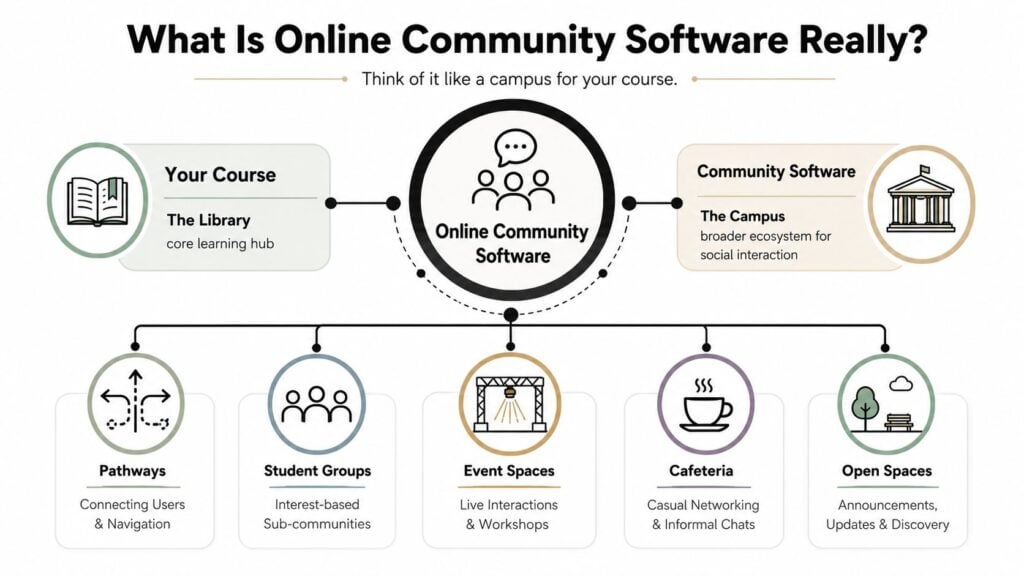
Your course is the library
The library holds the core material. Lessons, downloads, templates, recordings, quizzes. That’s where students go to learn the official curriculum.
But libraries are quiet. People don’t naturally bump into each other there.
Your community platform is the campus
The campus is where learning gets social.
It includes the discussion spaces, live event areas, private groups, member profiles, announcements, and the little moments of interaction that help students feel less alone. In a good setup, learners can move from lesson to question to conversation without friction.
That difference matters because a forum often centers on topics, while a chat app centers on speed. A true community platform has to support both structure and belonging.
Here is how I explain the difference to course creators:
| Tool type | What it does well | Where it falls short |
|---|---|---|
| Forum | Good for organized discussions and searchable answers | Can feel formal or inactive if nobody guides it |
| Chat app | Fast conversation and live energy | Important ideas get buried quickly |
| Community platform | Brings together discussion, events, member spaces, moderation, and analytics | Usually takes more setup and clearer strategy |
Two common ways to set one up
Some platforms act like a standalone campus. Tools such as Circle-style community spaces are built to be the central destination.
Others work more like an extension of an existing site. A WordPress setup with BuddyBoss-style functionality can feel like a new wing added onto your course website.
Neither approach is automatically better. The key question is whether your learners should visit a separate hub or experience the community as part of the place they already use.
Practical rule: If your students already log into one main learning portal every week, adding a disconnected community can create more friction than value.
The best online community software doesn’t just store conversations. It supports the habits, rituals, and relationships that make learning stick.
Core Features Every Community Platform Needs
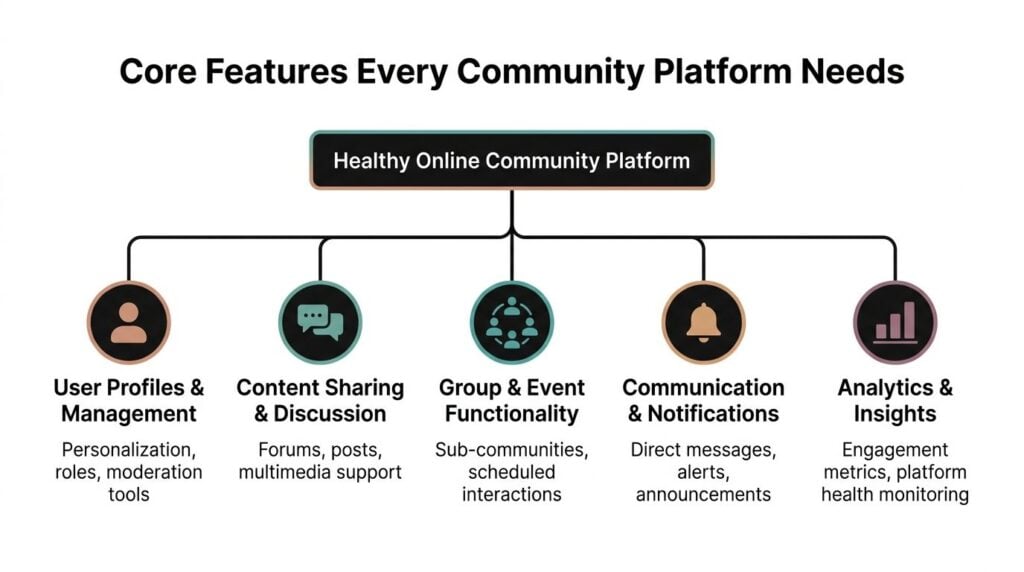
When people shop for online community software, they often get distracted by polished design, flashy apps, or long feature lists. I think it’s smarter to start with the basics that keep a community usable, safe, and sustainable.
According to Discourse’s overview of core community features, the five essential features that form the foundation of any functional community platform are Signup, Search, Moderation, Analytics, and Data Ownership.
Signup should feel easy, not risky
If joining your community feels complicated, some learners won’t bother.
That sounds obvious, but I still see creators send students through awkward login steps, mismatched passwords, or unclear invitations. A smooth signup flow reduces confusion and sets the tone. People should know where to click, what happens next, and why the space is worth joining.
For educators, this first impression also communicates whether the community is active or neglected.
Search protects your best content from disappearing
Search is one of the most underrated features in community software.
When students ask the same question every week, weak search creates repetition. Strong search helps people find old answers, useful threads, and prior workshop notes before posting again. That’s good for learners, and it’s good for your team.
Some high-performance communities go further than native platform search. FeverBee’s community benchmarks note that communities using advanced search setups such as Coveo or SearchUnify have seen improved discoverability, and benchmarks cited there show 30 to 40% fewer manually counted questions per day and a 25% increase in accepted solution rates after implementing advanced search.
Moderation shapes the emotional climate
Moderation isn’t only about spam control. It’s about protecting the kind of learning environment you want.
A healthy platform should let you report content, warn users, ban bad actors, assign moderator roles, and review flagged posts. Wylo’s overview of moderation features highlights options like reports, bans, warnings, auto-filters, and manual approval systems. That’s the practical side.
The cultural side matters just as much.
If beginners fear being mocked, they stop posting. If advanced members dominate every thread, newer students read silently and leave. If moderators step in only when things explode, trust drops.
For a deeper look at what this looks like in practice, I like this guide to community moderation tools for educators and creators.
Analytics should help you notice people, not just numbers
Good analytics tell you who is active, what topics are working, and where people seem to stall.
Forj’s discussion of online community platforms describes dashboards that surface engagement patterns, churn risks, and content opportunities. GroupApp’s feature guide also points to active member counts, popular content, and engagement tool usage as useful community measures.
What I care about most is whether analytics help you act. Can you spot a quiet member who used to participate? Can you see that one discussion format keeps pulling people back in? Can you identify the lesson that generates the most confusion?
Data ownership matters more than people expect
If your community grows, your discussions become an asset.
You don’t want to lose member history, discussion archives, or learning patterns because your platform makes exports hard or keeps data locked inside its system. This doesn’t feel urgent at the beginning. It becomes urgent later, when you want to migrate, analyze trends, or protect your business.
A community isn’t just a place where people gather. Over time, it becomes a knowledge base. Make sure you can keep what your members helped create.
Choosing and Integrating Your Community Platform
Picking online community software is partly a software decision and partly an operations decision. The tool has to match your teaching model, your tech stack, and the way your learners already behave.
I usually start with a simple question. Do you want your community to be the main destination, or do you want it to support a destination you already have?
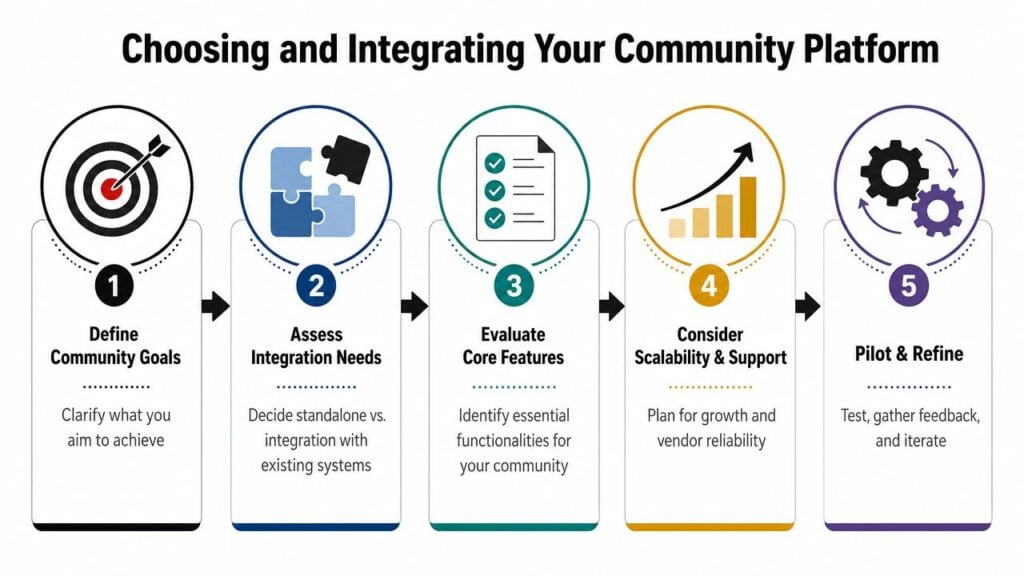
Standalone or integrated
A standalone platform gives your community its own identity. That can work well for memberships, masterminds, and communities where discussion is the product.
An integrated setup fits better when the course platform should stay central. For example, if your learners already move through WordPress, LearnDash, Kajabi, or a branded training portal, adding a connected community layer can feel smoother than asking them to adopt an entirely separate destination.
Here are the tradeoffs I usually map out:
| Approach | Best fit | Watch out for |
|---|---|---|
| Standalone platform | Memberships, paid communities, peer interaction-heavy programs | Learners may ignore it if it feels separate from the course |
| Integrated platform | Course businesses that want one login and one home base | Setup can be more technical |
| Self-hosted setup | Teams that want deeper control | Maintenance becomes your responsibility |
| Managed service | Small teams that want speed and support | You may have less flexibility |
If you’re still narrowing options, it helps to compare community software across creator and business use cases before booking demos. Not because a roundup will choose for you, but because it can show you how differently these products are positioned.
Ask better questions before you buy
The wrong selection process usually starts with features. The better one starts with friction.
I ask questions like these:
- Where do learners already log in most often? If they already use your LMS daily, don’t make them hunt for the community.
- What kind of interaction do you want most? Ongoing discussion, live events, peer feedback, local meetups, office hours, or support threads all push you toward different tools.
- Who on your team will run this? A powerful platform with weak staffing often underperforms.
- How important is branding control? Some educators care a lot. Others just need a clean, stable member experience.
- What happens if you grow fast? Member limits, admin seats, and upgrade rules matter more than they seem to on day one.
Integrations are where good plans often break
On paper, many platforms look similar. In practice, their integrations create a huge difference.
Platforms that don’t connect natively with LMS, payment, and email tools force teams into workarounds that create data silos. According to BuddyBoss’s roundup of community management software, 68% of community managers report churn signal misalignment when analytics are not integrated with membership and course delivery systems.
That sounds technical, but the everyday version is simple. You can’t clearly tell who stopped paying, who stopped learning, and who just stopped visiting the community.
A simple integration map
For most educators, these are the key connections to think through first:
Payment and access. If you sell through Stripe, MemberPress, or a checkout tool, new buyers should get the right community access automatically. Nobody wants a manual welcome process forever.
Course delivery
If you use LearnDash, Kajabi, or another LMS, decide whether course progress should live beside the community or link to it. That affects navigation and support requests.Email and automation. Mailchimp, ConvertKit, HubSpot, and Zapier-style automations help you send reminders, trigger onboarding messages, and segment inactive members.
CRM and learner records. This matters more for teams selling cohorts, certifications, or corporate training. You want a clear picture of member activity across systems.
When a student asks for help, your team should be able to see their payment status, course access, and community activity without opening five tabs.
I also recommend reviewing your community platform choice through the lens of your full creator business, not as a separate app purchase. This piece on choosing a community platform for creators is useful for that broader decision.
The best implementation feels boring in the best way. People join, get access, know where to go, and don’t need a tutorial just to participate.
Driving Engagement Beyond Day One
The software matters. Culture matters more.
I’ve watched creators spend weeks comparing platforms, then lose momentum because they treated community as a feature instead of a practice. The platform can make participation easier, but it can’t create trust, rhythm, or relevance by itself.

According to this analysis of why small online communities still matter for developers, 60% of small online communities fail due to unclear purpose, poor onboarding, or toxic cultural norms, not software limitations. I think educators should take that seriously. Most communities don’t fade because the button colors were wrong. They fade because nobody taught members how to belong there.
Start with onboarding, not announcements
A new member should never have to guess what to do first.
When someone joins, I want them to understand three things quickly:
- Why this community exists
- What kind of participation is encouraged
- Where to begin without feeling awkward
That means your onboarding should be more than a welcome post. It should include a guided first step, a simple norms document, and one easy prompt that invites a reply. In a course community, that could be “Tell us what you’re working on this month” or “What’s the first lesson you’re starting with?”
A good onboarding flow removes social risk. People post when they know what kind of post belongs.
Build rituals people can rely on
Communities get stronger when members know what happens each week.
You don’t need complicated programming. You need repeatable patterns. A Monday planning thread. A Wednesday win check-in. A Friday feedback request. An office hour every month. A monthly showcase for student projects.
Those rituals reduce the pressure to invent fresh engagement every day. They also give quieter members a familiar doorway into participation.
A few formats I like for learning communities:
- Progress threads for accountability
- Feedback posts for works in progress
- Member spotlights to reward contribution
- Prompt-based discussions tied to lesson content
- Live Q&A sessions for bottlenecks and momentum
If you want a practical framework for this kind of rhythm, this guide on community engagement best practices is worth keeping nearby.
Reward useful behavior, not just visible behavior
Many communities accidentally reward the loudest people.
That’s a mistake. In a learning space, some of the most valuable members are the ones who answer beginner questions kindly, summarize a workshop clearly, or welcome new people without making it a big performance. Your software may offer badges, member tags, or highlighted posts. Use those tools to reinforce generosity, clarity, and consistency.
I also like to create lightweight leadership roles. Community hosts, project feedback volunteers, accountability partners, or event greeters can all help distribute the work of belonging.
Here’s a helpful walkthrough on community engagement strategy from a social reporting angle if you also need to prove social media marketing ROI. It won’t replace community strategy, but it can help you explain engagement value in business terms to a team or client.
Use the data to spot silence early
You don’t need to obsess over dashboards. You do need to notice absence.
Look for patterns like these:
| Signal | What it may mean |
|---|---|
| Fewer introductions from new members | Onboarding may be unclear or uninviting |
| Lots of views, few replies | People are consuming, not connecting |
| The same members answer everything | You may need broader participation and better prompts |
| Questions go unanswered | Trust drops quickly when help feels uncertain |
Later in your engagement cycle, it can help to watch a short strategy breakdown like this one before refining your routine:

A healthy community doesn’t feel busy all the time. It feels responsive, clear, and worth returning to.
What a Thriving Community Looks Like
A yoga instructor’s community often works best when it supports practice between classes. Members post how many sessions they completed that week, ask for modifications, and share what made a routine hard to stick with at home. The software matters, but what really helps is the tone. Beginners feel safe asking basic questions, and experienced members model consistency instead of perfection.
A coding bootcamp community has a different rhythm. Students need project feedback, troubleshooting help, and peer encouragement when they get stuck. The strongest spaces I’ve seen make it easy to post code questions in the right area, search old answers, and join live sessions without confusion. The culture says, “Show your work, ask clearly, help generously.”
A business coach running a premium mastermind needs something else again. Privacy matters more. Smaller group spaces matter more. Curated discussion often matters more than open posting. In that environment, online community software becomes the container for structured accountability, reflection, and decision-making.
Inclusion changes the quality of the whole space
The next big question isn’t only which platform looks best. It’s who your community implicitly excludes.
This issue brief on online content for low-income and underserved Americans points to a major gap in accessibility for underserved communities. In practice, many users need things like offline modes, SMS integration, or multilingual support, and those features are often not built in by default.
That matters for educators more than many people realize.
If your community assumes fast internet, high confidence with digital tools, and one dominant language, some learners will stay invisible even after they join.
A thriving community looks active on the surface. Underneath, it also feels navigable, welcoming, and usable for people with different constraints.
That’s the standard I’d use when choosing online community software. Not just “Can this host discussions?” but “Can this help different kinds of learners participate fully?”