Instructional Design for Teachers: A Simple Five-Step Plan

Nine at night, marking on one side of the kitchen table and a laptop on the other. I'm building tomorrow's lesson, and I've decided the worksheet is good because it took me forty minutes to make.
It wasn't good. I found that out at 9:05 the next morning, when half the class stalled on question one and two kids finished before everyone else had written their names.
That gap between what I planned and what happened is the whole subject here. Instructional design for teachers is the thinking you do before the worksheet exists, and it's the part most of us were never taught to do on purpose.
What Instructional Design Means in a Classroom
The worksheet goes out. Question one lands and the room splits three ways: hands up, blank stares, and one kid asking whether this counts for marks. The sheet was fine. The design behind it wasn't.
Instructional design is three decisions made in order. What should students be able to do by the end? How will I know they can do it? Which activities will get them there? Everything else, the slides, the group task, the quiz, hangs off those three answers.

Here's the analogy I use with colleagues. A lesson plan is the recipe card. Instructional design is the cook's head: why these ingredients, why this order, and what the taste test looks like before the plate leaves the kitchen. Two cooks can follow the same card and produce very different dinners.
The usual difference: most planning starts with a topic and an activity. We're doing fractions, so let's do a pizza task. Design starts with the gap between what students can do now and what they need to do by Friday.
That gap is where professional learning often misses too. In TALIS 2018, 94% of teachers across OECD countries reported taking part in at least one professional-development activity in the previous 12 months, and 82% said it had a positive impact on their work. Yet only 44% took part in development involving peer or self-observation, coaching or networking, according to the OECD's TALIS 2018 report. Showing up to a session is not the same as changing what happens on Tuesday.
You already run these steps in your head. Naming them just means you can run them in order, and get faster.
Start here: pick the one lesson where students keep making the same mistake. That lesson becomes your case study for everything below.
A Five-Stage Cycle for Planning Any Lesson
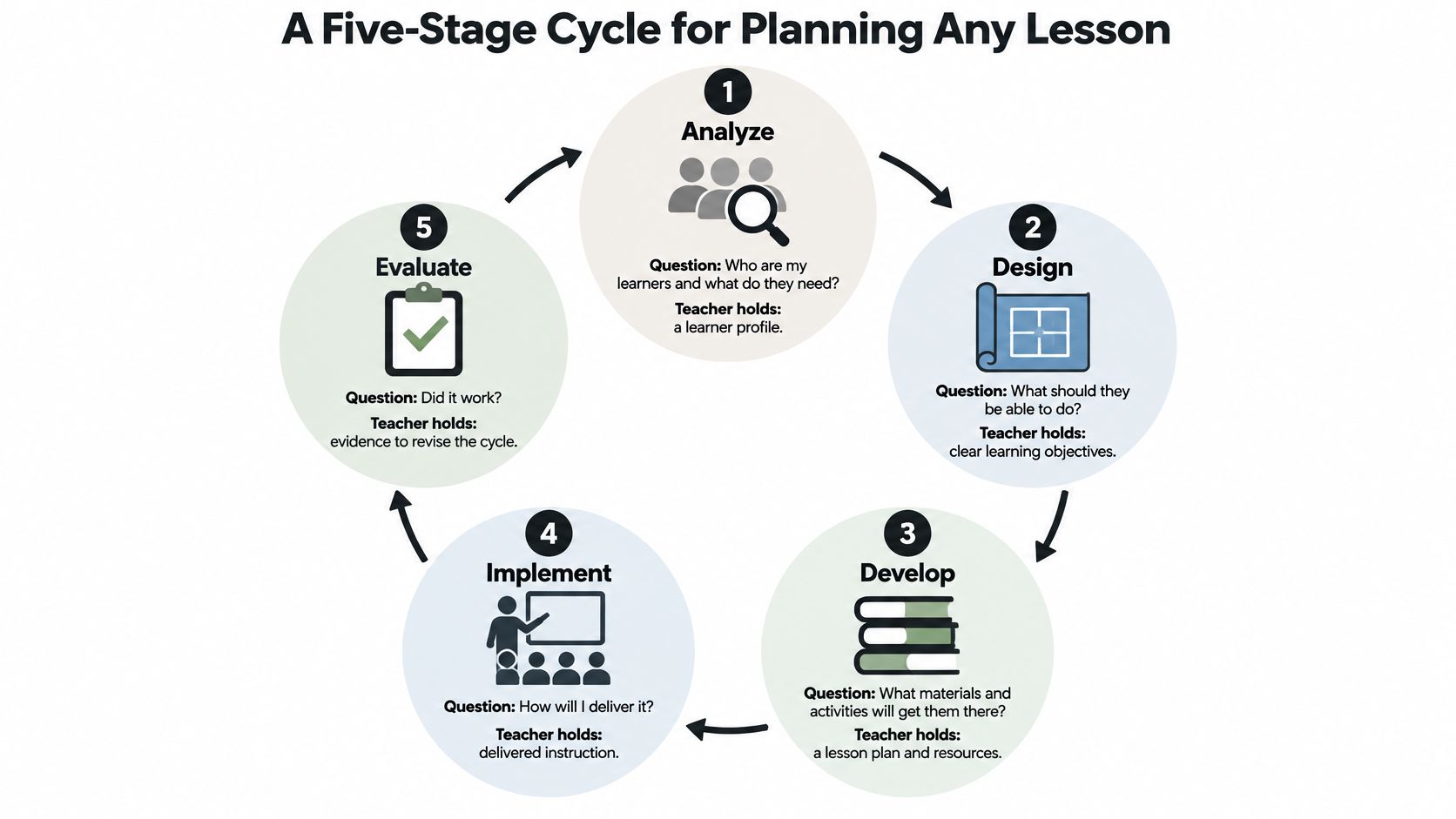
A Year 8 fractions class can look ready for a new topic until students meet denominators with more than one common factor. A five-stage cycle helps turn that gap into a lesson with a clear purpose and a way to check what students learned.
- Analyze the learners. What do students already know, and where do they get stuck? Note prior knowledge, recurring misconceptions, available time, and access needs.
- Set objectives. What should students be able to do by the end? Write one to three objectives that describe observable learning.
- Design activities. Which tasks let students practise those objectives? Put the tasks in an order that supports learning.
- Plan feedback. Where will you check student work, and how will you respond? Choose checkpoints and a response for each.
- Evaluate. Did the lesson meet its objectives? Record a brief observation and decide whether to reteach or move on.
The cycle follows the lesson from its starting point to the next decision:
For the fractions lesson, analysis shows that students can find common denominators but struggle when the denominators share more than one factor. The objective is: “Add fractions with unlike denominators and explain the steps in writing.” Students study a worked example, solve three problems in pairs, then identify an error in another solution. While they work, you check their steps. A two-question exit ticket shows what they can do independently.
Sort the tickets into three groups: students ready to move on, students who need a short review, and students who need more practice. That decision shapes the next lesson.
The plan can change when your starting information changes. If students already understand equivalent fractions, spend less time on visual models and more on word problems. The five stages stay the same; the tasks respond to the class.
With practice, planning one lesson through all five stages can take less than an hour. First attempts may take longer. For another planning structure, see this guide to making a lesson plan.
Know Your Learners and What to Keep When Time Is Short
Stage one carries the most weight and usually gets the least time. When Thursday night arrives and you're teaching five periods tomorrow, analysis is the first thing to disappear.
Three questions get you most of the way. What do students already know? Which mistake keeps showing up? What access needs will shape this lesson, whether that's reading level, language, device access or fine motor?
Evidence is cheaper than people assume. A two-question entry slip, last week's exit tickets, the last unit test, or two minutes of asking the class what felt hard. That's a learner profile. It doesn't need a document or a template.
On a rushed week, something has to give. Not everything should.
Practical rule: keep the objective and the exit check. Without them you can't tell whether the lesson worked, and a lesson you can't evaluate is just time passing.
| Step | Keep when short | Shorten or cut when short |
|---|---|---|
| Analyze learners | Keep one quick question about prior knowledge | Reuse last week's profile instead of writing a new one |
| Set objectives | Keep one observable objective | Cut any objectives beyond the main one |
| Design activities | Keep the single task that practices the objective | Cut optional extension tasks |
| Plan feedback | Keep one in-class response step | Cut written comments students are unlikely to read |
| Evaluate | Keep the exit check and the reteach or move-on decision | Cut detailed notes down to one line |
A lesson built this way still counts as designed. It's a smaller version of the same thing, not an abandonment of it.
So which of those steps would you protect first if tomorrow got away from you? Answer that and you've found your own design priority.
Writing Objectives That Shape Every Activity
Here's the before and after that convinces many readers.
Before: "Understand photosynthesis."
After: "Explain in two sentences how light energy becomes glucose in a leaf."
The second one tells you what to teach, what to check and what a student's work should look like. The first one could be satisfied by a nod.
A workable objective has three parts: an action the student performs, a condition such as two sentences, a diagram, or working without notes, and a standard that tells you what good enough looks like. You don't need all three every time, but the action is essential.
Verbs do the heavy lifting, which is why Bloom's taxonomy earns its place on the staffroom wall.
| Level | Action verbs | Sample objective |
|---|---|---|
| Remember | list, define, name | List the three main stages of the water cycle. |
| Understand | explain, summarize, describe | Explain in two sentences why the water cycle needs the sun. |
| Apply | solve, use, calculate | Calculate the area of a rectangle to fit a given floor plan. |
| Analyze | compare, classify, contrast | Classify five sentences as simple, compound or complex. |
| Evaluate | justify, critique, judge | Justify which of two historical sources is more reliable. |
| Create | design, propose, compose | Design a simple experiment to test one factor that affects plant growth. |
One verb per objective. Match the verb to the task and to the exit check. If the objective says compare, the activity must ask students to compare, and the exit question must let you see the comparison. When those three drift apart, students do the activity and miss the point.
Words like understand, appreciate and know are traps. You can't see them in student work. My test is simple: could two colleagues watch the same student and agree on whether the objective was met? If not, the verb needs replacing.
Lower-level verbs suit the first lesson of a unit, when students need the building blocks. Save evaluate and create for later, once there's something to evaluate. For a deeper look at how the levels map onto tasks, this explanation of Bloom's taxonomy and learning objectives is worth twenty minutes.
Now rewrite one objective from your current unit using a verb from that table, and name the task that would show it.
Practice Design Using Retrieval, Spacing and Interleaving
Rereading feels like revision. It's comfortable, it's fast, and it fades within days. Practice that makes students produce an answer does more, provided the practice forces production.
A review of the evidence on testing, spacing and interleaving is blunt about this: the benefits depend on whether the practice makes students pull the answer out of memory. Dropping a quiz into a lesson does nothing if students can get there by recognition, copying or pattern matching.
Three specifications turn review into practice.
Retrieval means students generate the answer from memory. A five-minute opening quiz on last week's content, books closed, three questions, no notes. Not a recap from you. Generation from them.
Spacing means returning to the same idea after a gap, then stretching the gap once they've succeeded. A concept from week one comes back in week three and again in week six. A forgetting curve chart helps here. Something like Quotabl's forgetting curve tool shows how quickly recall drops without reactivation, which makes it easier to justify why you're not done with last month's topic.
Interleaving means mixing problem types in one set so students have to choose the method, not repeat the one you just demonstrated. Ten questions of the same type teaches the procedure. Three types shuffled together teaches them to select it.
Here's a week you could copy for almost any topic.
- Monday: entry quiz with three questions from earlier units, five minutes, no notes.
- Wednesday: mixed set of three problem types, shuffled, with the worked example removed.
- Friday: one cumulative question from two lessons back, plus a "explain your method" prompt.
Then read the results properly. A wrong answer tells you to reteach, or to build a better cue. A right answer with no explanation is often fragile knowledge wearing a costume, so ask the student to justify it out loud before you count it.
One warning on item design. Multiple-choice recognition items let a student guess their way to a correct answer and learn very little. Keep at least half the questions in a form that requires producing the answer in words, numbers or a diagram.
Pick one topic this week and sketch that Monday, Wednesday, Friday schedule for it. It takes about ten minutes and it replaces the rereading you were going to assign anyway.
Feedback Loops That Lead to Real Improvement
Feedback is information about performance measured against a learning goal. That's the definition worth keeping, because it rules out most of what fills a marking pile.
The Education Endowment Foundation's feedback evidence summary puts the average impact at approximately six additional months of progress, based on 155 studies, while noting wide variation and some negative effects. Some feedback makes things worse. Usually that's feedback delivered too late, too vaguely, or at a volume nobody can act on.
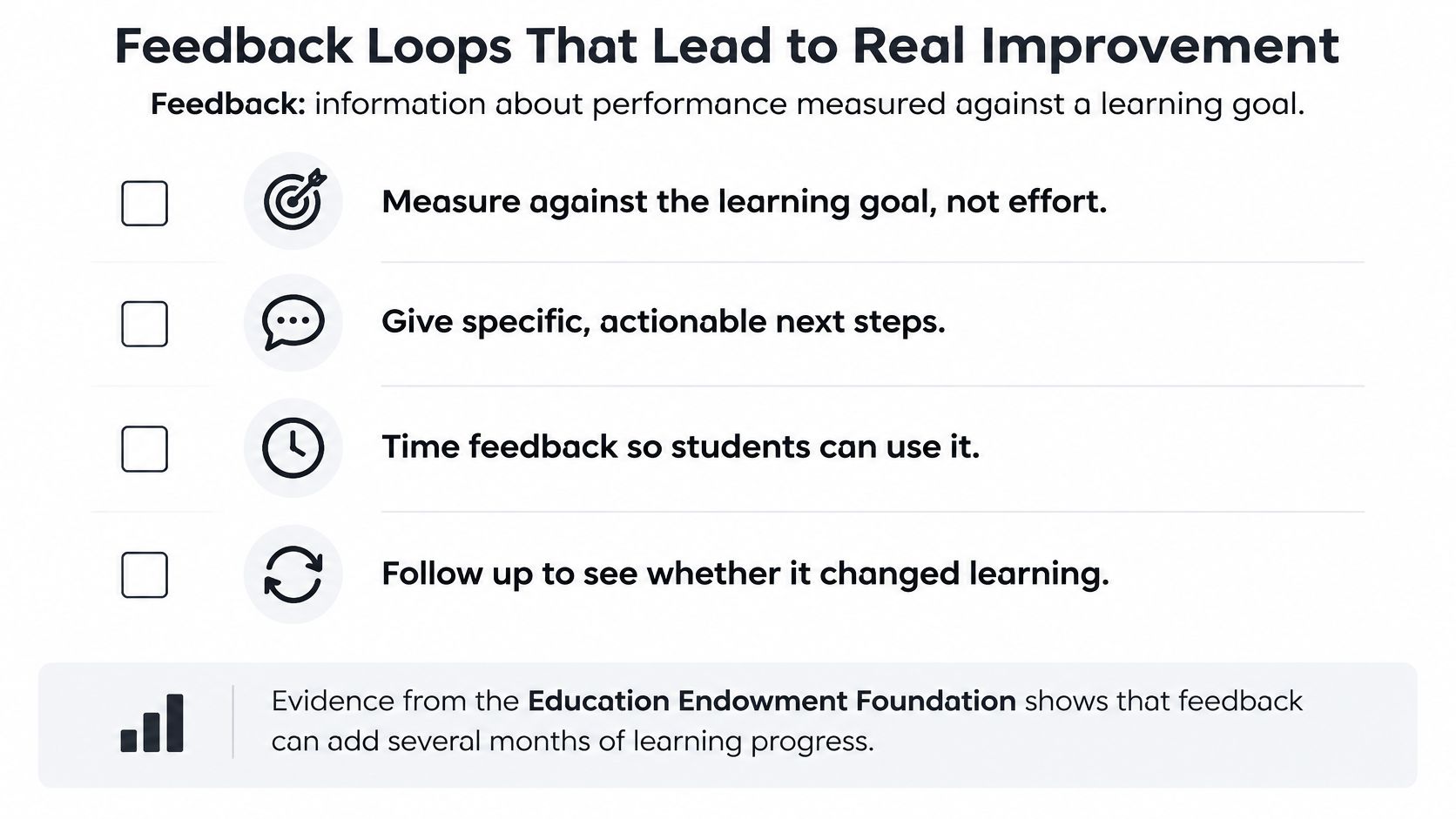
The five-move feedback routine
- Share success criteria before anyone starts. Students can't hit a target they can't see.
- Collect evidence. Questioning, a quick look at an exemplar, or a short exit task.
- Find the most important misconception. One, not five. The error half the room made.
- Give one or two next steps. Short enough to remember while the paper is still in front of them.
- Require a response before the bell. A revision, a retry, or a spoken explanation.
That last move is where most of us lose the benefit. Research this clear is easy to agree with and hard to timetable.
Say a science exit ticket shows students confusing mass with weight. It's not a marking problem, it's a design problem. Two minutes of reteaching with a balance on the bench, then the students redo the same two questions and you look at the second attempt. That's a loop, and it closes inside the lesson.
A short video refresher, useful before you try the routine with a real class:

What to leave out
Don't chase volume. Feedback works when it targets the task, the subject knowledge, or the student's self-regulation, and it fails when it targets fixed traits like intelligence. Keep the criteria clear and peer feedback can do real work. The same goes for digital feedback tools, provided students know exactly what they're checking against.
Pick one lesson this week where students could revise their work before they leave the room. If you can't find one, that's the lesson to redesign.
Designing for Every Learner With Universal Design for Learning
Universal Design for Learning starts from a simple premise. Build the options into the plan from the start rather than retrofitting them for one student after the lesson falls apart.
CAST organises the framework around three principles: engagement, representation, and action and expression. Those break down into nine guidelines, per the CAST UDL guidelines. The principles are broad. The guidelines are where planning happens.
| Principle | Guideline | Classroom move |
|---|---|---|
| Engagement | 7. Recruit interest | Offer a choice of topic or context within the unit |
| Engagement | 8. Sustain effort and persistence | Make goals visible and vary the challenge level |
| Engagement | 9. Self-regulation | Give a self-assessment checklist and a goal-setting sheet |
| Representation | 1. Perception | Pair key text with an image, audio or a diagram |
| Representation | 2. Language and symbols | Define vocabulary in a glossary with worked examples |
| Representation | 3. Comprehension | Model the thinking with a worked example and labeled steps |
| Action and expression | 4. Physical action | Allow different ways to move, handle and navigate materials |
| Action and expression | 5. Expression and communication | Accept written, spoken, drawn or built responses |
| Action and expression | 6. Executive functions | Provide planning templates and scaffolds that are reduced over time |
Planning the options in advance
Look at guideline 5 for a moment. Instead of every student writing an explanation, some record a short presentation, some draw a labeled diagram, and some build a model. The objective hasn't changed. The route to showing it has.
Scaffolds work the same way. Sentence starters and planning templates are supposed to shrink as fluency grows, so the support doesn't become the ceiling. CAST spells out the mechanics of varied response, of using multiple media for communication, and of graduated support for practice and performance in its guidance on action and expression. If you want to see these moves inside real lesson plans rather than a list of guidelines, these UDL examples in e-learning show the same principles applied to actual tasks.
Engagement follows its own logic, from attracting interest through to students monitoring their own progress. Choice within a topic, visible goals, mastery-oriented feedback and a self-assessment checklist at the end all draw on the engagement guidelines.
Where teachers get stuck with UDL
The common mistake is treating UDL as a checklist to complete rather than a set of trade-offs to weigh. Adding audio to a text helps some students and adds bandwidth, cognitive load and maintenance work for others. Adding a visual option may help a student who reads below grade level and distract one who doesn't need it.
There's no single representation that works best for every learner. That's the reason alternatives belong in the design, not in a plan B folder.
So choose media that serve the objective, not media that look impressive. If a diagram doesn't help a student explain the water cycle, it's decoration.
Pick one principle for your next lesson and one guideline inside it. Representation plus guideline 2 is a good first move, because vocabulary is where a lot of lessons lose people.
Using AI and Local Context Without Losing Judgment
The pitch is compelling. In a 2025 Gallup survey of 2,232 U.S. public-school teachers, about three in ten teachers used AI weekly, and those weekly users estimated saving 5.9 hours per week. Teachers mostly used it for lesson preparation, worksheets and activities, and adapting materials for student needs.
Here's the catch, and it's the part the time-saving number leaves out.
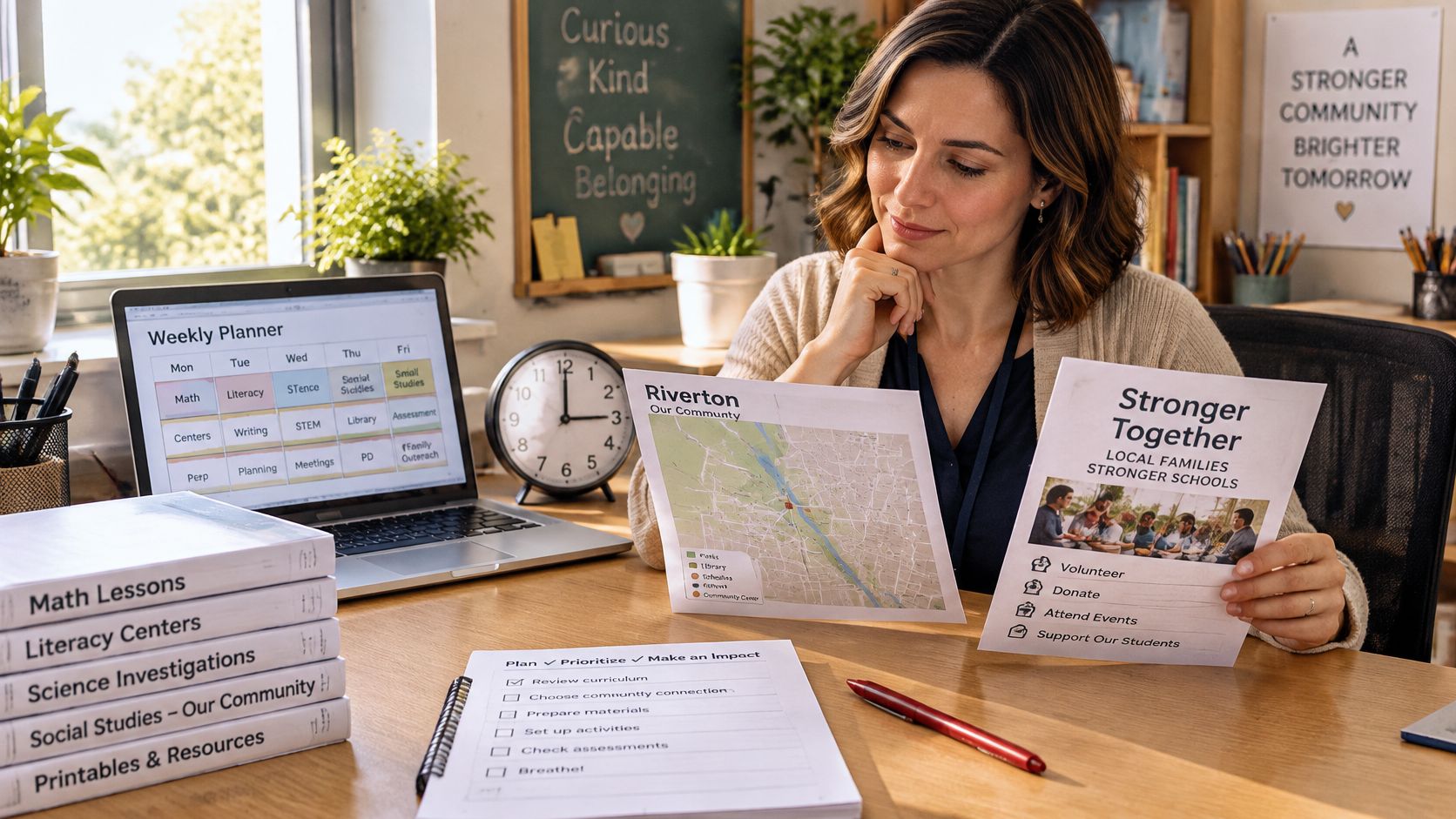
Some of that saved time comes back as checking work. Verifying facts, catching a reading passage pitched three grade levels too high, fixing a task that doesn't match the standard, and re-teaching something the generated material muddled. The same Gallup report notes that across tasks, 60% to 84% of users reported time savings and 7% or fewer said AI increased the time required. Those numbers are real. They just don't tell you where the checking went.
The global picture is patchier. An OECD summary of TALIS 2024 data cited in that same report found only 36% of lower-secondary teachers across OECD countries had used AI for work in the preceding 12 months, with large differences between countries.
A routine that keeps the judgment with you
- Write the objective first. Before you open a tool. The objective is the thing the tool serves.
- Ask for two or three alternatives, not one finished product. Choosing between options keeps you in the designer's seat.
- Check facts, reading level and cultural fit. A passage that names unfamiliar references costs you a lesson's worth of explanation.
- Adapt for the students in front of you. Language support and cognitive demand are separate dials, and simplifying the language is not the same as lowering the thinking.
- Write down what you changed. One line. It becomes your evidence for next time.
Local context isn't a final review step
A mixed-methods study of 1,043 teachers found AI integration blocked by infrastructure, workload, content compatibility, and linguistic or cultural mismatches, and reported a small reduction in teaching-demand stress after the intervention (effect size d = −0.436), published in the study on teacher AI integration. Infrastructure and language are design constraints, not excuses.
Practical rules that follow from that. Prioritise the barriers that stop a student reaching the objective, not the ones that are easiest to fix. Prepare a printable or low-bandwidth version of anything you'll rely on. Test the material with a student or a disability specialist before it goes live.
I've kept an AI-drafted reading passage exactly once without rewriting it, and only after a student with limited English read it aloud to me and I watched where she stumbled.
Write down the tasks you'd happily hand over, and the one check you'd never skip. That second list is your professional judgment, written down where you can see it.
Redesign One Lesson and Decide What Comes Next
Pick the lesson where the exit tickets usually go quiet. Put the plan on paper in one prep block, and let the cycle set the order instead of a blank page.
Start with the learners: ask one question that shows prior knowledge, then write an observable objective with a verb from the table. Choose one retrieval task and one spaced review. Add a single feedback checkpoint with revision built in, then give students one small UDL option, such as choosing how to respond.
Teach it and read what students produce at the checkpoint. Use the exit task to decide what happens next. When most students meet the objective, move on. When the same error keeps surfacing, reteach with a different cue before the next lesson rather than repeating the explanation louder.
Keep one line on what changed. That line turns planning from memory into evidence.
Show the one-page plan to a colleague, since a fresh reader often spots gaps the planner can't see.
Then keep a design log: one dated page per unit with what you tried and what you would keep. When time runs out, hold onto the objective, the retrieval task, the checkpoint, and the note; cut the rest first. After a term, each unit gets easier to plan than the one before it.
For follow-up reading on planning digital lessons and choosing learning platforms, LearnStream publishes guides, tips, and reviews of online learning platforms. Start with the lesson you picked above, run the cycle once, and see what your exit tickets tell you.