AICC vs SCORM Differences Explained

You finish building your course. The slides look good, the quiz works, and the export menu gives you a choice that feels way more technical than it should.
AICC or SCORM?
For a new course creator, that moment is annoying because it sounds like a developer decision. In practice, it affects whether your course uploads cleanly, tracks learner progress properly, and keeps working when a client moves to a different LMS later.
I’ve seen people treat this like a minor export setting. It isn’t. These standards are the rules your course uses to communicate with an LMS, and when you pick the wrong one, the pain usually shows up later. You get failed imports, broken tracking, support tickets, and that familiar message from a client saying, “The course opens, but completion isn’t recording.”
If you’re trying to make sense of the options in front of you, this guide will help. I’m focusing on AICC vs SCORM differences explained in practical terms, not in spec-sheet language. And if you’re also weighing newer standards, this guide on SCORM vs xAPI vs cmi5 differences is a useful next read.
Choosing Your E-Learning Standard AICC vs SCORM
Most course creators don’t meet AICC and SCORM in a textbook. They meet them while exporting from Articulate Storyline, Adobe Captivate, iSpring Suite, or another authoring tool and wondering which radio button will cause the fewest problems.
That confusion makes sense. Both standards exist to help a course and an LMS work together, but they come from different eras and solve the problem in very different ways.
Here’s the short version early, because it helps frame everything else.
| Criterion | AICC | SCORM |
|---|---|---|
| Typical setup | More manual and configuration-heavy | Usually simpler to upload and launch |
| Packaging style | Separate descriptive files, often with externally hosted content | Single ZIP package with imsmanifest.xml |
| Communication method | HTTP/HTTPS text exchanges | JavaScript API calls inside the LMS |
| Fit for modern LMSs | Mostly legacy or niche use | Common default for commercial LMS deployments |
| Best current use case | Client requirement, legacy environment, specific hosting constraints | Most new online course projects |
If you only need the practical answer, here it is.
Practical rule: If nobody has explicitly asked for AICC, choose SCORM.
That’s the choice that usually saves time during upload, testing, handoff, and future migration.
The reason this matters today is simple. Modern course production is rarely just about publishing once. You may need to send the same module to multiple clients, upload it into a partner LMS, swap vendors next year, or troubleshoot tracking without engineering help. In those situations, standards stop being abstract. They become operational.
AICC still appears in the wild, so it’s worth understanding. But for those currently building courses, SCORM is the format that fits the tools and workflows they’re already using.
Where AICC and SCORM Came From
The history matters because it explains why these standards feel so different when you work with them.
AICC came from an earlier phase of digital training. It was built for a world where organizations needed a way to make training content work across systems, especially in environments where web-based delivery wasn’t the whole story yet. That origin shows up in how AICC handles communication and hosting.
SCORM arrived later, in the web LMS era. It was shaped around browser-based learning, which is why its workflow feels more familiar if you build online courses today.
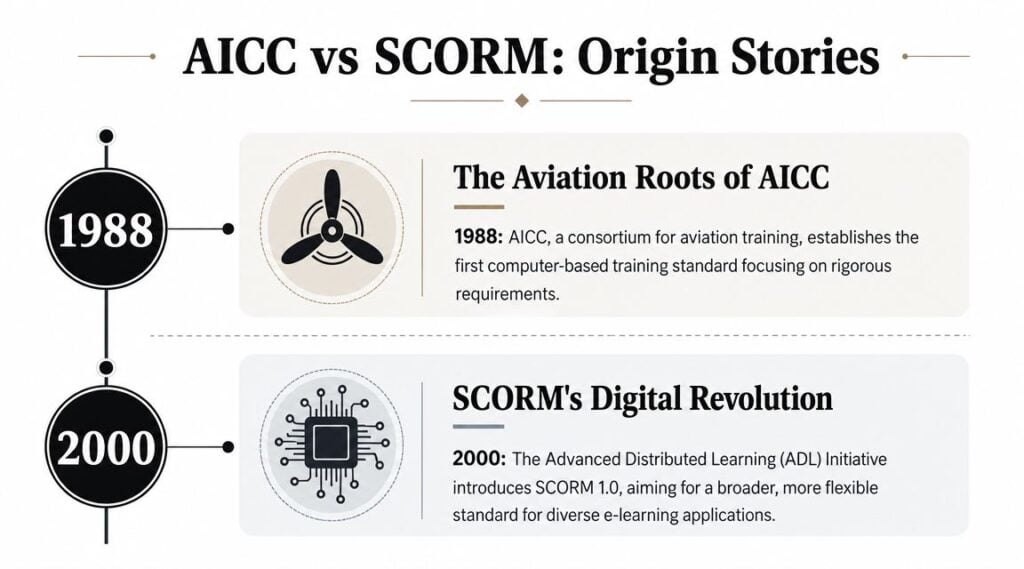
Why the origin story still affects your workflow
AICC’s roots are one reason it often feels like a standard you inherit rather than choose. It reflects older assumptions about enterprise training infrastructure, separated systems, and more specialized deployment setups.
SCORM feels more natural to current authoring tools because it matches the way most course creators work now. You build in a browser-friendly tool, export a package, upload it to an LMS, test completion and scoring, and move on.
That difference isn’t academic. It affects who can manage the course after launch.
- AICC often assumes technical coordination: Someone may need to manage hosting, configuration, and LMS setup details.
- SCORM fits self-serve publishing better: An instructional designer or LMS admin can often handle the full process without involving a web team.
- Maintenance follows the same pattern: The harder the deployment model, the more fragile the handoff tends to be.
A standard’s backstory usually shows up later as either convenience or friction.
Why course creators still see both in export menus
Authoring tools keep legacy options around because corporate training ecosystems move slowly. A vendor may support long-standing client requirements for years, even after most new work has shifted elsewhere.
So if AICC looks like a relic, that’s partly true. But the option still appears because some organizations haven’t retired the systems or processes built around it. When you understand that, the menu stops looking random. It starts looking like a snapshot of e-learning’s long transition from legacy training infrastructure to web-first delivery.
Core Technical Differences That Actually Matter
This is where the real split shows up.
According to iSpring’s breakdown of SCORM vs AICC, AICC and SCORM differ materially in course packaging and LMS transport mechanics, which affects deployment complexity and interoperability. AICC content is typically hosted externally and communicated via HTTP/HTTPS text exchanges, often requiring a multi-step upload and configuration process, while SCORM packages content into a ZIP file with an imsmanifest.xml and uses JavaScript API calls for runtime communication inside the LMS. In practical terms, SCORM is easier to distribute and more portable across modern LMSs, whereas AICC’s architecture is older and more operationally cumbersome. This is why AICC is now mainly found in legacy or niche environments, while SCORM has become the default for most commercial LMS deployments.
That sounds technical, so let’s translate it into normal course-creator language.
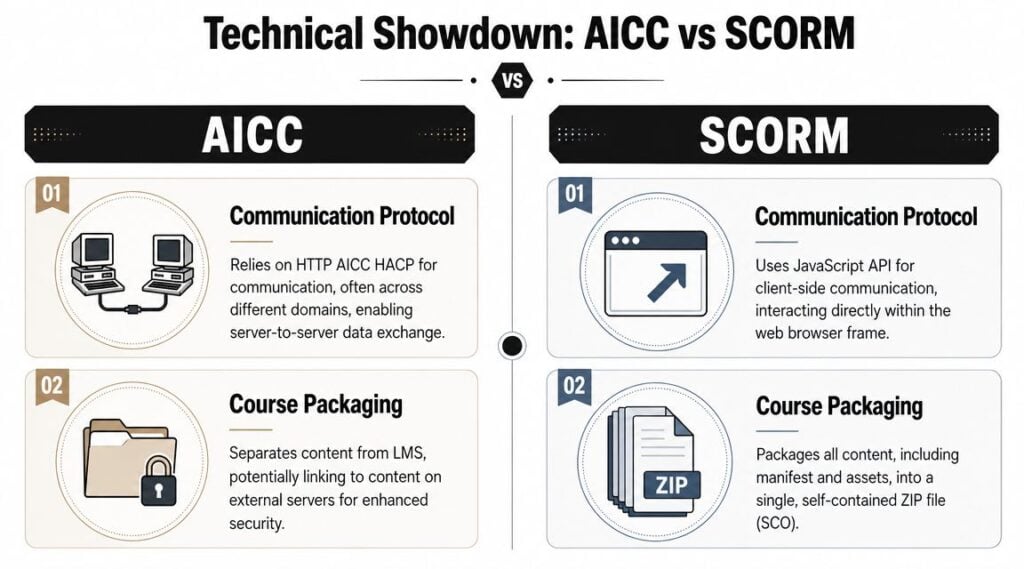
SCORM is the suitcase
A SCORM package is a single ZIP file that bundles the course assets together with a file called imsmanifest.xml. In practical terms, that means you can hand one file to an LMS, import it, and usually get a predictable launch process.
I think of SCORM as a packed suitcase. Everything important is inside, labeled, and ready for the LMS to unpack.
That packaging model helps in a few common situations:
- Client delivery is cleaner: You send one file instead of a bundle of instructions.
- Testing is faster: If something fails, there are fewer moving parts to inspect.
- Migration is easier: When a course moves to another LMS, the package is more portable.
AICC is the hosted setup with directions attached
AICC works more like sending someone a set of instructions that points to where the course lives and how to communicate with it. The LMS and the content exchange information through HTTP or HTTPS text-based communication, and the setup can involve more than a simple upload.
That doesn’t make AICC useless. It does make it more operationally demanding.
If you’ve ever had a project where the content, the LMS, and the IT team all live in separate worlds, you can probably see the issue. Every extra dependency creates another place where things can break.
Here’s a side-by-side version.
AICC vs SCORM At a Glance
| Criterion | AICC | SCORM |
|---|---|---|
| Packaging | Multiple descriptive files, with content often hosted separately | Single ZIP package |
| Runtime communication | HTTP/HTTPS text exchanges | JavaScript API calls in the LMS environment |
| Upload process | Often multi-step | Usually straightforward |
| Portability | More dependent on setup details | More portable across modern LMSs |
| Operational burden | Higher | Lower |
| Typical place you’ll see it now | Legacy or niche environments | Most commercial LMS deployments |
A quick visual can help if you want to see the mechanics from another angle.

What works well and what usually doesn’t
SCORM works well when you want a course to move cleanly from an authoring tool into an LMS with minimal custom setup. That’s why it fits freelancers, internal L&D teams, agencies, and course businesses that need repeatable delivery.
AICC works when an organization already has an established AICC process and knows how to support it. It can also make sense when content hosting needs to remain outside the LMS for organizational reasons.
What usually doesn’t work is choosing AICC casually.
If you export AICC for a modern project without a specific requirement, you’re usually signing up for extra troubleshooting, not extra capability.
That’s the key practical takeaway in any honest AICC vs SCORM differences explained article. The technical architecture directly changes your workload.
Comparing Learner Tracking and Reporting
For most instructors and training managers, the packaging question matters less than one simple issue.
What can I see about learner progress?
SCORM often proves more useful in day-to-day work. Because it communicates inside the LMS environment through a browser-based API model, it usually supports a richer reporting experience than older AICC workflows.
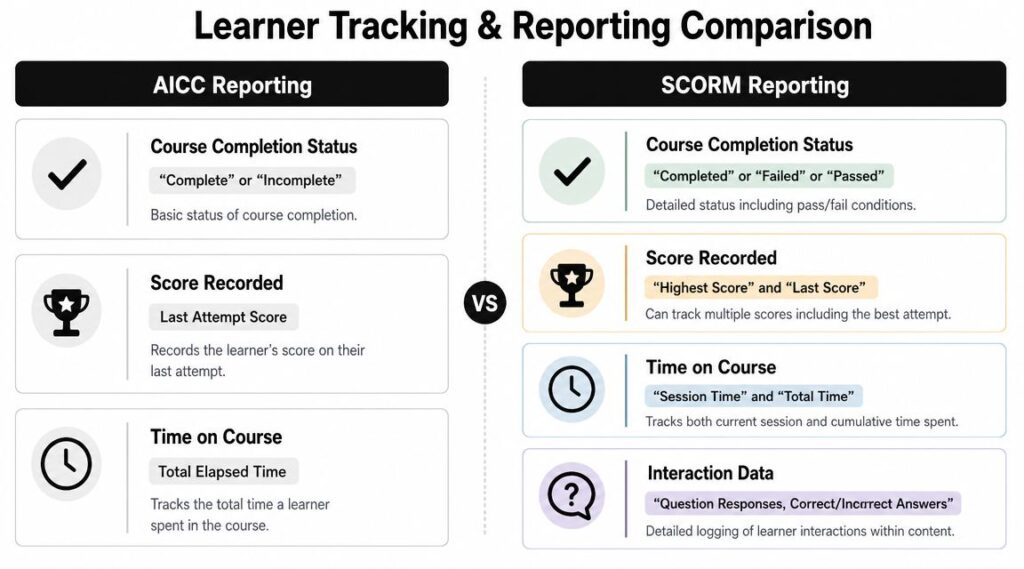
The difference an instructor actually feels
With SCORM, you can usually ask better questions after launch.
Did learners finish?
Did they pass?
How long did they spend?
Where did they struggle in the quiz?
Which interactions seem to cause drop-off?
AICC can still support basic reporting, but in practice it’s generally associated with more limited visibility. If your goal is simple status tracking in an older environment, that may be enough. If you want to improve course design based on learner behavior, it often isn’t.
That’s why SCORM tends to be the better fit for people who review reports regularly, especially inside corporate training teams where managers expect more than a completion tick box.
Reporting needs change once a course is live
During development, people often assume that “completed” and “score” will be enough. Then the course launches, and the actual questions start.
- A manager wants detail: Who passed, who failed, and who never finished.
- An instructor wants diagnosis: Which questions are consistently missed.
- A client wants proof: Whether the LMS is capturing time and status correctly.
- A designer wants feedback: Which parts of the module may need revision.
SCORM is better aligned with that kind of follow-up.
Better reporting doesn’t just help admins. It helps course creators decide what to fix next.
If you’re still learning the LMS side of this, this guide on how to import SCORM files into an LMS is worth bookmarking, because reporting problems often start with packaging or upload mistakes rather than the course itself.
A practical way to choose based on reporting
If your course is compliance-heavy, assessment-driven, or client-facing, choose the format that gives you clearer evidence after launch. Most of the time, that points to SCORM.
If the project lives in an older enterprise setup and the reporting expectation is minimal, AICC may still get the job done. But that’s usually a constraint-driven choice, not a best-practice choice.
When You Might Still Use AICC in 2026
Most course creators won’t choose AICC on purpose. They’ll encounter it because a client, employer, or LMS requirement puts it on the table.
That distinction matters. AICC is usually not the first-choice format for a new build. It’s the format you support when the environment around the project hasn’t fully moved on.

The situations where AICC still shows up
I’d expect AICC to appear in a handful of recognizable scenarios.
- Legacy LMS environments: Large organizations sometimes keep old learning infrastructure in place because replacing it is disruptive.
- Long procurement cycles: Government, aviation, manufacturing, and heavily regulated teams may continue using older standards longer than smaller companies do.
- Externally hosted course requirements: Some organizations want the learning content controlled outside the LMS for internal policy or architecture reasons.
- Client-mandated delivery specs: Agencies and freelancers sometimes get a statement of work that names AICC explicitly.
None of that means AICC is the better standard. It means the surrounding system still depends on it.
What to do if a client requests AICC
Don’t panic, but don’t assume it will behave like SCORM either.
Start with a short checklist:
- Ask where the course will be hosted. If the LMS isn’t hosting the course content directly, you need clarity early.
- Confirm what the LMS expects. “Supports AICC” can mean different things depending on how the platform was configured.
- Test completion and score tracking before handoff. Basic launch success doesn’t guarantee reporting success.
- Document the setup steps. AICC projects often need more handoff detail than SCORM projects.
- Keep a SCORM export ready if possible. If the requirement changes, you’ll want a fallback.
The biggest mistake with AICC projects is treating them like standard self-serve LMS uploads.
When AICC is a dead end
If you’re building your own course library, launching a membership program, selling training, or creating modules for broad LMS compatibility, AICC usually points in the wrong direction. It adds friction without giving most independent creators anything useful in return.
That’s why I think of AICC today as a support skill, not a strategic format. You should know what it is, know why some organizations still use it, and know how to handle the request. You probably shouldn’t build your publishing workflow around it.
My Recommendation SCORM or AICC for Your Next Course
For most new course projects, use SCORM.
That’s the practical answer after all the comparison work. SCORM matches modern authoring workflows better, it’s easier to distribute, and it’s the safer choice when you care about portability across LMS platforms.
If you’re building in tools like Articulate Storyline, Rise, Adobe Captivate, or iSpring Suite, SCORM usually gives you the smoothest path from export to upload to reporting. That matters more than people think. Small publishing decisions create big support burdens later.
When I’d choose SCORM without hesitation
- You’re selling or licensing courses
- You work with multiple clients
- You need straightforward LMS uploads
- You want clearer learner reporting
- You expect the content to move between platforms over time
In other words, almost every normal e-learning production scenario.
When I’d accept AICC
I’d use AICC when a client’s system requires it and there’s a real operational reason behind that requirement. If the LMS, hosting model, or internal policy depends on AICC, then fine. Build to spec and test carefully.
But I wouldn’t choose it as the default for a fresh project.
Choose AICC because you must, not because you’re trying to future-proof anything.
There’s also a broader trend worth keeping in mind. SCORM still matters, but the standards conversation doesn’t end there. Teams that need more flexibility are also looking at xAPI and related approaches. That doesn’t reduce SCORM’s value right now. It just means SCORM is the practical present, not the final destination for every learning stack.
If you’re publishing your next course soon, master SCORM first. That will solve the biggest share of real-world delivery problems. And if you need authoring options, this list of the best tools to create SCORM-compliant courses will help you choose software that won’t fight you during export.