Teachable Alternatives Worth Switching to

You don’t usually start hunting for teachable alternatives because you’re bored. You get there after a few annoying moments stack up. Maybe you’re watching fees chip away at a course that finally sells. Maybe a student asks for a smoother mobile experience, or you realize your business needs a real community layer, not a basic forum.
I’ve been in that spot with platform decisions before, and the wrong choice always feels obvious after the fact. The right move depends less on flashy features and more on switching friction, what your students need, and how your business makes money.
| Platform | Best for | Live events | Mobile app | Transaction fees |
|---|---|---|---|---|
| Circle | Membership-first learning | Strong | Yes | 0.5% to 2% |
| Thinkific | Course delivery | Light | Yes | 0% on paid plans |
| Kajabi | All-in-one businesses | Strong | Yes | 0% |
| Podia | Simple selling | Light | No native app | 5% on lower plan, 0% on higher plan |
| LearnWorlds | Structured training | Light | Add-on | Varies by plan |
| Skool | Community-led programs | Strong | Yes | 2.9% to 10% |
| Mighty Networks | Social learning | Strong | Yes | Varies |
| Circle | Community-only stack | Strong | Yes | 0.5% to 2% |
Why Creators Start Looking for Teachable Alternatives
I usually see the switch trigger when a creator says, “Teachable was fine until it wasn’t.” That’s the story. The platform works for a while, then the business changes and the limits start showing up in plain view.
The four pressure points that push people out
First, transaction fees. Once revenue starts moving, percentage-based fees stop feeling minor. That’s when creators start comparing flat pricing against fee-heavy plans and thinking like operators instead of hobbyists.
Second, community depth. A basic forum is fine if your course is just content delivery. It falls short when your program depends on peer interaction, live sessions, accountability, or member retention.
Third, branding control. If your offer is supposed to feel premium, a rigid student experience can get in the way. Strong brands want their course environment, checkout, and member experience to feel like one product.
Fourth, mobile experience. Students expect to learn on their phones without friction. When the mobile side feels fragmented, the course starts to feel less like a modern product and more like a desktop system with a phone wrapper.
The global LMS market is no longer small, either. Recent estimates place it at USD 26.8 billion in 2025 with a forecast of USD 100.6 billion by 2034 and a 15.84% CAGR, while other reports project similar growth paths, including USD 33.4 billion in 2026 rising to USD 97.4 billion by 2035 (Research and Markets). That kind of expansion explains why so many platforms keep appearing.
Practical rule: if your problem is really funnel performance or offer clarity, a platform switch won’t fix it. If the product itself is blocking your business model, that’s when a move makes sense.
The Course Platform Landscape in 2026
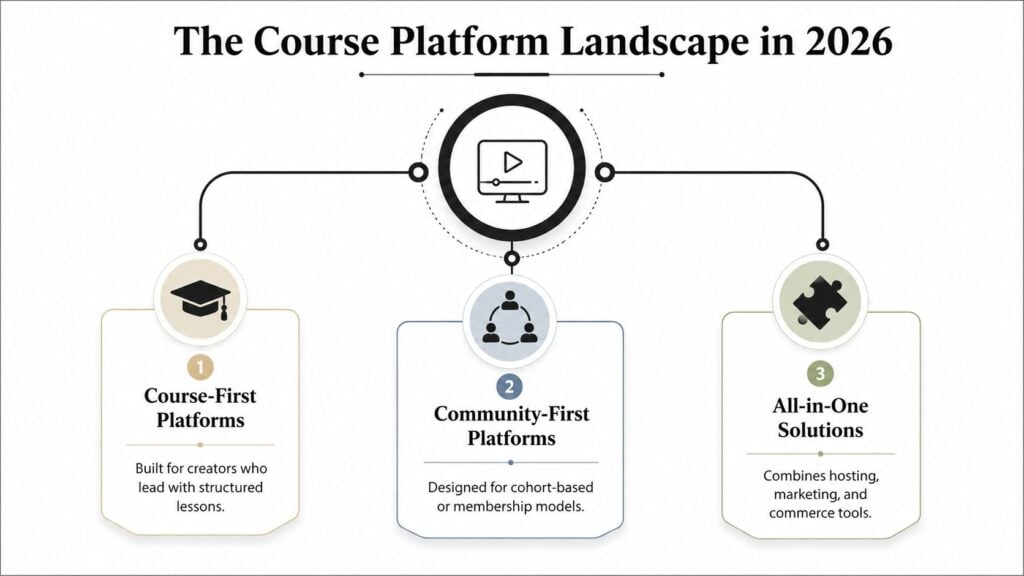
The market has split into clear lanes, and that matters more than most comparison posts admit. Pick the wrong lane and you pay for features you will not use, or you stitch together tools that should live in one place.
Three categories that matter
Course-first platforms focus on lesson delivery, student progress, quizzes, and certificates. Thinkific fits here. LearnWorlds does too when structured instruction and assessments matter most.
Community-first platforms put conversation, events, and member interaction at the center. Circle and Skool are the obvious examples. In these tools, courses support the experience, but they are not the whole business.
All-in-one platforms bundle courses, marketing, checkout, and sometimes funnels into one system. Kajabi and Podia are the clearest names here. They make sense when you want fewer logins and less software sprawl.
This split exists because the market keeps expanding, and vendors keep specializing instead of pretending one product fits every creator business. North America is also described as the largest regional market in one estimate, holding more than 43.2% share in 2025.
The part comparison posts skip is migration friction. Moving platforms means rebuilding pages, moving students, checking automations, and fixing the places where your old stack was holding things together. That is why I would read the 2026 video training platform buyer’s guide before you switch video-heavy courses, because format fit changes the amount of work you inherit.
If your course is mostly content delivery, course-first tools keep the switch cleaner. If your business depends on member activity and recurring touchpoints, community-first tools justify the mess. All-in-one platforms reduce tool count, but they can still leave you with a painful rebuild if you have a mature funnel or a custom student flow.
How Two Popular Teachable Alternatives Actually Differ
Circle and Thinkific both show up in Teachable comparisons, but they solve different problems. If you treat them like substitutes, you’ll probably choose badly.
Circle is built around membership energy
Circle’s own comparison makes the contrast pretty clear. It includes native courses, community, live events, gamification, and iOS and Android apps, with transaction fees of 0.5% to 2% and a starting price of $89 per month (Circle). That makes it much more attractive for creators who sell belonging, not just content.
I see Circle fit coaches, cohort-based educators, and membership businesses that need members to show up between lessons. If your business depends on conversations, attendance, and recurring engagement, Circle gives you a real operating system for that.
Thinkific is the cleaner course replacement
Thinkific leans more heavily into course delivery and keeps the stack simpler. Circle’s comparison notes that Thinkific has weaker native community and live event depth, but no transaction fees on its TCommerce tier (Circle). That’s a huge deal if you care more about course sales than social mechanics.
The easiest way to decide is to ask what your student experience is supposed to feel like. If the course is the product, Thinkific makes sense. If the community is the product, Circle is the stronger bet.
For a more detailed platform comparison in a different lane, I’d also look at this breakdown of Zenler vs Teachable. It’s helpful if you’re trying to understand how course delivery tools diverge once you get past the marketing copy.
Comparing Features That Actually Matter
Most feature lists waste your time with checkbox noise. What matters is whether the platform changes how you run the business every day.
| Platform | Course Building | Assessments | Integrations | Transaction Fees |
|---|---|---|---|---|
| Circle | Strong for structured lessons | Solid for membership learning | Good ecosystem support | 0.5% to 2% |
| Thinkific | Strong for course delivery | Good quizzes and certificates | Broad support | 0% on paid plans |
| Kajabi | Strong all-in-one builder | Good for creator education | Broad support | 0% |
| Podia | Simple and fast | Basic | Broad support | 5% on lower plan, 0% on higher plan |
| LearnWorlds | Strong for training | Strong for formal learning | Broad support | Varies by plan |
Course building and assessments
If you sell a straight course library, course building matters most. Thinkific and Kajabi are the safest bets for creators who want a smooth lesson editor, while LearnWorlds is better when the learning experience needs more structure. That’s where assessments, certificates, and interactive training affect the product.
Community and integrations
Community is a separate decision. Circle is built for it, and Podia only gives you a lighter discussion layer. If your audience needs member interaction, moderation, and live programming, don’t pretend that a basic forum will feel the same.
Integrations matter too, but only after you know what you’re integrating. Email tools, payment processors, Zoom, and webhooks should support the business, not hold it together like duct tape.
My rule of thumb: if a platform makes you combine three tools just to recreate one core feature, it’s probably the wrong home for that business.
Payment terms and fees
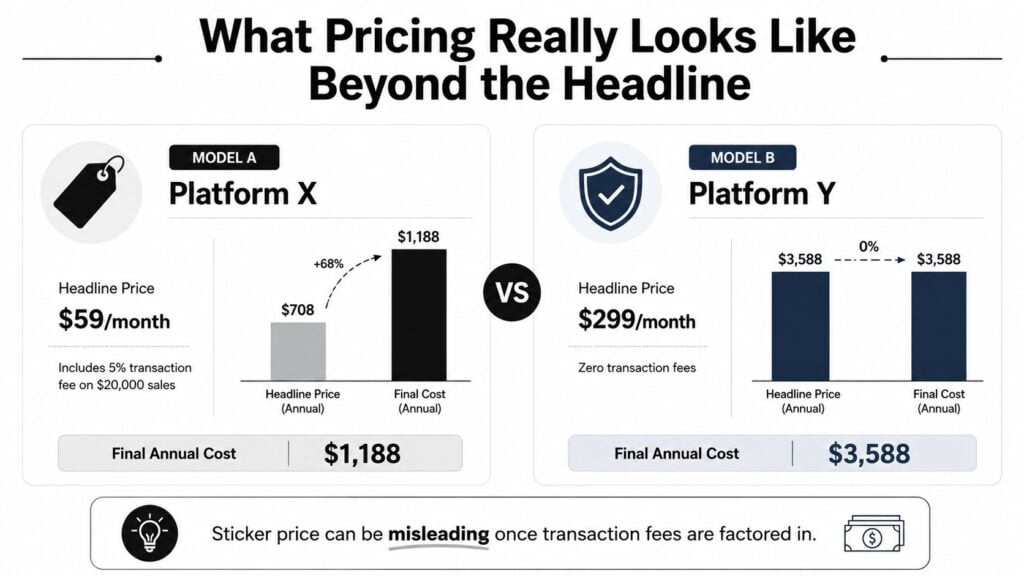
Fees are where a lot of creators get surprised. A platform that looks cheaper on the pricing page can become expensive once transaction charges stack up. The cleanest choice isn’t always the cheapest monthly plan, and the platform that takes a percentage can be fine at small scale but painful later.
If you want a broader look at monetization platforms beyond course delivery, LearnStream’s own digital product monetization tools roundup is a useful reference point. It helps when you’re thinking about the whole offer stack, not just the lesson host.
What Pricing Really Looks Like Beyond the Headline
The sticker price is rarely the number that matters. The key question is what you keep after fees, and what you give up when the platform stops helping you sell more.
Think in revenue bands, not just plan names
At very low revenue, a cheaper plan can make sense because fixed costs matter more than percentage cuts. As sales grow, transaction fees start behaving like a silent tax. Creators who are scaling should care more about fee structure than the monthly headline.
Ask three questions before you compare plans. What do I pay when revenue is low? What happens once sales become steady? What features disappear unless I upgrade?
Hidden costs are not always labeled as fees. They can show up as branding limits, support limitations, or paid add-ons for app access and advanced tools. Those costs are real even when they do not appear as line items.
Pricing in the Teachable alternatives market is also shaped by the broader LMS category, which has pulled in everything from simple course hosts to heavier learning infrastructure. That mix is one reason pricing models vary so much.
What I’d watch before switching
- Transaction fees: If the platform takes a cut, model it against your actual sales pattern.
- Feature gating: Some tools look affordable until you need community, assessments, or branding control.
- Support access: If you sell live, slow support can become a business problem fast.
- Mobile access: A phone-friendly student experience matters.
- Upgrade path: If growth forces a jump too soon, the cheap plan stops being cheap.
Before you switch, use a learning management system pricing guide to map the cost of the plans you are considering. Compare the monthly rate, then compare the business friction. That is where the price difference shows up.
Best Platforms by Use Case
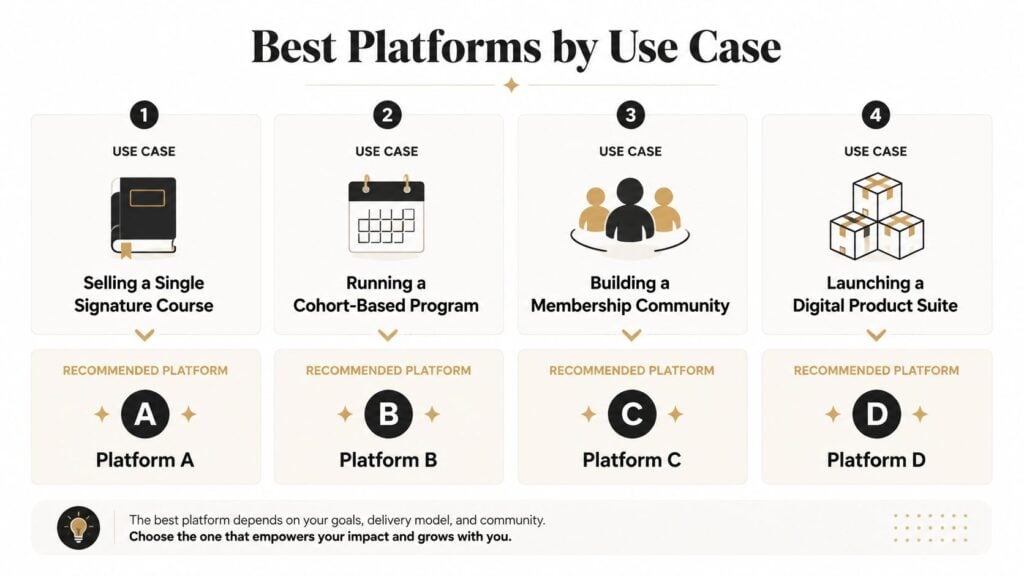
Pick the platform from the offer you are building. A creator selling a live cohort, a self-paced library, and a community membership needs a different setup, and switching later can get expensive fast.
Cohorts, memberships, and live programs
For live cohorts and membership programs, Circle is the cleanest fit. It keeps courses, community, and events together, so people have a reason to return. Kajabi also fits here if you want an all-in-one stack and can justify the higher cost.
Self-paced libraries and simpler course selling
For mostly self-paced content, Thinkific and Podia are easier to run. Thinkific is the better pick if course structure matters and you want less friction during setup. Podia works better if you want a simpler tool and do not need much complexity.
Training, certification, and compliance
For structured learning, LearnWorlds is the strongest option in this group. I’d look at it when assessments, certificates, and training depth matter more than a simple creator storefront. If you are comparing course hosts against broader online course platforms guide recommendations, this is the kind of use case that separates them.
Community-first and social learning
For a membership that depends on participation, Skool and Circle are the first tools I’d test. Skool is stripped down and opinionated. Circle gives you more control and usually feels more polished for a branded community.
Budget-conscious beginners
If you are starting small, keep the spend low. Teachable’s free tier can work for testing, and Podia is a practical starting point if you want basic selling without much setup. I’d also look at digital product monetization tools if your offer may expand beyond courses into downloads or bundles.
Before you commit, use this comparison chart showing the best platforms for selling courses, cohorts, communities, and digital product suites. to cross-check how each platform lines up with your business model.
Your Migration Checklist Before You Switch
Switching looks exciting right up until you’re staring at exports, checkout settings, and student logins. That’s where platform decisions turn into operations work.
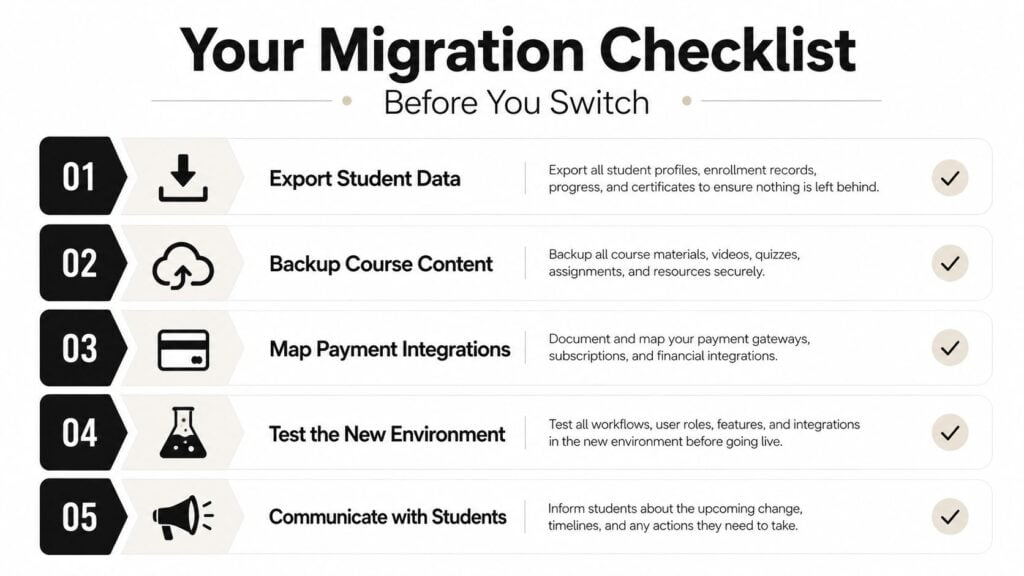
Get the content and student data out first
Start by exporting your course files, student list, and enrollment data. Video files, PDFs, worksheets, and quiz structures don’t always transfer cleanly, so check every format before you assume it’ll import cleanly. If something lives outside the platform already, like a hosted video library, that gives you a little more portability.
Protect the student experience
Think carefully about active students, especially if they’re mid-course. Don’t cut off access without a plan. I’d keep the old platform live in read-only mode for a while so students can finish what they started and you can answer support questions without panic.
Test the new setup like a buyer
Run a real small purchase through the new checkout before you announce anything. Confirm the confirmation email, login flow, access rules, and mobile view. This is the part most creators rush, and it’s the part most likely to embarrass you later.
Don’t forget email and payments
Set up email forwarding or a re-engagement sequence so nobody falls through the cracks. Then check payout timing, because payment processors can move money on different schedules. That matters more than people think when a launch is in motion.
You also need to keep basic accessibility in mind. One accessibility checklist for course platforms says the main pages of a website should be accessible and that an accessibility statement should be posted (Accessible.org). Those are concrete things you can carry over to any new platform.
Practical rule: don’t announce the switch until you’ve tested one real buyer flow from landing page to login. If that journey breaks, your students will find the break on day one.
Making the Final Call and When to Stay on Teachable
Switching platforms should solve a measurable business problem. If the pain is limited to annoyance, migration work, student confusion, and temporary support load can cost more than the upgrade delivers.
When Teachable is still the right choice
Stay on Teachable when your business mainly needs reliable course delivery and your current setup is working. It remains a sensible choice if you do not need deeper community features, live-event tools, advanced assessments, or a richer mobile experience. Rebuilding those functions elsewhere can create new subscriptions, integrations, and maintenance work.
The strongest reason to stay is retention. Review refund requests, course completion, support tickets, and renewal or repeat-purchase behavior before blaming the platform. If those measures are stable and students are not reporting a clear access or learning problem, switching may change your workflow without improving outcomes.
The decision test
Before choosing a new platform, write down the exact gap Teachable creates and the business result tied to it. Then calculate the switching cost:
- migration hours for lessons, downloads, quizzes, and automations
- contractor or setup fees
- replacement tools for email, community, events, or payments
- support time for students who need new logins
- revenue at risk during the change
Compare that total with the value of fixing the gap over the next year. Include revenue protected by better retention, sales enabled by missing features, and recurring costs removed. A feature belongs on the migration list only when it changes one of those outcomes.
Set a clear decision rule. If the gap does not affect sales, retention, or course delivery, stay. If it does, test the replacement with a small group of existing students and track support volume, completion, refunds, and repeat purchases before moving everyone.
My honest take: a platform switch should feel like a business upgrade, not a mood shift.
If the test shows no improvement, keep Teachable and fix the surrounding process. If results improve and the migration cost has a defined payback, switch with a staged rollout. The right choice is the platform that improves the student experience without creating a larger operating problem.