Video Online Course Guide for Better Learning
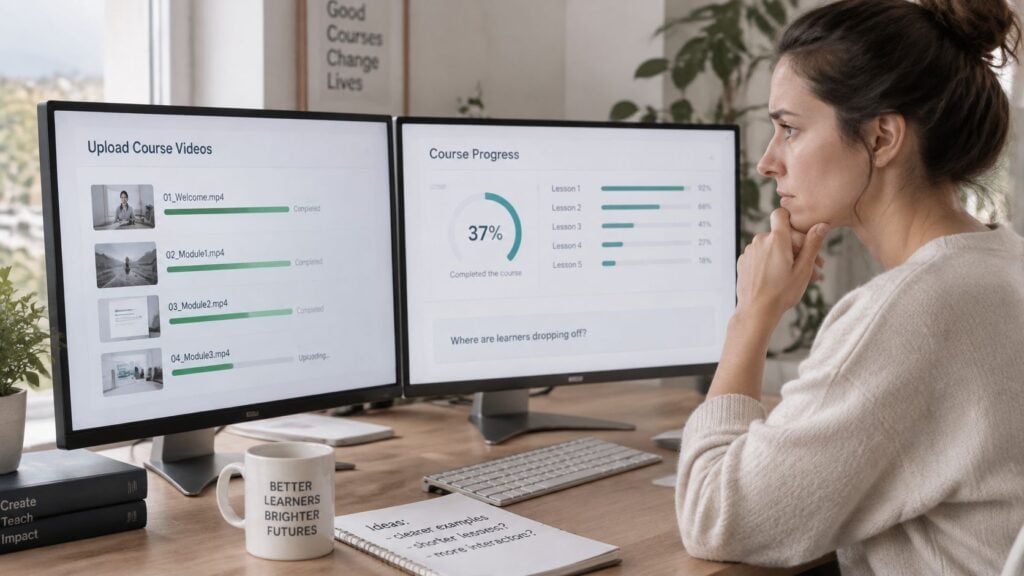
You’ve uploaded the recordings, checked the sound, and arranged the lessons into modules. Then you open the student dashboard and wonder why people seem to disappear before reaching the work you most want them to try.
That’s a frustrating place to be, especially when you’ve put care into the teaching. When I plan a video online course, I start with what learners need to accomplish, then decide where recordings will help them get there.
Why Video Online Courses Need a Clear Learning Design
Suppose you’re creating a course on spreadsheet reporting. You could record yourself explaining formulas, formatting tables, and building charts. The recordings might look polished, but learners could still struggle when they open an unfamiliar spreadsheet.
The missing piece is a learning design that connects explanation to independent performance. Before recording, I’d define the outcome as something observable, such as preparing a readable sales report from an untidy data file.
Start with the learner’s problem
Write down what your learner can already do, where they get stuck, and what successful performance would look like. A beginner who can enter data needs a different route from an analyst who needs to justify chart choices.
Online delivery is already familiar to a broad audience. National Center for Education Statistics data for fall 2024 reported that 54.7% of U.S. postsecondary students, approximately 10.76 million students, took at least one distance-education course, according to this summary of online education enrollment data.
That scale doesn’t tell you what your particular learners need. You still need a precise teaching promise and a realistic understanding of their circumstances.
Planning rule: Describe the task learners should complete without your help before deciding what to record.
Use that task to guide the surrounding decisions. Choose a presentation format that makes the task understandable, production methods that keep it usable, and delivery tools that make participation straightforward. Your revenue model and support commitments should fit the same promise.
A camera and editing software help you make recordings. A coherent design helps you decide whether those recordings belong in the course at all. Sometimes a worked demonstration earns its place. Sometimes a reference sheet is the more useful choice.
Understanding the Video Online Course Building Blocks
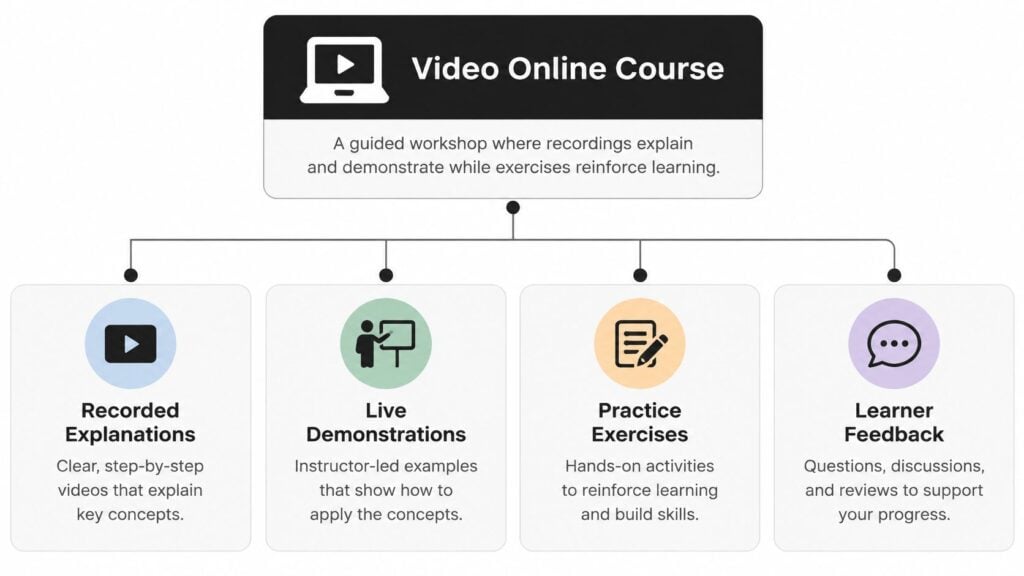
Think of a video online course as a guided workshop. The instructor explains a process, demonstrates it, gives learners something to attempt, and responds to what they produce. Recordings carry part of that experience, but they don’t replace the whole workshop.
A video library can be useful for reference. A complete course also needs a route through the material and a way for learners to recognize progress.
Decide how learners will participate
In a self-paced course, learners choose when to work, so instructions and support arrangements need to stand on their own. A live course gives you opportunities to respond immediately, but learners must attend at the scheduled time.
A cohort-based course gives a group a shared schedule, even when some teaching is recorded. A blended course combines online work with in-person learning. These choices describe participation, not the type of video you upload.
UNESCO’s digital citizenship and AI course recorded more than 33,000 registrations from over 113 countries, with reported retention above 34%. Its combination of videos, testimonials, forums, and case studies offers a concrete example of a video-centered course with a wider learning structure.
Give each component a job
For a practical course, I’d identify these building blocks before production:
- Outcome and sequence: What learners will accomplish and what they need to understand beforehand.
- Explanation and demonstration: What needs verbal clarification, visual modeling, or both.
- Learner activity: What learners will create, decide, discuss, or troubleshoot.
- Support and progress evidence: How learners get help and demonstrate that they’re ready to continue.
An instructor-led explanation might introduce a concept, while a screen recording shows its application. Learners could then submit their own demonstration for feedback.
If you’re exploring how to turn a script into a video, ClipNova AI is a production resource to consider after you’ve assigned the recording a teaching purpose. Review the result for accuracy and instructional fit rather than treating a finished export as a finished lesson.
Choosing Video Formats That Support Learning
The best format depends on what learners need to notice. A software lesson needs visible interface actions. A problem-solving lesson needs your reasoning. An interview can expose different judgments, but it may need editing and prompts to become useful instruction.
I choose formats by completing this sentence: Learners need to see or hear this because… If the answer is unclear, I reconsider whether video is necessary.
Video format selection guide
| Video format | Best instructional use | Supporting learner activity | Main design risk |
|---|---|---|---|
| Direct instruction | Explaining a concept or decision rule | Classify a fresh example | Too much explanation before application |
| Software demonstration | Showing a workflow | Repeat the workflow with different inputs | Learners copy clicks without understanding |
| Problem-solving walkthrough | Making reasoning visible | Solve a related problem independently | Skipping the difficult thinking |
| Interview | Comparing professional judgments | Evaluate competing recommendations | Interesting conversation without a clear purpose |
| Recorded workshop | Examining a realistic process | Complete an edited workshop task | Irrelevant discussion and waiting time |
| Short concept video | Clarifying a focused idea | Answer a retrieval question | Removing context to meet a time target |
A course can combine these formats without feeling inconsistent. For example, you might explain a reporting principle on camera, demonstrate it in Excel, then ask learners to defend their choice of chart. The consistent element is the instructional purpose, not the camera angle.
Use duration as a design constraint
A study of 4,198 student responses found the strongest overall engagement with videos lasting 5 to 8 minutes, while preferred ranges differed by year of study, according to the instructional video length research.
That’s useful guidance, but I wouldn’t turn it into a rule that every lesson must fit the same duration. A demonstration should include the decisions learners need, without unrelated setup or repeated explanation.
Research covering 6.9 million viewing sessions across four edX courses also found stronger engagement with shorter videos, informal instructor presentations, and tablet-style drawing than with conventional classroom footage, as described in the study of video production and engagement.
My practical recommendation is to cut at a meaningful conceptual boundary. Keep an explanation and its essential example together. Move optional detail into a separate resource, and place practice where learners have enough information to attempt it.
A longer recording isn’t automatically more thorough. Elaborate production isn’t automatically better teaching, either.
Producing Accessible Video Without Losing Your Voice
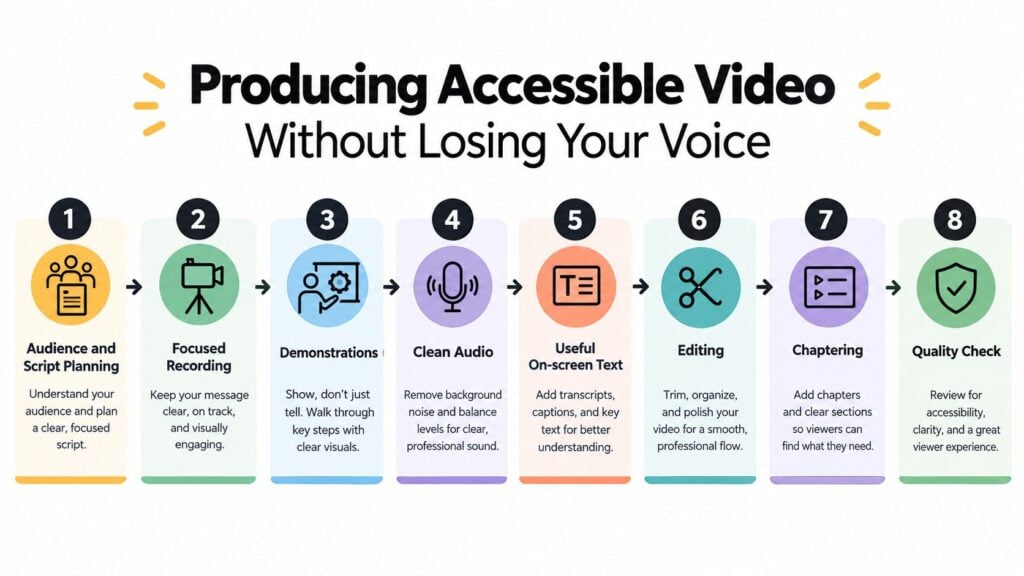
Write your script as if you’re helping someone beside you. Use familiar words, explain unfamiliar terms, and include the places where you’d naturally pause to let them inspect the screen.
I prefer a spoken outline for conversational explanations and a more detailed script for demonstrations where wording or sequence matters. Either way, prepare the example files before recording so learners aren’t watching you search for materials.
Record for clarity
Make a test recording and listen through headphones. Check whether your voice is understandable, whether screen labels are readable, and whether notifications or background noise interrupt the explanation.
During demonstrations, describe meaningful actions and changes. Say which setting you select and why, rather than relying on phrases such as “click this” or “look over here.” Useful on-screen text should reinforce key terms without competing with a dense narration.
Edit out dead time and errors, then add descriptive chapter labels where learners may need to return to a particular task.
Build accessibility into the workflow
A 2025 survey of more than 600 educators found that only 16% of K–12 teachers captioned 76–100% of their videos, compared with 37% of higher-education faculty, according to the state of video accessibility survey.
For a small team, I recommend a practical release checklist:
- Review captions manually: Correct names, technical vocabulary, punctuation, and timing. An incorrect negative can reverse your meaning.
- Provide a usable transcript: Include relevant visual information and organize the text so learners can find topics.
- Explain essential visuals: Add audio description where the main narration doesn’t communicate the demonstration.
- Check the player and visuals: Test keyboard controls, caption access, contrast, and readable text.
- Plan language support: Consider multilingual captions and sign-language options where appropriate to your audience.
For captioning tools, LearnStream’s guide to AI subtitle generators for course videos can support your shortlist. Keep human review in the workflow regardless of which tool you choose.
Accessibility review should ask whether someone can complete the learning task, not merely whether a caption file exists.
Test the finished lesson on a phone and with the sound muted. Ask someone unfamiliar with the material to attempt the activity. These checks won’t establish legal compliance, but they give you a practical starting point for finding usability barriers.
Choosing a Distribution Platform for Your Course
A learner buys your course during a lunch break, receives a receipt, creates a password, opens the first lesson, submits an activity, and asks where feedback will appear. If any step sends them elsewhere or leaves an instructor without a clear way to respond, recording quality will not repair the experience. Walk that route before comparing products.
The learner journey is the buying checklist.
Two jobs sit inside it. Video hosting stores, streams, and protects recordings. Course management controls enrollment, sequencing, submissions, communication, and progress. One product can cover both, but I would evaluate the jobs separately before deciding they need to live together.
Rehearse the course in a trial account
Create a test learner and move through the course as they would: accept the invitation or pay, reset the password, open a lesson, submit work, ask a question, receive the reply, and confirm completion. Then switch into the instructor account and handle the same events. If a routine action requires workarounds on either side, growth will make that friction more visible.
The rehearsal also shows which platform category deserves a closer look. A self-hosted course site offers greater control over pages and integrations while adding maintenance and backup responsibility. An LMS is a stronger candidate when progression and assessment carry the teaching. A video-focused product may serve a browsable library well, and a marketplace can supply distribution under its own access and pricing rules. Membership and live-teaching environments place more value on continuing participation or scheduled interaction. Moodle, Teachable, Udemy, and Circle represent different combinations of these jobs, so test your process instead of relying on the label.
Look behind the learner screen before committing. Check who owns the domain and content, how learner data can be exported, whether progress records can move, which integrations are required, what happens when enrollment ends, and how costs change as the catalog grows. A reporting area may exceed what a short workshop needs, while a polished checkout can still leave assignment review unsupported.
For the playback and storage layer, the guide to video hosting platforms for online courses provides a focused evaluation path.
I would launch on the smallest connected setup that supports enrollment through completion. Add an email, discussion, or community tool only when you can name the learning need it serves and the person who will maintain it.
Selecting a Monetization Model That Fits
A creator finishes twenty polished lessons, sets a flat price, and after checkout learns that buyers expected weekly feedback. The videos were fine. The promise was wrong.
A price works like a syllabus for the business side: it states what learners receive, when access starts and ends, and how much help is included. Before choosing billing, I write that promise in plain language, then test whether the delivery week supports it.
| Model | Learners are paying for | Deliver this well |
|---|---|---|
| One-time purchase | A bounded path to a defined result | State the access period, updates, and support limits |
| Subscription | Continuing value after the first month | Keep practice, references, or teaching active |
| Cohort access | Deadlines, feedback, and shared pace | Protect instructor time for review and live sessions |
| Membership | Ongoing participation and peer contact | Plan programming beyond the video library |
| Free course, paid next step | A useful sample and a clear upgrade | Let the free part stand alone |
| Employer or organization license | Enrollment managed for a group | Define admin rights, reporting, access end dates, and customization |
The table exposes the workload before the revenue does. A low-price course with daily review can drain more hours than a higher-priced license with clear reporting duties. Renewal asks a harder question: what stays useful after the core videos are watched?
Cash flow matters early. If payment arrives monthly while production, support, and platform costs arrive upfront, growth can strain the course even as sales look healthy. A hybrid can help when some learners need feedback and others do not, as long as the self-paced course still makes sense without the upgrade.
I choose the smallest promise I can keep: outcome, access, support, and boundaries written before enrollment opens.
Using Video Analytics to Improve Engagement and Retention
A creator opens the dashboard the morning after a new lesson goes live and finds a healthy stack of play counts. Reassuring, yes. Conclusive, no. Playback starting tells you a button was pressed. It says nothing about whether the demonstration made sense or whether anyone can now do the thing the lesson promised.
I treat viewing data the way a nurse treats a temperature reading: a useful signal worth investigating, never a diagnosis on its own. In a course built as a learning system, the numbers earn their meaning only when set beside the work learners submit before, during, and after watching.
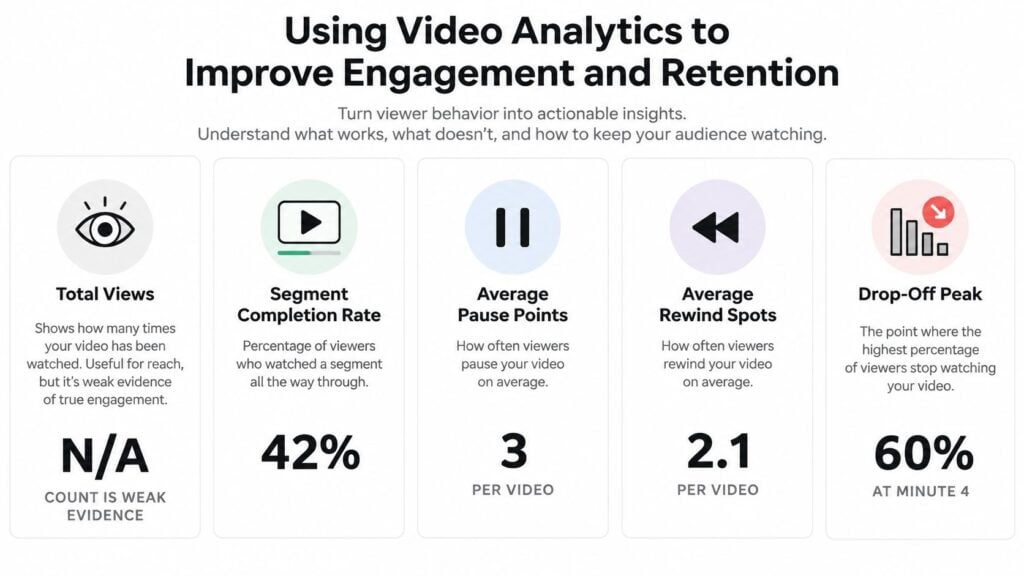
Read any illustrative values in the graphic as examples rather than benchmarks. Before comparing reports, confirm what your platform means by a view, a completion, a replay, and active time, and whether events describe sessions or individual learners. Platforms define these differently, and a misread definition can send you fixing a problem that never existed.
An analysis of more than 6.9 million MOOC video sessions found that, for videos lasting about three minutes, 75% of viewing sessions reached at least three quarters of the content, while students rarely watched more than half of a nine-minute video, according to this summary of instructional video engagement research.
Length is one explanation for an exit, rarely the only one. Learners may find their answer early, hit a playback barrier, or skip straight to the assignment. Pair each pattern with a second signal before acting. Replays near a demonstration combined with weak quiz results suggest the explanation needs a contrasting example. Clusters of pauses near a practice step may mean learners are working along with you. Strong viewing numbers paired with thin submissions point toward the activity design.
One study of 149 students measured engagement through completion, pausing, repeated viewing, time investment, and viewing regularity, and found higher engagement positively associated with satisfaction, understanding, integration, and grades in the asynchronous pharmacology course study. Watching more did not cause better learning, yet the patterns still marked where the design deserved a closer look.
For a fuller reporting checklist, I use the guide to video engagement metrics.
Use the video below to practice noticing where you would pause, replay, or check your own understanding.
Choose one intervention that fits the pattern: a recap, a retrieval question, a reminder, or an instructor response. Then check the next round of learner work before calling the revision a success.
Launching and Improving Your Video Online Course
Launch a manageable version of the learning experience before recording every possible topic. You need enough material to test the promised outcome, along with the instructions, activities, and support that make participation possible.
I’d invite a small pilot audience that resembles the intended learners. Ask them to use the course normally, then describe where they hesitated, what they skipped, and which tasks they couldn’t complete.
Prepare a coherent pilot
- Define the learner and outcome: State the entry requirements and the work learners should produce.
- Choose the smallest suitable format: Record only what benefits from visual or spoken teaching.
- Apply the production checklist: Review accessibility and playback before enrollment.
- Confirm delivery and payment: Test the platform workflow and offer terms as a learner.
- Map the lesson activities: Make the purpose of each task and assessment visible.
Pay attention early rather than waiting for end-of-course feedback. A 2025 study of 818 MOOC participants found that video viewing and discussion participation declined substantially before the midpoint. Related research also found that students placed more importance on assigned homework than on carefully watching videos, as discussed in the research on video use and course participation.
Revise a specific weak point
Avoid changing the script, assignment, navigation, and support process simultaneously. Select a problem, make a focused revision, and review what learners do afterward. Keep a short change log so you can connect feedback to decisions.
Common mistakes are preventable:
- Recording before planning: Approve the learning sequence before filling the production queue.
- Making every lesson a lecture: Use the format-selection criteria rather than a fixed template.
- Overcomplicating delivery: Remove tools that don’t serve a clear requirement.
- Measuring only views: Include evidence from learner performance.
- Postponing accessibility: Keep access checks inside the release process.
Your course is a learning system that you can inspect and improve. The recordings are part of it, alongside the choices learners make and the help they receive.
Choose a lesson you’re preparing today. Write its intended outcome, identify the learner activity, and draft the feedback they’ll receive. Then produce an accessible pilot and ask a representative learner to try it before you record the rest.