Webinar Lead Generation: A Start-to-Finish Playbook
You know the feeling. The registration page looks healthy, reminder emails are out, the deck is polished, and for a moment it seems like the hard part is over.
Then the webinar ends and nothing much happens.
A few people watched. A few people dropped a “great session” in the chat. Sales asks who they should follow up with, and all you really have is a registrant list with no signal, no prioritization, and no obvious next step.
That’s where most webinar programs stall out.
I’ve seen this happen with course launches, B2B demos, partner trainings, and expert-led workshops. The problem usually isn’t the platform or even the presenter. It’s that the webinar was built to attract sign-ups, not to identify buying intent. Those are two very different jobs.
Done well, webinar lead generation can be one of the strongest channels in the mix. Data shows 73% of B2B marketers rate webinars as their #1 source of high-quality leads, and webinar leads convert to qualified opportunities at 20% to 40% according to GTM 80/20’s webinar marketing statistics roundup.
The playbook below is built around that difference. Less obsession with vanity registrations. More focus on who shows real interest, what they signal during the session, and how to turn one event into a repeatable lead engine.
Why Most Webinars Fail at Lead Generation
A webinar can look successful from the outside and still produce weak pipeline.
I’ve watched teams celebrate a full registration list only to realize later that the audience was too broad, the topic was too generic, and the follow-up email treated every attendee exactly the same. The result was predictable. Plenty of activity, almost no urgency.
That’s the trap. Webinar lead generation falls apart when marketers count the easiest metric first.
Registrations feel good, but they don’t qualify anyone
A lot of webinars are built like digital billboards. Broad topic. Broad audience. Broad promise. The team wants volume, so they choose a safe title that appeals to everyone. In practice, that usually attracts curious people, not committed buyers.
A title like “Trends in Digital Learning” may earn clicks. It rarely tells you who has a problem right now.
A tighter session pulls in better-fit people and filters out the rest. That filter is useful. You want the wrong people to ignore your webinar.
Most weak webinars don’t fail during delivery. They fail much earlier, when the team chooses a topic that sounds impressive but doesn’t map to a real buying problem.
The follow-up is usually too generic
The second issue is what happens after the event. Everyone gets the same replay link, the same thank-you message, and the same call to action.
That approach wastes the best part of the format. A webinar gives you behavior. You can see who attended, who asked thoughtful questions, who answered polls, and who stayed engaged. If you want a smarter nurture path, it helps to study how teams personalize email strategies after someone takes a meaningful action instead of treating the whole list as one blob.
Here’s the shift I’d make every time:
- Stop measuring applause metrics like raw registrations in isolation
- Start looking for intent signals during the live session
- Give sales context instead of a spreadsheet full of names
- Build webinars around buyer problems rather than general education
When teams make that shift, the webinar stops acting like a one-off event and starts acting like a qualification tool.
Before You Build Anything. Your Lead Quality Blueprint
The best webinar lead generation strategy starts before the title, before the slides, and before the landing page.
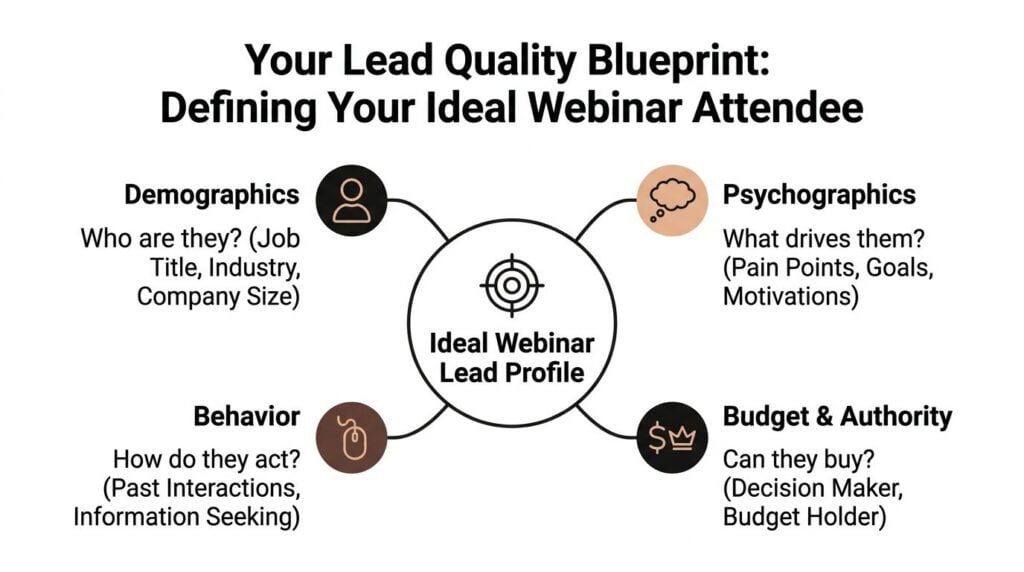
You need a clear definition of what a quality lead looks like for your business. Without that, everything else gets fuzzy. Promotion gets sloppy. The topic drifts. The registration form asks random questions. Sales gets names they can’t use.
Define quality before you define content
For some teams, a quality lead is a decision-maker from a specific segment.
For others, it’s a practitioner who owns the problem, influences the purchase, and is actively comparing options. In e-learning, I often see the strongest webinar leads come from people with a live initiative already on their plate. They’re launching training, fixing onboarding, replacing a clunky workflow, or trying to improve learner engagement.
That means your lead blueprint should cover more than contact details.
A useful working profile includes:
- Role fit like job title, function, and level of authority
- Business context such as industry, team size, or delivery model
- Pain point urgency meaning the problem is current, not hypothetical
- Buying relevance which could be budget ownership or direct influence
- Behavior signals like prior content engagement or webinar topic match
Practical rule: if your sales team can’t explain why one registrant matters more than another, your webinar criteria are still too vague.
There’s also a bigger reason to tighten this up. A Forrester report cited in Amra & Elma’s webinar statistics roundup says 81.4% of B2B marketers rank webinars as their highest-quality lead source, and webinar-influenced deals were 34% larger on average, worth about $28,400 more per opportunity. That’s exactly why the audience definition matters. Better fit changes downstream deal quality, not just top-of-funnel activity.
Pick a topic that attracts buyers, not browsers
Once the lead profile is clear, topic selection gets easier.
A strong webinar topic sits where three things overlap:
| What you know | What your audience needs | What connects to your offer |
|---|---|---|
| Your genuine expertise | A painful, urgent problem | A next step that feels natural |
Broad educational topics usually underperform for lead quality. They invite passive interest.
Specific topics do a better job. Think about the difference between “How to Improve Online Training” and “How to Reduce Drop-Off in a Multi-Module Training Program.” The second one signals a live problem. It also gives you a cleaner path to offer help.
Good topics usually have these traits:
- They name the problem clearly rather than circling around it
- They imply a result the attendee wants
- They fit one audience segment instead of trying to please five
- They create follow-up options for sales or nurture
Build the invitation around that pain point
Once you know the audience and angle, the invite gets much easier to write. Subject lines, page headlines, and teaser copy all improve when they’re tied to one concrete issue.
If you need a few patterns to sharpen that part, these webinar invitation subject line examples are useful for seeing how small wording changes can shift the tone from generic to specific.
The key is simple. The right webinar doesn’t attract the biggest crowd. It attracts the people your team can help.
Crafting a Webinar Experience That Converts
Most webinar lead generation advice jumps straight to promotion. I’d fix the experience first.
If the registration page is vague or the live session feels like a lecture, you’ll get weaker leads no matter how much traffic you push into it. The two assets that do the heavy lifting are the landing page and the session structure.
Build a registration page that earns the sign-up
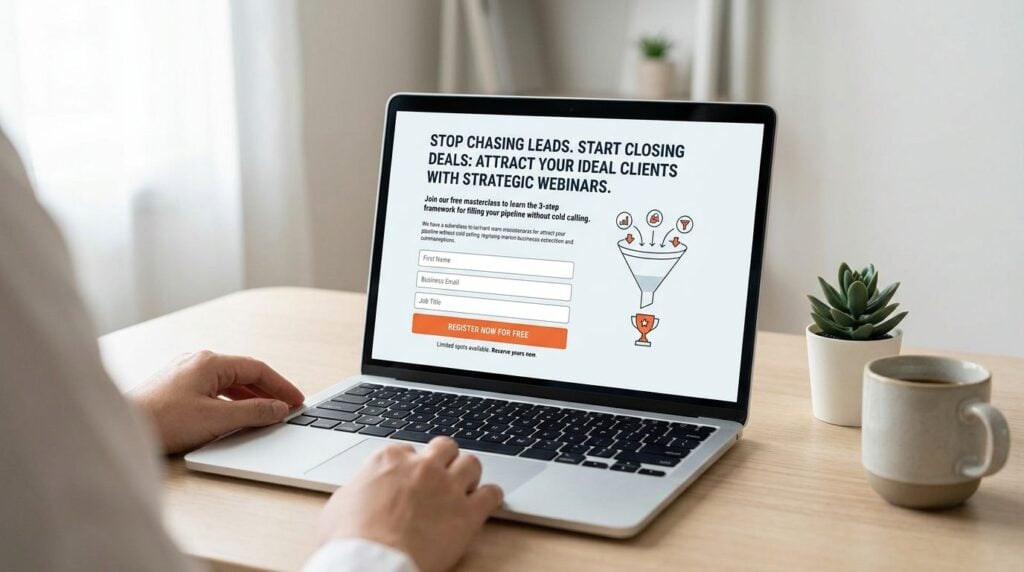
A good webinar page doesn’t need clever design tricks. It needs clarity.
When someone lands on the page, they should understand the problem, the outcome, who it’s for, and what they’ll walk away with. If they have to work to figure that out, conversion suffers and lead quality gets muddier.
My baseline registration page checklist looks like this:
- A direct headline that mirrors the pain point the right attendee already feels
- A short subhead that explains the outcome or transformation
- Three to five bullets on what they’ll learn, written as takeaways
- Date and time details that are easy to spot
- A short form with only essential fields plus one qualifying question
- Speaker credibility kept brief and relevant
- A plain CTA button that tells them exactly what happens next
That qualifying question matters. Don’t use it to satisfy curiosity. Use it to improve routing later. One field about biggest challenge, team setup, or use case can tell you more than a long form full of vanity data.
Structure the webinar for engagement, not endurance
People don’t register to admire your slide design. They register because they want help.
That sounds obvious, but a lot of webinar decks still read like conference talks. Dense slides. Too much setup. Too little interaction. No real checkpoints to understand what the audience needs.
A strong live format keeps things moving. According to WebinarNinja’s guide to webinar lead generation, practitioners recommend 40 minutes of presentation plus 15–20 minutes of live Q&A, with engagement supported by polls and a dedicated moderator.
That format works because it creates room for both teaching and signal collection.
A simple session outline:
| Segment | What to do | Why it matters |
|---|---|---|
| Opening | Frame the problem fast | Confirms relevance right away |
| Core teaching | Share a practical method, not a theory dump | Builds trust through usefulness |
| Mid-session poll | Ask about challenge, maturity, or priority | Creates segmentation data |
| Example or walkthrough | Show how the method works in practice | Makes the advice feel real |
| CTA setup | Introduce next step naturally | Keeps the offer connected to the topic |
| Live Q&A | Answer real objections and edge cases | Reveals intent and urgency |
What works well during the live session
I prefer light slides and a conversational pace. If a slide looks like a PDF page, it’s doing too much.
A few things consistently help:
- Use polls early and mid-session so attendees participate before attention drops
- Have a moderator watching chat, surfacing patterns, and collecting questions
- Call people into the room by acknowledging poll results or recurring challenges
- Teach one clear framework instead of spraying disconnected tips
- Leave enough room for Q&A because that’s where buying intent often shows up
A webinar should feel like guided problem-solving, not a narrated slide deck.
Shorter formats can outperform the classic long webinar
There’s another trade-off worth talking about. The traditional hour-long webinar still works, especially when the topic needs context or multiple stakeholders care about the outcome.
But I’ve also seen shorter sessions produce better lead quality in some cases. Practitioner guidance has started moving toward 15- to 25-minute recurring sessions, especially when teams want a steady rhythm of interviews, focused product education, or expert-led mini sessions, as discussed in this YouTube conversation on shorter recurring webinar formats.
That format won’t fit every goal.
It does fit teams that want to build momentum over time instead of betting everything on one large event. A shorter recurring webinar is easier to repurpose, easier to attend, and often better for people who already know the problem and want a fast answer.
Your Multi-Channel Webinar Promotion Calendar
A webinar can pull in 400 registrations and still hand sales a weak list.
It usually happens because promotion chases volume instead of fit. The message goes broad, the reminders start late, and every post sounds like a calendar notice. You get names. You do not get many people who are close to a buying decision.
The better approach is to build a promotion rhythm around the audience you want in the room and start early enough to let the message compound. ON24 recommends beginning webinar promotion about 4 to 6 weeks before the event, then supporting it with a registration page, reminder emails, and coordinated promotion across channels in its webinar marketing guide.
A practical calendar for attracting the right registrants
I use a simple sequence for B2B and education-led webinars.
| Timing | Channel | Focus |
|---|---|---|
| 4 to 6 weeks out | Email, landing page, organic social | Define the problem, name who the session is for, open registration |
| 2 to 3 weeks out | Social, partner shares, website placements, sales outreach | Add proof, preview takeaways, filter for fit |
| Final 5 days | Reminder emails, short social posts, retargeting if available | Reinforce why attending matters now |
| Day of event | Email and direct reminders | Remove friction and get registered people to show up |
That middle stretch matters more than teams expect. It is where you qualify by message. A post aimed at “anyone interested in learning more” fills the list with curiosity clicks. A post aimed at “training leads trying to improve course completion without rebuilding the LMS” draws a smaller room and a better pipeline.
What each channel should actually do
Email carries the load for conversion, but each send needs a job.
The first email should identify the pain point and promise a specific outcome. The second can handle objections, such as who the webinar is for and what attendees will leave with. The last reminder should be short, mobile-friendly, and built around one action: join.
Social works differently. It keeps the topic visible and gives people multiple ways to recognize themselves in the problem. Rotate the angle instead of repeating the same registration graphic:
- Problem-first post that names the operational issue your audience is dealing with
- Takeaway post that previews one practical idea or framework
- Credibility post that shows why the speaker has useful experience
- Last-call post that gives people a clear reason to register today
If your webinar program feeds a broader publishing calendar, this blueprint for 2026 content strategy is a useful reference for building repeatable distribution instead of promoting each event from scratch.
Broad reach usually hurts lead quality
A narrow message often produces fewer registrations and better opportunities. That trade-off is worth taking.
If the session is for enablement leaders at mid-market SaaS companies, say that plainly. Use examples from their workflow. Call out the problem in their language. Prospects who fit will feel seen. People outside that group will self-select out, which saves your sales team from chasing weak follow-up.
That focus also improves the room itself. The chat gets sharper. The questions get more specific. The attendee list looks more like a set of active opportunities and less like a rented crowd.
For extra promotional angles, these viral social media campaign ideas for your online webinars can help you vary the creative without drifting away from the core audience.
Turning Attendees into Hot Leads in Real-Time
The live webinar is where the best qualification data shows up.
A lot of teams treat the session like a performance. Deliver the deck, answer a couple of questions, export the attendee list, move on. That misses the richest part of webinar lead generation, which is the live behavior happening right in front of you.

Engagement is qualification data
Someone who registers and never attends isn’t the same as someone who stays for most of the session, answers a poll, and asks a question about implementation.
That difference should shape your follow-up.
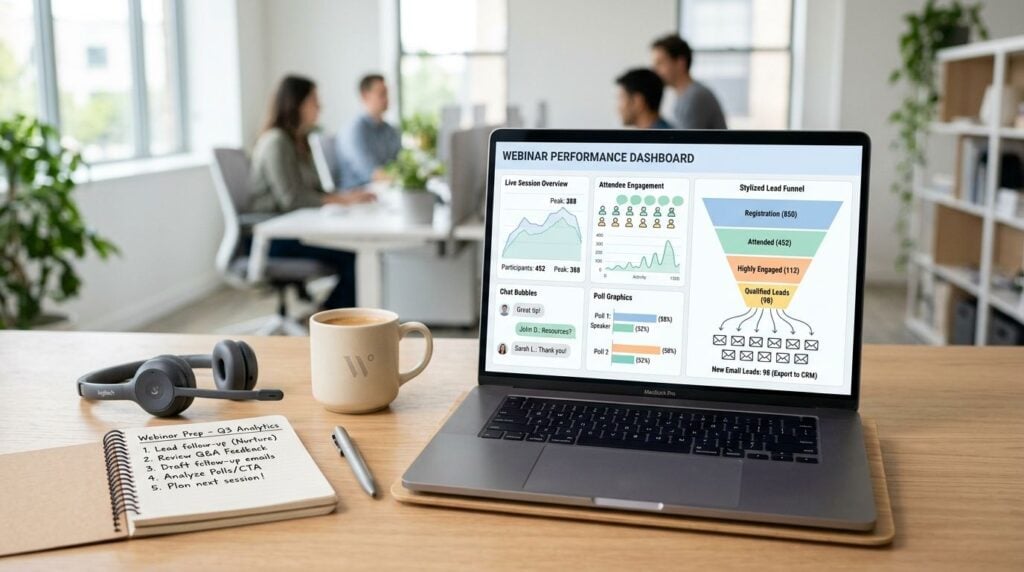
Guidance summarized by Kaltura on webinar lead generation recommends combining registration data with in-session signals like poll responses, Q&A behavior, and total time spent into a lead-scoring model. That’s the right direction because it moves your webinar from list-building to qualification.
I’d pay attention to signals like these:
- Poll answers that show urgency, budget planning, or active project work
- Q&A questions about setup, rollout, integration, or pricing logic
- Chat behavior that shows they’re engaged with the topic, not just present
- Time spent in session because staying longer usually means stronger interest
- Firmographic fit if your team serves a specific market or team profile
The attendee list tells you who arrived. The interaction data tells you who cares.
Use polls to split intent levels fast
Polls aren’t just engagement candy. They’re one of the fastest ways to segment the room.
For example, if you ask what’s blocking progress, the answers can immediately separate people who are exploring from people who are trying to fix a live issue. The wording matters. Ask questions that help sales or nurture know what to do next.
Better poll themes include:
| Poll type | What it reveals |
|---|---|
| Main challenge | Current pain point |
| Stage of initiative | How urgent the need is |
| Team setup or tool use | Fit and complexity |
| Priority outcome | What the next message should emphasize |
A useful live webinar also leaves room to observe patterns. If multiple attendees ask about rollout friction, that’s not just audience participation. That’s message research for future sales calls, landing pages, and follow-up emails.
Here’s a helpful walkthrough on reading webinar engagement more intentionally:

Score leads while the context is fresh
I like simple scoring models because teams utilize them.
You don’t need an overbuilt system on day one. Start by assigning value to behaviors that clearly suggest intent, then pass that context into your CRM or sales notes while the webinar is still fresh in everyone’s mind.
A basic working model might prioritize:
- Live attendance
- Meaningful poll participation
- Question quality
- Strong fit with your ideal attendee profile
- Interest in a next-step resource or conversation
The biggest mistake here is waiting too long. If sales gets a flat export three days later with no context, the moment is gone. A hot webinar lead cools off fast when nobody knows why they mattered in the first place.
The Post-Webinar Playbook to Close Deals
A webinar can feel successful at 11:59 and be forgotten by the next afternoon.
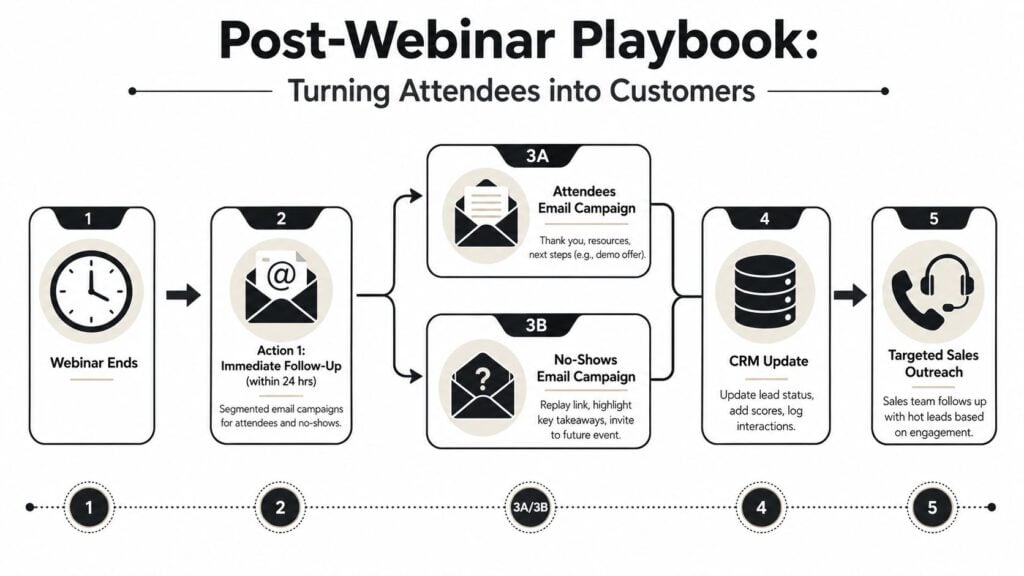
That drop-off usually has nothing to do with the presentation itself. It happens because follow-up is generic, sales gets a flat attendee list with no context, and everyone receives the same replay email whether they asked three sharp questions or never joined. If the goal is sales-ready pipeline, the work after the session needs as much structure as the event.
Split follow-up by behavior
Send the first follow-up while the session is still fresh. Same day is ideal. Within 24 hours is still workable. After that, reply rates tend to soften because the attendee has already moved on to the next priority.
Start with behavior, not just registration status. Two people can both count as attendees, but one stayed for 40 minutes, answered polls, and asked about rollout timing, while the other dropped after the intro. Those leads should not get the same email or the same sales treatment.
At minimum, separate:
- Engaged attendees who stayed live and showed clear buying interest
- Passive attendees who joined but gave you little signal
- No-shows who registered and missed the session
For engaged attendees, send a short thank-you, the replay, any promised resource, and one specific next step such as booking a working session or requesting a customized walkthrough. For passive attendees, lead with the most relevant takeaway and invite them back into the conversation with a lower-friction CTA. For no-shows, keep the tone light and give them a reason to watch a key segment instead of dumping a full recording in their inbox.
The best replay emails feel like a continuation of the room, not a file transfer.
Give sales the context, not just the contact
A raw CSV is rarely enough to close anything.
Sales should see what the person cared about, what they asked, how long they stayed, and what action they took after the webinar. A note like “Attended live, answered poll that they are evaluating tools this quarter, asked about LMS integration, clicked demo CTA” is far more useful than “Registered for webinar.”
I usually keep the handoff simple:
| Signal | What sales should know |
|---|---|
| Stayed to the final Q&A | Stronger interest and attention |
| Asked a pricing or implementation question | Higher buying intent |
| Downloaded the follow-up resource | Willing to continue research |
| Requested a meeting or demo | Immediate follow-up priority |
| Missed live but watched replay quickly | Still warm, but needs qualification |
That context also protects your team from chasing vanity leads. A webinar with fewer registrants can still produce better opportunities if the right people engaged in the right moments.
Turn the recording into a follow-up system
The recording should keep selling after the live date.
Clip the part that answered the hardest objection. Turn the best audience question into a short email. Pull a strong teaching moment into a sales enablement asset. If you want a practical workflow, these ways to repurpose webinar content are a good place to start.
Recording quality matters here. Clean audio, stable framing, and a clear screen share save a lot of editing time later, which is why I like reviewing ProdShort’s webinar tips before a live session.
A practical post-webinar checklist looks like this:
| Task | Why it matters |
|---|---|
| Send behavior-based follow-up | Keeps the message relevant to intent |
| Add engagement notes to the CRM | Gives sales usable context |
| Route high-intent leads first | Improves speed to conversation |
| Save poll and Q&A patterns | Sharpens future messaging |
| Repurpose the recording | Extends the lead engine past one event |
Teams that build predictable webinar pipeline rarely rely on one big event and one generic replay blast. They run shorter, repeatable sessions, watch engagement closely, and treat follow-up like part of qualification. That is how webinars start producing leads a sales team wants.