Single Sign on SSO for LMS Platforms Explained

You’ve probably dealt with this already.
A learner buys your course, clicks the welcome email, lands on the login screen, and gets stuck. They try one password, then another. They hit reset. They wait for the email. Maybe they give up and promise themselves they’ll come back later.
A lot of them don’t.
That’s why single sign on SSO for LMS platforms explained matters so much to course creators. Yes, SSO is a security tool. But from where I sit, it’s also a learner experience tool. If access feels easy, people start faster, return more often, and see your course platform as polished instead of frustrating.
For educators, membership owners, and training teams, that shift is a big deal. The global LMS market was valued at $24.05 billion in 2023 and is projected to reach $70.83 billion by 2030, with growth tied in part to frictionless authentication. At the same time, the average enterprise manages about 130 SaaS applications, which adds to password fatigue that SSO is designed to reduce, according to MiniOrange’s LMS SSO overview.
Why Your Learners Hate Their Passwords
I’ve seen login friction derail otherwise strong learning programs.
A course can have excellent lessons, thoughtful onboarding, and smart reminders. None of that helps if the first real experience is “password incorrect.” Learners rarely separate that frustration from your brand. They don’t think, “authentication failed due to a systems issue.” They think, “this course platform is annoying.”

The small problem that becomes a business problem
One password issue doesn’t sound serious.
But stack up enough of them and you start losing time in places that matter. You answer support emails instead of improving lessons. Your VA or admin team spends the morning resetting accounts. A new member joins your community and immediately runs into friction before they’ve even watched lesson one.
That hurts momentum.
For membership sites and online schools, momentum is everything. Learners need an easy first step. If access feels clunky, they delay starting. If they delay starting, they’re more likely to drift.
What password fatigue looks like in real life
Here’s what course creators usually notice first:
- Repeated reset requests because learners can’t remember which login belongs to which part of the experience
- Confusion across tools when the LMS, community, webinar area, and resource hub all have separate credentials
- Drop-off after purchase because the welcome journey feels like account setup instead of learning
- Support overload that pulls you back into admin work you thought your platform would reduce
A login problem rarely stays a login problem. It turns into a stalled lesson, a delayed onboarding flow, or a refund request.
If you work with business clients, the problem can be even messier. Employees may already log into Google Workspace, Microsoft Entra ID, or Okta all day. Asking them to remember one more LMS password feels unnecessary, because it is.
Why this matters more now
As digital learning grows, access becomes part of the product.
People compare your learning experience to the smoothest software they use every day. They expect one click, not a scavenger hunt for credentials. If your LMS still feels separate from the rest of their day, your content has to work harder just to keep attention.
That’s why I don’t think of SSO as a bonus feature anymore. I see it as part of the front door.
What Single Sign-On Actually Is in Simple Terms
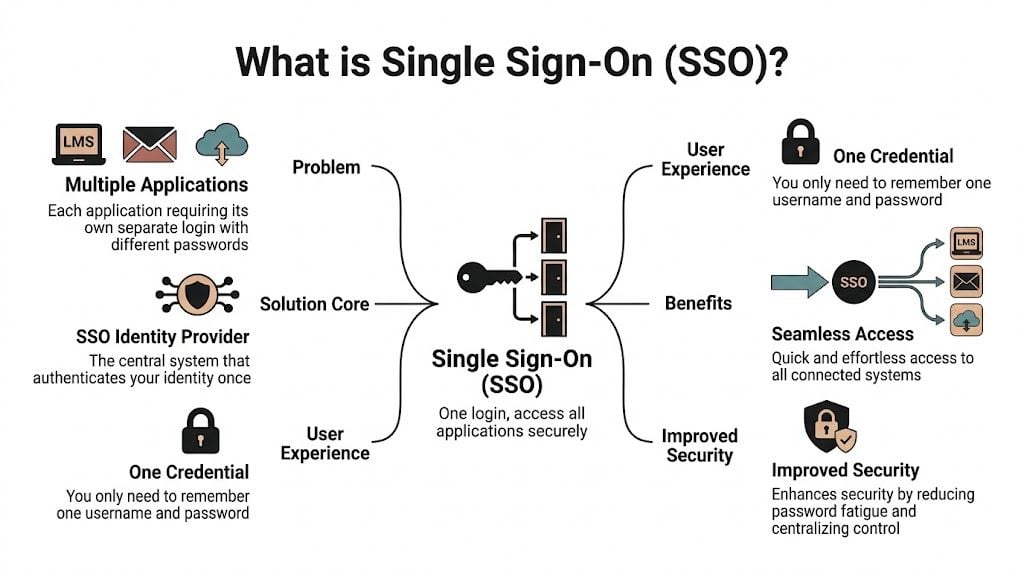
The easiest way to understand SSO is to think about a festival wristband.
When you arrive, staff check your ticket once and put a wristband on you. After that, you don’t keep showing your payment receipt at every gate. The food area, workshop tent, and VIP lounge all trust the wristband. You’re verified already.
That’s basically what single sign-on does.
The two players you need to know
You don’t need to be technical, but two terms help:
Identity Provider or IdP
This is the system that verifies who someone is. Common examples include Google Workspace, Microsoft Entra ID, and Okta.Service Provider or SP
This is the app that wants to let the person in. In this case, that’s your LMS.
So when a learner clicks into your LMS, the LMS says, “I trust Google” or “I trust Microsoft” or “I trust Okta.” If that trusted system has already verified the user, your LMS opens the door.
What the learner experiences
From the learner’s side, it’s refreshingly simple:
- They click your course link.
- They’re sent to their normal login provider if needed.
- They sign in once.
- They land inside the LMS without creating or remembering a separate course password.
That’s the whole magic. Fewer hurdles. Less confusion. Faster access.
A lot of course creators assume SSO is only for huge companies. That’s not really true anymore. It’s useful anywhere people move between connected tools, especially when you have a course area, member portal, resource library, and events platform that should feel like one experience.
To make the concept even clearer, this quick video gives a solid visual walkthrough:

A plain-English example
Let’s say you run a coaching membership.
Your members use:
- your LMS for lessons
- Circle for discussion
- Zoom for workshops
- a resource portal for templates
Without SSO, each tool might ask for a separate login. Even if that setup works technically, it feels fragmented.
With SSO, members can use one trusted identity and move through the experience with less interruption. You’re still controlling access. You’re just removing repeated sign-ins.
Practical rule: If your learners are asking “Which login do I use for this part?” you already have an SSO use case.
What confuses people most
The common misunderstanding is that SSO means no security. People hear “one login” and worry that it sounds loose.
In practice, SSO often gives you tighter control because authentication happens through one central system. That means you can manage sign-ins, revoke access, and apply rules from one place instead of chasing settings across separate apps.
For course creators, that translates to a cleaner learner journey and a less brittle setup behind the scenes.
Why SSO Is a Game Changer for Your Learners and Business
When I talk with course creators about SSO, the conversation usually starts with convenience.
It should end with retention.
A smoother login process changes how people experience your course from day one. They reach the content faster. They’re less likely to stall during onboarding. They don’t burn motivation on account problems before they’ve seen the value of what you teach.
Friction steals learning time
The business case becomes real. Employees and learners lose an average of 12.2 minutes daily juggling credentials across systems, and 59% of users still reuse passwords. SSO helps reduce that risk by centralizing access and supporting stronger controls like MFA, according to Mordor Intelligence’s single sign-on market report.
Those lost minutes add up, but the bigger issue for many educators is attention.
Learning already competes with busy schedules, notifications, and work demands. If your platform asks learners to stop and troubleshoot access, you’ve introduced one more reason to postpone the lesson until tomorrow.
Better access supports better retention
I wouldn’t frame SSO as some magical fix for low completion. Content quality, course design, and relevance still matter more.
But friction at the login stage is one of those avoidable problems. You can remove it. And when you do, the whole experience feels more intentional.
That matters whether you sell a flagship cohort course or run a large internal training academy. If you want a broader view of what makes LMS platforms more effective in practice, this roundup on the advantages of LMS platforms is a useful companion read.
Why learners trust polished systems
Learners notice when things feel connected.
They may not know the term “service provider” or care which protocol sits underneath your stack. What they do notice is whether your course feels like one system or four stitched together. SSO helps your setup feel coherent, especially when your learning experience spans lessons, community, files, and events.
Here’s the business upside in plain terms:
- Lower support load because fewer people get stuck at login
- Stronger first impressions because access feels modern and organized
- Easier scaling when you add new products, portals, or client groups
- Cleaner security habits because people aren’t creating weak duplicate passwords for side systems
If a learner can start in seconds, you protect the moment when motivation is highest.
SSO also makes your operation calmer
There’s a less glamorous benefit that I think matters just as much. SSO reduces decision fatigue for your team.
Instead of maintaining separate access rules in every platform, you can centralize more of that logic. That doesn’t remove all admin work, but it usually makes user management more predictable. Predictability is underrated when you’re juggling launches, support, updates, and content production.
For course creators serving businesses, this is often where SSO moves from “nice to have” to “we need this.” HR, IT, and compliance teams want access to align with the identity system they already use. If your LMS can fit into that flow, your program becomes easier to adopt.
Understanding Key SSO Protocols SAML OAuth and OIDC
This is the part that scares people off, mostly because the names sound heavier than they are.
You do not need to become a protocol expert. You just need enough understanding to ask good questions when your LMS vendor, developer, or client says, “We support SAML” or “We’d rather use OIDC.”
A simple way to think about the three
Here’s the short version.
SAML is common in enterprise environments. It’s the formal, established option a lot of organizations use when they connect internal systems.
OAuth 2.0 is mainly about authorization. It helps apps get permission to do something on a user’s behalf.
OpenID Connect or OIDC adds identity on top of OAuth 2.0, which makes it useful for login and modern web or mobile experiences.
If that sounds abstract, use this table.
Comparing SSO Protocols for Your LMS
| Protocol | Best For | Analogy |
|---|---|---|
| SAML 2.0 | Enterprise LMS setups and company-managed training portals | A security desk that checks official ID and sends a signed approval slip |
| OAuth 2.0 | Granting one app permission to access another service | A valet ticket that authorizes limited access |
| OIDC | Modern SaaS, mobile learning, and API-heavy platforms | A digital ID card that apps can read quickly |
Where SAML fits best
In many corporate LMS environments, SAML 2.0 is the default choice.
The flow is straightforward once you strip away the jargon. A learner visits the LMS. The LMS redirects them to the identity provider. The identity provider confirms who they are and sends a signed XML assertion back. The LMS reads that assertion and creates a session.
That’s why SAML is often a strong match when your learners come from one company directory and need stable access to internal training. According to Branch Boston’s guide to LMS SSO flows, SAML 2.0 is dominant in enterprise LMS integrations, and it can cut password reset tickets by up to 50%. The same source notes that attribute mapping issues can cause initial setup failures.
That last point matters a lot. SAML is powerful, but setup details matter.
The part people trip over
The most common issue isn’t the login itself. It’s what happens after login.
Your identity provider might send fields like:
- first name
- last name
- department
- role
- group
Your LMS has to know what to do with those fields. If “department” from the IdP doesn’t match what the LMS expects, learners may log in successfully but land in the wrong place, miss the right course access, or fail to get assigned the correct permissions.
That process is called attribute mapping.
Good SSO setup is often less about the login screen and more about getting user data lined up correctly after login.
Where OAuth 2.0 belongs
OAuth 2.0 gets mentioned in SSO conversations a lot, but it helps to keep its job clear.
OAuth is about permission, not identity on its own. For example, one app might ask for permission to connect with another service without exposing the user’s password. It’s foundational in modern app ecosystems, but by itself it doesn’t fully answer, “Who is this learner?”
That’s where OIDC comes in.
Why OIDC is popular for modern learning stacks
OpenID Connect builds on OAuth 2.0 and adds identity through tokens, often using JWTs.
If your LMS experience leans mobile, app-based, or API-heavy, OIDC can be a very good fit. It’s widely seen as a more modern option for cloud platforms that need flexible sign-in across devices and services.
JIT provisioning in plain English
You may also hear the phrase Just-in-Time provisioning, often shortened to JIT.
This means the LMS creates a user account automatically when the learner logs in for the first time. Instead of manually adding every person before they arrive, the system builds the account on the fly using the identity details sent by the provider.
That can save a lot of admin effort, especially when you onboard new members or bring in client cohorts regularly.
A practical example:
- A company adds a new team member to Microsoft Entra ID
- The learner clicks the LMS link
- SSO verifies their identity
- The LMS creates the profile automatically
- The learner gets access without waiting for manual setup
For course creators serving organizations, that’s a huge quality-of-life improvement.
How to choose the right protocol
You usually won’t choose in a vacuum. The right answer depends on the systems around your LMS.
A good rule of thumb:
- Choose SAML when you’re working with enterprise clients and formal internal identity systems
- Expect OIDC when the platform is modern, mobile-friendly, or built around APIs
- Treat OAuth 2.0 as part of the foundation, especially when apps need secure delegated access
If you’re the buyer, don’t ask only “Do you support SSO?” Ask these instead:
- Which protocols do you support natively?
- Which identity providers do you connect with most often?
- How does attribute mapping work?
- Do you support JIT provisioning?
- What does the learner see on first login?
Those questions usually reveal more than a yes or no feature checkbox ever will.
Your SSO Implementation Checklist for an LMS
SSO projects go better when you treat them like learner experience projects, not just technical tasks.
The technology matters, of course. But the core goal is simple. You want the right people to reach the right learning space with as little friction as possible.

Start with who your learners already trust
Before you touch settings, answer this question.
Where do your learners already sign in?
If you serve consumers, that might be Google. If you work with business clients, it may be Microsoft Entra ID or Okta. If you run association or membership training, it could be a member portal or another central identity system.
Your SSO plan should begin there. Don’t force people into a new login habit if they already have one.
Confirm what your LMS actually supports
“Supports SSO” can mean a lot of things.
One platform may support SAML only on an enterprise plan. Another may support OIDC but not your client’s preferred identity provider. Another might have SSO login but weak options for role handling after sign-in.
Platform due diligence matters. If your LMS also connects extensively with student or organizational records, this guide to LMS integration with SIS systems can help you think through the broader integration picture.
Decide which user attributes matter
This step is less flashy, but it’s one of the most important.
Make a list of the information the identity provider should send to your LMS. Usually that includes basics like name and email. It may also include team, role, membership tier, region, or client account.
I like to write this out as a plain-language checklist:
Required for access
Email address is usually the anchor field because it helps the LMS match or create the correct learner profile.Useful for personalization
First name and last name improve dashboard greetings, certificates, and reporting.Needed for automation
Role, group, or department fields can control what courses, spaces, or permissions the learner gets.
Test one real learner journey
Don’t launch SSO based on a successful admin login alone.
Test with a small pilot group that reflects actual users. Include at least one person who is not technical. Include someone on mobile if mobile access matters. Include someone who should receive one set of permissions and someone who should receive another.
Watch for questions like these:
- Did they know where to click first?
- Were they asked to log in more than expected?
- Did they land in the right course area?
- Were their name and profile details correct?
- Did anything feel confusing even though it technically worked?
The best SSO rollout is the one learners barely notice because access feels obvious.
Plan your communication before launch
A surprising number of SSO issues are communication issues.
If you change login behavior, tell learners clearly what’s changing. A short email, a help center article, and an updated login page can prevent a lot of support tickets. Use normal language. Don’t send people a wall of acronyms.
A simple message works well:
- Start at this login page
- Choose your company or Google login
- Use your usual credentials
- Contact support only if your access level looks wrong
Keep a fallback during transition
This is especially useful for larger launches or client migrations.
For a short period, keep a documented fallback option for support staff. That might be a legacy login path, a manual account creation process, or a temporary troubleshooting route with your LMS vendor. You may not need it often, but having it reduces stress during rollout week.
A clean implementation checklist
Here’s the compact version I’d use:
- Identify the primary identity provider
- Verify your LMS supports the required protocol
- List the user attributes your LMS needs
- Map roles and access rules carefully
- Run a pilot with real learners
- Fix onboarding copy and login instructions
- Launch in phases if the audience is large
- Monitor support requests during the first days
That sequence keeps the project grounded in learner outcomes, which is where SSO delivers the most value.
SSO Configuration and Security Best Practices
Once SSO is live, the job shifts from setup to maintenance.
This part doesn’t need to be intimidating. Most ongoing SSO work comes down to three things. Keep the connection healthy, make sure user data maps correctly, and review access rules before they drift.
What common LMS settings usually mean
When you open an SSO configuration screen, a few labels tend to appear over and over.
Here’s the plain-English version:
| Setting | What it usually means |
|---|---|
| Entity ID | The unique name or identifier for your LMS in the SSO relationship |
| ACS URL | The destination in your LMS where the login response gets sent |
| Certificate | The trust file used to verify that the login response came from the expected identity provider |
| Claim or Attribute Mapping | The rules that connect incoming user data to LMS profile fields or roles |
You don’t need to memorize those. You just need to know that each one helps your LMS and your identity provider trust each other and pass user details correctly.
The issues I see most often
Most SSO problems are predictable.
A learner can log in but doesn’t see the right course. Someone’s role comes through incorrectly. A certificate expires and the connection suddenly fails. These are annoying, but they’re manageable if you know where to look.
The usual trouble spots are:
- Role mapping errors where a valid user gets the wrong access level
- Missing attributes such as an email field not being passed as expected
- Expired certificates that break trust between systems
- Session confusion when users think they’ve signed out everywhere but still have an active identity provider session
For modern mobile and API-heavy learning setups, OIDC can simplify some of this. According to AnyforSoft’s LMS SSO guide, OIDC is ideal for these environments, its JWTs can be 40% faster to process than SAML’s XML, and mapping OIDC roles can cut manual user management by 70% by automating enrollment.
That last point is especially useful for membership sites with drip access or tier-based offers.
Security habits that make SSO stronger
SSO only helps if the identity side is well managed.
The biggest win is usually pairing SSO with multi-factor authentication. If your identity provider controls the login experience, it can also enforce stronger checks in one place instead of leaving each connected app to fend for itself. If you’re planning that step, this resource on MFA rollout for business gives a grounded overview of how teams approach rollout without creating unnecessary user friction.
I’d also keep these habits in place:
Review access regularly
Remove stale accounts, outdated roles, and old client groups before they create confusion.Document your mappings
Keep a simple internal note showing which incoming fields control which LMS actions.Check certificate dates early
Don’t wait for an outage to discover something expired.Test after major changes
If your LMS, IdP, or membership structure changes, run a fresh login test.
A secure SSO setup isn’t static. Someone on your team should own it, revisit it, and test it before learners find the problem for you.
Don’t treat SSO as separate from LMS security
Many course businesses often split things too much. They think about SSO as one project and platform security as another.
In practice, they overlap. Your login flow, permissions, learner records, and access controls all affect the quality of the learning experience. If you want a broader checklist for that side of your platform, this guide to LMS security features course creators should know is worth keeping nearby.
A practical maintenance rhythm
If I were managing SSO for an LMS long term, I’d use a lightweight routine:
- monthly access review
- periodic learner login test
- documented role mapping check after any product or client change
- certificate review well before renewal dates
- support trend scan for recurring login confusion
That’s usually enough to keep things stable without turning SSO into a full-time project.
Single sign on can sound like an IT topic, but for educators it reaches much further than that. It shapes first impressions, reduces avoidable support work, and helps learners stay in learning mode instead of recovery mode.
If you’re building courses, memberships, or training programs that need to feel smooth and scalable, SSO is worth understanding early. For more practical guides on LMS decisions, learner experience, and digital education systems, explore the latest articles on LearnStream.