Essential Features of LMS Platforms

You might be in that awkward stage where your course lives in five places at once.
Your videos are on YouTube or Vimeo. Payments run through Stripe. Student questions land in email, Instagram DMs, and a Facebook group. Progress tracking sits in a spreadsheet you swear you’ll clean up later. When someone asks, “Which lesson should I do next?” you have to stop and manually figure it out.
I’ve seen a lot of new course creators start this way. It works for a while, especially when you’re validating an idea. Then it becomes exhausting. Students feel the mess too. They lose links, miss updates, and stop logging in because the learning experience feels scattered.
That’s where an LMS starts to make sense.
A learning management system gives you one place to organize content, manage access, guide people through lessons, and see what they’re doing. If you run a course, membership, cohort program, or internal training library, the right LMS acts like the operating system behind the learning experience.
The problem is that most articles about the features of LMS platforms read like shopping lists. You get a huge checklist of functions, but not much help understanding which features solve real problems.
I don’t think most solo creators need the biggest feature list.
They need the right feature for the job in front of them. They need tools that reduce confusion for learners, reduce manual work for the owner, and make the course easier to improve over time.
Why You Need More Than Just a YouTube Channel
A YouTube channel is great for publishing content. It is not great for managing learning.
That difference matters more than many creators expect. Content publishing asks, “Can people watch this?” Learning management asks, “Can people move through this in the right order, know what to do next, get feedback, and finish with some kind of result?”
I worked with a membership owner who had strong content and loyal followers. She posted tutorial videos weekly, sent payment links through a checkout tool, and welcomed new members with a PDF. On paper, the setup looked fine. In practice, members kept asking the same questions. Where do I start? Which workshop is for beginners? How do I know what I’ve already completed?
None of those problems came from bad teaching. They came from bad structure.
Content alone doesn’t create a learning path
A course needs flow. A membership needs navigation. A student needs context.
If your material is spread across YouTube playlists, Google Drive folders, email sequences, and a chat app, your learners have to build that structure for themselves. Most won’t. They’ll skim, get overwhelmed, and drift away.
An LMS fixes that by creating a home base for the experience. Lessons sit in order. Modules are grouped logically. Access can be controlled. Progress can be shown. Feedback can happen inside the learning environment instead of in random side channels.
Your admin workload grows faster than you expect
The second issue is operational. Every disconnected tool creates another task for you.
You end up doing things like this:
- Manual onboarding: Sending welcome emails with the right links every time someone joins
- Progress tracking: Checking a spreadsheet to see who completed what
- Support cleanup: Answering questions that only exist because the platform is confusing
- Access management: Adding or removing people across multiple tools when payments change
That setup doesn’t just waste time. It also makes your business feel fragile. If one tool changes, the whole thing wobbles.
A good LMS gives you structure for learners and fewer moving parts for you.
When people ask me what the main benefit of an LMS is, I usually say this: it replaces duct-tape workflows with a real learning system.
The Foundation Core LMS Features You Cannot Skip
When people compare the features of LMS platforms, they often get distracted by shiny extras first. AI tools, white labeling, advanced automation, fancy certificates. Those can matter later. At the start, I look for the foundation.
If the platform can’t help you build, deliver, manage, and check learning, it won’t hold up well.
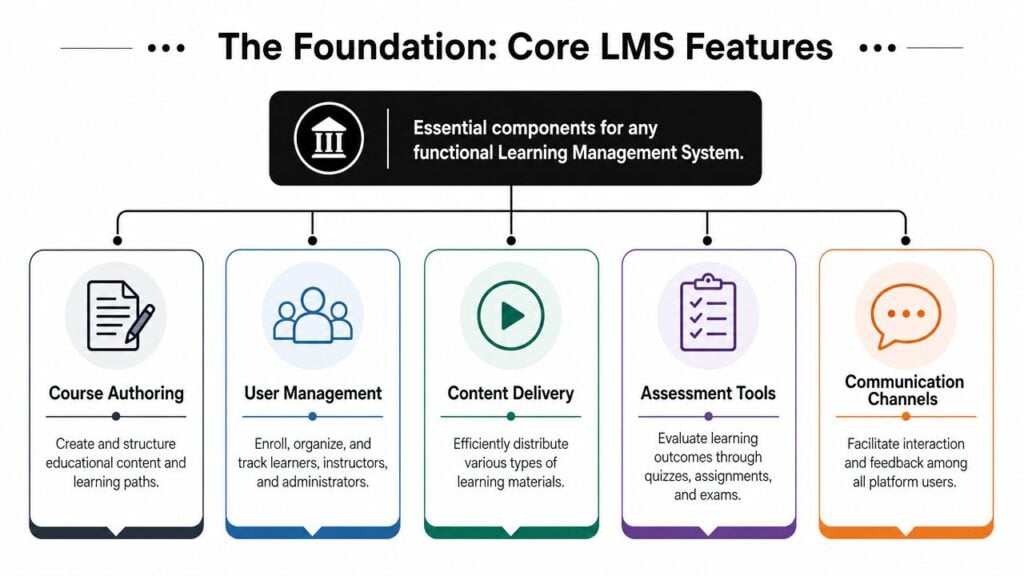
Course authoring gives your content a usable shape
Course authoring is the toolset you use to create lessons, modules, and learning paths inside the platform.
You want to be able to upload videos, PDFs, audio, text lessons, downloads, and links without wrestling the system every time. If adding a lesson feels like filling out tax forms, you won’t keep your content fresh.
For a solo creator, “good authoring” usually means:
- Easy lesson creation: You can add and reorder lessons quickly
- Flexible media support: Video, text, downloads, and simple embeds work without drama
- Clear module structure: You can group lessons by topic, level, or week
- Reasonable editing workflow: Updating one lesson doesn’t break the rest of the course
Think of course authoring like arranging rooms in a house. The furniture is your content. The layout is what makes the house livable.
Content delivery helps learners move forward
A lesson library isn’t enough. Learners need momentum.
Content delivery features are essential. These are the mechanics that control how content shows up and how learners move through it. Drip release is a common example. It lets you release lessons over time instead of dumping everything on day one.
That can be useful when you run a membership, a cohort, or a step-by-step transformation program. It keeps learners from racing ahead, and it reduces the overwhelm that comes from seeing a massive dashboard full of content.
Other delivery basics matter too:
- Progress tracking: Learners can see what they’ve completed and where they left off
- Lesson sequencing: You can guide people through a logical order
- Device-friendly access: Students can log in from laptop or phone without the course becoming unusable
User management saves you from admin chaos
New creators often underestimate this one.
An LMS should let you enroll learners, organize them properly, and separate what different people can see. Even a one-person business needs some form of user management. You may want one experience for paid members, another for free students, and limited access for a VA or co-instructor.
If your platform makes it hard to control access, growth gets messy fast.
Practical rule: If a platform looks beautiful but makes enrollment, access, and permissions confusing, keep looking.
Assessments tell you whether learning happened
You don’t need a university-style exam engine to start. But you do need some basic way to check understanding.
That could be a short quiz after a module. It could be an assignment upload. It could be a reflection prompt or a simple completion checkpoint. The point is to create a moment where the learner has to do something with the material.
Without that, you’re mostly delivering content and hoping it lands.
Tracking Success with LMS Analytics and Reporting
A lot of creators say they want better engagement. What they usually mean is, “I can’t tell where people are falling off.”
That’s why analytics and reporting are one of the most useful features of LMS platforms. They turn learner activity into something you can use. According to UDL On Campus on LMS assessment data, LMS data can be grouped into three broad categories: demographic data, usage data, and achievement data. The same source notes that usage data can include login/logout times, time stamps for assignment starts and submissions, forum views, posts, and replies, and grades on assignments.

For a new course creator, that might sound overly technical. It isn’t. It just means the platform can show you what learners did, when they did it, and how that connects to performance.
The reports that actually help
Here are the kinds of questions a useful LMS should help you answer:
- Who is active right now: Not just who bought, but who is showing up
- Where are people slowing down: Lessons with repeated drop-off or delayed completion need a closer look
- Which assignments cause friction: If learners start but don’t submit, something may be unclear
- How engagement changes over time: You want patterns, not isolated snapshots
This is why I tell creators that an LMS is also a measurement system. If learners keep stalling at lesson four, that is course feedback. If discussion activity spikes around one module, that probably means the topic is valuable, confusing, or both.
Data helps you redesign, not just monitor
Good reporting isn’t there so you can stare at dashboards and feel productive.
It helps you revise the course with more confidence. You might shorten a lesson that people abandon. You might add examples where assignment starts are high but submissions lag. You might spot learners who have stopped logging in and send a timely reminder.
If you’re still fuzzy on the basics, this guide to LMS reporting dashboards for beginners is a useful next read.
A simple mental model helps here. Think of analytics like the mirrors and dashboard lights in a car. They don’t drive for you. But without them, you’re making decisions blind.
Here’s a short walkthrough that gives the idea some visual context:

What solo creators should prioritize
You probably don’t need a giant executive dashboard on day one.
You do need reporting that answers practical questions fast. Can you see course progress? Can you view activity by learner? Can you identify which lessons are skipped, replayed, or stalled? Can you connect activity with outcomes like assignment completion or persistence?
If the answer is no, the platform may look polished, but it won’t help you improve your teaching.
Building Community with Engagement Features
One of the biggest shifts in online learning is that people no longer expect a course to feel like a digital filing cabinet.
They expect interaction.
That doesn’t mean every course needs a buzzing social feed. It does mean learners often need some place to ask questions, share progress, react to ideas, and get feedback while they’re still inside the experience. According to 360Learning’s overview of LMS features, collaborative LMS functions include in-course chat, comment threads, simultaneous editing by multiple users, and user permissions for course review and editing. Market coverage in the same area also highlights communication tools such as discussion forums and messaging.
A quiet course can still feel supportive
I worked with a creator whose course had excellent videos and worksheets, but very low completion. The issue wasn’t the material. It was isolation.
Students got stuck and had nowhere natural to ask for help. Email felt too formal. Social media felt too public. So they did what learners often do when learning gets hard and support is inconvenient. They paused and never came back.
A few simple engagement features changed that. Comment threads under lessons gave people a low-friction place to ask small questions. A discussion area let learners compare how they were applying the material. The creator could answer once, and everyone benefited.
When learners can exchange feedback during the course, the course feels alive instead of abandoned.
Which engagement tools are useful for small creators
You don’t need every community feature under the sun. I usually separate these into “directly useful” and “easy to overbuy.”
Directly useful:
- Lesson comments: Great for clarifying confusion right where it happens
- Discussion forums: Helpful when learners benefit from peer examples and shared accountability
- Messaging or chat: Useful in memberships, cohorts, and active communities
- Feedback options: Comments and reactions can show you what resonates
Easy to overbuy:
- Complicated gamification systems: Fun in theory, often ignored in practice
- Too many social layers: If learners have a forum, chat, live sessions, and external community app, they may not know where to participate
- Heavy co-authoring tools: Valuable for teams, not always necessary for a solo teacher
If community matters to your offer, this article on community engagement best practices is worth reading alongside your LMS shortlist.
Match the feature to the kind of learning
A self-paced mini-course may only need comments and occasional announcements.
A membership usually benefits from stronger discussion features. A cohort program may need live session integrations and easier peer interaction. A team-based training environment may get more value from collaborative review and permissions.
The point isn’t to collect engagement features. The point is to remove the loneliness and hesitation that often stop learning.
Advanced Features for Scaling Your Business
Once your course business starts growing, the features of LMS platforms start serving a different job.
At the beginning, you need order. Later, you need systems.
That usually shows up when you’re tired of repeating the same admin tasks, or when your learning offer becomes part of a bigger business setup with email tools, customer data, staff roles, and different audience segments.
Integrations and permissions make the business feel real
An enterprise-grade LMS is defined in large part by support for multi-tenant architecture, role-based access control, and integrations with systems like HR and CRM tools, as explained by Skilljar’s overview of what an LMS is. That matters because training for external audiences is often measured through ROI and usage data, which makes integrations important for operational reporting.

If you’re a solo creator, that can sound far removed from your world. But the underlying idea still applies. As your operation matures, the LMS needs to connect with the rest of the tools you rely on.
Here are the advanced features that often matter first:
- Integrations: Your LMS should play nicely with email platforms, CRMs, webinar tools, and payment systems
- Role-based access: Useful when you bring in a VA, support manager, instructor, or community moderator
- Brand control: White labeling and custom domains help create a more professional learner experience
- Portal separation: Multi-tenant or multi-portal setups matter when you serve different client groups or brands
Efficiency matters more than feature count
A common mistake buyers make is seeing a huge advanced feature list and assuming more equals better.
What matters is whether those features reduce manual work and support your delivery model. A creator running one signature course may not need multi-tenant architecture at all. A membership owner with paid tiers, moderators, guest experts, and different content tracks might need it sooner than expected.
AI features are part of this shift too. Many newer LMS conversations focus less on static lists and more on workflow efficiency. That can include search, tagging, content suggestions, or drafting support. If you’re curious about the broader role of AI in learning, this piece on how AI agents enhance learning gives helpful context without getting too technical.
Nice to have versus worth paying for
A good scaling feature should do at least one of these jobs:
- Cut repeat admin work
- Support more learners without confusion
- Let team members work inside the system safely
- Make your reporting cleaner across audiences
- Improve the learner experience without adding friction
If it doesn’t do one of those, it may be a shiny object.
I’ve seen creators pay extra for advanced branding controls when they still didn’t have strong onboarding, clear lesson structure, or useful reporting. That’s like repainting the front door while the inside of the house is still unfinished.
How to Choose Which LMS Features Matter for You
I’ll now get opinionated.
LMS shoppers frequently ask the wrong first question. They ask, “What features does it have?” A better question is, “Which features will remove friction from how I teach and how I run the business?”
That shift matters. Independent guidance summarized by Docebo’s LMS features discussion makes the same point clearly. For many buyers, the key question is not what features exist but which features reduce manual work at scale. It also notes that the conversation is moving toward efficiency and time-saving outcomes, including AI-enabled workflow automation.
Start with your actual job to be done
If you’re a solo creator launching a first course, your LMS has a smaller job.
It needs to host content cleanly, guide learners through it, collect payments or connect to your checkout, show basic progress, and let you answer questions without chaos. That’s enough to produce a good experience.
If you’re running a small business with a growing training library, memberships, or client education, the LMS has a bigger job. It needs to support delegation, structured access, reporting, and systems that hold up when more people enter the picture.
This breakdown helps.
| LMS Feature Checklist Solo Creator vs. Small Business |
|---|
| Feature |
| Course builder |
| Progress tracking |
| Basic quizzes or assignments |
| Comments or discussion |
| Email and checkout integration |
| Role-based permissions |
| White labeling |
| Multi-portal or multi-tenant setup |
| Advanced automation |
| Deep analytics |
More features can create more work
A bloated platform can create the very problems you’re trying to solve.
Every extra setting creates another decision. Every advanced module creates another thing to configure, test, and explain to users. I’ve seen creators buy powerful systems and then avoid using half the platform because it felt too heavy.
That hidden cost is real. Complexity increases setup time, support burden, and the chance that your learner experience becomes cluttered.
Buy for the next practical stage of your business, not for the fantasy version three years from now.
If you’re comparing options right now, this guide on how to choose an LMS gives a solid decision framework.
Don’t ignore accessibility and context
One of the most overlooked buying questions is whether a feature improves learning for your actual audience.
Some platforms put all the emphasis on dashboards, certificates, and engagement extras, but that doesn’t automatically mean the course will work better for different learners. In global, blended, or mobile-heavy environments, operational features like offline access, localization, and simpler navigation may matter more than flashy engagement tools.
So before you choose, ask yourself:
- What does my learner need in order to keep going?
- What do I need to stop doing manually?
- Which feature directly supports those two answers?
That question pair will keep you out of a lot of expensive trouble.
Frequently Asked Questions About LMS Features
A few questions come up almost every time I talk to creators about LMS selection.
Do I need a full LMS if I’m just starting out
Not always.
If you’re testing a tiny offer, a lightweight course platform may be enough. But once you need structured lessons, progress tracking, learner management, feedback, and reporting in one place, an LMS starts earning its keep. The key is matching the tool to the complexity of the experience you’re delivering.
What’s the difference between an LMS and a simple course platform
A simple course platform is usually optimized for publishing and selling.
An LMS is more focused on managing the learning experience itself. That can include structured delivery, assessments, reporting, user roles, feedback workflows, and broader operational control. Some tools blur the line, which is why feature evaluation matters more than labels.
Do I need SCORM support
Maybe, but many solo creators don’t need to worry about it right away.
SCORM mostly matters when you’re using packaged learning content that needs to communicate properly with the platform. If you’re uploading your own videos, PDFs, text lessons, and quizzes directly into the LMS, it may not be urgent. If you plan to use third-party training content or serve corporate clients later, it becomes more relevant.
Should I prioritize engagement features or operational features
That depends on your learners and your delivery model.
This is one area where common LMS feature articles often fall short. As noted in Absorb’s comparison of LMS features, many articles don’t really address whether those features improve learning transfer or accessibility for different learner groups. The more useful question is whether you should prioritize rich engagement features or operational features like offline or mobile access and localization, especially in broader learning environments.
For a membership where community is central, engagement tools may matter most.
For a distributed audience learning on the go, operational basics may be more important.
What’s the one mistake you see most often
Buying based on feature volume instead of day-to-day fit.
A platform can look impressive in a demo and still be wrong for your workflow. I would rather see a creator use a simpler LMS well than buy a huge system they never fully implement.