How to Choose Tech Stack for Courses That Scale

You’ve probably been there. You’re ready to launch a course or membership, then discover that the “technology decision” includes an LMS, payment processor, email platform, video host, community tool, analytics layer, database, hosting provider, and perhaps a custom frontend. Every vendor promises a smooth learner experience. Every developer has a preferred framework. Meanwhile, your launch date is getting closer.
I’ve seen course businesses make a fast choice that works beautifully for the first release, then struggle when they add drip content, live sessions, subscriptions, certificates, integrations, or a larger support team. The problem usually isn’t that the original tool was bad. The problem is that nobody defined who would own the system after launch.
A tech stack is the collection of technologies that build and run your product. For an education business, that includes the learner-facing interface, application logic, database, infrastructure, identity and access controls, payments, content delivery, messaging, reporting, and third-party connections. Those decisions influence page performance, enrollment flows, staff workload, learner retention, and the cost of changing direction later.
If you’re researching the benefits of technology in education, you’ll find plenty of discussion about engagement and access. The less glamorous question is what happens behind the learner experience when a payment fails, a webhook stops firing, a video provider changes its API, or your developer leaves.
This guide treats how to choose a tech stack as an ownership decision. You’ll start with the product requirements, map the integrations, weigh staffing and cloud realities, validate a shortlist with a small prototype, and finish with portability and rollout checks. The aim isn’t to predict the next fashionable framework. It’s to choose something your team can operate when real learners, real payments, and real content are on the line.
Introduction Why Your Tech Stack Decides Course Success
A course creator often begins with a sensible thought: “I need somewhere to host my lessons.” Then the requirements arrive one by one.
The product needs a sales page, checkout, member login, lesson completion tracking, a welcome email, a private community, live workshop links, downloadable resources, and an automated way to grant access to the next module. A corporate customer asks for learner reporting. A subscriber wants to pause rather than cancel. A tutor needs to update content without calling a developer.
That collection of requests turns a simple course website into a small software business. The stack determines how reliably those workflows connect. It also determines whether a content manager can make routine changes safely or whether every update becomes a ticket.
The first shortcut is rarely the last one
Early decisions feel harmless because the audience is small and the catalog is manageable. A plugin can handle access rules. A spreadsheet can track certificates. A manual email can replace an automation. Those workarounds can be reasonable while you’re validating demand, but they become risky when learners expect instant access and the team starts adding products.
I’m cautious about custom development before the learning experience is clear. I’m equally cautious about assembling a pile of disconnected tools because each one looks inexpensive or convenient. Every connection creates another place where data can be duplicated, delayed, or lost.
Your stack also shapes the people you’ll need. A product built with a familiar, well-supported framework is easier to hand to another developer. A niche system may be perfectly capable, but if only one person understands its conventions, that person becomes part of the architecture.
Practical rule: Choose the system you can explain, monitor, repair, and hand over. A fast launch only counts if the business can keep running after launch day.
Cloud concentration makes this decision more durable than many founders expect. In Q1 2026, Amazon Web Services held 28% of the global cloud infrastructure services market, Microsoft Azure held 21%, and Google Cloud held 14%, for a combined 63% share, according to industry reporting on Q1 2026 cloud market share. AWS launched in 2006 and still led the market in 2026, which shows how long platform ecosystems can influence architecture decisions.
That doesn’t mean every course business should use AWS. It means a “best” stack usually aligns with the cloud ecosystem your team can support reliably, including its managed databases, identity services, hosting options, AI tools, and enterprise integrations. The rest of this article gives you a practical way to make that choice without getting trapped by a demo or a trend.
Clarify What Your Course and Membership Actually Needs
Start with the learner journey, not a list of frameworks. Before comparing Laravel, Django, Node.js, .NET, or a hosted LMS, write down what a learner does from discovery through renewal.
A requirements worksheet keeps the conversation concrete. Record the audience, content, access model, business rules, staff roles, integrations, reporting needs, and operational risks. “We need an LMS” is too broad to guide a technical decision. “A member pays monthly, receives immediate access to a beginner path, completes modules on a schedule, joins a private discussion space, and can cancel without losing historical completion records” is useful.
Turn product ideas into technical requirements
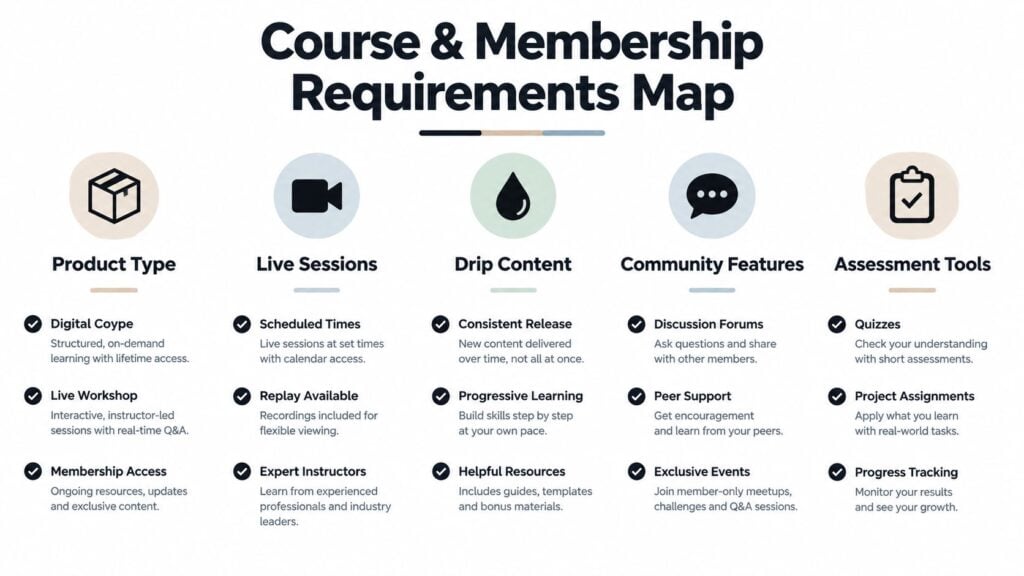
Use five categories to structure the worksheet:
- Product type: Decide whether you’re building a self-paced course, cohort program, membership library, certification product, or a combination. Each model creates different access, scheduling, and reporting needs.
- Live sessions: Record whether learners need calendar invitations, attendance tracking, replay access, instructor permissions, or integrations with tools such as Zoom.
- Drip content: Define whether release dates are based on enrollment, calendar dates, completion, subscription status, or cohort membership.
- Community features: Specify whether discussions live inside the platform or in Circle, Discord, Slack, or another service. Note whether access must be removed automatically after cancellation.
- Assessment tools: List quizzes, assignments, grading, certificates, feedback, retakes, and any evidence that must be retained.
Next, separate must-have behavior from preferences. A membership owner may say “we need flexible content,” but the actual requirement could be scheduled publishing, regional availability, role-based access, or different entitlements for annual and monthly subscribers.
Ask stakeholders to describe failure scenarios too. What should happen when a payment is declined? Can a learner keep access during a grace period? Who can refund an order? Can an instructor edit grades? What happens to course access when a corporate seat is reassigned?
Include ownership and compliance early
Privacy, accessibility, retention, and audit requirements shouldn’t appear after vendor selection. Identify the learner data you’ll store, where it moves, who can see it, and which vendors process it. A system that looks elegant in a product demo may become difficult to govern once payment, identity, assessment, and reporting data flow across several services.
Create a short worksheet with these fields:
- Learner actions: enroll, pay, log in, watch, complete, discuss, download, renew.
- Business rules: access, refunds, cancellations, cohorts, certificates, roles.
- Data: profile, progress, payments, submissions, attendance, communications.
- Staff tasks: publish, moderate, support, report, export, revoke access.
- Failure handling: failed payments, unavailable video, duplicate accounts, integration outages.
- Ownership: who reviews code, manages vendors, handles incidents, and approves changes.
Start with the needs your course business must satisfy. Choose tools only after those needs are specific enough to test.
That worksheet becomes the filter for every later decision. It also gives nontechnical stakeholders a way to contribute before a developer turns preferences into architecture.
Map Integrations and Ecosystem Fit Before You Fall in Love With Tools
Many course stacks fail at the boundaries. The lesson page works, but the payment event doesn’t grant access. The email platform receives a contact without the right tag. The community invitation goes out, but cancellation never removes the member. These are integration failures, and learners experience them as broken promises.
Build an integration inventory before selecting a core platform. Include payment gateways such as Stripe, email and CRM tools such as HubSpot, video hosting, webinar software, community platforms, analytics, customer support, accounting, and any student information system. For each connection, record whether it uses a maintained native connector, a documented API, webhooks, an automation tool such as Zapier, or custom code.
A platform that connects cleanly to your existing systems can be a better business choice than a technically impressive product that requires constant custom work. This matters particularly for education organizations evaluating LMS integration with SIS systems, where enrollment, identity, course records, and reporting may cross organizational boundaries.
Compare the practical fit
Consider two hypothetical options. Stack A uses a mainstream backend and a hosted PostgreSQL database, with mature connectors for Stripe, Mailchimp, Zoom, and common CRM tools. Stack B uses a newer framework with a polished developer experience, but requires custom adapters for payments and community access.
| Criteria | Stack A | Stack B |
|---|---|---|
| Payment integration | Mature connector and documented events | Custom integration likely |
| Email and CRM | Broad ecosystem support | Depends on vendor-specific work |
| Community access | Standard automation options | Additional service layer required |
| Hiring depth | Easier to staff and hand over | Smaller specialist pool |
| Technical flexibility | Conventional patterns | Greater control and novelty |
| Integration risk | Lower for common workflows | Higher until prototypes prove otherwise |
The table isn’t a verdict. Stack B may be the right choice if it solves a real product requirement that Stack A can’t handle. The point is to price the integration surface, not just the framework.
Hiring is part of ecosystem fit
A developer doesn’t only write new features. They investigate failed webhooks, upgrade dependencies, review AI-generated code, explain data flows, and support the person who publishes content. A stack that’s easy to hire for reduces the risk of one-person knowledge.
“Boring” technology often wins. A conventional stack with strong documentation, established packages, and familiar deployment practices can make onboarding and support more predictable. Independent guidance on choosing a technology stack for a growing business also treats hiring depth, time to market, integration needs, and compliance as first-order factors.
Forms deserve the same scrutiny as payment and email tools. If your marketing team needs a flexible form builder for surveys, applications, or lead capture, a comparison such as why marketers need a Typeform alternative can help you evaluate another dependency before it becomes embedded in the learner journey.
Ask every vendor or developer to demonstrate the full path, not just the happy path. Create a member, take payment, grant access, send the email, join the community, complete a lesson, cancel, and export the record. That sequence tells you more than a feature checklist.
Weigh Scalability Cost and Long Term Ownership Honestly
Cloud infrastructure spending reached a record $129 billion in Q1 2026, while the three largest cloud providers captured about 63% of that spend, according to reporting on Q1 2026 cloud infrastructure services spending. That environment gives course businesses access to powerful managed services, but it also makes provider choice and portability worth examining early.
For a small education business, scalability rarely begins with a dramatic traffic event. It begins with more operational detail. More courses create more content records. More members create more access checks, progress updates, emails, payment events, support tickets, and reporting queries. A stack that saves developer time but makes these workflows opaque can become expensive to maintain.
Compare speed with ownership
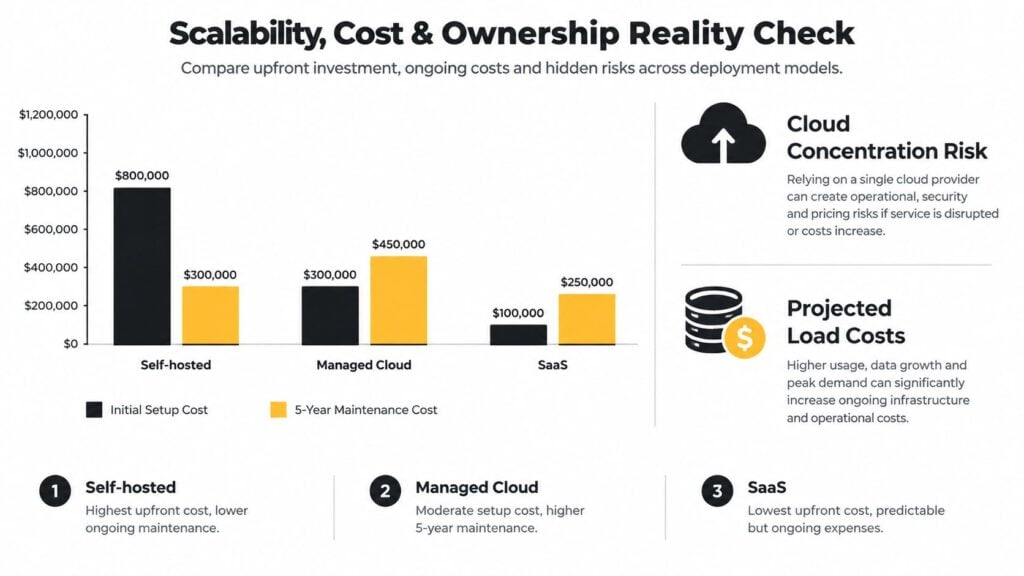
When you estimate cost, separate cost to build, cost to run, and cost to change. A SaaS platform may reduce infrastructure work but impose subscription fees, feature limits, or migration constraints. Self-hosting may provide control but transfer patching, backups, monitoring, and incident response to your team. Managed cloud services sit between those models, with operational support in exchange for provider dependence and usage costs.
Cloud-native deployment itself has become the default direction for much software. The surrounding market rewards stacks that reduce operational burden, integrate with managed services, and support iteration at scale. A SaaS learning management system may therefore make sense when your team wants to focus on curriculum and customer experience rather than infrastructure operations.
Your model should include projected load, database usage, storage, email volume, video delivery, background jobs, support time, monitoring, and specialist development. Don’t treat the lowest starting price as the lowest total cost.
AI changes the speed calculation
AI-assisted coding can produce a working feature quickly. It can also produce code your team doesn’t understand well enough to debug later. The relevant question is whether someone on your team can review, test, secure, and maintain that code after the original prompt is forgotten.
AI makes adjacent technologies more approachable. A team familiar with one mainstream web framework may be able to evaluate another with help from coding tools. That doesn’t remove the need for judgment. A framework with clear conventions can be easier for both AI tools and new developers to follow than a highly flexible system where every feature can be implemented several ways.
Stack Overflow’s 2025 Developer Survey provides context for this shift, including continued wide use of JavaScript and a notable adoption jump for Python connected to AI and data work. The useful takeaway for a course operator is practical. Choose a stack your team can inspect, not one that looks fast only while an assistant is generating code.
Test Your Shortlist With Real Prototypes Not Just Demos
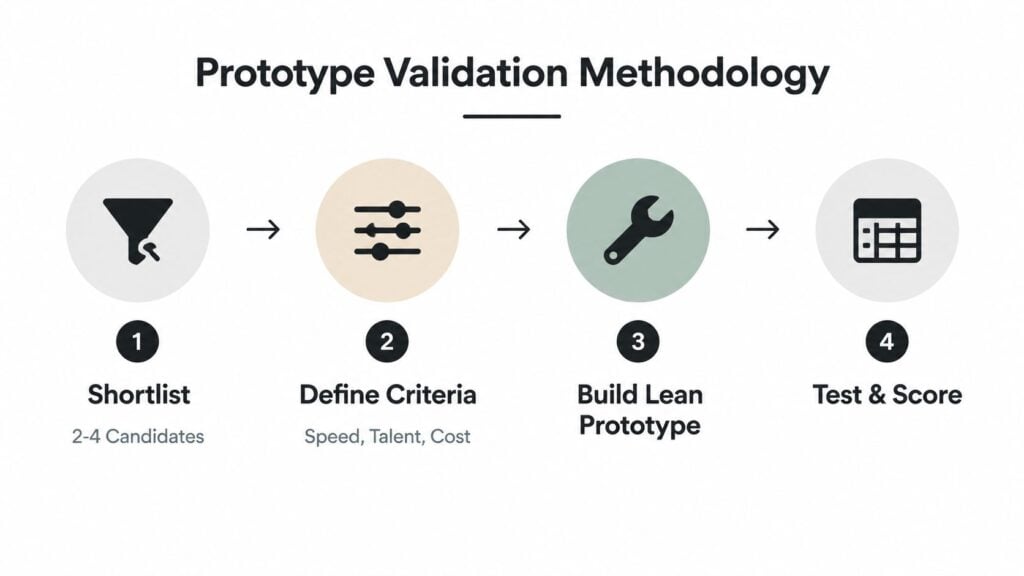
Once the requirements and ecosystem are clear, reduce the field to 2 to 4 candidates. A long list feels thorough, but it usually delays the decision and encourages shallow comparisons. Each candidate should be capable of supporting the same small slice of the product.
Use weighted criteria that reflect your business. Speed to ship matters, but so do talent availability, ecosystem maturity, cost to run at projected load, security, operational fit, and the team’s ability to maintain the code. Give each criterion a weight before testing so a smooth demo doesn’t overpower a serious staffing or portability problem.
Build the same thin slice
Don’t ask each vendor to show its favorite feature. Build the same learner journey in every candidate:
- Create an account and purchase access.
- Grant the correct entitlement.
- Display a protected lesson.
- Record completion.
- Send an email or community event.
- Cancel access and preserve the right records.
- Export the learner’s data and progress.
That slice exposes authentication, data modeling, background jobs, integrations, admin workflows, and failure handling. It also lets your content and support teams test the parts developers may overlook.
A prototype should be deliberately small. The point isn’t to build the entire course platform. The point is to expose unknowns before you commit to a long implementation.
Test under realistic conditions
Benchmarks can mislead when teams change several variables at once, use undersized systems, rely on unrealistic workloads, or fail to document the conditions. Benchmarking guidance from the IEEE Computer Society highlights the risk of apples-to-oranges comparisons and synthetic tests that don’t resemble customer use.
For a course product, use representative lesson records, access rules, progress updates, background jobs, and concurrent learner actions. Record the database configuration, test data, application version, workload, and observed bottlenecks. A result nobody can reproduce is a story, not evidence.
Portability deserves its own proof gate. AWS recommends flexible, loosely coupled applications, including Docker containers that can run in different environments and microservices that reduce the blast radius of changes. Its vendor lock-in guidance also recommends asking providers to demonstrate data portability tools.
Check the mechanics, not just the promise. Nubius’ technical vendor lock-in checklist points to portable VM formats such as qcow2 or raw, OCI-compliant container images, and standard data access through block devices, NFS exports, or S3-compatible endpoints.
Write a decision record after the prototype. Include the requirements, scores, test conditions, unresolved risks, rejected alternatives, and the person responsible for revisiting the decision.
This short video can supplement the prototype review with another practical perspective:
Your Rollout Checklist and Next Steps for a Confident Launch
A good stack decision becomes valuable during rollout. Before launch, make sure the people who operate the course can complete routine work without developer intervention, and make sure the team can recover when a dependency fails.
Use this checklist as a final review:
- Confirm ownership: Name the person responsible for application changes, infrastructure, integrations, backups, access control, and incidents.
- Verify the learner journey: Test enrollment, payment, login, content release, completion, email delivery, community access, cancellation, and refund handling.
- Review portability: Export important data, inspect the available formats, and confirm that the provider can demonstrate the process.
- Add observability: Monitor failed jobs, payment events, authentication errors, integration failures, storage, and database health.
- Document recovery: Write down how to restore data, revoke access, replace credentials, and contact vendors.
- Prepare onboarding: Give a new developer or technical contractor enough documentation to understand the architecture without relying on one person.
- Create a change path: Use a decision record for major additions, such as a new community platform, AI feature, payment method, or reporting system.
Don’t wait for perfect architecture. A course business needs a stack that supports the current learning experience and leaves sensible options for future changes. Avoid premature microservices, unnecessary custom interfaces, and tools that nobody on the team can confidently operate.
Review the decision when the product, team, or compliance requirements change. You don’t need to rewrite a working system because a newer framework appears. You do need to act when support risk, integration failures, staffing difficulty, or operational cost begins to interfere with learners and revenue.
The most useful next step is concrete. Fill out the requirements worksheet, list every integration, and select no more than four candidates. Then build the same enrollment-to-completion slice in each one, record what you learn, and choose the stack your team can staff, integrate, govern, and repair over time.
If you’re planning a course or membership launch, start that worksheet today and use the first real learner journey as your test case. A stack decision grounded in actual access rules, payments, content operations, and ownership questions will give your team a much stronger foundation than another round of framework browsing.