Artificial Intelligence Learning: A Creator’s Guide

You open your course dashboard and see three familiar problems. One learner has stalled halfway through a lesson, another has raced ahead, and someone else has posted a question your community hasn’t answered yet. You want to help each person without turning every day into a queue of manual replies.
That’s where artificial intelligence learning becomes useful as a course-design lens. It asks how a system can respond to learner needs using examples and data, and how you can make that support practical, reliable, and fair. The aim isn’t to add AI everywhere. It’s to choose features that help people learn, then check that they’re doing so.
What Artificial Intelligence Learning Actually Means
Artificial intelligence learning describes how machines identify patterns from data and use those patterns to improve their responses or decisions. In a digital course, that could mean suggesting a review lesson after repeated wrong answers, offering a different explanation, or helping a learner find an answer in course materials.
That’s different from ordinary automation. A rule-based automation follows instructions you set, such as sending a reminder when someone hasn’t logged in. An AI feature can use patterns in examples to decide which response or recommendation may fit. And ChatGPT is one kind of AI tool, not a synonym for the whole field.
The course-design lens
I find it helpful to start with the learner’s job, not the technology. If a student is stuck on a concept, the design question is whether a custom hint, a short recap, or a human response would help them move forward. If the system can’t make a useful distinction between those needs, adding AI may only add another interface.
This matters to online educators and membership owners because learners arrive with different backgrounds, goals, and schedules. A course feature that adapts thoughtfully can make support feel more responsive. But the feature still needs sound instruction, relevant content, and a way to catch mistakes.
If you want a light introduction to the vocabulary and ideas behind the field, AI fundamentals for trivia fans offers an accessible starting point. The practical question for a course creator is what the system learns from, what it does with that learning, and how you’ll know whether its response helped.
The Core Technologies Behind AI in Education
Start with machine learning. Instead of writing a rule for every possible learner response, a developer provides examples and a learning method that detects patterns. It’s a little like training a dog with repeated examples and feedback rather than handing it a book of rules. The analogy has limits, but it captures the basic shift from explicit instructions to learning from examples.
That distinction has a history. Artificial intelligence became a formal research field in 1956 at the Dartmouth Summer Research Project. Later, AlexNet’s 2012 ImageNet win cut top-five error rates from 26.2% to 15.3%, helping shift the field from hand-written rules toward statistical learning (history of artificial intelligence).
From patterns to useful course features
Deep learning uses layered neural networks to learn increasingly complex patterns. Those layers helped systems make progress in tasks such as image recognition and language processing. For a course creator, the takeaway is that a model’s capabilities depend on learned patterns, not on a human understanding of the subject.
Natural language processing, often shortened to NLP, gives software ways to work with written or spoken language. It’s part of what lets a chatbot interpret a learner’s question and produce a response. That doesn’t mean the response is necessarily correct, so course materials and clear limits still matter.
Recommender systems use information such as learner progress or stated interests to suggest a next item. A familiar example is a platform recommending a lesson or resource based on what someone has already viewed or completed. The suggestion can be helpful, but only when the available learning materials fit the learner’s need.
These building blocks often appear together. An AI tutor might use language technology to interpret a question, a model to generate a response, and course data to point the learner toward a relevant lesson. For a plain-language look at classroom uses, Gaeilgeoir AI’s overview of machine learning in education provides useful context.
Five Practical Applications Course Creators Can Use Right Now
AI is most useful when it takes on a clear course creator job. These applications can reduce routine work or help learners find support, but each needs a sensible boundary.
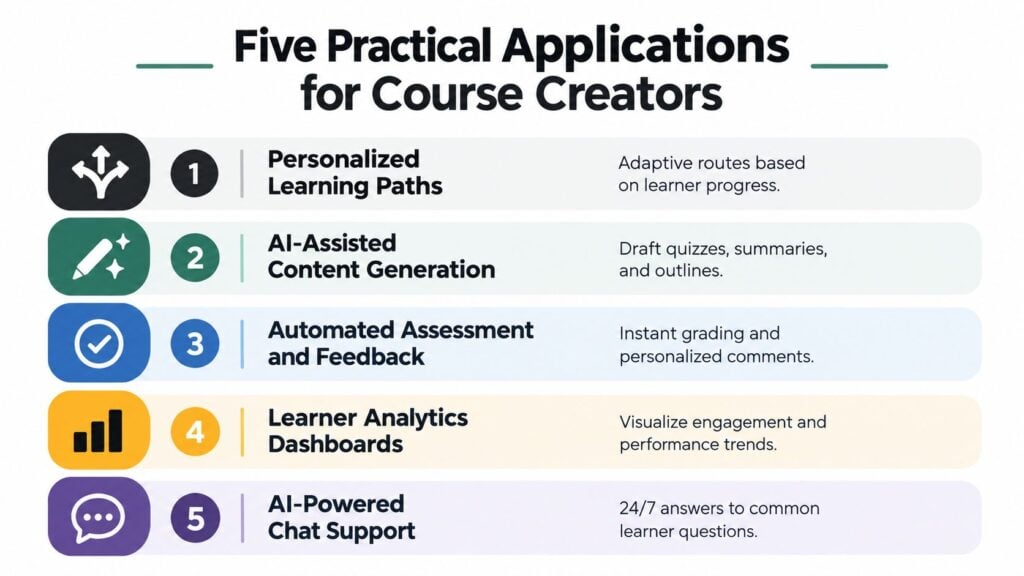
Personalized learning paths recommend a lesson, recap, or practice activity based on learner progress. They can help learners who need a different route through the material. They work best when you have enough well-organized content to recommend, and the recommendations should be checked for relevance.
AI-assisted content generation can draft quiz questions, summaries, outlines, or examples. That can speed up a first draft, but an editor still needs to check accuracy, tone, accessibility, and alignment with the learning outcome. The final content belongs to the course team.
Automated assessment and feedback can help learners get a quick response to common answers or practice tasks. The tradeoff is that automated scoring can miss nuance, especially when an answer is thoughtful but phrased differently from the expected response. Use human review when the result affects grades, placement, or certification.
Learner analytics dashboards can show patterns in participation, answers, or lesson progress. They’re useful when you start with a specific question, such as which concept is confusing learners. A dashboard full of signals won’t tell you what action to take unless you decide what matters.
AI-powered chat support can answer common questions at the moment a learner needs help. It should draw from approved course information and make uncertainty clear. If you’re exploring conversational tools, you can talk to the AI career assistant to see one example of an AI chat experience.
For a broader look at how course design can incorporate AI features, see this guide to AI for instructional design.
| Application | Primary benefit | Main risk | Start when you have |
|---|---|---|---|
| Personalized learning paths | More relevant next steps | Recommendations may miss the learner’s need | A structured library of lessons and practice |
| AI-assisted content generation | Faster drafts | Errors or inconsistent voice | An editor and clear content standards |
| Automated assessment and feedback | Faster routine feedback | Nuanced work may be misread | Low-stakes tasks with defined criteria |
| Learner analytics dashboards | Visible learning patterns | Data without a decision question | A clear question to investigate |
| AI-powered chat support | Answers to common questions | Confident but unsupported replies | Approved course content and escalation routes |
How Data Quality and Scaling Shape What AI Can Learn
An AI feature learns from the examples and information it receives. If those examples are repetitive, incomplete, or poorly matched to the course, the output can be unhelpful even when the underlying model is capable. Think of building a course library like building a house: adding more materials doesn’t fix a weak foundation or missing structural parts.
Model training has scaling relationships. In dense transformer training, the amount of training data should grow in proportion to model size, with a commonly cited guideline of roughly 20 training tokens per parameter. Under that regime, a 70-billion-parameter model would require roughly 1.4 trillion tokens (Berkeley’s lecture materials on scaling and compute). That training-scale example helps explain why “more content” alone doesn’t guarantee better results.
Make examples earn their place
For course creators who aren’t training a large model from scratch, the practical lesson is about what information you supply and how you test the feature. Remove duplicate or outdated material, check that the content represents the learners and topics you serve, and test unusual but realistic questions. A system that performs well on familiar examples may still struggle with a new phrasing or a less common learner need.
Active learning offers another useful idea. Instead of asking people to label examples at random, a system can surface examples that are likely to be informative. Research on meta-learning finds that selecting informative examples can improve performance when supervision is limited. For a course team, that suggests reviewing edge cases and uncertain answers carefully, rather than spending equal effort on repeated, obvious examples.
Practical rule: Curate for coverage, not volume. A smaller set of clear, representative examples can be more useful than a larger collection with gaps and duplicates.
Track whether the feature helps learners understand and apply ideas, not just whether it produces plausible text. Completion can show that someone reached the end of a module. A transfer task, where they apply a concept to an unfamiliar problem, can tell you more about whether the learning travels beyond the example they practiced.
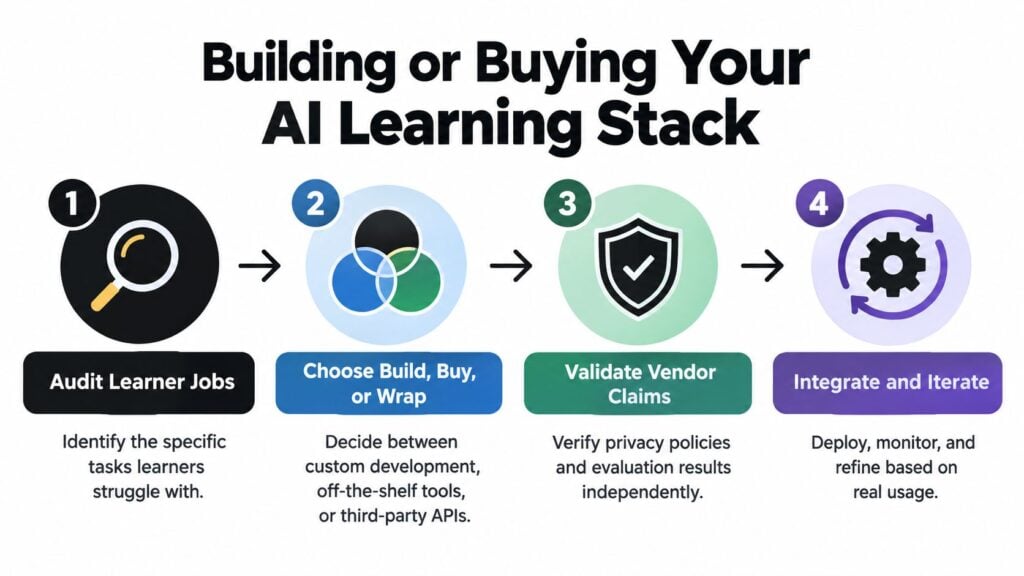
Building or Buying Your AI Learning Stack
Organizations are adopting AI across work, and that makes it easier for course creators to find tools to consider. Stanford’s 2025 AI Index reports that 78% of organizations used AI in at least one business function in 2024, up from 55% in 2023. Generative AI use in at least one business function rose from 33% to 71% over the same period (Stanford’s 2025 AI Index). Those figures describe organizational use, not proof that a particular education tool will improve learning.
A practical decision starts with the learner task. Then you can choose between an off-the-shelf tool, a feature built into an LMS or authoring product, a third-party API wrapped in your own interface, or custom development. No-code tools may be quicker to try and require less technical setup, while custom implementations usually require more engineering and ongoing maintenance. Costs and skill demands vary by vendor and scope, so compare actual plans and support rather than assuming a standard price tier.
Four stages before you scale
Audit learner jobs. Identify where learners get stuck, what instructors repeat, and which routine task consumes time. Keep the initial problem narrow.
Choose build, buy, or wrap. Community platforms, LMS features, and AI-enhanced authoring tools may fit different workflows. LearnStream publishes practical guidance for digital learning businesses, including material on AI learning tools. Use the LMS evaluation checklist to organize the wider platform questions.
Validate vendor claims. Ask what data the tool uses, how outputs are evaluated, and what happens when it’s wrong. Check the privacy terms and test the product with representative course material before learners rely on it.
Run a small pilot. Limit the feature to a defined use, gather learner and instructor feedback, and decide what evidence would justify expanding it. Don’t scale because the demonstration looked polished.
Before signing, ask where learner data is stored, whether prompts or outputs are used to train models, who can review the outputs, and how the vendor evaluates accuracy and safety. Also ask how you can export or delete your data if you stop using the service. Keep a qualified person responsible for decisions that affect learner progress.
Equity, Privacy, and Age Concerns Most Guides Miss
A course can be technically available without being equally usable. A 2025 UNESCO-UNEVOC survey of 4,268 young people across 128 countries found that 24% lacked reliable internet access or suitable equipment, and 40% had received no training in ethical AI use, media literacy, or digital responsibility (UNESCO-UNEVOC survey report). Those findings make access a design issue, not a box to tick after launch.
Offer downloadable lesson materials, mobile-friendly pages, and activities that can be completed without a continuous chatbot connection. Where learners share devices, keep the workflow simple and avoid requiring multiple accounts or long online sessions. If you offer multilingual support, make sure the core instructions and assessment criteria remain understandable in each version.
Privacy and age need clear boundaries
UNESCO’s guidance recommends that governments require data privacy protections for generative AI used in education. Before you add a tool, document what learner information leaves your platform, how long it’s retained, whether it’s used for profiling or model training, and which privacy rules apply. Collect only what the learning task needs, and don’t enter sensitive personal information into a general-purpose AI system.
UNESCO recommends a minimum age of 13 for AI use in the classroom and calls for age-appropriate design and supervision (UNESCO guidance on AI in schools). That benchmark doesn’t replace local law or school policy. For courses serving teenagers, define permitted tasks, consider parent or teacher involvement for younger learners, and provide a way to report unsafe or incorrect responses.
For consequential decisions, keep a human in the loop. The U.S. Department of Education recommends human oversight as a key criterion for educational AI. A qualified person should be able to inspect and correct an output, override a recommendation, and explain a final decision about grading, placement, or learner support (U.S. Department of Education report on AI in education).
Measuring Real Learning Instead of Just Engagement
Time on page and completion rates can show whether learners are using a course. They can’t, by themselves, show whether learners can explain an idea, spot an error, or apply a skill somewhere new. That distinction matters when you use AI to draft feedback or help learners produce polished work.

A learner might submit a strong answer with AI assistance without being able to defend the reasoning. To understand what they know, use assessments that make thinking visible: staged drafts, error-analysis tasks, oral or screen-recorded explanations, and closed-book transfer checks. For a certificate to carry weight, it should represent more than course access and completion.
Research presented at the 2025 Artificial Intelligence in Measurement and Education Conference notes that structured AI interactions may support next-item performance, while longer-term transfer and durable learning effects remain unresolved priorities (conference research on AI in measurement and education). That’s a reason to test whether learners can use an idea beyond the immediate exercise, rather than treating a quick improvement as proof of lasting mastery.
A small measurement habit
This month, add one transfer task to a module and review the responses with an instructor. Also choose one integrity check for a cohort, such as asking learners to explain how they revised an AI-assisted answer. Keep the task aligned with the course outcome and tell learners in advance what AI support is permitted.
For help defining what learners should demonstrate, use this guide to measuring learning outcomes. Better evidence can help you improve instruction and make completion certificates more credible. It can also support retention by showing learners that the course helps them use skills, not just consume lessons.
When you want a visual overview of learning analytics and planning, this video offers another perspective.
Your Next Steps and Quick Answers for Course Creators
Start with a focused plan for next week:
- Audit learner data: Review what your course collects and where learners stall.
- Choose one application: Use the comparison table to pick a problem worth solving.
- Scope a pilot: Define who will use it, what it will do, and how you’ll review results.
- Write a privacy disclosure: Explain what data the feature uses and how it’s handled.
- Add a transfer task: Ask learners to apply a concept in a new context.
Should learners be allowed to use AI? Set rules by learning outcome. Allow support where it helps practice, and require learners to disclose or explain AI assistance when independent reasoning is being assessed.
How should I judge ROI? Compare the time, cost, and learner outcomes for the specific task you’re improving. Don’t claim a return until your own pilot gives you evidence.
Choose one learner problem, design a small and accessible pilot, and review the results with both learners and instructors before expanding it. That’s a practical way to make artificial intelligence learning serve your course rather than the other way around.