Membership Onboarding Process

A new member joins on a Tuesday afternoon. Payment goes through. They get a welcome email, click around for ten minutes, skim a few tabs, then leave.
Nobody notices they never came back.
By the time renewal comes around, the lapse feels sudden from the business side. From the member side, it happened much earlier. They never found the first useful action, never formed a habit, and never got routed toward the part of the membership that fit them.
That’s the problem with most membership onboarding process work. Teams treat onboarding like a welcome email project when it’s really an activation system. If you run a paid community, a learning membership, or an association-style site, your first job after checkout isn’t to say hello. It’s to help that person do something meaningful fast, then keep that momentum going long enough for the membership to feel normal in their week.
The First 90 Days Decide Year Two
The membership teams I trust most don’t talk about onboarding as a one-day task. They talk about it as a 90-day activation window.
That framing matters because the retention gap shows up early. One industry benchmark puts the median overall membership renewal rate at 82%, while first-year members renew at 72%, and members who fail to engage in their first three months are 60-70% more likely to churn at renewal (Industry benchmark on membership retention).
Those numbers match what operators see in the wild. Most churn doesn’t begin with an angry cancellation email. It starts with silence.
What changes when you treat onboarding as a 90-day phase
Once you stop treating onboarding like a single welcome sequence, a few practical shifts happen:
- One owner gets named. Someone has to watch activation, not just send emails.
- Behavior beats opens. You start caring more about first logins, profile completion, event attendance, and forum activity than open rate vanity.
- Copy gets simpler. New members don’t need the whole catalog. They need one clear next step.
- Support gets proactive. Staff can spot stalled members before renewal notices go ignored.
Practical rule: if your team can’t answer “what should a member do in the first 30 minutes?” the onboarding flow is still too vague.
I also think this changes staffing. A strong membership onboarding process usually needs shared ownership across operations, support, community, and content. One person can run the system, but one person rarely owns every touchpoint that makes it work.
The framework that actually holds up
The rest of the work tends to fall into a predictable set of decisions:
- Set activation goals before writing emails
- Map the journey from checkout to renewal
- Create a fast first-action rule
- Personalize without dumping choices on people
- Wire the platform and automations correctly
- Run tests before renewal pressure shows up
I’ve seen teams spend weeks polishing welcome copy while the problem was a confusing dashboard, a dead-end first login, or no obvious community entry point. When the first 90 days are treated as their own operating system, those problems surface fast.
Set Onboarding Goals and KPIs Worth Tracking
Most teams start with content. I’d start with measurement.
If you don’t define success before building the sequence, you’ll end up reporting on whatever your tools make easy to see. Usually that means opens, clicks, and other weak signals that don’t tell you whether a new member is getting value.
A better membership onboarding process tracks behavior. The strongest KPI stack centers on time-to-value, completion, and early retention. Independent benchmark data notes average onboarding checklist completion at 19.2% with a 10.1% median, while strong programs usually target 40–60% completion and top performers reach 70–80%. The same benchmark warns that when value isn’t understood within seven days, churn can become extreme, and non-engagement within 72 hours is a major danger signal (SaaS onboarding KPI benchmark).
Use thresholds that force action
I like KPIs that tell the team what to fix. A metric should have a target, an owner, and a review rhythm.
For example:
- Time-to-first-action tells you whether the product experience is intuitive
- Day-7 activation tells you whether the first week moved people
- Day-14 repeat visits shows whether interest turned into habit
- Day-30 meaningful engagement tells you whether members found real value
If you work with service-style flows too, there’s a useful parallel in this breakdown of an agency onboarding process. The contexts are different, but the lesson is the same. Speed, clarity, and structured follow-up beat long handoffs every time.
Onboarding KPIs and Activation Thresholds
| KPI | Target Threshold | Data Source | Review Window |
|---|---|---|---|
| Time-to-first-action | Under 30 minutes from signup | Product analytics, event tracking | Daily for new signups |
| Activation by day 7 | Member completes the core first-win action set by day 7 | CRM, member platform events | Weekly by cohort |
| Repeat-visit rate by day 14 | Member returns after the initial session and uses at least one key area again | Login data, app analytics | Weekly |
| Meaningful engagement by day 30 | Member attends, posts, submits, or completes a core learning step by day 30 | Community platform, LMS, event system | Monthly by cohort |
| Checklist completion | Aim for the strong-program range of 40–60%, with top performers reaching 70–80% (benchmark) | Onboarding checklist tool | Weekly |
| Early retention health | Review alongside your broader retention metrics guide so onboarding doesn’t get judged in isolation | Billing data, CRM, analytics dashboard | Monthly |
The point isn’t to track more things. It’s to track the few things that expose whether your welcome flow leads to usage.
Email opens can tell you whether the subject line worked. They can’t tell you whether the membership made sense.
Map the Member Journey From Signup to Renewal
The cleanest onboarding plans I’ve seen all start with the same exercise. They map the member’s path from the payment confirmation screen to the renewal decision, then mark where confusion or doubt shows up.
A quick scan of onboarding patterns shows that members don’t move in a straight line. They bounce between inbox, login page, community, mobile, and life. A single linear sequence can’t handle that by itself.
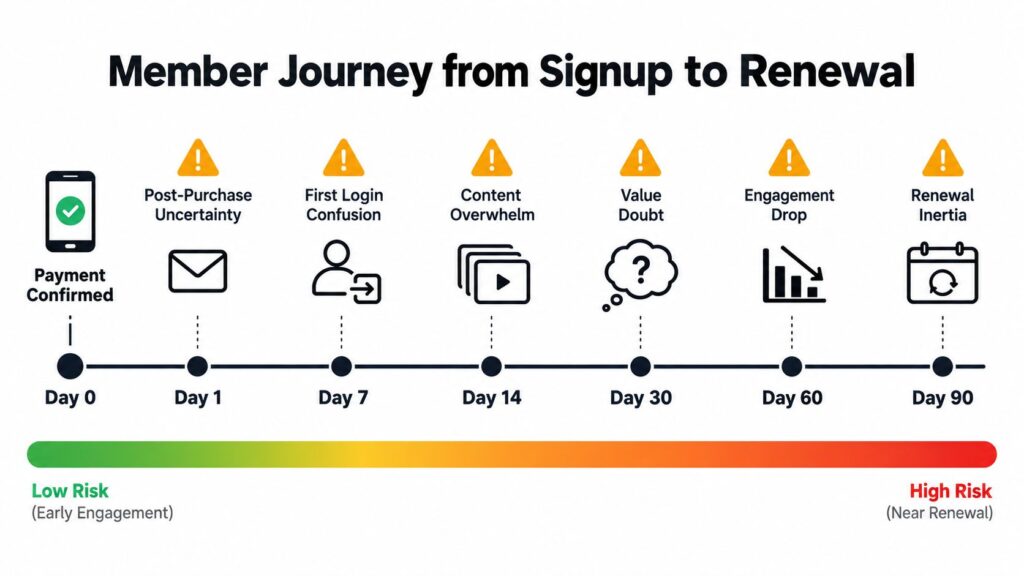
The six points where people usually drift
Here’s the journey map I use most often.
Post-purchase uncertainty
Right after payment, people want reassurance. They need login details, access confirmation, and one sentence that tells them what happens next.First login confusion
Bad navigation hurts. If the dashboard looks busy or empty, new members hesitate.Content discovery paralysis
Large libraries and busy communities often create the same problem. Too many choices, no obvious starting point.Week-two silence
Motivation fades. If no one re-engages the member, inactivity starts to feel normal.Month-one value assessment
People start asking a quiet question: “Was this worth paying for?”Pre-renewal reconsideration
If usage stayed shallow, renewal feels optional rather than obvious.
Capture signals, not just messages
Each stage needs a signal your platform can capture:
- Confirmation viewed
- First login completed
- Profile started or finished
- First community action
- First content consumption
- Return visit after first week
- Event or discussion participation
- Renewal-page visit or billing friction
That’s why a serious membership onboarding process needs more than a welcome series. You need a blueprint for when automation handles the next step, when a human should step in, and when the system should simplify choices rather than add more.
I’ve found that journey maps become much more useful when teams write the member’s likely internal question at each step. The copy gets sharper right away because it stops sounding like marketing and starts answering real hesitation.
Build the Welcome Sequence and First Action
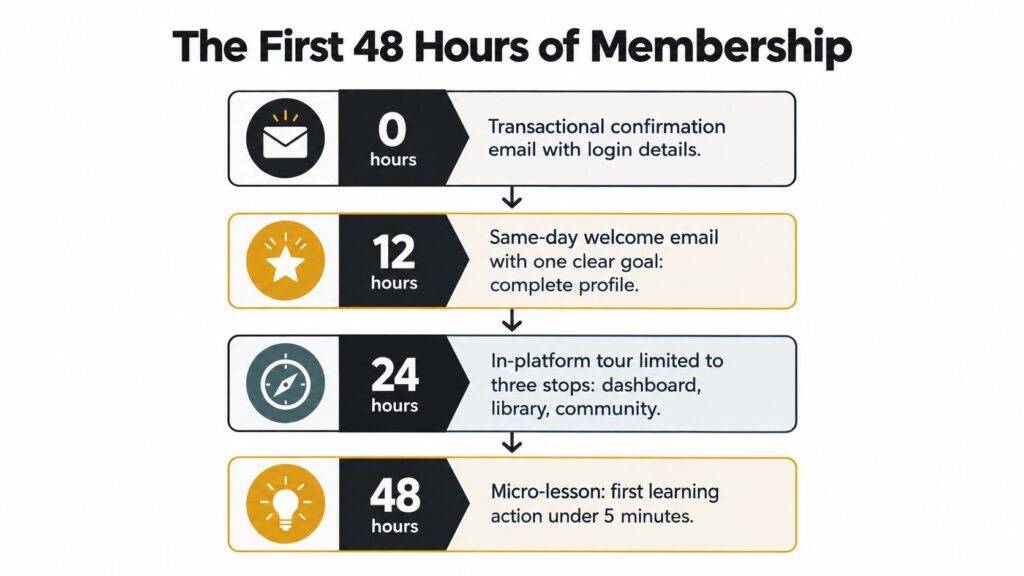
The first 48 hours deserve more precision than they typically get. You either create momentum or create drift.
A benchmarked onboarding workflow found that responding within 4 hours, completing onboarding in 5 days or fewer, using a portal instead of email-only intake, and automating follow-ups were associated with much lower early churn. In that same benchmark, first-90-day churn was 5.2% for the top tier versus 28.6% for the bottom tier, with retention lifts tied to fast response, quick wins, portal use, and automated reminders (Onboarding benchmark report).
That benchmark comes from client onboarding, but the operating lesson translates cleanly to memberships. Speed matters. Friction matters. And the first clear win matters a lot.
The fast first-action rule
My default rule is simple. A new member should complete one meaningful behavior inside 30 minutes of signup.
That action will vary by membership type:
- Community membership might push profile completion and one introduction
- Course membership might push a starter lesson
- Association membership might push chapter selection or event RSVP
- Resource library might push one curated download or watchlist save
What matters is that the action produces a visible result. “Browse the platform” is not a result. “Complete your profile,” “post an intro,” and “finish lesson one” are results.
A practical 48-hour sequence
Use distinct triggers and one action per touch.
Immediate confirmation
Send the transactional email as soon as payment succeeds. Include login details, access link, and one sentence about the first action.
Plus 1 hour
If they haven’t logged in, send a short reminder. Don’t restate the whole membership. Just point back to the first action.
Here’s a useful walkthrough before building your sequence:
Plus 24 hours
Deliver the welcome email. One goal. One CTA. If the goal is profile completion, everything in that email supports profile completion.
Plus 48 hours
Offer the micro-lesson or starter task. Keep it under five minutes if possible. The point is progress, not education volume.
A welcome email should remove uncertainty. A first-action email should remove hesitation.
Four-email skeleton you can adapt
Subject: You’re in. Start here
Body beats: confirmation, access, first action
CTA: Log in and complete the starter stepSubject: Your next step takes two minutes
Body beats: friction removal, where to click, what happens after
CTA: Finish profile or enter the starter areaSubject: Don’t explore everything yet
Body beats: one guided tour through three stops only, such as dashboard, library, community
CTA: Visit the recommended starting areaSubject: Get your first win today
Body beats: short lesson or task, visible outcome, where to ask for help
CTA: Complete the micro-lesson or first post
A lot of onboarding copy gets bloated because teams try to “show value” by listing every benefit. New members rarely need more information. They need less ambiguity.
Personalize Without Overwhelming New Members
Generic onboarding feels efficient from the team side and noisy from the member side.
The better approach is light routing. Ask one simple question at signup, use two or three declared signals, then let one observed behavior confirm the path. That’s usually enough to personalize without building a giant branching system.
There’s good reason to keep the first path focused. Community benchmark coverage suggests onboarding-focused communities help new members feel at home twice as fast, and engagement is linked to 31% higher retention in longitudinal analysis (Community onboarding statistics).
The rule of three
Give a new member no more than three options at a decision point.
Any more than that and the cognitive load starts climbing. This is especially true when your membership includes courses, events, forums, chapters, live calls, archives, and bonus resources. “Explore everything” sounds generous. In practice, it often creates delay.
I prefer a routing model like this:
- Declared signal one might be role, such as teacher, consultant, or team lead
- Declared signal two might be goal, such as networking, certification, or practical templates
- Declared signal three might be experience level
- Observed behavior is the first click, visit, or participation event
Generic Onboarding vs Interest-Matched Routing
| Signal | Generic Onboarding | Interest-Matched Routing |
|---|---|---|
| Stated goal | Same welcome path for everyone | Welcome copy references the member’s selected goal |
| Recommended next step | Broad prompt to browse | One specific touchpoint, such as a chapter, working group, or starter lesson |
| Message volume | More explanation needed because relevance is low | Fewer messages because the first recommendation is tighter |
| Navigation burden | Member sorts the catalog alone | Platform pre-sorts the path |
| Early support | Generic FAQ and help links | Segment-aware guidance and examples |
| Behavior follow-up | Same reminders for all inactive members | Reminder changes based on the chosen path and first behavior |
Counterintuitive advice: narrower onboarding often feels more personal than “full access” onboarding.
One specific early touchpoint usually beats a buffet. If a member joins for peer connection, route them to one discussion space. If they join for learning, route them to one starter lesson. If they join for local connection, route them to one chapter or regional group.
That’s personalization at scale. It’s focused, not fancy.
Set Up the Platform and Automation Behind It
Good onboarding falls apart when the plumbing is shaky.
You need four things working together. Payment and access provisioning, event-based automation, a tagging layer, and one place to review activation data. If any one of those breaks, the member experience starts to feel random.
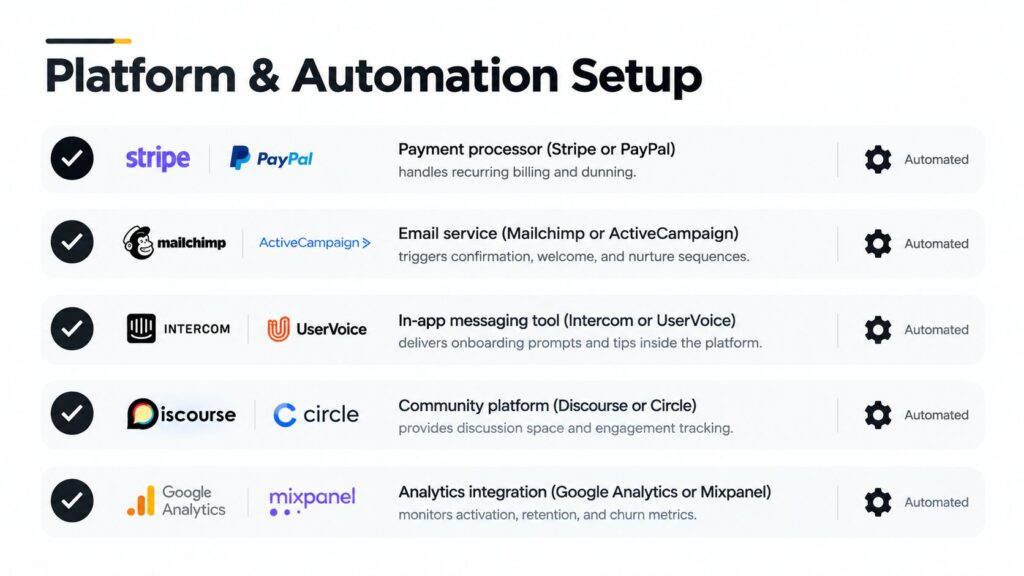
The core setup that prevents avoidable failures
At a minimum, I’d want this stack:
- Payment trigger with Stripe or PayPal so paid status creates access immediately
- Email automation in Mailchimp, ActiveCampaign, ConvertKit, or similar
- In-app or onsite prompts so members aren’t dependent on inbox behavior alone
- Community or learning event tracking from Circle, Discourse, Moodle, Kajabi, or similar
- Analytics dashboard that surfaces onboarding KPIs by cohort
If you want a reference for lean stack decisions on smaller sites, LearnStream has a practical guide to a tech stack for a $10 membership site. It’s useful when you need a simpler system without losing the basics.
The automation rules worth writing down
Non-developers should still be able to brief this clearly:
- When payment succeeds, create access and send confirmation
- If login doesn’t happen, trigger the reminder path
- If the member completes the first action, suppress beginner reminders and move them forward
- If an email fails, retry through the fallback path or queue an in-app prompt
- If a member stays inactive, tag them for a support or community follow-up
- If billing fails later, keep retention and dunning flows separate from the welcome flow
Before any live launch, run a checklist:
- Test staging signups
- Check email deliverability warm-up
- Verify tracking events
- Review suppression lists
- Confirm mobile rendering
- Create a rollback plan if the wrong segment gets the wrong sequence
I’ve seen more onboarding failures come from broken trigger logic than bad copy. A plain sequence that fires beats a one that half-runs.
Run Retention Experiments Before Renewal
The period before renewal is where onboarding proves whether it worked. It’s also where many teams get reactive and start sending discounts or urgency emails before checking whether the member ever activated properly.
A better move is to treat the 60-90 day window like an experiment cycle.
A 2026 membership performance survey reported that 45% of organizations saw increased retention, up from 32% in the prior report, while 31% said retention stayed flat and 15% reported declines. The same report summary noted that about 90% of respondents said new memberships had increased or stayed the same, and a similar share expected retention rates of 80% or above (Membership retention confidence survey summary).
That tells me two things. Teams are getting more serious about retention, and growth alone doesn’t solve the first-year activation problem.
What to test first
Keep tests narrow. One variable per test.
Good first experiments include:
- Subject line vs send time on the day-7 check-in
- Guided tour vs single orientation lesson
- Automated reminder vs manual staff nudge
- One CTA path vs three CTA choices
- Milestone review email vs community invitation email around day 30
The brief called for a sample size and duration. I’d handle that qualitatively in practice. Use enough volume to avoid reading noise as a win, and let the test run long enough to capture more than the opening spike.
Onboarding Experiment Tracking Template
| Hypothesis | Variant | Sample Size | Duration | Primary Metric | Result |
|---|---|---|---|---|---|
| A single CTA will outperform a multi-link email | One-action welcome vs multi-resource welcome | Record actual cohort size | Run through a full early onboarding cycle | Activation by day 7 | Fill after review |
| A guided tour will reduce first-login confusion | 3-stop tour vs no tour | Record actual cohort size | Long enough to capture early return behavior | Repeat visit by day 14 | Fill after review |
| A personal reminder will re-engage stalled members better than automation alone | Manual nudge vs automated reminder | Record actual cohort size | Run before renewal freeze period | Meaningful engagement by day 30 | Fill after review |
| A milestone summary will strengthen renewal readiness | Day-30 progress recap vs generic nurture | Record actual cohort size | Continue until enough members reach the checkpoint | Renewal intent or downstream renewal behavior | Fill after review |
The 30-60-90 day activation checklist
Use this as a working checklist for every cohort.
Days 1-30
- Confirm access: Member logs in successfully
- Complete orientation: Member finishes the starter lesson or setup flow
- Take part once: Member makes a first post, submission, or equivalent
- Show up somewhere: Member attends one live or async touchpoint
Days 31-60
- Go deeper: Member finishes a starter track or core module
- Reply, not just consume: Member joins at least one discussion thread
- Use a depth signal: Member consumes a featured resource that shows commitment
Days 61-90
- Send a personal milestone nudge: certification, featured contribution, or invite to a members-only event
- Review actual usage before renewal: don’t send a blind renewal push
- Tailor the renewal message: informed by engagement data, not generic urgency
For message assets, keep a small library ready: day-one welcome, day-7 check-in, day-30 milestone review, and a day-75 renewal sequence. If you need to tighten that last stage, this guide on renewal of membership is a useful companion.
The biggest onboarding mistake near renewal is sending an offer before reviewing whether the member ever got to value.
A few pitfalls show up over and over. Teams bury the first action. They skip mobile testing. They send renewal messaging before anyone looks at usage data. And they assume low engagement means low interest, when sometimes it just means the original path was too broad or too quiet.
If you’re rebuilding your membership onboarding process this week, start smaller than you think. Pick one first action. Strip your welcome email down to one goal. Route new members into one relevant path. Then watch what they actually do in the first 90 days. That’s where retention stops being a guess.