LMS vs LXP: Which Learning Platform Fits Your Team

You're comparing learning platforms because something in your current setup isn't working. Perhaps employees can't find useful resources, your course buyers disappear after enrolling, or someone has asked for training records you can't confidently produce. Meanwhile, every vendor demo seems to promise personalization, better engagement, and simpler reporting.
Before comparing features, I'd settle two questions: Who should decide what learners do next, and what proof must your team produce? Those answers make the LMS vs LXP decision much clearer, including when you need both and when another subscription would just add work.
LMS vs LXP at a Glance
A learning management system, or LMS, assigns, delivers, tracks, and records formal training. A learning experience platform, or LXP, helps learners find, choose, and share resources more independently. The practical difference is where you put control.
LMS vs LXP at a glance
| Feature | LMS | LXP |
|---|---|---|
| Who drives learning | Administrators assign courses and deadlines | Learners search, pick and follow their own paths |
| Where content lives | Courses hosted or administered inside the system | Content pulled from many sources into one search |
| Main metrics | Completion, scores and compliance status | Engagement, content preferences and skills progress |
| Typical use | Mandatory training, certification and audits | Informal learning, peer sharing and self-directed growth |
| On-demand content share of use cases | 41% | 72% |
| Role in the tech stack | System of record for grades and completion | Discovery layer that usually sits above or beside the LMS |
The on-demand figures aren't a dividing line between platforms: one corporate learning analysis cited in Learning Pool's modern learner experience publication reported that 41% of LMS use cases involved on-demand content consumption, compared with 72% of LXP use cases. An LMS can support voluntary learning, even if that isn't its main job.
Why the categories overlap
The LMS came first as an institutional hub for courses, administration, assessment, and records. By 2017, LMS vendors had started adding personalized pathways and broader content discovery, according to this Springer chapter on learning platforms.
That overlap matters when you're buying. A product called an LMS may already offer the discovery features you need, while an LXP may still require a separate system for official transcripts. Judge the workflow rather than the label on the sales page.
Practical rule: Find the row that matches your biggest headache before comparing the longest feature lists.
If the problem is missing completion evidence, prioritize record control. If employees already have useful content but can't locate it, prioritize discovery. Many teams eventually use both capabilities, but that doesn't automatically justify buying separate platforms.
How Content Discovery Changes the Learner Experience
Say a sales rep needs help explaining a pricing change before a customer call. Searching an LXP could return the approved pricing video, a presentation deck, and a peer discussion about handling objections. The rep can solve an immediate problem without enrolling in a complete sales course.
The sourcing model makes that possible. An LXP can index material from different locations and expose it through federated search, meaning learners search across connected sources through a shared interface. KPMG's learning experience platform guide compares this to a smart TV bringing together content from different streaming providers.
Better search still needs editorial work
Connecting libraries is only the beginning. Someone must decide which pricing deck is current, who can access it, and whether an older recording should disappear from results.
For a useful discovery setup, define:
- Content ownership. Give each resource an accountable editor who can update or retire it.
- Search metadata. Tag material by role, topic, product, language, and intended task.
- Clear status. Distinguish approved guidance from informal peer suggestions.
- Usable pathways. Arrange resources around an outcome, such as preparing a renewal proposal, rather than a loose topic like sales.
Saved pathways give learners a place to return. Recommendations can suggest a next step, but they need enough context to be useful. A beginner looking for an introduction shouldn't land in an advanced troubleshooting discussion just because it's popular.
Freedom or guidance
For a language-learning membership, a resource such as German Cultural Association Hong Kong (GCA)’s best learning apps reviewed can help learners compare external options before choosing supplementary practice. The curator's job is to explain where that resource fits, rather than adding another item to the catalog.
That distinction is central to designing a learner experience platform. Learners need a useful route through the material, even when they control the destination.
More choice can mean more clicking and less progress. I'd test discovery with a real task: ask a learner to find the current answer, explain why they trust it, and identify what to do next. If they can't, adding more sources won't solve the problem.
Who Owns Records, Compliance and Proof
Keep the LMS authoritative for learner identity, completion status, grades, compliance evidence, and structured curriculum. A learning-platform research model distinguishes LMS administration and performance tracking from the LXP's emphasis on discovery, participation, and experience sharing.
Think of the architecture as a records vault connected to a learner-facing workspace.
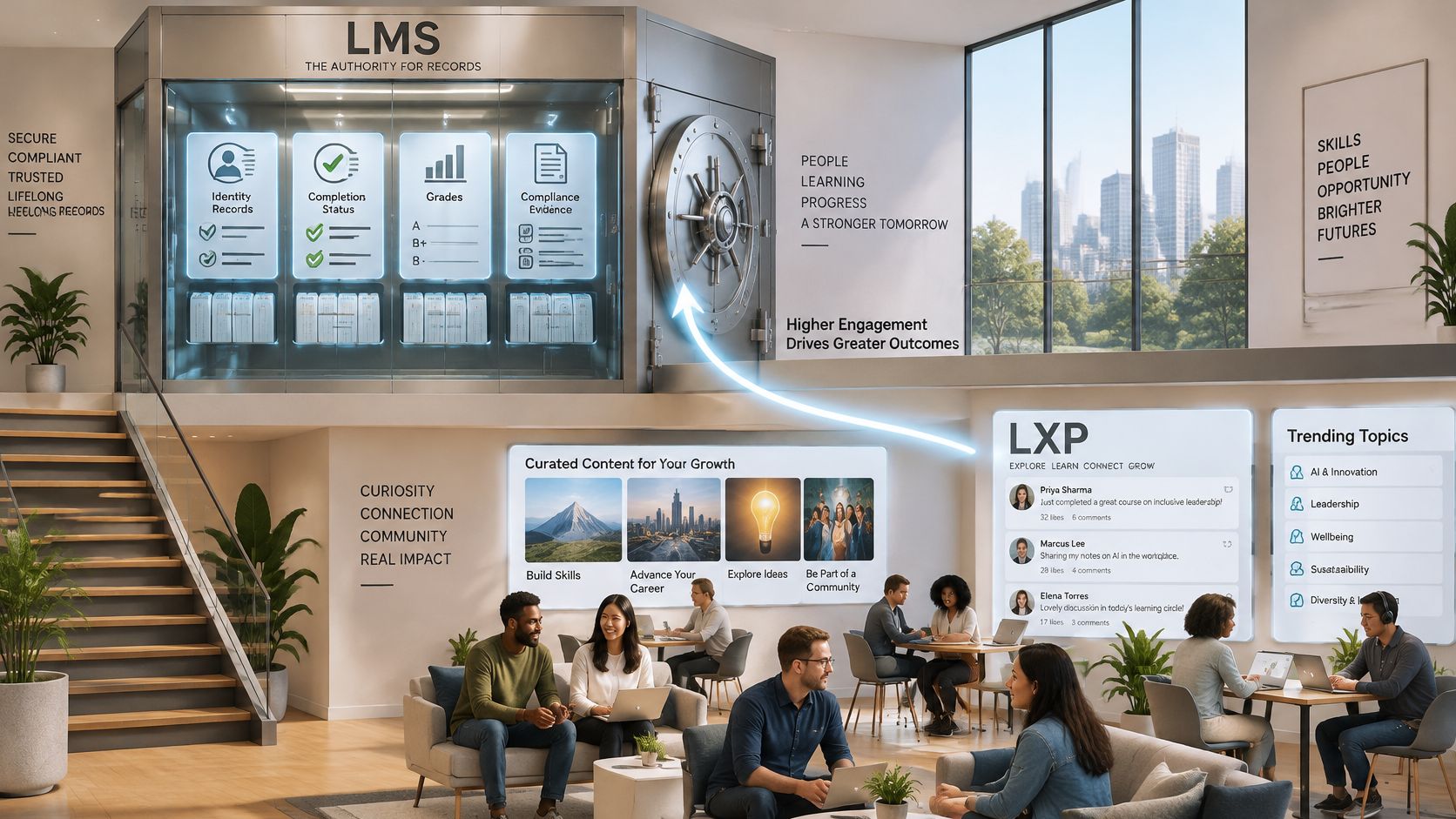
A recommendation click proves that someone opened a resource. A discussion post proves participation. Neither automatically proves that the learner passed an assessment or demonstrated competency.
Test the record journey
Before signing an integration contract, work through this checklist with your learning administrator and IT owner:
- Confirm identity ownership. Establish the authoritative learner identifier and how the LMS receives it from your identity or HR system.
- Define write-back events. Specify which assessments, completions, and certificates must enter the official record. Don't send every browsing event as a completion.
- Agree on interfaces. Use standards-based identity and learning-data connections where supported. Document field mappings, timestamps, failed-event handling, and duplicate prevention.
- Verify the transcript. Complete a pathway through the learner interface, then inspect the LMS transcript and exported report. Test failures and retries too.
Say a manufacturing team needs safety certificates on file while technicians browse troubleshooting videos freely. The certificate workflow needs a clear assessment result, completion date, and retrievable record. Watching an optional repair clip shouldn't alter that status.
Use this video alongside a workflow demonstration, not as a substitute for testing your own records.

Integration also has a cost beyond setup. Budget for monitoring failed transfers, reconciling learner accounts, maintaining connectors, and supporting users when platforms disagree.
Ask for an exportable sample record during procurement. Buying an LXP doesn't remove the need for LMS controls when an auditor asks who completed what, when, and against which assessment.
Accessibility, Governance and Personalization Control
A recommendation feed can look harmless until a learner asks why a required course was buried, an auditor asks who approved the rule, or a screen reader user cannot reach the assessment feedback. Set the ownership answer first: who may change recommendations, who can override them, and what proof the team must produce when a choice is challenged.
Personalization needs boundaries. Required content must remain visible, sensitive learner information needs a defined purpose, and employees need a way to challenge irrelevant suggestions. An LMS can still hide problems behind tidy assigned paths, so inspect the learner journey rather than trusting the admin view.
Test the whole learning task
A clean automated accessibility audit does not show that someone can finish the course comfortably. Test the actual journey: signing in, using search results, playing media, submitting an assessment, and retrieving feedback.
Build these checks into your learning management system requirements:
- Name the personalization owner. Assign responsibility for recommendation rules, overrides, and complaints.
- Test assistive technology. Check screen-reader labels, keyboard focus, captions, transcripts, and assessment feedback in both systems.
- Document recommendation logic. Record which profile details and activity signals affect suggestions, who can inspect them, and how unsuitable results are corrected.
- Schedule a yearly learner review. Include people who use assistive tools and pay attention to accommodation requests that fall outside automated checks.
- Check language and access conditions. Review translated menus, content language labels, mobile use, and performance on constrained connections.
Accessibility needs an owner, a correction process, and a budget. A procurement checkbox cannot provide those.
Give administrators time to act on what testing reveals, and train content authors too. An accessible platform can still deliver an unusable document or an uncaptioned recording. Write your oversight and accommodation policies before rollout, while you can still make them acceptance criteria.
Use Cases Where Each Platform Wins
A warehouse running forklift safety training needs assignments, deadlines, assessment results, and retrievable proof. I'd start with an LMS and test the reporting workflow before discussing recommendation engines. Optional learning can wait until the required process works reliably.
Scenarios and the platform that fits best
| Scenario | Better fit | Why |
|---|---|---|
| Mandatory safety or compliance training | LMS | Needs assignments, deadlines and auditable completion |
| Certification tracking for licensed staff | LMS | Records and reports must hold up under review |
| Self-directed skill building for mixed roles | LXP | Learners need search and recommendations across sources |
| Peer knowledge sharing and communities | LXP | Social features and user-contributed content are the main value |
| Membership site with structured courses | LMS | Sequencing, payments and completion tracking matter most |
| Large company with scattered content libraries | Both | LXP unifies discovery while the LMS keeps the records |
A mixed-role sales team has a different requirement. Account executives, sales engineers, and managers may need different resources around the same product launch. The Oxford Centre's LMS and LXP comparison describes this operational distinction as administrator-led training versus learner-led discovery.
Onboarding needs a firm core and optional depth
A new hire shouldn't have to infer which training is mandatory. Assign a defined core path covering required policies, essential systems, and role-specific tasks, with a named manager responsible for follow-through.
Then offer optional material for context: product demonstrations, team introductions, customer stories, and peer discussions. An LXP layer can make those resources easier to explore without turning every useful item into another required course.
Keep the interface clear about the difference. Mark required work explicitly and show the learner where to get help. Otherwise, a rich welcome library can distract from the tasks the new hire needs to finish.
Course businesses need commercial checks too
For a membership selling sequenced courses, prioritize lesson access rules, assessment, completion tracking, and the payment workflow. Verify whether checkout, subscriptions, refunds, and account access are native capabilities or separate integrations. The LMS label alone doesn't guarantee them.
For an open professional community, searchable peer contributions may be the main value. An LXP-style experience can fit that model, but moderation, outdated advice, and unanswered questions still need human attention.
A small team rarely needs separate LMS and LXP subscriptions at launch. A large organization with scattered libraries has a stronger case, provided someone owns the ongoing curation and integration work.
Measuring Whether Each Platform Is Working
The metrics that matter depend on the proof your team has to produce. A compliance officer who must show auditors which employees finished required training needs different evidence than a department head checking whether people find answers without being assigned a course. Settle who owns learning decisions and what records leadership expects before picking measures, because an LMS and an LXP are built to report on different behaviors.
An LXP group achieved significantly better E-MHLE learner-experience scores than an LMS group in a comparative study of digital natives and digital immigrants. The result reflects a specific educational context and measurement instrument. It does not establish a universal advantage in learning attainment or administrative efficiency.
Use measures that reflect each platform's job.
Metrics to track on each platform
| Platform | Metric | What It Tells You |
|---|---|---|
| LMS | Enrollment accuracy | Whether the right people were assigned the right course |
| LMS | Completion record integrity | Whether finished courses are recorded correctly |
| LMS | Assessment turnaround | How quickly grades and feedback reach learners |
| LMS | Reporting coverage | Share of required training visible in compliance reports |
| LMS | Interoperability | Whether learning data moves cleanly to and from other systems |
| LXP | Recommendation click-through | Whether suggested content matches what learners need |
| LXP | Content diversity | How many sources learners actually use |
| LXP | Repeat visits | Whether learners come back without a reminder |
| LXP | Contribution rate | Share of learners who add content, comments or peer answers |
| LXP | Pathway progression | How far learners move through self-selected paths |
| LXP | Experience survey scores | How easily learners say they find what they need |
Read the table as two scorecards. The LMS rows show whether prescribed training reached the right people and produced records that hold up under review. The LXP rows show whether learners return and contribute when nobody assigns the next step.
Separate platform effects from course design
A completion gap can come from course design as easily as from the platform running it. In a vendor dataset of 1.31 million enrollments, scheduled cohort courses had 53.4% completion versus 41.9% for open-access self-paced courses, while courses with structured assessments reached 59.1% versus 42.4% without them, according to the workplace learning report material. These are correlations, not proof that scheduling or assessments caused the difference.
For broader context on delivery choices, Access Courses Online's online learning outcomes compared is a useful companion when framing evaluation questions. Comparing delivery formats is a different exercise from testing whether your chosen platform performs.
Run the measurement in stages.
- Baseline the current setup. Record performance before changing software.
- Choose a small metric set. Take measures from each relevant platform row above, plus one assessment or workplace outcome that lives outside either system.
- Control the pilot. Keep content, audience, manager support, and evaluation conditions as comparable as practical.
- Review the cost of improvement. Count administration, curation, integrations, and support hours alongside subscription charges.
A structured approach to measuring training effectiveness turns a pilot like this into an evaluation plan rather than a one-off experiment. More visits are useful only when learners accomplish something worthwhile.
Pick the Platform Your Learning Problem Needs
Write the problem in a sentence before booking another demo. Missing certification evidence, slow resource discovery, and learners who never begin a course are different problems. They shouldn't automatically lead to the same purchase.
Use this checklist to keep the decision grounded.
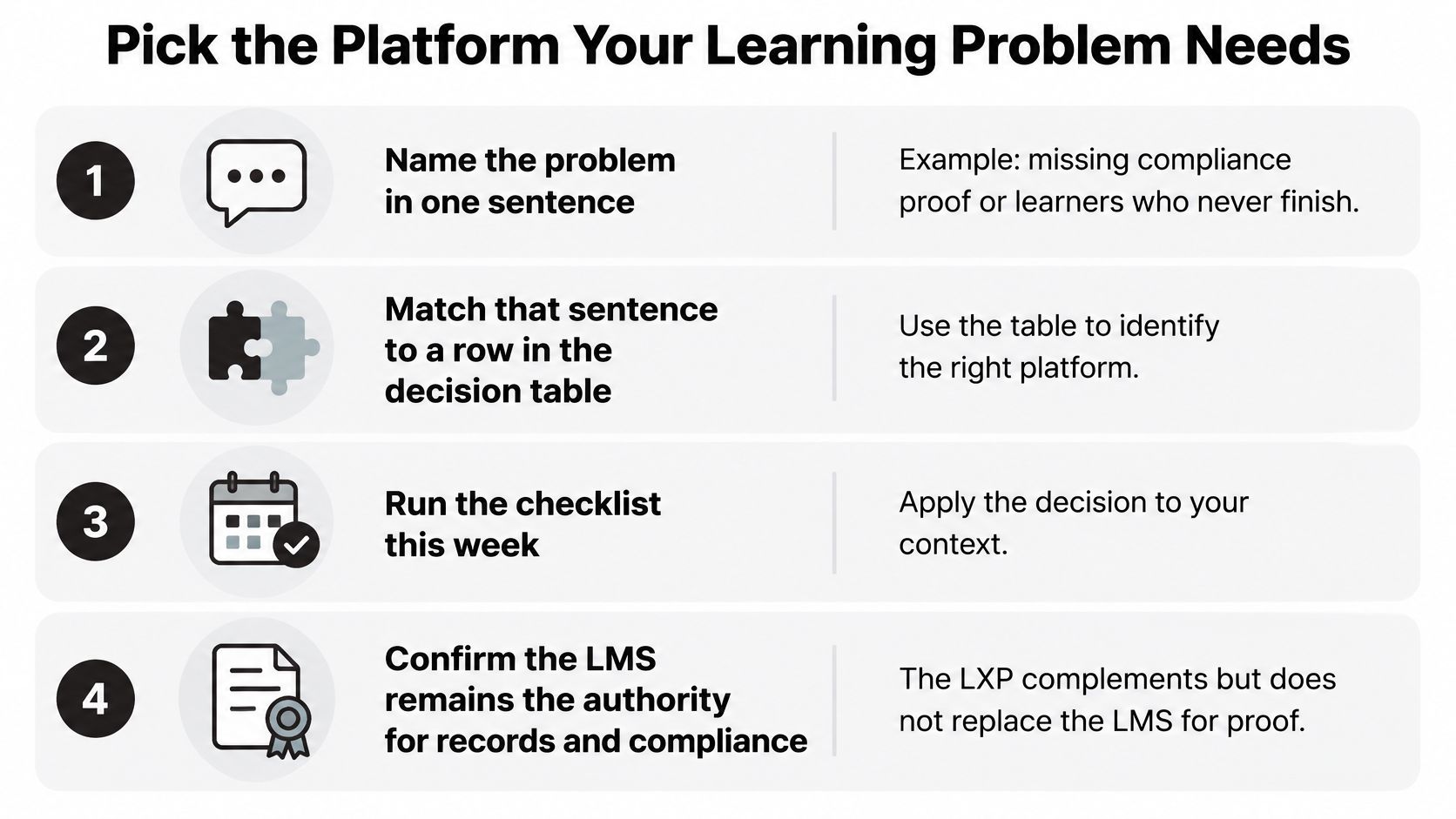
Run a problem-first buying check
- Name the failure. Write something observable, such as employees cannot retrieve the approved procedure.
- Match the decision rights. Decide where administrators must prescribe the next step and where learners should choose.
- Inspect your existing setup. Test its search, personalized pathways, catalog organization, and reporting before assuming you need another product.
- Require incremental value. Have vendors demonstrate the same task using your content. Compare time to first lesson, completion, repeat engagement, and the staff effort required.
A requirements-led comparison is useful beyond software. CFII's Sling aircraft comparison offers a specialist comparison resource for aviation buyers. Apply that discipline here by defining the intended use before comparing specifications.
My recommendation: If learners aren't starting, fix the invitation, access process, opening lesson, and course sequence before buying an LXP.
A small education business may need clearer onboarding rather than broader discovery. A regulated organization with extensive technical libraries may reasonably need both capabilities from the start. The deciding factor is whether the additional layer solves a distinct problem that someone has the capacity to manage.
Price the complete arrangement, including migration, content subscriptions, single sign-on, connector maintenance, and ongoing administration. At LearnStream, our guide comparing learning management systems for employee training covers team size, pricing, SCORM and xAPI support, and use case, plus a pilot plan.
Pick the scenario that matches your biggest problem this week. Write down the metric that would demonstrate improvement, assign an owner, and test that workflow in your current platform before asking a vendor to replace it.