Learner Experience Platform: A Complete Guide for 2026
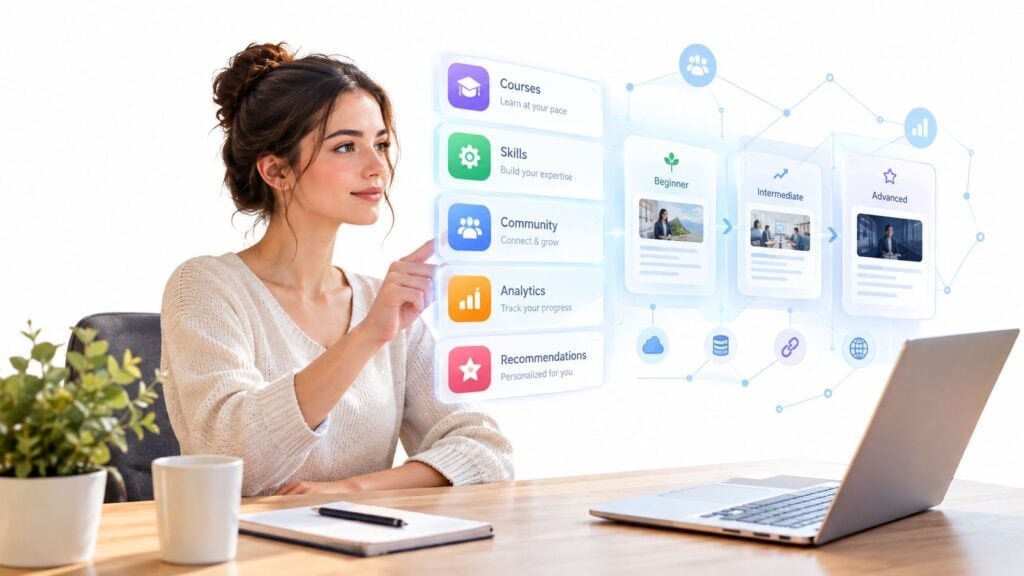
You open a learning portal looking for one useful answer. Instead, you find a long list of courses, duplicate topics, outdated resources, and no clear starting point. The platform knows your name, perhaps your department, but it doesn’t seem to know what you’re trying to accomplish.
That frustration is why the learner experience platform, or LXP, has become an important category. An LXP places discovery, relevance, participation, and measurable progress around learning content. The interesting question isn’t whether a platform can recommend a course. It’s whether those recommendations help people learn, apply skills, and return when they need support.
Why Learning Tools Feel Broken in 2026
Most learning portals were designed from the institution’s point of view. An administrator uploads courses, assigns them to groups, tracks completion, and produces a report. That structure works well for mandatory training, but it often leaves self-directed learners staring at a content library that treats everyone alike.
The pressure has changed. Learners move between work, mobile devices, community spaces, videos, articles, simulations, and short reference materials. Consumer apps have also trained people to expect search that understands intent and feeds that adapt to their interests. A static catalog feels slow by comparison.
Training teams face a second problem. Completion tells you that someone opened and finished a course. It doesn’t necessarily show that the learner understood the concept, retained it, or used it in practice. Educators and managers increasingly need evidence of skill development, not just administrative activity.
Practical rule: A useful learning experience begins with the learner’s next decision, not with the administrator’s content inventory.
An LXP responds by adding an experience and engagement layer around learning resources. It can bring together formal courses, videos, articles, discussions, assessments, and internal knowledge. It can also use profiles, skills, behavior, and stated goals to help learners find a sensible path through that material.
The category has become substantial. A market analysis of the LXP category estimated the global market at USD 3.25 billion in 2025, rising to USD 3.76 billion in 2026 and USD 8.35 billion by 2031, with a projected 17.3% compound annual growth rate from 2026 through 2031. Large enterprises held 58.72% of market share in 2025, while corporate users generated 64.37% of revenue.
Those figures show commercial momentum, but they don’t prove that personalization works in every learning context. The rest of the buying conversation should therefore include harder questions. Does adaptive content change outcomes? Does a community improve learning, or add another discussion space? Can accessibility be measured through participation and retention rather than a checklist?
What a Learner Experience Platform Actually Is
Think of a traditional course library as a shelf. The shelf holds resources, labels them, and waits for someone to choose. An LXP acts more like a knowledgeable guide in the library. It asks what you’re trying to do, notices what you’ve already explored, points you toward relevant resources, and lets you follow a structured route when one exists.
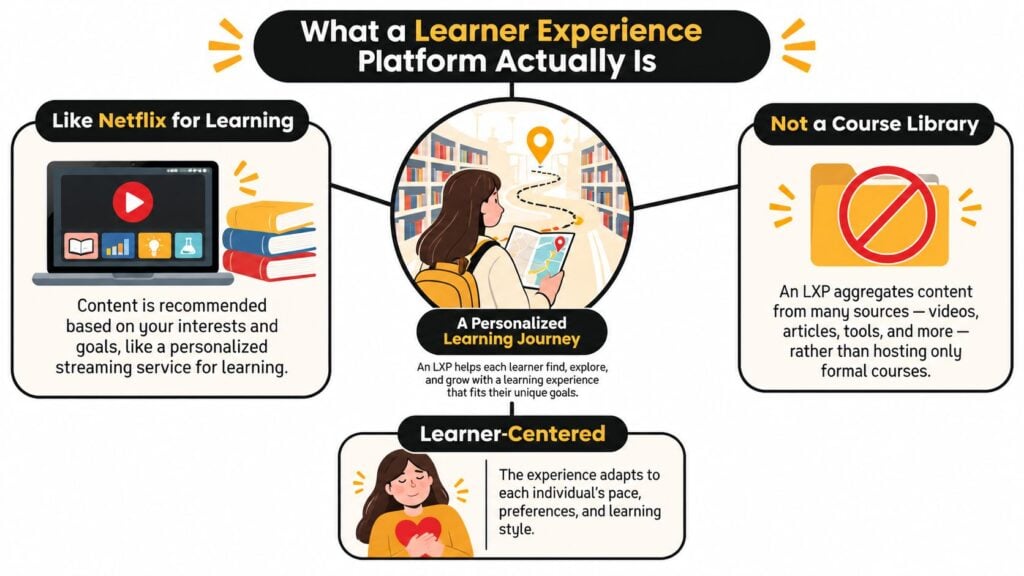
The distinction starts with the learner as the point of entry. Instead of asking only, “Which course should this group complete?”, an LXP can support questions such as:
- What skill is this person trying to build?
- Which resources already exist across the organization?
- What should the learner do next?
- Where has participation slowed?
- Which activity demonstrates that the skill has been applied?
The main building blocks
Content aggregation brings material from different places into a more discoverable experience. A learner might see an internal lesson beside an external video, an article, a discussion, and a practical assessment. The LXP doesn’t have to own every item, though it needs enough metadata to explain what each resource is for.
Skills and role frameworks connect resources to capabilities. A sales manager, new instructor, and software engineer may need different pathways through the same content collection. A skills framework gives recommendations more context than a generic “popular courses” feed.
Personalization layers use information such as role, interests, previous activity, stated goals, and assessment results. The quality of personalization depends on the quality of those inputs. A platform can’t create a meaningful pathway from incomplete profiles and poorly labeled content.
Social learning surfaces let learners ask questions, recommend resources, respond to peers, and share examples. These features can support participation, but they need a purpose. A quiet discussion board isn’t automatically a learning community.
What an LXP isn’t
An LXP isn’t a prettier LMS. It also isn’t an AI search box placed over an unstructured content store. If the underlying resources are irrelevant, inaccessible, or poorly organized, a polished interface only makes the problem easier to browse.
A plain-language definition is enough for most conversations: an LXP is a learner-centered layer that helps people discover, participate in, and measure learning across multiple resources. It can work alongside formal administration, but it gives the learner more control over how development happens.
LXP vs LMS and What Each One Is Actually For
The practical difference comes down to the direction of control.
An LMS usually begins with the organization. Administrators define courses, assign training, manage records, and confirm completion. An LXP usually begins with the learner. The platform supports discovery, recommendations, personal pathways, peer interaction, and access to a wider set of resources.
That doesn’t make one universally better. A compliance manager may need a reliable assignment and certification workflow. A learner developing a new capability may need search, curation, optional resources, practice, and a way to connect learning with a role or goal.
LXP vs LMS at a Glance
| Dimension | LMS | LXP |
|---|---|---|
| Primary user | Administrator and compliance owner | Learner and learning community |
| Content model | Centrally assigned courses | Aggregated and curated resources |
| Main activity | Enrollment, completion, certification | Discovery, progression, practice, sharing |
| Personalization | Often based on groups or assignments | Based on interests, roles, skills, and activity |
| Reporting focus | Completion and administrative records | Engagement, pathways, skills, and experience |
| Best fit | Required training and formal programs | Self-directed development and blended learning |
A hybrid approach often makes sense. The LMS can remain the system of record for required learning, while the LXP gives people a more flexible front door to development resources. The success of that arrangement depends on integration. Learners shouldn’t have to understand which system owns a resource before they can use it.
For course creators and membership operators, the choice may look different. A smaller business might need structured sequencing, progress tracking, discussions, and feedback more than a full enterprise skills graph. LearnStream’s customer education platform guidance is relevant when the audience includes customers or members who need a clear journey rather than an internal employee record.
Use three questions to narrow the decision:
- Who controls the content? If administrators must assign everything, start with LMS capabilities. If learners need to explore multiple sources, prioritize LXP functions.
- What must be reported? Compliance evidence and certificates require dependable administrative records. Skill development requires richer activity and assessment data.
- What problem comes first? Choose the system that addresses the main constraint. Don’t buy an elaborate discovery layer when the core issue is missing content, weak instruction, or unclear outcomes.
Core Features That Matter and the Ones That Sound Cool
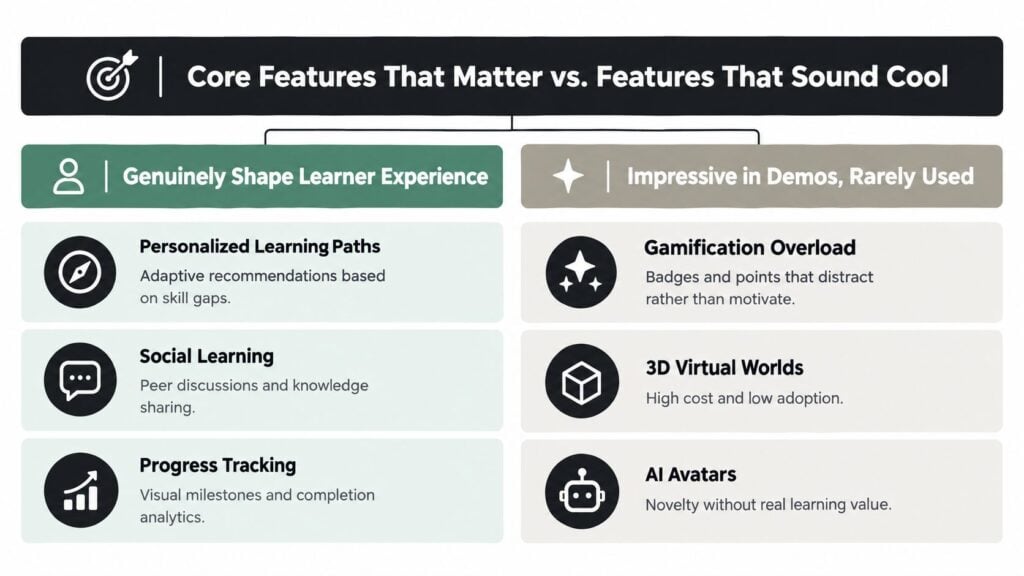
Feature lists can make every LXP look impressive. I prefer to evaluate each feature by asking what a learner can do afterward that they couldn’t do before.
Capabilities that change the experience
Search and content aggregation matter when useful resources sit across a course system, knowledge base, video library, and community. The platform should show enough context for learners to choose well, including skill relevance, format, difficulty, prerequisites, and expected effort.
Progress tracking should show more than a percentage bar. Learners benefit from visible milestones, completed practice, assessment feedback, and a clear next action. Managers need to identify stalled pathways without reducing learning to a single activity count.
Social learning earns its place when people need examples, feedback, or access to experience that isn’t captured in formal content. A discussion prompt connected to a real task can help. A generic forum added to every course may create noise.
Mobile and in-flow access matters when learners work away from a desk or need help during a task. Short resources, searchable answers, and lightweight practice can fit into real routines better than a single long session.
Personalization deserves a test
Personalization sounds valuable because relevance usually helps. But recommendation quality and learning impact are different things.
A 2025 mixed-methods study comparing Khan Academy, Coursera, and Codecademy examined 23 learners and found differences in completion time, accuracy, and satisfaction. Participants viewed the platforms’ AI-driven adaptive features as subtle and minimally influential, while basic interactivity had a stronger effect on the experience.
That finding should change how buyers evaluate AI. Ask whether the system changes sequence, difficulty, practice, feedback, or support. If it only rearranges a content feed, it may improve discovery without improving learning.
A recommendation is useful only when it changes a learner’s next productive action.
Features that need skepticism
Gamification can support a well-designed practice loop, but badges and points can also distract learners from the task. Virtual worlds, AI avatars, and other highly visual features may fit a specific instructional need, yet novelty alone isn’t evidence of value.
Start with the fundamentals. Make content findable, pathways understandable, practice relevant, feedback timely, and analytics actionable. Then test advanced features against outcomes such as completion time, assessment accuracy, delayed retention, help requests, and satisfaction.
How Real Teams Use a Learner Experience Platform
The same learner experience platform looks different in a membership business, a corporate learning team, and a community-led program. The common thread is a deliberate route from learner need to useful action.

A course creator might use an LXP layer to help members move from a broad library to the lesson that matches their current goal. A new member interested in launching a course could receive a starting pathway, discover a related checklist, watch a short demonstration, and then join a discussion with peers who are working through the same problem.
A corporate learning team has a different balance. It may keep required training in an LMS while using the LXP to surface role-based resources, internal experts, practical videos, and optional development pathways. The platform becomes a common discovery layer, while governance determines which materials are mandatory and which are exploratory.
A community-led educator may combine cohort sessions with self-serve discovery. Live sessions create shared momentum, while the LXP helps learners revisit recordings, locate supporting resources, ask follow-up questions, and choose a next step after the cohort ends.
The design should reflect real participation patterns. A U.S. Regional Educational Laboratory study of online-course engagement identified six participation patterns, with weekly engagement ranging from 1.5 to at least 6 hours. 77% of students engaged steadily at approximately 1.5 or 2.5 hours per week, and students participating for at least 1.5 hours per week generally earned enough points to pass.
That doesn’t mean every learner should be pushed toward a fixed time target. It means teams should design for regular participation and watch for declining activity early.
A useful external example is Applied’s verified case study, which provides context for examining how learning technology can be used in a large educational environment.
Every scenario has a failure point. A membership platform can have excellent recommendations but too little content. A corporate implementation can stall because legal, HR, and IT teams disagree about data ownership. A community can build a beautiful front door over an empty room.
Integrations and Analytics as the Real Foundation
Integrations are often presented as a row of vendor logos. That misses the architectural question: can useful learning data move between systems in a trustworthy way?
The Next Generation Digital Learning Environment research framework calls interoperability the environment’s “linchpin” because exchanging content and learning data enables personalization, analytics, collaboration, assessment, and accessibility. An LXP that can’t exchange data may look modern while producing shallow recommendations and incomplete reports.
Follow the data path
Start with identity. Single sign-on can reduce friction, but the platform also needs a consistent way to recognize the same learner across content tools, assessments, communities, and reporting environments.
Then examine learning events. A system may record an attempt, completion, discussion contribution, assessment result, or external activity. Standards-based APIs, structured metadata, portable identifiers, and learning record integrations help connect those events without rebuilding every connection from scratch.
Finally, check whether the flow works in both directions. Can the LXP send activity to a reporting environment? Can role or skill information arrive from another system? Can a learner’s history remain coherent when they use a resource hosted elsewhere?
For teams working with video and media content, a practical guide for video marketers can help clarify how third-party tools fit into a broader content workflow. The same principle applies to learning systems. A connection is useful only when it supports a real learner or reporting task.
Treat governance as part of the architecture
Fraunhofer research on decentralized, middleware-based Learning Record Store designs describes the use of xAPI, data enclaves, and controlled data flows to support privacy, federated identity, policy enforcement, and interoperability. That model points to a practical discipline for smaller teams too.
Define an event taxonomy before launch. Map each event to a learning objective or operational question. Separate personally identifiable information from activity data where possible, and give dashboards and AI services only the access they need.
A good procurement conversation should ask:
- Which system owns each learner attribute?
- What events are collected and why?
- How are duplicate identities resolved?
- Can administrators restrict records by team or business unit?
- Can the organization export its data in a usable format?
- What happens when a content provider is removed?
For readers building the reporting layer, LearnStream’s beginner’s guide to LMS reporting dashboards offers a useful starting point for separating activity measures from decisions that teams need to make.
Accessibility and Inclusion as a Retention Metric
Accessibility is often treated as a launch checklist. That approach misses the experience learners have after the audit is complete.
A platform can provide captions and alternative text yet still make participation difficult. Recommendations may lead to resources that don’t work with assistive technology. A dense interface may be hard to use on a phone. A video-heavy experience may assume reliable bandwidth. A course may use one dominant language even when the audience works across regions.
Recent research on inclusive open digital learning emphasizes captions, alternative text, keyboard navigation, assistive-technology compatibility, and accessibility expertise from the outset. It also warns that checklist compliance can coexist with unequal outcomes caused by inaccessible recommendations, dense interfaces, weak mobile performance, high-bandwidth assumptions, or language barriers.
Measure the experience groups have
A small team can combine technical checks with carefully governed experience data. Compare login and completion patterns by device, region, connectivity level, language, and disability status where collection is lawful, voluntary, and safe. Add time to first successful activity, support requests, assessment performance, and abandonment points.
You don’t need to expose individual identities to every administrator. Use aggregated reporting, role-based access, and a clear event taxonomy. The purpose is to find where a group encounters friction, not to label individual learners.
Accessibility becomes actionable when the team can connect a barrier to a participation outcome and assign someone to fix it.
Prioritize barriers that block entry or prevent progress. A keyboard navigation failure, missing caption, inaccessible assessment, or unusable mobile interaction should usually come before cosmetic refinements. After each fix, check whether the affected group can start, continue, and complete learning more easily.
The LearnStream guide to accessibility for online courses can support a broader content audit, but platform teams should also inspect the recommendation layer and reporting experience. Inclusion applies to the route through learning, not only to the individual lesson.
How to Choose and Roll Out the Right LXP
Start with the problem you can observe. Define learner segments, map your content sources, identify the skill or behavior you want to influence, and decide which evidence will count as progress.
Before speaking with vendors, write down your governance rules. Decide who can see activity data, which events may feed recommendations, how learner identities are managed, and what records must remain separate. Fraunhofer’s research on decentralized Learning Record Store designs is useful background for thinking about xAPI, controlled data flows, data enclaves, and organizational policy enforcement.
Run a focused pilot
Choose one learner group, one pathway, and one measurable problem. Keep the pilot small enough to observe closely. Compare the experience with your current approach using measures such as successful starts, assessment performance, help requests, pathway progression, and learner feedback.
Don’t judge the pilot by recommendation clicks alone. A feed can be popular and still fail to improve learning. Ask whether the platform helped learners choose better resources, practice more effectively, recover from confusion, and apply the target skill.
For teams planning AI capability building, Prometheus Agency’s guide to AI training for growth leaders offers useful context for connecting training decisions with broader organizational priorities.
During rollout, review the first signs of friction. Learners may ignore recommendations because labels are unclear, skip pathways because prerequisites are hidden, or abandon activities because the mobile experience is slow. Fix the content and journey before adding more features.
Choose an LXP when it strengthens the route learners take through your resources. Simplify when the platform creates more administration than value. Expand only when the pilot shows a reliable connection between experience changes and learning outcomes.
An LXP should help people find the right resource, follow a sensible path, participate regularly, and demonstrate what they can do. If you’re evaluating platforms or redesigning an existing learning ecosystem, start by documenting one learner journey this week. Define the friction, choose the evidence, and test the smallest change that could make progress easier.